Klipper: Stuttering while printing cylinder in vase mode on RPi 3
I just tried latest Klippy (from master, as at time of this post) and latest Octoprint.
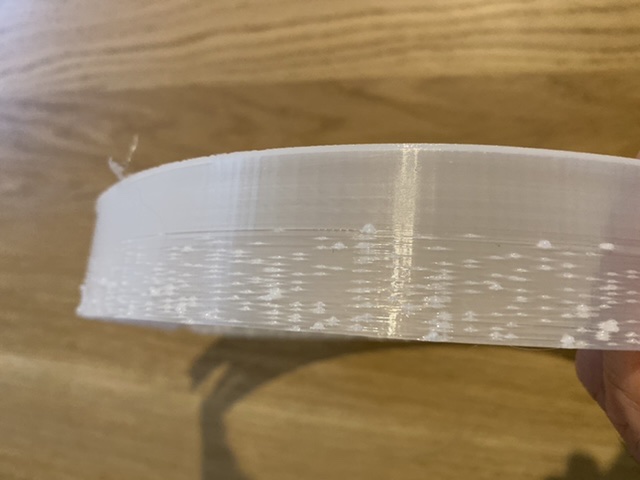
After getting to about the 30th layer in vase (or spiralised) mode, what was once smooth suddenly stuttered every few seconds, leaving nasty blobs and slowing the print.
I'm wondering if it's essentially due to the constant detail of a circular path, that I exported in 'high detail' to make it smooth.
I've attached the gcode and stl too.
In the attached Klippy log, this seems relevant:
Stats 7929.7: gcodein=618910 mcu: mcu_awake=0.099 mcu_task_avg=0.000259 mcu_task_stddev=0.000223 bytes_write=1151168 bytes_read=525467 bytes_retransmit=0 bytes_invalid=0 send_seq=34791 receive_seq=34788 r
etransmit_seq=0 srtt=0.010 rttvar=0.004 rto=0.026 ready_bytes=445 stalled_bytes=1119 freq=16000309 heater_bed: target=80 temp=80.0 pwm=0.736 print_time=3263.172 buffer_time=2.919 print_stall=1 extruder: t
arget=240 temp=240.5 pwm=0.501
Stats 7930.7: gcodein=619123 mcu: mcu_awake=0.099 mcu_task_avg=0.000259 mcu_task_stddev=0.000223 bytes_write=1152976 bytes_read=525751 bytes_retransmit=0 bytes_invalid=0 send_seq=34823 receive_seq=34823 r
etransmit_seq=0 srtt=0.009 rttvar=0.006 rto=0.031 ready_bytes=0 stalled_bytes=0 freq=16000311 heater_bed: target=80 temp=80.0 pwm=0.572 print_time=3263.172 buffer_time=1.919 print_stall=1 extruder: target
=240 temp=240.4 pwm=0.573
Stats 7931.7: gcodein=619432 mcu: mcu_awake=0.103 mcu_task_avg=0.000290 mcu_task_stddev=0.000219 bytes_write=1156458 bytes_read=526167 bytes_retransmit=0 bytes_invalid=0 send_seq=34884 receive_seq=34884 r
etransmit_seq=0 srtt=0.011 rttvar=0.003 rto=0.025 ready_bytes=33 stalled_bytes=492 freq=16000310 heater_bed: target=80 temp=80.0 pwm=0.623 print_time=3264.942 buffer_time=2.688 print_stall=1 extruder: tar
get=240 temp=239.8 pwm=0.764
Stats 7932.7: gcodein=619693 mcu: mcu_awake=0.103 mcu_task_avg=0.000290 mcu_task_stddev=0.000219 bytes_write=1158822 bytes_read=526491 bytes_retransmit=0 bytes_invalid=0 send_seq=34927 receive_seq=34927 r
etransmit_seq=0 srtt=0.010 rttvar=0.003 rto=0.025 ready_bytes=40 stalled_bytes=183 freq=16000313 heater_bed: target=80 temp=80.0 pwm=0.881 print_time=3265.794 buffer_time=2.540 print_stall=1 extruder: tar
get=240 temp=240.5 pwm=0.521
Stats 7933.7: gcodein=619957 mcu: mcu_awake=0.103 mcu_task_avg=0.000290 mcu_task_stddev=0.000219 bytes_write=1161057 bytes_read=526800 bytes_retransmit=0 bytes_invalid=0 send_seq=34967 receive_seq=34967 r
etransmit_seq=0 srtt=0.009 rttvar=0.004 rto=0.025 ready_bytes=21 stalled_bytes=0 freq=16000314 heater_bed: target=80 temp=80.0 pwm=0.841 print_time=3266.630 buffer_time=2.374 print_stall=1 extruder: targe
t=240 temp=239.8 pwm=0.784
Stats 7934.7: gcodein=620307 mcu: mcu_awake=0.103 mcu_task_avg=0.000290 mcu_task_stddev=0.000219 bytes_write=1163472 bytes_read=527120 bytes_retransmit=0 bytes_invalid=0 send_seq=35012 receive_seq=35012 r
etransmit_seq=0 srtt=0.011 rttvar=0.003 rto=0.025 ready_bytes=43 stalled_bytes=89 freq=16000313 heater_bed: target=80 temp=80.0 pwm=0.579 print_time=3267.718 buffer_time=2.462 print_stall=1 extruder: targ
et=240 temp=240.4 pwm=0.614
Stats 7935.7: gcodein=620672 mcu: mcu_awake=0.103 mcu_task_avg=0.000290 mcu_task_stddev=0.000219 bytes_write=1165900 bytes_read=527444 bytes_retransmit=0 bytes_invalid=0 send_seq=35056 receive_seq=35055 r
etransmit_seq=0 srtt=0.009 rttvar=0.005 rto=0.030 ready_bytes=15 stalled_bytes=210 freq=16000313 heater_bed: target=80 temp=79.9 pwm=0.990 print_time=3268.782 buffer_time=2.525 print_stall=1 extruder: tar
get=240 temp=239.8 pwm=0.788
Stats 7936.7: gcodein=621022 mcu: mcu_awake=0.115 mcu_task_avg=0.000278 mcu_task_stddev=0.000216 bytes_write=1168285 bytes_read=527789 bytes_retransmit=0 bytes_invalid=0 send_seq=35100 receive_seq=35099 retransmit_seq=0 srtt=0.012 rttvar=0.003 rto=0.025 ready_bytes=7 stalled_bytes=261 freq=16000315 heater_bed: target=80 temp=80.0 pwm=0.825 print_time=3269.823 buffer_time=2.565 print_stall=1 extruder: target=240 temp=241.0 pwm=0.416
Suddenly something called stalled_bytes goes up, until it finally reaches 9607, at which point I forcibly stopped the print.
I also checked the processes on the RPi itself, and at the time of the stuttering, the Octoprint Python process was at 100% - however, so far as I know that shouldn't be an issue?
So my question is - is this just a limitation of the RPi or the Mega 2560 in the Creality 10S?
 marcosscriven
All 18 comments
marcosscriven
on 9 Nov 2019
It is a widely known problem with Octoprint use virtual Sdcard for printing
ref
https://github.com/KevinOConnor/klipper/issues/513
virtual sdcard
https://github.com/KevinOConnor/klipper/blob/master/config/example-extras.cfg#L443
 BlackStump
on 9 Nov 2019
BlackStump
on 9 Nov 2019
Thanks @BlackStump
Couple of questions if I may:
- If the virtual card is needed, why is it not the default?
- Does one lose any functionality by doing so?
- How is it the Marlin can deal with it fine? I thought the whole point of Klipper was to be much faster.
marcosscriven
on 9 Nov 2019
octoprint has a problem not just with Klipper so it is a question for octoprint to answer.
Why is virtual sdcard not a default well not everyone uses octoprint it is the developers preferred front end for Klipper but not the only one.
I am just a user and actually don't use octoprint any more because it over taxes the cpu but I guess it is about choice.
Why does Marlin work with octoprint and not stutter ? No idea not used Marlin for some years , I use Klipper exclusively .
I don't think there is much in the way of similarities between Klipper and Marlin and that is actually why I use Klipper.
Maybe a octoprint user can chime in to better answer your question about octoprint
BlackStump
on 9 Nov 2019
I might add I believe the issue with octoprint is it can not send the Gcode fast enough to keep up with Klipper hence the stutter Klipper is waiting for octoprint.
If you print slower then the stutter is less or mitigated and that may be why Marlin doesn't suffer because you are printing slower? In any case it is not a Klipper problem it lies solely with octoprint or you are using octoprint on a desktop computer with Marlin and have a lot more processing power .....if octoprint is using 100% cpu that is a problem and typically octoprint does when it stutters
BlackStump
on 10 Nov 2019
@marcosscriven
- you lose g-code viewer functionality
- if you print fast enough on a marlin printer that's not printer-board-cpu limited, you get the same stuttering
 vladbabii
on 10 Nov 2019
vladbabii
on 10 Nov 2019
@BlackStump / @vladbabii
Looking at my gcode (starting at layer 5) there's 300 gcodes per circumference of 628 mm, which is ~ 2mm per edge.
That also tallies with the print speed of 60mm/s, resulting in 10 seconds per layer.
This means I'm only getting 30 edges per second in this situation, so it doesn't seem anywhere near the levels mentioned in the ticket you linked: https://github.com/KevinOConnor/klipper/issues/513#issuecomment-409861168
Could this be another issue?
marcosscriven
on 10 Nov 2019
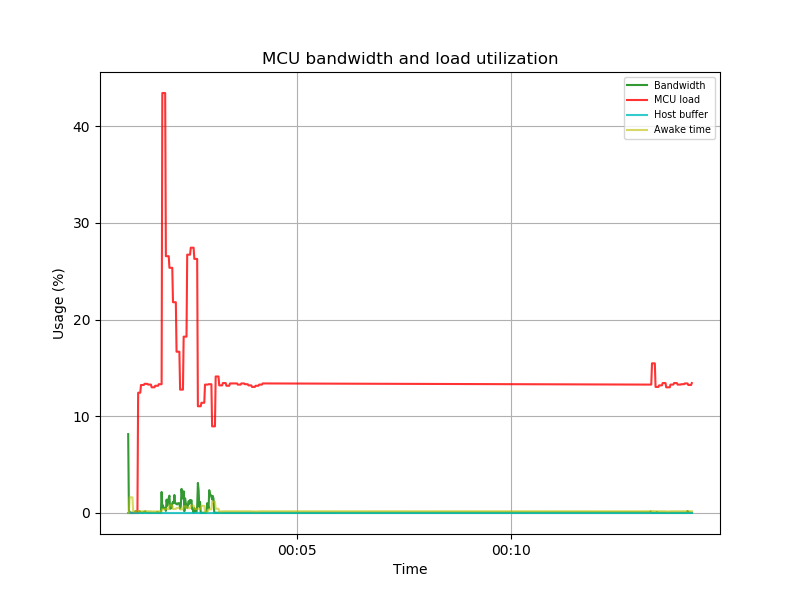
I generated a graph too - I don't see any of the peak host buffer spikes.
marcosscriven
on 10 Nov 2019
you originally quoted
I also checked the processes on the RPi itself, and at the time of the stuttering, the Octoprint Python >process was at 100%
that is pretty typical of Octoprint comms issue.
have you printed the same gcode using the virtual sdcard option?
BlackStump
on 10 Nov 2019
have you printed the same gcode using the virtual sdcard option?
Not yet - I'll give it a go.
I was reticent to, however, as I'd rather not have to use it when I _shouldn't_ need it, if the ticket you linked is the same issue as mine.
I've shown I'm only doing 30 edges/second, an order of magnitude less that when others have been anywhere near reporting stuttering. This, combined with the fact I'm not seeing max buffer in the graph, suggests it's another issue.
marcosscriven
on 10 Nov 2019
This is the graph from the log at the top of this issue:
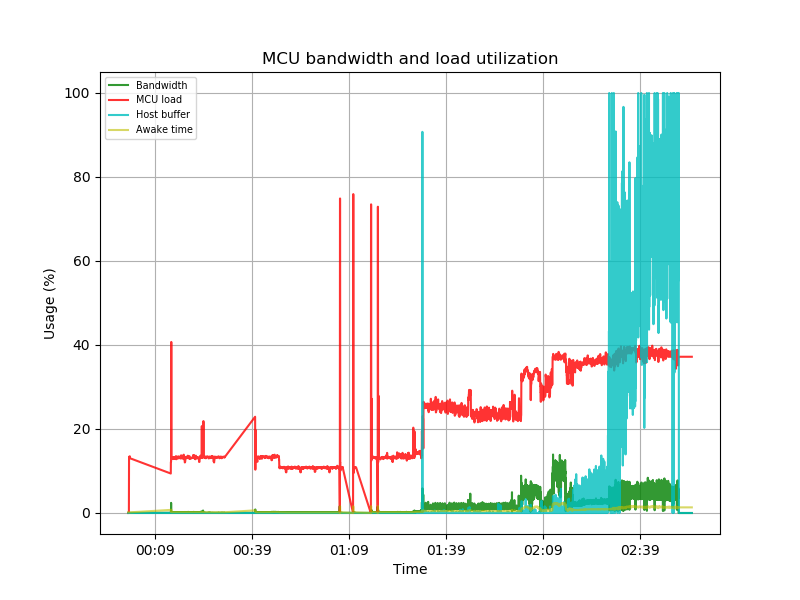
If the printer moves faster than OctoPrint can send commands, then Klipper has no choice but to pause for more commands. As indicated above, the virtual_sdcard is the main work around for this.
-Kevin
 KevinOConnor
on 10 Nov 2019
KevinOConnor
on 10 Nov 2019
Thanks @KevinOConnor
Not sure how I messed up doing the graph. Will take another look.
Regarding calculations on edges per second though - 30/s shouldn’t be anywhere near the max of Octoprint on an RPi3. https://github.com/KevinOConnor/klipper/issues/513#issuecomment-409861168 - mentions > 98/s being fine.
marcosscriven
on 10 Nov 2019
Sorry one other thing - before moving to virtual SD card - I’ve done a little more investigating and noticed it can stutter when Octoprint is only around 20%.
marcosscriven
on 10 Nov 2019
It's not only related with cpu usage. I got stuttering with Octoprint running on a I7 @ 4ghz that is basically doing nothing. I suspect it's related to the implementation of the command buffer in octoprint.
vladbabii
on 11 Nov 2019
@marcosscriven
here a link from Octoprints git
https://github.com/foosel/OctoPrint/issues/2799
I am sure if you research Octoprints stuttering you will find plenty more info
BlackStump
on 11 Nov 2019
FWIW, my last stuttering issue was resolved when I disabled DEBUG logging in octoprint...
 cmock
on 14 Nov 2019
cmock
on 14 Nov 2019
Any kind of logging on the PI can slow it down if it can't write fast enough or ram is not enough. This is why i did some changes
- use tmpfs for /tmp
- setup a logrotate rule to truncate klipper logs over a certain size
Another option is to run of a usb ssd over usb 3.0 to get awesome disk read/write speeds.
vladbabii
on 14 Nov 2019
I'm going to close this issue as it appears the root cause of the original issue was found (the printer was moving faster than octoprint could send commands).
-Kevin
KevinOConnor
on 2 Dec 2019
Related issues
 amaximchuk
·
6Comments
amaximchuk
·
6Comments
 TronskiFPV
·
5Comments
TronskiFPV
·
5Comments
 superg3
·
6Comments
superg3
·
6Comments
 ChiliApple
·
4Comments
ChiliApple
·
4Comments
 Hywelmartin
·
6Comments
Hywelmartin
·
6Comments