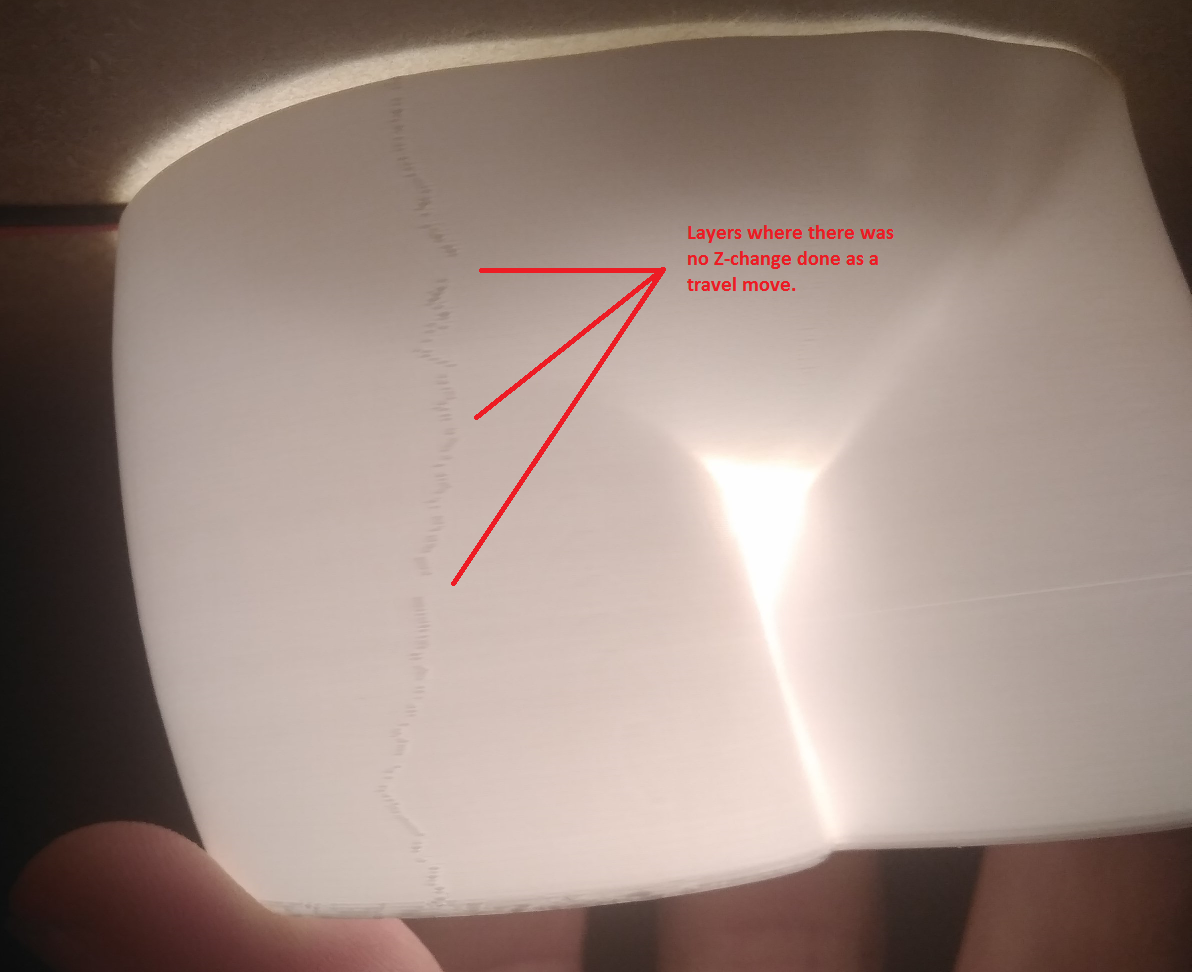
Klipper: Klipper creating a visible seam with Cura's 'Spriralize Outer Countour' because of G0 travel moves.
Sometimes when Cura slices a vase mode print, the layer change also happens to have the tiny Z-change that is spread around the layer, which is then done as a G0 travel move. Klipper does not like this and will visibly 'pause' to do the move for a fraction of a second which produces a very visible seam on the model, even though it tries its best to do a Pressure Advance retraction during it.
G1 X107.773 Y115.692 Z38.598 E486.314
G1 X107.823 Y115.322 Z38.599 E486.32364
G1 X107.843 Y115.106 E486.32924
G1 X107.847 Y114.888 E486.33487
;TIME_ELAPSED:1104.089512
;LAYER:240
;MESH:Woman_body_for_vase_mode_v13.stl
G0 F13500 X107.847 Y114.888 Z38.6
;TYPE:WALL-OUTER
G1 F906.6 X107.814 Y114.474 E486.34558
G1 X107.766 Y114.245 Z38.601 E486.35162
G1 X107.625 Y113.808 Z38.602 E486.36348
G1 X106.939 Y112.291 Z38.605 E486.40645
G1 X106.721 Y111.748 Z38.607 E486.42155
G1 X106.591 Y111.375 E486.43174
F13500 matches my Travel Speed of 225mm/s while my Z-axis is limited to 50mm/s in printer.cfg - also note that the Z-axis change is a whopping 0.001mm from Z38.599 to Z38.6, while X and Y don't move at all, meaning it pretty much is a completely useless move command.
 JohnEdwa
All 22 comments
This seems like a Cura bug.
 jakep82
on 29 Jan 2019
jakep82
on 29 Jan 2019
@jakep82
While I agree it's dumb Cura does this and should be changed, this is not an issue I had on Marlin (the Cura profile is identical) so Klipper is doing something weird with it.
[EDIT] I'll do a batch of tests on this to figure out what exactly it is that trips Klipper up in this process.
JohnEdwa
on 29 Jan 2019
Almost assuredly this results because Klipper does not do lookahead across moves that have significantly different extrude rates. The Z only move doesn't extrude while the previous and following moves do. Klipper interprets this as a request to make a move without any extrusion and thus decelerates so that the extruder can come to a full stop (and so Klipper can perform any pressure advance if so configured). FWIW, this behaviour is documented in docs/Kinematics.md .
I'm not really sure how one could avoid the deceleration in the general case. So, I don't immediately see a way to avoid the issue you are seeing. (Other than fixing Cura, of course.)
-Kevin
 KevinOConnor
on 30 Jan 2019
KevinOConnor
on 30 Jan 2019
Ah, that makes sense and would fit the results of my tests as well.
Though the first thing I did was to set pressure advance to 0 which didn't fix it, would it make sense to tie this deacceleration to that somehow?
Though it's doing exactly what the G-code is asking it to do, move without extruding.
In any case, I'll continue this on the Cura side.
JohnEdwa
on 30 Jan 2019
Though the first thing I did was to set pressure advance to 0 which didn't fix it, would it make sense to tie this deacceleration to that somehow?
Even without pressure advance we want to decelerate/accelerate if there is a significant change to extruder speed. I'm not sure what Marlin does to avoid that, but not decelerating (in the general case) seems incorrect to me.
FWIW, if you just want to print the model I suspect you could write a script to identify and remove these bogus G0 moves.
-Kevin
KevinOConnor
on 30 Jan 2019
That's an interesting problem.
Have you tried a different slicer to see if there is a difference? Personally I prefer Slic3r Prusa Edition. I did some fairly simple tests between Slic3r and Cura a while ago and the quality of the print for things like the edges of small holes was vastly better from Slic3r. Ideamaker was my go-to backup if Slic3r struggled with a poor STL but this handling has improved since then and I haven't had to revert to a different slicer for ages now.
 theopensourcerer
on 30 Jan 2019
theopensourcerer
on 30 Jan 2019
This is actually a problem for me as well. But occurs before/after high retractions.
And this is all due to complete stops between movements in klipper.
X+E => X => X+E. I know this is silly example, but...
this one will want to decelerate to 0 during X+E movement, because there is no E movement later. Even if whole X movement is a straight line. Marlin will do that too, but with relatively high jerk (10 by default). Thus, X will decelerate to 10mm/s of E, not to 0.
So, whole X movement will be non-stop, but decelerating to 10 mm/s and accelerating afterwards.
10 mm/s on E -- that is ~24mm3 of filament (1.75), that is 300 mm/s X axis speed with 0.4 width and 0.2 layer! If constant X speed in first part was below 300mm/s -- X axis will not need to accelerate/decelerate at all.
Decelerations to 0 is a huge problem with bowden systems before retract, because of pressure in bowden tube. Personally, I think decelerations to 0 is a problem even in systems without bowden tube, just not so noticable visually.
Pressure advance do nothing here, because it will change deceleration pattern, but it will want to decelerate to 0 on E axis with pressure advance too.
The perfect movement for pattern above looks for me like this:
1) move, constant
2) decelerate X+E, because of E, until E hits e.g. 10 mm/s
3) STOP scheduling steps to E. Forget about any "should be planned E movement".
4) accelerate on X
I know our universe dont allow instant velocity changes, but current "fair" planner just not good enought for FDM process. In the example above I beleive 99% of steppers on E will be able to hold instantly.
If E will skip some steps extruding without scheduling (I dont beleive they do, but...) -- that will cause oozing. And this could be completely eliminated by lowering "max instant e deceleration from 10".
--
During retractions I have same issue
X+E => E-N => X => E+N (I'm using bowden, so 5mm < N < 10mm)
X will completely stop just before retraction and that WILL make blobs no matter how fast we will retract after that. Pressure advance could help here, but not much. Just because any stop after movements + extrude will make blobs, small or big, but they will be in any case, because of liquidity of material we extruding. In marlin the sequence above looks differently. Since we have jerk on both X and E axis:
- Extrude + move
- Decelerate to 10mm/s (X)
- Stop scheduling X, accelerate (negative) on E from 10mm/s (coz of jerk), stop after N at 10mm/s.
- Accelerate X, and so on
In klipper:
- Extrude + move
- Decelerate to 0 (X) and E (0)
- Accelerate (negative) on E, decelerate, stop E at N
- Accelerate on X, and so on
I was able to eliminate final blobs only with huge pressure advance which lead to visible underextrusion just before stop. Thus, pressure advance didnt helped at all.
 mocksoul
on 30 Jan 2019
mocksoul
on 30 Jan 2019
Once again - marlin silly jerk makes magic with E.
X+E deceleration to E 10mm/s means X deceleration to 300 mm/s (0.4 width extrusion and 0.2 layer). In short: no deceleration on X at all.
We have square_corner_velocity, but I beleive "move - stop" is not a corner :)))
mocksoul
on 30 Jan 2019
a similar behavior also occurs when the slicer tries to use a different velocity for the overhangs. if there is a change in print velocity, the extruder will come to a full stop before extruding again. there are a few slicers (cura - not by default, kisslicer, slic3r prusa edition) that generate "slow down" code for overhangs. resulting in ugly seams on the surface prior the slow downs.
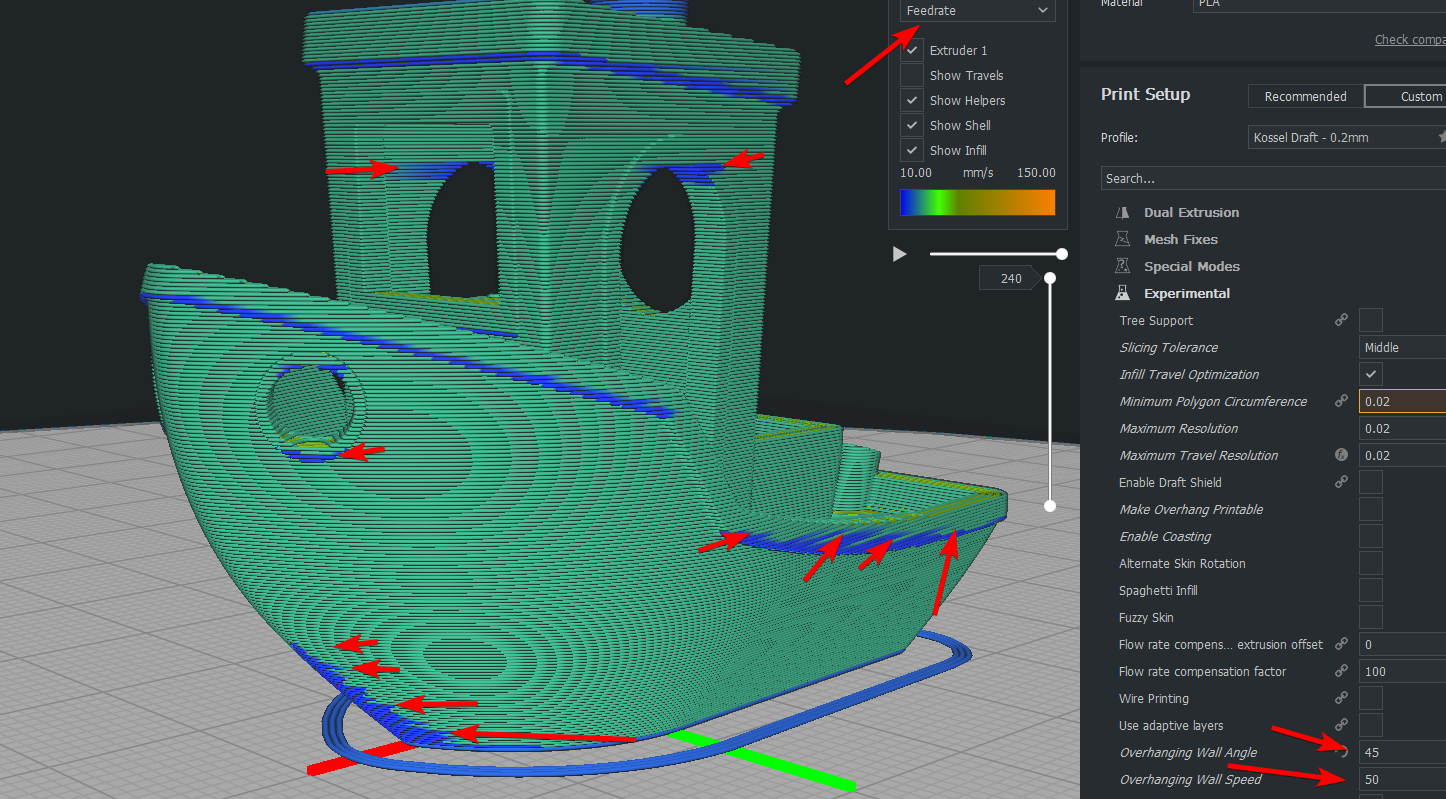
edit: i just realized slic3r prusa edition also does slowdown on overhangs, where klipper doesn't interpolate between 2 print speed.
 megablue
on 31 Jan 2019
megablue
on 31 Jan 2019
if there is a change in print velocity, the extruder will come to a full stop before extruding again.
That is not correct - Klipper does do lookahead between moves of different velocity. The only limitation is if the extrusion width changes significantly - Klipper will decelerate to zero between two moves of significantly different extrusion width (technically extrusion cross section area). FWIW, this is documented in docs/Kinematics.md .
-Kevin
KevinOConnor
on 31 Jan 2019
X+E => X => X+E. I know this is silly example, but...
It's not a silly example, as these types of moves do happen. If I understand you correctly, you are saying Marlin (in practice) may not decelerate at all. That's really bad behaviour - as it will result in ooze all over the print. If you don't give the extruder time to stop extruding then it will keep extruding - this is true with and without pressure advance.
-Kevin
KevinOConnor
on 31 Jan 2019
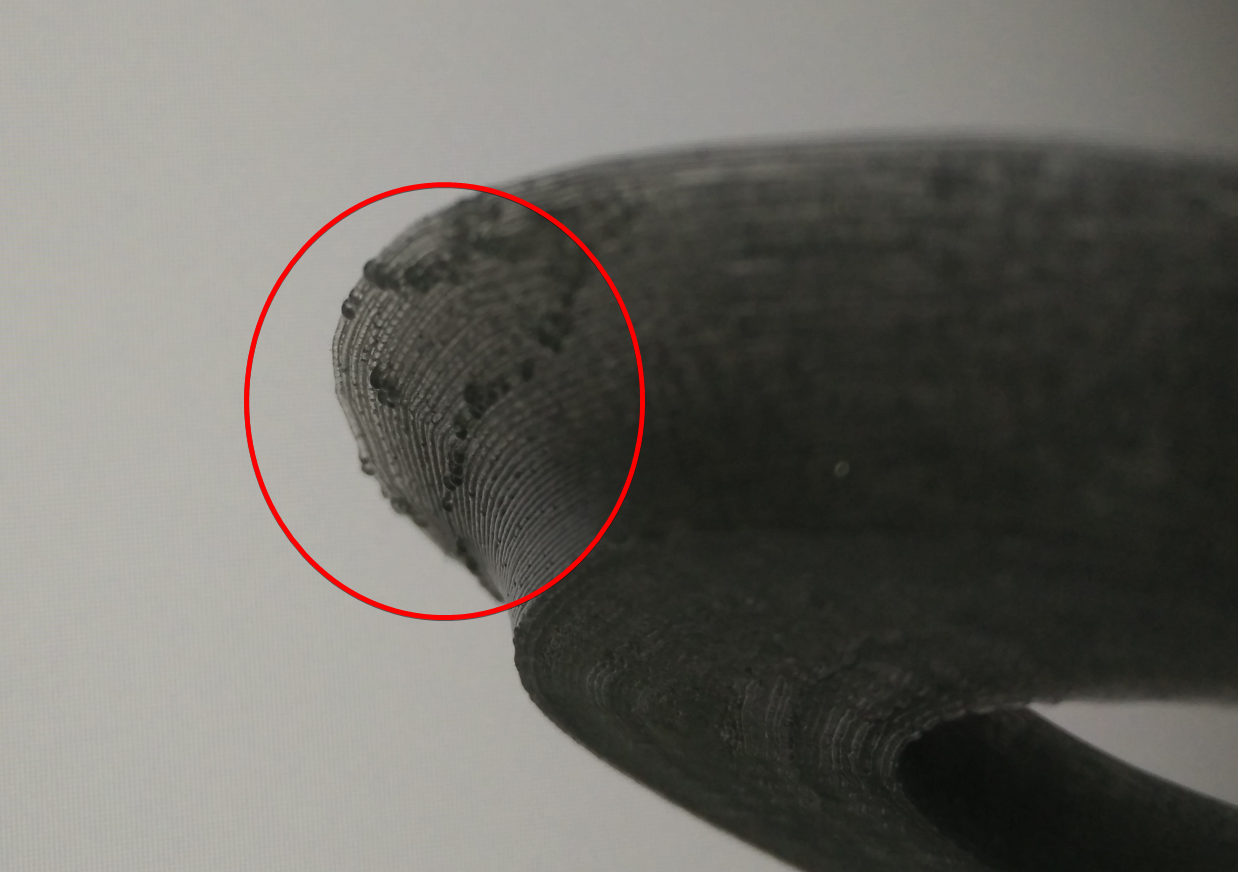
i might be wrong on the "full stop" part, but the slowdowns are causing blobs, i think the behavior is not really ideal. Here is an example, the moon city model i've sliced with slic3r prusa edition, there are only minor slowdown on the overhangs of the model.
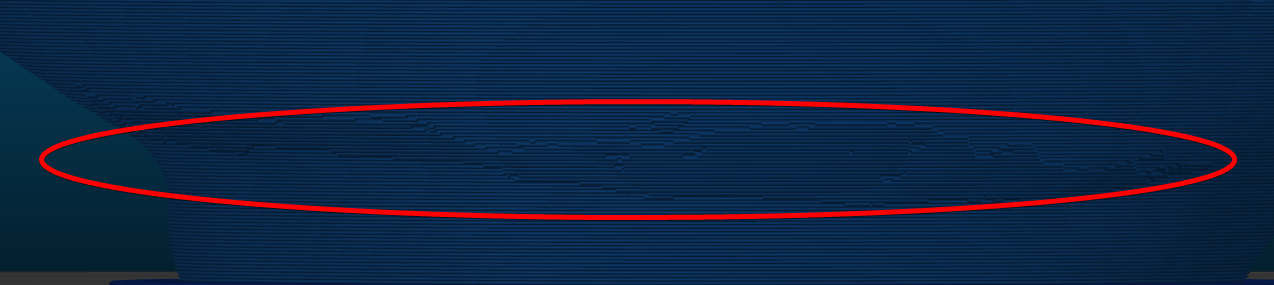
the artifacts, caused by the slowdowns, the minimum speed is 20mm/s while the rest of the outer perimeters are 30mm/s.
megablue
on 31 Jan 2019
X+E => X => X+E. I know this is silly example, but...
It's not a silly example, as these types of moves do happen. If I understand you correctly, you are saying Marlin (in practice) may not decelerate at all. That's really bad behaviour - as it will result in ooze all over the print. If you don't give the extruder time to stop extruding then it will keep extruding - this is true with and without pressure advance.
-Kevin
You are correct about marlin -- it will not decelerate at all. But if next move has no E axis movement - all slicer will want to make retracts, eliminating ooze effectively. Thus above example actually will look like this:
X+E => [E-N] => X => [E+N] => X+E
Obviously there will be stop in X axis move in that case, but it will look like this:
Decel to 10mm/s => X stop and E-N => move X => E+N and accel X from 10mm/s
And I have 0 blobs. In weird retraction tests (e.g. print 100 small towers in a row) the only problem I have with huge retractions (e.g. 8mm) -- filament cut by gears :)). But no blobs at print at all. Neither before retraction or after. In klipper I have blobs just before retraction while nozzle in stopped phase. I think this is because that phase is too long
It is also interesting how smoothieware handles this scenario, I'll try to look in their sources..
mocksoul
on 31 Jan 2019
There is also some thoughts about XY move with E -- actually, you should never want XY move less than some thershold, e.g. printing with 2-5mm/s usually leads to bad results. Thus "fair" deceleration from any speed to 0 while extruding maybe not very good idea at all. At least in reality, coz on paper it is completely fine and fair :).
mocksoul
on 31 Jan 2019
Well, this issue has been fixed in Cura thanks to the excellent work of @smartavionics, but the underlying design problem with the extruder stopping completely in Klipper is still something that maybe should be taken a new look at. In a perfect world with no oozing from Bowden tubes and other pesky things related to physics, Klipper is doing exactly as it's supposed to - trying its hardest not to extrude during a move it's been asked not to.
But in practice these are sub-millimeter moves we are talking about so grinding to a halt because of these is creating orders of magnitude more glaring visual print defects than ignoring them would. I'm not saying Klipper shouldn't ever do this, but there should be some sort of a treshold for it.
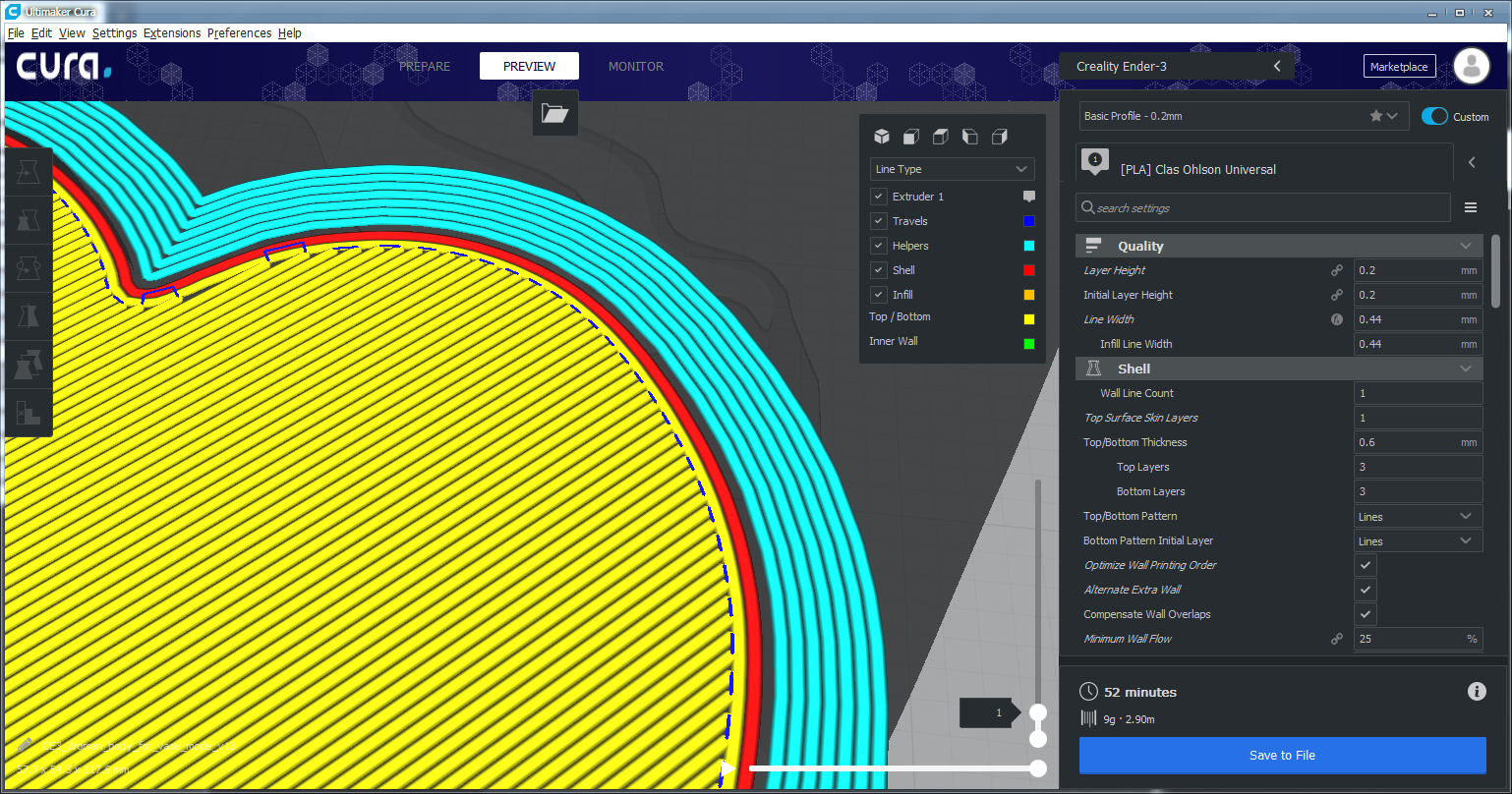
For example, should Klipper really be slowing down or even stopping and doing a pressure retraction for every single "Lines" pattern line move, as it is currently doing?
G1 F1200 X118.528 Y137.195 E65.33429
G0 F4666.7 X118.846 Y136.892
G1 F1200 X99.868 Y117.914 E66.29659
G0 F4666.7 X100.081 Y117.504
G1 F1200 X119.153 Y136.576 E67.26365
G0 F4666.7 X119.452 Y136.253
These moves are less than the width of the nozzle. Which do you think produces more oozing, blowingpast them at 60mm/s not caring about the extruder, or slowing down to 0 so we can do a pressure advance retraction?
JohnEdwa
on 31 Jan 2019
Another thing to consider -- stepper motors have maximum available torque at 0 speed and it can be 5-10 times lower on higher rpms. Thus it is much easier to change velocity from 0 to 10mm/s than 90-100 mm/s. There is much more chance for skipped steps on higher speeds with constant acceleration. Thats why I do not understand reasoning on "s-curve" accelerations in marlin as well. Acceleration should be max at 0 speed and several times lower on higher speeds.
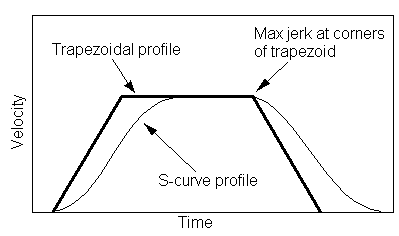
I believe s-curve should be used only for avoiding sudden speed changes at the end of acceleration, to avoid any print artifacts. This is ok on top of the curve, but should not be used at the start of the motion.
Also on higher speeds we have a lot of moving parts coming to play - that make things even worse.
Right now we have constant acceleration from start until we reach required speed (trapezoid accel)
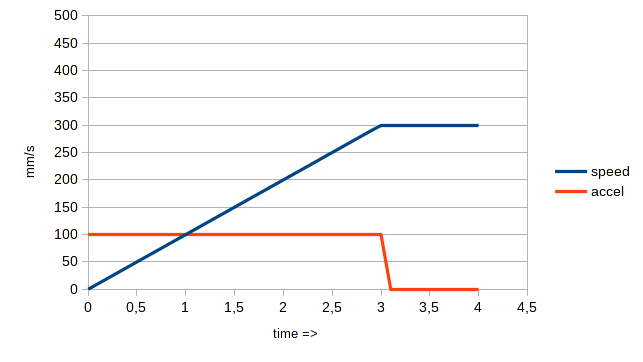
Marlin has the same curve, but graph starts at 10mm/s (0=>10mm/s with "infinite" acceleration)
But I think ramping acceleration on lower speeds and vise versa could help greatly:
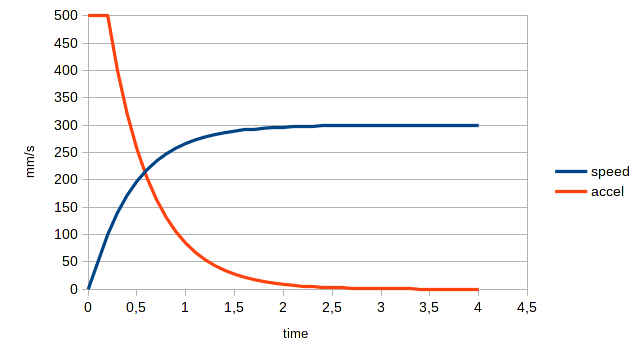
Also small addition of insanely fast acceleration on speeds below some value ("jerk" in marlin) would be great, but I cant show that on graph with 0.1s resolution.
This will:
1) take into account increasing friction on higher speeds
2) take into account motor torque on higher speeds, which is quite low on stepper motors (regular 3phase motor has almost constant torque thru all rpm range)
3) stress test any 3d printer frame for vibrations on low zigzag speed movements :-D
4) reduce "slow XY speed during extruding" and "slow XY speed after extruding" a LOT
5) allow faster speeds without skipping steps. Usually step skipping occurs on the upper side of accel/decel curve, on high speeds. For example, accel 5000 speed 100 - ok, but accel 5000 speed 500 - fail and steps skipping on high speeds (low motor torque + high friction)s)
mocksoul
on 1 Feb 2019
I think this github issue has wandered a bit from the original topic.
@megablue - It's really hard to say what is the cause of the blobbing - someone would need to extract the specific g-code lines from the print to determine what Klipper was commanded to do during the event (as the original poster did at the top of this issue). To the best of my knowledge, Klipper implements what is documented in docs/Kinematics.md .
@JohnEdwa / @mocksoul - I don't doubt some other look ahead passes could be implemented. It would require a developer to implement, test the results, demonstrate its effectiveness, and then submit a pull request with the changes.
Cheers,
-Kevin
KevinOConnor
on 3 Feb 2019
To the best of my knowledge, Klipper implements what is documented in docs/Kinematics.md .
Probably does, but maybe some of what's written in there isn't the best practice for a firmware to do in the imprecise conditions of the real world.
Though reading it I did notice the pressure_advance_lookahead_time section - couldn't a system almost identical to that also be used to check if the gap between extrusion moves tiny and if so, ignore and just continue going?
Because that is exactly what the original Cura bug was making, a 0.001mm move at 225mm/s without extrusion right between two long continuous extrusion moves.
And just to add fuel to the fire because that is always fun, here are some comments from the Cura issue:
Waiting for extrusion to stop completely is not a smart idea.
And they really should fix klipper so that it doesn't care about those little moves. It's not uncommon for slicer's to have rounding issues so it would be better if the firmware was robust enough to cope with a little imprecision!
Well, in an ideal world the slicer should be able to cope with small errors in models and the firmware should be able to cope with small errors in the gcode. None of the SW is perfect but, hopefully, the wrinkles get removed as they are discovered.
JohnEdwa
on 3 Feb 2019
FYI, I know a bunch of different topics were raised in this issue. However, I'm inclined to close this issue as it looks like the original issue (cura quirk) has been resolved.
-Kevin
KevinOConnor
on 18 Feb 2019
In my search for another thing this came up
https://github.com/slic3r/Slic3r/blob/master/utils/post-processing/decimate.pl
 Hywelmartin
on 21 Feb 2019
Hywelmartin
on 21 Feb 2019
@KevinOConnor
Another issue with Klipper that popped up because of the motion planning: Cura tries to eliminate the so-called "Z-seam" artefact by doing a wipe after the outer wall (set by Outer Wall Wipe Distance, second on the page) - it will move the nozzle inside the wall to draw the excess filament in instead of stopping at the end of the extrusion.
G1 X90.603 Y126.036 E28.03926
G0 F6000 X90.642 Y125.942
But because this wipe is done as a non-extruding move, the Klipper motion planning will stop completely at the end of the extrude and only then do the wipe move, which actually makes the Z-seam more visible because it will cause the nozzle to ooze at the end of each outer wall extrusion.
So if you are using Cura, this is an option that should be disabled as it's not compatible with the abnormal way Klipper works compared to other firmwares.
JohnEdwa
on 8 Apr 2019
@KevinOConnor
Another issue with Klipper that popped up because of the motion planning: Cura tries to eliminate the so-called "Z-seam" artefact by doing a wipe after the outer wall (set by Outer Wall Wipe Distance, second on the page) - it will move the nozzle inside the wall to draw the excess filament in instead of stopping at the end of the extrusion.
G1 X90.603 Y126.036 E28.03926
G0 F6000 X90.642 Y125.942
But because this wipe is done as a non-extruding move, the Klipper motion planning will stop completely at the end of the extrude and only then do the wipe move, which actually makes the Z-seam _more_ visible because it will cause the nozzle to ooze at the end of each outer wall extrusion.
So if you are using Cura, this is an option that should be disabled as it's not compatible with the abnormal way Klipper works compared to other firmwares.
I also believe slic3r does this too
 totalitarian
on 12 May 2019
totalitarian
on 12 May 2019
Related issues
 jannoke
·
3Comments
jannoke
·
3Comments
 TronskiFPV
·
5Comments
KevinOConnor
·
6Comments
TronskiFPV
·
5Comments
KevinOConnor
·
6Comments
 LazaroFilm
·
6Comments
LazaroFilm
·
6Comments
 sapell
·
3Comments
sapell
·
3Comments