Klipper: "MCU 'mcu' shutdown: Timer too close" when running 160 steps/mm on 150 mm/s
I got error "MCU 'mcu' shutdown: Timer too close" after over 5 hours of printing.
This was first print after I changed X and Y steppers and doubled step rate from 80/mm to 160/mm. Before the change MCU utilization used to be 40% even when I tried to push 250 mm/s:

So I thought I was safe with double step rate and 150 mm/s. However with double step rate I might be overloading the MCU:

Looks like it is lingering around 100% and barely works until it hits part of the print where there is lots of 300 mm/s moves as it prints two towers with about 10 inch between them,
Log file attached.
I also have rather aggressive pressure advance setting of 1.3 and step rate on that stepper is ~100/mm.
For now I installed old driver and switched back to 80 mm/s 1/16 microstep.
Perhaps it worth adding some kind of communication back to the server to slow down the feed, just throttle down steps?
 akpch
akpch
All 8 comments
The log indicates that the host had to regularly perform retransmits during the failed print. During the actual failure, several successive retransmits failed to the point that the data stream was delayed by several hundred milliseconds which caused the mcu to raise an error. It's unclear from the log if this is a hardware issue or due to the high load, but I suspect it is due to the high load.
The "MCU load" parameter is a heuristic - it shouldn't be taken too seriously. However, at those high values it is possible for the mcu to be so busy processing steps that it can't process incoming commands as fast as they can arrive. I suspect this is what occurred - the mcu not keeping up on the command stream would result in retransmits. The ultimate failure likely just a bad combination of retransmits that took exceptionally long to fill. I agree that the software could have done a better job here.
The general XY step rate doesn't look that high, but the pressure advance setting is very high - that might account for much of the load.
I'll have to give this issue further thought.
-Kevin
 KevinOConnor
on 11 Apr 2018
KevinOConnor
on 11 Apr 2018
Same problem.
Speed of moving 230 mm / s
Print speed from 100 to 30 mm / s (printing stand with 4 legs upside down). After 40-50 minutes:
Recv: // MCU 'mcu' shutdown: Timer too close
Three times in a row. Reboot, "FIRMWARE_Restart" - does not help.
klippy2.zip
 Alexdad76
on 14 Apr 2018
Alexdad76
on 14 Apr 2018
@Alexdad76 - indeed - it does look similar. However, you've got a step rate that is too high for an atmega2560. This is the graphstats.py analysis of your log:
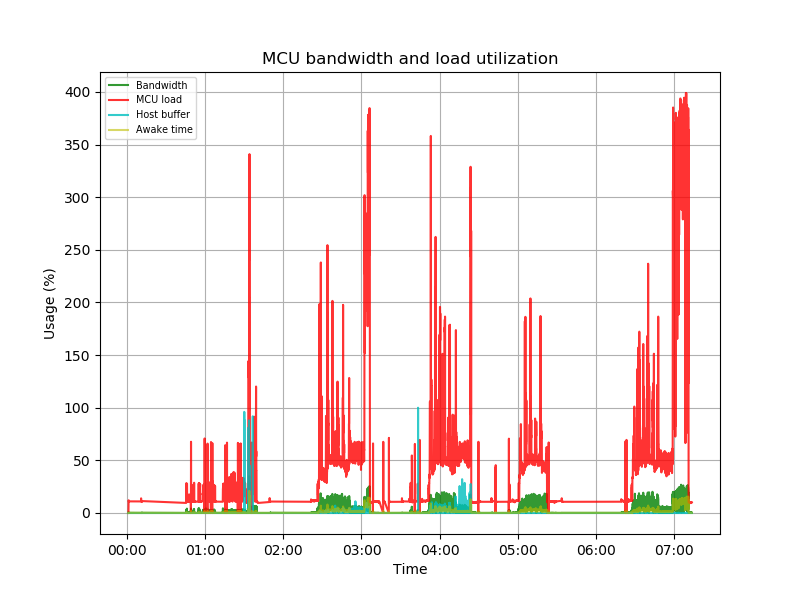
A corexy machine uses 2 steps for each step distance on horizontal and vertical moves. At 230mm/s at .005mm/step that's 92000 steps per second just for the X and Y steppers, which is near the maximum benchmark stepping rates. The benchmarks are the absolute limit, and they don't include processing time needed for temperature measurements, command processing, etc. With a step_distance=.005 on corexy, I'd aim for a max_velocity around 80mm/s.
That said, I agree the code could have done better - it was actually handling the load until a series of retransmissions delayed command transmission for a few hundred milliseconds. I still need to think further on this.
KevinOConnor
on 15 Apr 2018
@KevinOConnor , thank you so much for the instant feedback!
So, in order to save speed, I need to increase step_distance = .005 (200 steps per millimeter) -> step_distance = .01 (100 steps per millimeter). What is the maximum speed I can set -160 mm / s? Another clarification - is there any difference in the speed of printing and the speed of just traveling, can it be set higher and how much?
P.S. Or add another atmega2560 (there is one more in stock)? What is the speed limit for two atmega2560? And how to distribute the load to the two MCUs?
Alexdad76
on 15 Apr 2018
If I may.... speed of traveling can not be much faster either. During traveling klipper still need to issue steps, the only difference is lack of extruder movement. In my case failure happened only after ratio of travels significantly increased, and travel was set to 300mm/s.
I have reduced microstepping since, 80 steps/mm and 200 mm/s printing with 300 mm/s travel is not an issue.
akpch
on 15 Apr 2018
Right - the extruder rarely steps high enough to be of any concern. Yes, doubling the step_distance should basically double the maximum speed.
It's hard to make predictions on maximum speed - if you want to push the maximum velocity, I'd run a few prints and then run graphstats.py on the resulting log. If you see "mcu load" on the graph going above a 100% for sustained periods then it's a sign there could be trouble.
-Kevin
KevinOConnor
on 19 Apr 2018
In order for multi-mcu to improve throughput on a corexy, you'd need to put x and y on separate mcus. That currently doesn't work for corexy, because the endstops need to be wired to the stepper. However, this could be made to work - see: https://github.com/KevinOConnor/klipper/issues/259#issuecomment-376704426 for the details. Putting both X and Y on separate MCUs would likely double the possible max speed.
KevinOConnor
on 19 Apr 2018
I think this issue should now be fixed (primarily as of commit d798fae2). With the latest code, an mcu using a traditional serial port will not be sent messages until there is space in its receive buffer. This should avoid the retransmit problem even under high load.
-Kevin
KevinOConnor
on 29 May 2018
Related issues
 CHILLYSMOKES
·
5Comments
CHILLYSMOKES
·
5Comments
 superg3
·
6Comments
superg3
·
6Comments
 Hywelmartin
·
6Comments
Hywelmartin
·
6Comments
 talfari
·
5Comments
talfari
·
5Comments
 jannoke
·
3Comments
jannoke
·
3Comments