Hi,
With the release of the prusa mk3 which now has new controlboard which has the option of an on board raspberry pi.
I think it would be nice if slipper could support the mk3
 Richardgriff
All 166 comments
It is mostly compatible, since the board is on a AVR and is RAMPS like. I think only we are missing TMC2130 support.
 dragonnn
on 5 Jan 2018
dragonnn
on 5 Jan 2018
cruwaller already has a branch with tmc2130 (and a smoothie compatible, or both), I already compiled it and will probably test it at the weekend
 hg42
on 5 Jan 2018
hg42
on 5 Jan 2018
Would like to try. Please let me know if you get this working
Richardgriff
on 6 Jan 2018
Hi, i am also interested in testing this somewhere in the next month. Just installed tmc2130 on my megatronics 2 board. Where could i find this cruwaller branch?
 Diederikvanderpant
on 16 Jan 2018
Diederikvanderpant
on 16 Jan 2018
Would be amazing if this worked with prusa mk3 + octoprint. The prusa firmware has a bunch of features which I assume would not have equivalences in klipper such as the auto leveling stuff and filament detection/crash detection...
 simonlee
on 23 Jan 2018
simonlee
on 23 Jan 2018
actually cruwaller does not have a tmc2130 branch anymore. I think he deleted it.
whats the level of effort for getting klipper to utilize stallguard2 via spi
simonlee
on 26 Jan 2018
on 2017-12-26 he merged tmc2130 branch into lpc176x, where he is testing it now, see for example klippy/drivers/tmc2130.py
Also, his latest commit in lpc176x branch has the comment
"TMC2130 debugging continues. Works with AVR now, Due to go..."
hg42
on 26 Jan 2018
unfortunately he did not answer my questions on his github mail address or in any of my issue comments (explicitly asking @cruwaller).
He has a bunch of changes that would be useful, e.g. things like allowing any order of ^! for pin definitions or suppressing some compiler warnings.
hg42
on 26 Jan 2018
@hg42 sorry :(
I missed your email.... I will send you a response soon.
 cruwaller
on 26 Jan 2018
cruwaller
on 26 Jan 2018
Others, TMC2130 branch is merges to lpc176x (all my mods are there now). It still supports same MCU as original...
TMC2130 drivers are working great now incl sensorless homing (i running my corexy setup on RADDS)...
cruwaller
on 26 Jan 2018
@cruwaller so TMC2130 should now work in ramps config?
 NeelD87
on 31 Jan 2018
NeelD87
on 31 Jan 2018
@cruwaller I see there is an ss_pin for CS/SS but what about for the diag pin?
simonlee
on 31 Jan 2018
from what I know about TMC2130 the diag pin is not needed, because you can write/read values via SPI.
The diag pin could be used to signal some condition (e.g. stall detection) to the outside world. This could allow to use a diag pin as endstop.
Which usage do you mean/want/think of?
hg42
on 31 Jan 2018
my printer is the prusa mk3 which i believe uses the diag pin for the endstop. ive tried setting the endstop pin to use the diag pin but no detection. there are many other issues im having and i doubt i can get this to work correctly without expert aid.
simonlee
on 31 Jan 2018
@cruwaller how did you connect the TMC2130?
I once had a plan to program the diag pin to signal stalls and simple connect it to an endstop input.
This way you could program the TMC at start and then forget it.
But may be there are benefits form reading values (force etc.) while printing. Also the stall detection may differ depending on speeds (e.g. homing speed). So there are definitely more usages.
hg42
on 31 Jan 2018
@simonlee not that I currently use the TMC2130, but did you look at the example config files?
[driver tmc2130_x]
type:               TMC2130
#steps_per_mm:       400
steps_per_mm:       100
# SPI
ss_pin:             driverxy:ar7
spi_mode:           3
spi_speed:          2000000
# config
current:            1500.0
microsteps:         8
#microsteps:         32
mode :              spreadCycle
diag0_out:          temp_prewarn
diag1_out:          stall
diag0_active_high:  1
diag1_active_high:  1
interpolate:        0
sensor_less_homing: 1
stealth_max_speed:  40
stall_threshold:    19
so you select a function for the diag pins 0 and 1.
You said that one diag pin is connected to the endstop input (you don't need to configure this, it's a cable!).
You need to make sure that the diag pin that is connected to the end stop has the stall function.
If it is not diag1, you have to swap the diag0 and diag1 names in the section.
For example, if you have diag0 connected to the end stop input, then it has to be
diag0_out:          stall
diag0_active_high:  1
and either you omit diag1 or you set it like this
diag1_out:          temp_prewarn
diag1_active_high:  1
if you want to assign the temperature warning to it.
hg42
on 31 Jan 2018
I gathered from this file that the max endstop pin is the diag pin:
https://github.com/prusa3d/Prusa-Firmware/blob/MK3/Firmware/pins_Einy_0_4.h
#define X_TMC2130_CS           41
#define X_TMC2130_DIAG         64 // !!! changed from 40 (EINY03)
#define X_STEP_PIN             37
#define X_DIR_PIN              49
#define X_MIN_PIN            12
//#define X_MAX_PIN            30
//#define X_MIN_PIN              X_TMC2130_DIAG
#define X_MAX_PIN              X_TMC2130_DIAG
#define X_ENABLE_PIN           29
so my config looks like:
[driver tmc2130_x]
type:               TMC2130
steps_per_mm:       400
# SPI
ss_pin:             ^PG0
spi_mode:           3
spi_speed:          2000000
# config
current:            1000.0
microsteps:         32
mode :              spreadCycle
diag0_out:          temp_prewarn
diag1_out:          stall
diag0_active_high:  1
diag1_active_high:  1
interpolate:        1
sensor_less_homing: 1
stealth_max_speed:  40
stall_threshold:    19

...

[stepper_x]
driver: tmc2130_x
step_pin: PC0
dir_pin: !PL0
enable_pin: !PA7
step_distance: .01
endstop_pin: ^PK2

position_min:       0
position_max:       200
position_endstop:   0
homing_offset:      0
homing_speed:       40
homing_direction:   min
homing_retract_dist:5
PK2 is the x diag pin. Not sure if it needs ^ or ! though. I will try swapping the diag0 and diag1 functions.
simonlee
on 31 Jan 2018
I would try to find out which diag pin is used, there are 3 pins.
Eventually you can follow the copper traces.
With diagX_active_high you can change the polarity.
You can get your endstops and note them.
Then you changexxxx_active high and then send RESTART and see if an endstop changed.
Otherwise you programm another diag pin.
I think I would only configure the one you try. Remove the other.
I think it's not a pullup (no ˆ) and adding a pullup could harm.
hg42
on 1 Feb 2018
Any progress @simonlee ? I'm stuck in the same position with TMC2130 and RAMPS.
So far I think the SS is for clock select? Either way I was able to move the axis by flashing Marlin, while maintaining power then flashing klipper. Cold start wouldn't initialize which I guess it means SPI is not working on AVR?
It would be wonderful of @cruwaller adds avr example section for one axis as an example.
Back to repetier, cant print loud anymore. Might aswell set my tmc2130 to standalone with an external switch for klipper. Current can be set sensed by stalling/skipping the motor by hand to get the ~800ma default current via the pot. I will miss the sensorless homing though.
 ghost
on 12 Feb 2018
ghost
on 12 Feb 2018
@TunaLatte , I'm not sure where @cruwaller is with his development, but if someone can forward me a schematic of an AVR board with the TMC2130 then I'll take a look at adding basic support for it. (I need a link to the schematics - a simple document describing which pins on the mcu connect to which pins on the TMC2130.) We already support the TMC2100 on the Replicape, so I don't think it's a big deal to add in basic TMC2130 support.
 KevinOConnor
on 12 Feb 2018
KevinOConnor
on 12 Feb 2018
@KevinOConnor : Check page 10 in the datasheet. Is that what you need?
 herrwusel
on 12 Feb 2018
herrwusel
on 12 Feb 2018
@TunaLatte
I've taken a break from this. I tried the above suggestions but no luck. The steppers do move, but I am not able to figure out how to get it to detect the endstops via the diag pins.
simonlee
on 12 Feb 2018
I see
Can you please post your config? For ramps I suspect the SS pin to be
different?
Thanks
On Feb 12, 2018 6:53 PM, "Simon Lee" notifications@github.com wrote:
@TunaLatte https://github.com/tunalatte
I've taken a break from this. I tried the above suggestions but no luck.
The steppers do move, but I am not able to figure out how to get it to
detect the endstops via the diag pins.—
You are receiving this because you were mentioned.
Reply to this email directly, view it on GitHub
https://github.com/KevinOConnor/klipper/issues/101#issuecomment-364965673,
or mute the thread
https://github.com/notifications/unsubscribe-auth/AiMQ8ighWReDOrCF3wyUDGtgNgCDp4bvks5tUF6GgaJpZM4RUwuL
.
ghost
on 12 Feb 2018
[driver tmc2130_x]
type:               TMC2130
steps_per_mm:       400
# SPI
ss_pin:             ^PG0
spi_mode:           3
spi_speed:          2000000
# config
current:            1000.0
microsteps:         32
mode :              spreadCycle
diag0_out:          temp_prewarn
diag1_out:          stall
diag0_active_high:  1
diag1_active_high:  1
interpolate:        1
sensor_less_homing: 1
stealth_max_speed:  40
stall_threshold:    19

[driver tmc2130_y]
type:               TMC2130
steps_per_mm:       400
# SPI
ss_pin:             ^PG2
spi_mode:           3
spi_speed:          2000000
# config
current:            1000.0
microsteps:         32
mode :              spreadCycle
diag0_out:          temp_prewarn
diag1_out:          stall
diag0_active_high:  1
diag1_active_high:  1
interpolate:        1
sensor_less_homing: 1
stealth_max_speed:  40
stall_threshold:    19

[stepper_x]
driver: tmc2130_x
step_pin: PC0
dir_pin: !PL0
enable_pin: !PA7
step_distance: .01
endstop_pin: ^PK2

position_min:       0
position_max:       200
position_endstop:   0
homing_offset:      0
homing_speed:       40
homing_direction:   min
homing_retract_dist:5

[stepper_y]
driver: tmc2130_y
step_pin: PC1
dir_pin: !PL1
enable_pin: !PA6
step_distance: .01
endstop_pin: ^PK7

position_min:       0
position_max:       200
position_endstop:   0
homing_offset:      0
homing_speed:       40
homing_direction:   min
homing_retract_dist:5

[stepper_z]
step_pin: PC2
dir_pin: !PL2
enable_pin: !PA5
step_distance: 0.0025
endstop_pin: ^PB4

position_min:       0
position_max:       210
position_endstop:   0.15
homing_pos_x:       100
homing_pos_y:       100
homing_offset:      1.5
homing_speed:       3
homing_direction:   min
homing_retract_dist:5
homing_retract_after: true

[extruder]
step_pin: PC3
dir_pin: PL6
enable_pin: !PA4
step_distance: .003571
nozzle_diameter: 0.400
filament_diameter: 1.750
heater: heater_nozzle

[heater_nozzle]
heater_pin: PE5
min_temp: 0
max_temp: 270
control: pid
pid_Kp: 21.70
pid_Ki: 1.60
pid_Kd: 73.76
sensor_type: EPCOS 100K B57560G104F
sensor_pin: PF0

[heater_bed]
heater_pin: PG5
sensor_type: EPCOS 100K B57560G104F
sensor_pin: PF2
control: watermark
min_temp: 0
max_temp: 130

[heater_fan extruder_cooling_fan]
heater_temp: 50.0
pin: PH5
heater: heater_nozzle


[heater_fan nozzle_cooling_fan]
heater_temp: 100.0
pin: PH3
heater: heater_nozzle

[mcu]
serial: /dev/ttyACM0

[printer]
kinematics: cartesian
max_velocity: 500
max_accel: 1250
max_z_velocity: 12
max_z_accel: 200
I did not try to swap the diag0 diag1 as @hg42 suggested though.
simonlee
on 12 Feb 2018
Thanks Ill mess around and report asap
ghost
on 12 Feb 2018
@KevinOConnor In a basic scheme this is how mine is exactly wired now + diag1 (upper pin from the triangular pin order in the following picture orientation.) to the S (signal) endstop pin accordingly per each axis for sensorless endstop :

Source:hackaday
ghost
on 12 Feb 2018
Success!
Well using your config with pin modification worked well except sensorless homing like you said, but after changing stall_threshold from 19 to 4 (0 also works well) its worked perfectly!
I think the value is too high since if you look at cruwaller's example, his current is also too high, which works well with a value like 19. I had the same issue when converting from 12v to 35v.
Time to test stealthchop skipping! Apparently, the reason why it isn't used in marlin, duet (reprapfirmware double step at 100mm/s travel moves afaik) and most firmware is that it doesn't like double or quadstepping, at least thats what Trinamic said. Klipper can save this with 8 bit mcu :) No more noise or spreadCycle.
I'll be dry running a 15 hour print now (with nozzle removed so the extruder motor/calculations are still done) and report back.
Here is my config for RAMPS1.4 with the same wiring as above including the extra (not visible) enstop pins like this from toms3d:

(the handwritten stuff are crap, its diag1 if u cant read it)
Config:
# This file contains common pin mappings for RAMPS (v1.3 and later)
# boards. RAMPS boards typically use a firmware compiled for the AVR
# atmega2560 (though other AVR chips are also possible).

# See the example.cfg file for a description of available parameters.

[driver tmc2130_x]
type:               TMC2130
steps_per_mm:       40
# SPI
ss_pin:             ^PB0
spi_mode:           3
spi_speed:          2000000
# config
current:            500.0 #800 minimum under 18v
microsteps:         8 #with interpolation enabled there is less tiny pauses leading to higher accuracy than 16+ MS. Will also offload MCU load. Who needs non repeatable <50micron accurate gt2 20t setup for molten plastic? 16 is useful for non interpolated drivers, to reduce vibrations and noise only on common 3d printers.
mode :              stealthChop
diag0_out:          temp_prewarn
diag1_out:          stall
diag0_active_high:  1
diag1_active_high:  1
interpolate:        1
sensor_less_homing: 1
stealth_max_speed:  300
stall_threshold:    2

[driver tmc2130_y]
type:               TMC2130
steps_per_mm:       40
# SPI
ss_pin:             ^PL0
spi_mode:           3
spi_speed:          2000000
# config
current:            500.0 #800 minimum under 18v
microsteps:         8 #with interpolation enabled there is less tiny pauses leading to higher accuracy than 16+ MS. Will also offload MCU load. Who needs non repeatable <50micron accurate gt2 20t setup for molten plastic? 16 is useful for non interpolated drivers, to reduce vibrations and noise only on common 3d printers.
mode :              stealthChop
diag0_out:          temp_prewarn
diag1_out:          stall
diag0_active_high:  1
diag1_active_high:  1
interpolate:        1
sensor_less_homing: 1
stealth_max_speed:  300
stall_threshold:    2


[stepper_x]
driver: tmc2130_x
step_pin: ar54
dir_pin: ar55
enable_pin: !ar38
step_distance: .025
endstop_pin: ar3
#endstop_pin: ^ar2
position_max: 284
homing_speed: 50
position_endstop:   0
homing_speed:       40
homing_direction:   min
homing_retract_dist:1 #important! else you will have endstop timeout error

[stepper_y]
driver: tmc2130_y
step_pin: ar60
dir_pin: ar61
enable_pin: !ar56
step_distance: .025
endstop_pin: ^ar14
#endstop_pin: ^ar15
position_endstop: 0
position_max: 292
homing_speed: 50
homing_retract_dist:1 #important! else you will have endstop timeout error
homing_offset: 34 #adjust when you remove your endstop, I gained around 3-5cmm area on each axis, good for nozzle cleaning pad space :D

[stepper_z]
step_pin: ar46
dir_pin: ar48
enable_pin: !ar62
step_distance: 0.04
endstop_pin: ^!ar18
position_endstop: 0.0
position_max: 310
homing_speed: 10.0

[extruder]
step_pin: ar26
dir_pin: ar28
enable_pin: !ar24
step_distance: 0.00249314385
nozzle_diameter: 0.500
filament_diameter: 1.750
pressure_advance_lookahead_time: 0.010
pressure_advance: 0.05
max_extrude_only_distance: 150
pwm_cycle_time: 0.010
heater: heater_nozzle

[heater_nozzle]
heater_pin: ar10
sensor_type: ATC Semitec 104GT-2
sensor_pin: analog13
control: pid
pid_Kp: 28.853476
pid_Ki: 1.282377
pid_Kd: 162.300802
min_temp: 0
min_extrude_temp: 160
max_temp: 257
pwm_cycle_time: 0.010 #for sensitive power supply, less voltage ripple (e.g no 5V load on ATX PSU)
#*** Thermal protection
protect_period_heat:        20
protect_hysteresis_heat:    4
protect_period:             10
protect_hysteresis_runaway: 10

[heater_bed]
heater_pin: ar8
sensor_type: EPCOS 100K B57560G104F
sensor_pin: analog14
control = pid
pid_kp = 22.2
pid_ki = 1.08
pid_kd = 114
min_temp: 0
max_temp: 170
#max_power: 0.6
pwm_cycle_time: 0.010 #for sensitive power supply, less voltage ripple (e.g no 5V load on ATX PSU)
pid_deriv_time: 10
#*** Thermal protection
protect_period_heat:        20
protect_hysteresis_heat:    4
protect_period:             10
protect_hysteresis_runaway: 10

[fan0]
pin: ar9
cycle_time: 0.1 #for non pwm friendly blowers

[mcu]
serial: /dev/ttyACM0
pin_map: arduino

[printer]
#buffer_time_high: 30 #when running on Rpi Zero or single core SBCs with Octoprint
kinematics: cartesian
max_velocity: 500
max_accel: 1500
max_z_velocity:  10
max_z_accel: 30
junction_deviation: 0.005 #large moving beds, acceleration is not enough
Edit: config was the wrong one, updated.
I highly recommend rewriting the entire config, things like fan0 instead of fan or heater: can be confusing.
Edit2: ~18 hour print worked well, I slept near the printer (same room), stealthChop + vslot is very silent, had to keep looking at the printer to make sure its printing even in close proximity :)
Edit3: After several tests, spreadCycle is completely unnecessary, stealth_max_speed is not needed with klipper. Setting a value like 300mm/s is appropriate where skipping is likely to happen (although it still didn't with a moving bed at 3000mm/s accel!!).
ghost
on 12 Feb 2018
@TunaLatte what printer are you running and what speeds did you manage? with Marlin I have everything running including sensorless homing but the problem is skipped steps and have to run it at slow speeds.
NeelD87
on 13 Feb 2018
In Marlin you can override the SPI pins , will it be possible in klipper
- Default pins for TMC software SPI
*/
if ENABLED(TMC_USE_SW_SPI)
#ifndef TMC_SW_MOSI
#define TMC_SW_MOSI 66
#endif
#ifndef TMC_SW_MISO
#define TMC_SW_MISO 44
#endif
#ifndef TMC_SW_SCK
#define TMC_SW_SCK 64
#endif
endif
/**
- Use software SPI for TMC2130.
- The default SW SPI pins are defined the respective pins files,
- but you can override or define them here.
*/
//#define TMC_USE_SW_SPI
//#define TMC_SW_MOSI -1
//#define TMC_SW_MISO -1
//#define TMC_SW_SCK -1
NeelD87
on 13 Feb 2018
@NeelD87 Its a custom built cartesian printer, I just ran the calibration ringing cube at 70mm/s with 130mm/s travel, very shaky but intended for layer shifting i guess and so far there are no shifts. On marlin it skips at ~30mm/s without s3d auto speed on small areas ("Adjust printing speed for layers below"). I have a semi broken Duet and it skips immediately at around 100mm/s on travel moves if I disable spreadcycle. (invert constexpr uint32_t GCONF_SPREAD_CYCLE = 1 << 2; in tmc22xx.c if you want to try).
ghost
on 13 Feb 2018
@TunaLatte thanks I am going to try it on weekend.
Please keep posted on your tests
NeelD87
on 14 Feb 2018
@TunaLatte I am getting Recv: // Internal error on command:"G28" when homing XY
Z homing works
NeelD87
on 17 Feb 2018
@neeld87 can you post the full log? There are important info on startup related to SPI init, to determine wether the connection is working to the drivers.
ghost
on 17 Feb 2018
INFO printer.mcu.mcu :: Configured MCU 'mcu' (633 moves)
WARNING printer.stepper.x.tmc2130 :: Reset has occurred!
INFO printer.stepper.x.tmc2130 :: Stealth max speed: 55 (71)
WARNING printer.stepper.x.tmc2130 :: Reset has occurred!
INFO printer.stepper.x.tmc2130 :: Stand still
ERROR printer.stepper.x.tmc2130 :: Phase B short to ground
ERROR printer.stepper.x.tmc2130 :: Phase A short to ground
WARNING printer.stepper.x.tmc2130 :: Over temperature prewarning!
ERROR printer.stepper.x.tmc2130 :: Over temperature!
ERROR printer.stepper.x.tmc2130 :: motor stall
WARNING printer.stepper.x.tmc2130 :: driver has switched to fullstep
INFO printer.stepper.x.tmc2130 :: DRV_STATUS : Current (CS) = 31, stallGuard2 result (SG) = 1023
WARNING printer.stepper.x.tmc2130 :: Reset has occurred!
WARNING printer.stepper.x.tmc2130 :: Reset has occurred!
WARNING printer.stepper.x.tmc2130 :: Reset has occurred!
WARNING printer.stepper.x.tmc2130 :: Reset has occurred!
WARNING printer.stepper.x.tmc2130 :: Reset has occurred!
ERROR printer.stepper.x.tmc2130 :: GCONF Configuration error! [was 0xFFFFFFFF expected 0x00003144]
ERROR printer.stepper.x.tmc2130 :: CHOPCONF Configuration error! [was 0xFFFFFFFF expected 0x15028135]
ERROR printer.stepper.x.tmc2130 :: COOLCONF Configuration error! [was 0xFFFFFFFF expected 0x000A0000]
ERROR printer.stepper.x.tmc2130 :: PWMCONF Configuration error! [was 0xFFFFFFFF expected 0x000505FF]
ERROR printer.stepper.x.tmc2130 :: IHOLD_IRUN Configuration error! [was 0xFFFFFFFF expected 0xFFFFF9EC]
INFO printer.stepper.x.tmc2130 :: init done!
WARNING printer.stepper.y.tmc2130 :: Reset has occurred!
INFO printer.stepper.y.tmc2130 :: Stealth max speed: 50 (79)
WARNING printer.stepper.y.tmc2130 :: Reset has occurred!
INFO printer.stepper.y.tmc2130 :: Stand still
ERROR printer.stepper.y.tmc2130 :: Phase B short to ground
ERROR printer.stepper.y.tmc2130 :: Phase A short to ground
WARNING printer.stepper.y.tmc2130 :: Over temperature prewarning!
ERROR printer.stepper.y.tmc2130 :: Over temperature!
ERROR printer.stepper.y.tmc2130 :: motor stall
WARNING printer.stepper.y.tmc2130 :: driver has switched to fullstep
INFO printer.stepper.y.tmc2130 :: DRV_STATUS : Current (CS) = 31, stallGuard2 result (SG) = 1023
WARNING printer.stepper.y.tmc2130 :: Reset has occurred!
WARNING printer.stepper.y.tmc2130 :: Reset has occurred!
WARNING printer.stepper.y.tmc2130 :: Reset has occurred!
WARNING printer.stepper.y.tmc2130 :: Reset has occurred!
WARNING printer.stepper.y.tmc2130 :: Reset has occurred!
ERROR printer.stepper.y.tmc2130 :: GCONF Configuration error! [was 0xFFFFFFFF expected 0x00003144]
ERROR printer.stepper.y.tmc2130 :: CHOPCONF Configuration error! [was 0xFFFFFFFF expected 0x15028135]
ERROR printer.stepper.y.tmc2130 :: COOLCONF Configuration error! [was 0xFFFFFFFF expected 0x000A0000]
ERROR printer.stepper.y.tmc2130 :: PWMCONF Configuration error! [was 0xFFFFFFFF expected 0x000505FF]
ERROR printer.stepper.y.tmc2130 :: IHOLD_IRUN Configuration error! [was 0xFFFFFFFF expected 0xFFFFF9EC]
INFO printer.stepper.y.tmc2130 :: init done!
Are the drivers gone
NeelD87
on 17 Feb 2018
On Mon, Feb 12, 2018 at 11:19:01AM -0800, Talal A. wrote:
@KevinOConnor In a basic scheme this is how mine is exactly wired now + diag1 (upper pin from the triangular pin order in the following picture orientation.):
Thanks. Could you test if the work-tmc2130-20180217 branch works on
your hardware? This doesn't implement stealthchop or sensorless
homing, but I'd like to see if basic stepper movement works. See the
example-extras.cfg file for the config details.
cd ~/klipper ; git fetch ; git checkout origin/work-tmc2130-20180217 ; sudo service klipper restart
-Kevin
KevinOConnor
on 18 Feb 2018
@KevinOConnor I didn't have time to re-setup the endstops but will do, though I just issued G28 X > Emergency stop (m112) > G28 Y > Emergency stop with a slow homing speed and it works well.
Interpolation is apparently not enabled by the sound of it. I left the sense_resistor value stock as its equivalent to my waterott specs.
Will test a print if required.
Klippy.log attached for config.
klippy.log
edit: It should be noted that anyone coming from marlin or even cruwallers branch requires full power cycle to reset settings like sensorless(stallgaurd) settings. (mine home when i first tested this branch)
ghost
on 18 Feb 2018
@KevinOConnor, sorry but I can't understand why restart with a completely new branch when @cruwaller branch is working with all register configurable and also the sensorless homing function work,
It's something I already ask to @cruwaller without an answer, isn't the opensource principle to share
to grow up faster and better?
Maybe I'm lost somewhere?
Anyway this is the link of his fork:
https://github.com/cruwaller/klipper/tree/lpc176x
regards
 andrea7376
on 18 Feb 2018
andrea7376
on 18 Feb 2018
On Sun, Feb 18, 2018 at 04:40:22PM +0000, andrea7376 wrote:
@KevinOConnor, sorry but I can't understand why restart with a completely new branch when @cruwaller branch is working with all register configurable and also the sensorless homing function work,
It's something I already ask to @cruwaller without an answer, isn't the opensource principle to share
to grow up faster and better?
Maybe I'm lost somewhere?
Anyway this is the link of his fork:
https://github.com/cruwaller/klipper/tree/lpc176x
I chatted briefly with cruwaller on irc a couple of days ago. He
indicated that he is not planning to submit his changes to my repo. I
can't easily extract his changes (and wouldn't without a
signed-off-by).
A number of people have been asking about the tmc2130 and it looks to
be only about a days worth of work. So, it's not a big deal to
implement it if I need to. :-(
-Kevin
KevinOConnor
on 18 Feb 2018
OK after playing with it further got it running, used same pin configurations which were working with marlin.
Its homing now sensorless and all axis are moving. So time to do some actual printing.
NeelD87
on 18 Feb 2018
@KevinOConnor Ok, now the situation it's clear for all :-(
Thank you.
andrea7376
on 18 Feb 2018
@TunaLatte just printed 20mm calibration cube and for few layers had small incremental X shift and later had big Y shift about 10mm.
NeelD87
on 18 Feb 2018
NeelD87
on 18 Feb 2018
Can't understand why @cruwaller wouldn't submit his changes but hey...
Really looking forward to this, I am running an i3 MEGA on the trigorilla board with TMC2130 stepsticks.
 tiziano149
on 18 Feb 2018
tiziano149
on 18 Feb 2018
Running them at 30V. Going to play with current and see.
Waiting for @KevinOConnor implementation to test further.
NeelD87
on 19 Feb 2018
Seems teemuatlut has now worked on coolstep
https://github.com/teemuatlut/TMC2130Stepper
NeelD87
on 19 Feb 2018
Its one used in Marlin now, also someone posted that he reverted back to teemuatlut/TMC2130Stepper@58f01ad and is working fine with Marlin 1.1.8
NeelD87
on 19 Feb 2018
current: 500.0 #800 minimum under 18v
Running them at 30V. Going to play with current and see.
But you mentioned before that you are on 12v, your current in config also shows that. Your drivers are burning hot right now, and cruwaller's branch doesn't report pre-temp or overheating yet, you also refuse to show what board you are using, and no logs after several requests, now you are going offtopic about Marlin, sounds all fishy to me from the beginning, opting out and deleting my useless comments to reduce clutter sorry.
ghost
on 19 Feb 2018
I am using 150W DC-DC 10-32V to 12-35V adjustable Step-UP
Measured the voltage with multimeter.
Seems few others have similar issues with Marlin firmware.
NeelD87
on 19 Feb 2018
Thanks for all your help it did help in getting started and debuging.
I cant see what lies you seem in the config and log and what you think is fishy.
NeelD87
on 19 Feb 2018
I am using ramps 1.4 board . Soldered VM and GND pins and supply external 30V supply through stepup converter. Half success today , again thanks to @TunaLatte I have now reduced the current to 500. But still not clean.

NeelD87
on 19 Feb 2018
@NeelD87 You seem to have a hardware issue, I've never seen such shifts on Marlin, shifts should be maximum 1-2 mm randomly no 10mm one shot and that has nothing to do with stealhchop. 3rd time asking: are you using the waterott/official not chinese knock off?
ghost
on 20 Feb 2018
Also, if your step-up is slow to power up it could damage and lead to similar issues. According to waterott, you should supply power to VM (motor) before VIO (driver) that is assuming that you are only running the drivers at this voltage. It wont matter if the entire system is 30v. It could be good to test spreadcycle first.
ghost
on 20 Feb 2018
Hi,
Today I got my TMC2130 and tested the cruwaller branch the printer (corexy) is moving and also the sensorless homing is working.
At the moment I didn't print anything.
I have some strange things in the log file:
CPU: 4 core ARMv7 Processor rev 4 (v7l)
Python: '2.7.13 (default, Nov 24 2017, 17:33:09) \n[GCC 6.3.0 20170516]'
INFO printer :: Start printer at Mon Feb 26 21:30:10 2018 (1519680610.3 660.5)
INFO config :: ===== Config file =====
[driver tmc2130_x]
type = TMC2130
steps_per_mm = 400
ss_pin = ar53
spi_mode = 3
spi_speed = 4000000
current = 600.0
microsteps = 32
mode = stealthChop
diag0_out = temp_prewarn
diag1_out = stall
diag0_active_high = 1
diag1_active_high = 1
interpolate = 1
sensor_less_homing = 1
stealth_max_speed = 50
stall_threshold = 2
[driver tmc2130_y]
type = TMC2130
steps_per_mm = 400
ss_pin = ar49
spi_mode = 3
spi_speed = 4000000
current = 600.0
microsteps = 32
mode = stealthChop
diag0_out = temp_prewarn
diag1_out = stall
diag0_active_high = 1
diag1_active_high = 1
interpolate = 1
sensor_less_homing = 1
stealth_max_speed = 50
stall_threshold = 2
[stepper_x]
driver = tmc2130_x
step_pin = ar54
dir_pin = ar55
enable_pin = !ar38
step_distance = 0.00625
endstop_pin = ar3
position_endstop = 0
position_min = -1
position_max = 300
homing_speed = 25
homing_positive_dir = false
[stepper_y]
driver = tmc2130_y
step_pin = ar60
dir_pin = ar61
enable_pin = !ar56
step_distance = 0.00625
endstop_pin = ar14
position_endstop = 0
position_min = -1
position_max = 300
homing_speed = 25
homing_positive_dir = false
[driver drv8825_z]
type = DRV8825
microsteps = 32
[stepper_z]
driver = drv8825_z
step_pin = ar46
dir_pin = ar48
enable_pin = !ar62
step_distance = 0.000625
endstop_pin = ^!ar18
position_endstop = 350.6
position_min = -10.0
position_max = 355.0
homing_speed = 5
homing_positive_dir = true
[extruder]
step_pin = ar36
dir_pin = ar34
enable_pin = !ar30
steps_per_mm = 900
nozzle_diameter = 0.300
filament_diameter = 1.750
heater = heater_nozzle
min_temp = 0
max_temp = 310
pressure_advance = 0.05
pressure_advance_lookahead_time = 0.020
max_extrude_cross_section = 99.0
[heater_nozzle]
heater_pin = ar10
min_temp = 0
max_temp = 300
control = pid
pid_kp = 10.186
pid_ki = 0.686
pid_kd = 37.816
sensor_pin = analog13
sensor_type = EPCOS 100K B57560G104F
rtd_nominal_r = 100
rtd_num_of_wires = 2
rtd_reference_r = 430
spi_mode = 1
spi_speed = 8000000
protect_period_heat = 20
protect_hysteresis_heat = 2
protect_period = 10
protect_hysteresis_runaway = 10
[heater_bed]
heater_pin = ar8
sensor_type = EPCOS 100K B57560G104F
sensor_pin = analog15
control = pid
pid_kp = 38.279
pid_ki = 1.994
pid_kd = 183.740
min_temp = 0
max_temp = 130
max_power = 0.75
protect_period_heat = 20
protect_hysteresis_heat = 4
protect_period = 10
protect_hysteresis_runaway = 10
[mcu]
serial = /dev/ttyACM0
pin_map = arduino
restart_method = arduino
[printer]
kinematics = corexy
max_velocity = 300
max_accel = 3000
max_z_velocity = 30
max_z_accel = 300
motor_off_time = 600
require_home_after_motor_off = false
allow_move_without_home = true
=======================
INFO printer.stepper.x :: steps per mm 160.0 , step in mm 0.00625
INFO printer.stepper.y :: steps per mm 160.0 , step in mm 0.00625
INFO printer.stepper.z :: steps per mm 1600.0 , step in mm 0.000625
INFO printer.coreXY :: Kinematic created: coreXY
INFO printer.extruder.stepper :: steps per mm 900.0 , step in mm 0.00111111111111
INFO printer.mcu.mcu.serial :: Starting serial connect
INFO printer.mcu.mcu.serial :: Loaded 59 commands (v0.5.0-135-ga51d851-20180226_203056-octopi / gcc: (GCC) 4.9.2 binutils: (GNU Binutils) 2.26.20160125)
INFO printer.mcu.mcu.serial :: MCU config: ADC_MAX=1023 PWM_MAX=255 CLOCK_FREQ=16000000 SOFT_PWM_MAX=256 SERIAL_BAUD=250000 MCU=atmega2560 STATS_SUMSQ_BASE=256
INFO printer.mcu.mcu :: Sending MCU 'mcu' printer configuration...
INFO printer.mcu.mcu :: Configured MCU 'mcu' (636 moves)
WARNING printer.stepper.x.tmc2130 :: Reset has occurred!
INFO printer.stepper.x.tmc2130 :: Stealth max speed: 50 (197)
WARNING printer.stepper.x.tmc2130 :: Reset has occurred!
INFO printer.stepper.x.tmc2130 :: Stand still
INFO printer.stepper.x.tmc2130 :: DRV_STATUS : Current (CS) = 9, stallGuard2 result (SG) = 0
WARNING printer.stepper.x.tmc2130 :: Reset has occurred!
WARNING printer.stepper.x.tmc2130 :: Reset has occurred!
WARNING printer.stepper.x.tmc2130 :: Reset has occurred!
WARNING printer.stepper.x.tmc2130 :: Reset has occurred!
WARNING printer.stepper.x.tmc2130 :: Reset has occurred!
ERROR printer.stepper.x.tmc2130 :: COOLCONF Configuration error! [was 0x00000000 expected 0x00020000]
ERROR printer.stepper.x.tmc2130 :: PWMCONF Configuration error! [was 0x00000000 expected 0x000505FF]
ERROR printer.stepper.x.tmc2130 :: IHOLD_IRUN Configuration error! [was 0x00000000 expected 0x00001209]
INFO printer.stepper.x.tmc2130 :: init done!
WARNING printer.stepper.y.tmc2130 :: Reset has occurred!
INFO printer.stepper.y.tmc2130 :: Stealth max speed: 50 (197)
WARNING printer.stepper.y.tmc2130 :: Reset has occurred!
INFO printer.stepper.y.tmc2130 :: Stand still
INFO printer.stepper.y.tmc2130 :: DRV_STATUS : Current (CS) = 9, stallGuard2 result (SG) = 0
WARNING printer.stepper.y.tmc2130 :: Reset has occurred!
WARNING printer.stepper.y.tmc2130 :: Reset has occurred!
WARNING printer.stepper.y.tmc2130 :: Reset has occurred!
WARNING printer.stepper.y.tmc2130 :: Reset has occurred!
WARNING printer.stepper.y.tmc2130 :: Reset has occurred!
ERROR printer.stepper.y.tmc2130 :: COOLCONF Configuration error! [was 0x00000000 expected 0x00020000]
ERROR printer.stepper.y.tmc2130 :: PWMCONF Configuration error! [was 0x00000000 expected 0x000505FF]
ERROR printer.stepper.y.tmc2130 :: IHOLD_IRUN Configuration error! [was 0x00000000 expected 0x00001209]
INFO printer.stepper.y.tmc2130 :: init done!
Can someone figure out what is happening? thank you.
Andrea
andrea7376
on 26 Feb 2018
They are pretty normal and exactly like my log, these are unconfigured
features and the debugging level is verbose.
On Feb 27, 2018 12:53 AM, "andrea7376" notifications@github.com wrote:
Hi,
Today I got my TMC2130 and tested the cruwaller branch the printer
(corexy) is moving and also the sensorless homing is working.
At the moment I didn't print anything.
I have some strange things in the log file:CPU: 4 core ARMv7 Processor rev 4 (v7l)
Python: '2.7.13 (default, Nov 24 2017, 17:33:09) \n[GCC 6.3.0 20170516]'
INFO printer :: Start printer at Mon Feb 26 21:30:10 2018 (1519680610.3
660.5)
INFO config :: ===== Config file =====
[driver tmc2130_x]
type = TMC2130
steps_per_mm = 400
ss_pin = ar53
spi_mode = 3
spi_speed = 4000000
current = 600.0
microsteps = 32
mode = stealthChop
diag0_out = temp_prewarn
diag1_out = stall
diag0_active_high = 1
diag1_active_high = 1
interpolate = 1
sensor_less_homing = 1
stealth_max_speed = 50
stall_threshold = 2[driver tmc2130_y]
type = TMC2130
steps_per_mm = 400
ss_pin = ar49
spi_mode = 3
spi_speed = 4000000
current = 600.0
microsteps = 32
mode = stealthChop
diag0_out = temp_prewarn
diag1_out = stall
diag0_active_high = 1
diag1_active_high = 1
interpolate = 1
sensor_less_homing = 1
stealth_max_speed = 50
stall_threshold = 2[stepper_x]
driver = tmc2130_x
step_pin = ar54
dir_pin = ar55
enable_pin = !ar38
step_distance = 0.00625
endstop_pin = ar3
position_endstop = 0
position_min = -1
position_max = 300
homing_speed = 25
homing_positive_dir = false[stepper_y]
driver = tmc2130_y
step_pin = ar60
dir_pin = ar61
enable_pin = !ar56
step_distance = 0.00625
endstop_pin = ar14
position_endstop = 0
position_min = -1
position_max = 300
homing_speed = 25
homing_positive_dir = false[driver drv8825_z]
type = DRV8825
microsteps = 32[stepper_z]
driver = drv8825_z
step_pin = ar46
dir_pin = ar48
enable_pin = !ar62
step_distance = 0.000625
endstop_pin = ^!ar18
position_endstop = 350.6
position_min = -10.0
position_max = 355.0
homing_speed = 5
homing_positive_dir = true[extruder]
step_pin = ar36
dir_pin = ar34
enable_pin = !ar30
steps_per_mm = 900
nozzle_diameter = 0.300
filament_diameter = 1.750
heater = heater_nozzle
min_temp = 0
max_temp = 310
pressure_advance = 0.05
pressure_advance_lookahead_time = 0.020
max_extrude_cross_section = 99.0[heater_nozzle]
heater_pin = ar10
min_temp = 0
max_temp = 300
control = pid
pid_kp = 10.186
pid_ki = 0.686
pid_kd = 37.816
sensor_pin = analog13
sensor_type = EPCOS 100K B57560G104F
rtd_nominal_r = 100
rtd_num_of_wires = 2
rtd_reference_r = 430
spi_mode = 1
spi_speed = 8000000
protect_period_heat = 20
protect_hysteresis_heat = 2
protect_period = 10
protect_hysteresis_runaway = 10[heater_bed]
heater_pin = ar8
sensor_type = EPCOS 100K B57560G104F
sensor_pin = analog15
control = pid
pid_kp = 38.279
pid_ki = 1.994
pid_kd = 183.740
min_temp = 0
max_temp = 130
max_power = 0.75
protect_period_heat = 20
protect_hysteresis_heat = 4
protect_period = 10
protect_hysteresis_runaway = 10[mcu]
serial = /dev/ttyACM0
pin_map = arduino
restart_method = arduino[printer]
kinematics = corexy
max_velocity = 300
max_accel = 3000
max_z_velocity = 30
max_z_accel = 300
motor_off_time = 600
require_home_after_motor_off = false
allow_move_without_home = true=======================
INFO printer.stepper.x :: steps per mm 160.0 , step in mm 0.00625
INFO printer.stepper.y :: steps per mm 160.0 , step in mm 0.00625
INFO printer.stepper.z :: steps per mm 1600.0 , step in mm 0.000625
INFO printer.coreXY :: Kinematic created: coreXY
INFO printer.extruder.stepper :: steps per mm 900.0 , step in mm
0.00111111111111
INFO printer.mcu.mcu.serial :: Starting serial connect
INFO printer.mcu.mcu.serial :: Loaded 59 commands
(v0.5.0-135-ga51d851-20180226_203056-octopi / gcc: (GCC) 4.9.2 binutils:
(GNU Binutils) 2.26.20160125)
INFO printer.mcu.mcu.serial :: MCU config: ADC_MAX=1023 PWM_MAX=255
CLOCK_FREQ=16000000 SOFT_PWM_MAX=256 SERIAL_BAUD=250000 MCU=atmega2560
STATS_SUMSQ_BASE=256
INFO printer.mcu.mcu :: Sending MCU 'mcu' printer configuration...
INFO printer.mcu.mcu :: Configured MCU 'mcu' (636 moves)
WARNING printer.stepper.x.tmc2130 :: Reset has occurred!
INFO printer.stepper.x.tmc2130 :: Stealth max speed: 50 (197)
WARNING printer.stepper.x.tmc2130 :: Reset has occurred!
INFO printer.stepper.x.tmc2130 :: Stand still
INFO printer.stepper.x.tmc2130 :: DRV_STATUS : Current (CS) = 9,
stallGuard2 result (SG) = 0
WARNING printer.stepper.x.tmc2130 :: Reset has occurred!
WARNING printer.stepper.x.tmc2130 :: Reset has occurred!
WARNING printer.stepper.x.tmc2130 :: Reset has occurred!
WARNING printer.stepper.x.tmc2130 :: Reset has occurred!
WARNING printer.stepper.x.tmc2130 :: Reset has occurred!
ERROR printer.stepper.x.tmc2130 :: COOLCONF Configuration error! [was
0x00000000 expected 0x00020000]
ERROR printer.stepper.x.tmc2130 :: PWMCONF Configuration error! [was
0x00000000 expected 0x000505FF]
ERROR printer.stepper.x.tmc2130 :: IHOLD_IRUN Configuration error! [was
0x00000000 expected 0x00001209]
INFO printer.stepper.x.tmc2130 :: init done!
WARNING printer.stepper.y.tmc2130 :: Reset has occurred!
INFO printer.stepper.y.tmc2130 :: Stealth max speed: 50 (197)
WARNING printer.stepper.y.tmc2130 :: Reset has occurred!
INFO printer.stepper.y.tmc2130 :: Stand still
INFO printer.stepper.y.tmc2130 :: DRV_STATUS : Current (CS) = 9,
stallGuard2 result (SG) = 0
WARNING printer.stepper.y.tmc2130 :: Reset has occurred!
WARNING printer.stepper.y.tmc2130 :: Reset has occurred!
WARNING printer.stepper.y.tmc2130 :: Reset has occurred!
WARNING printer.stepper.y.tmc2130 :: Reset has occurred!
WARNING printer.stepper.y.tmc2130 :: Reset has occurred!
ERROR printer.stepper.y.tmc2130 :: COOLCONF Configuration error! [was
0x00000000 expected 0x00020000]
ERROR printer.stepper.y.tmc2130 :: PWMCONF Configuration error! [was
0x00000000 expected 0x000505FF]
ERROR printer.stepper.y.tmc2130 :: IHOLD_IRUN Configuration error! [was
0x00000000 expected 0x00001209]
INFO printer.stepper.y.tmc2130 :: init done!Can someone figure out what is happening? thank you.
Andrea—
You are receiving this because you commented.
Reply to this email directly, view it on GitHub
https://github.com/KevinOConnor/klipper/issues/101#issuecomment-368663738,
or mute the thread
https://github.com/notifications/unsubscribe-auth/AiMQ8rLOXoplZQYCUYdDj-ffhqp5smW4ks5tYyemgaJpZM4RUwuL
.
ghost
on 26 Feb 2018
I fixed the errors yesterday. Those are meaningless and my typo :)
Get a pull and try again....
cruwaller
on 27 Feb 2018
Hi Cruwaller and thank you, today I tested but I got this when I try to home the z axis with fisical end stop.
ERROR printer.gcode :: Internal error on command:"G28"
Traceback (most recent call last):
File "/home/pi/klipper/klippy/gcode.py", line 187, in process_commands
handler(params)
File "/home/pi/klipper/klippy/gcode.py", line 100, in
func = lambda params: origfunc(self.get_extended_params(params))
File "/home/pi/klipper/klippy/gcode.py", line 696, in cmd_G28
homing_state.home_axes(axes)
File "/home/pi/klipper/klippy/homing.py", line 101, in home_axes
self.toolhead.get_kinematics().home(self)
File "/home/pi/klipper/klippy/corexy.py", line 98, in home
init_sensor=sensor_funcs)
File "/home/pi/klipper/klippy/homing.py", line 88, in home
self.homing_move(movepos, endstops, speed)
File "/home/pi/klipper/klippy/homing.py", line 63, in homing_move
mcu_endstop.home_wait(move_end_print_time)
File "/home/pi/klipper/klippy/mcu.py", line 187, in home_wait
while self._check_busy(eventtime, home_end_time):
File "/home/pi/klipper/klippy/mcu.py", line 213, in _check_busy
raise error("MCU is shutdown")
error: MCU is shutdown
Traceback (most recent call last):
File "/home/pi/klipper/klippy/gcode.py", line 187, in process_commands
handler(params)
File "/home/pi/klipper/klippy/gcode.py", line 100, in
func = lambda params: origfunc(self.get_extended_params(params))
File "/home/pi/klipper/klippy/gcode.py", line 696, in cmd_G28
homing_state.home_axes(axes)
File "/home/pi/klipper/klippy/homing.py", line 101, in home_axes
self.toolhead.get_kinematics().home(self)
File "/home/pi/klipper/klippy/corexy.py", line 98, in home
init_sensor=sensor_funcs)
File "/home/pi/klipper/klippy/homing.py", line 88, in home
self.homing_move(movepos, endstops, speed)
File "/home/pi/klipper/klippy/homing.py", line 63, in homing_move
mcu_endstop.home_wait(move_end_print_time)
File "/home/pi/klipper/klippy/mcu.py", line 187, in home_wait
while self._check_busy(eventtime, home_end_time):
File "/home/pi/klipper/klippy/mcu.py", line 213, in _check_busy
raise error("MCU is shutdown")
error: MCU is shutdown
INFO printer.gcode :: Dumping gcode input 9 blocks
Read 44.139727: 'N0 M110 N0125\n'
Read 44.147948: 'N0 M110 N0125\n'
Read 44.207361: 'N1 M115*39\n'
Read 44.214682: 'M21\n'
Read 49.153409: 'M105\n'
Read 54.503911: 'M105\n'
Read 59.505986: 'M105\n'
Read 62.582317: 'G91\n'
Read 62.593817: 'G28 Z0\n'
gcode state: absolutecoord=False absoluteextrude=True base_position=[0.0, 0.0, 0.0, 0.0] last_position=[0.0, 0.0, 0.0, 0.0] homing_add=[0.0, 0.0, 0.0, 0.0] speed_factor=0.0166666666667 extrude_factor=1.0 speed=25.0
WARNING printer.gcode :: Internal error on command:"G28"
INFO printer.mcu.mcu :: MCU 'mcu' shutdown: Move queue empty
clocksync state: mcu_freq=16000000 last_clock=710582093 clock_est=(39.884 339597359 16017953.404) min_half_rtt=0.000454 min_rtt_time=34.988 time_avg=39.883(232.082) clock_avg=339597359.897(3717476710.456) pred_variance=46070188.951
Dumping serial stats: bytes_write=8308 bytes_read=10598 bytes_retransmit=489 bytes_invalid=1 send_seq=373 receive_seq=365 retransmit_seq=373 srtt=0.013 rttvar=0.010 rto=0.055 ready_bytes=3823 stalled_bytes=0
Dumping send queue 100 messages
and after:
WARNING printer.gcode :: Internal error on command:"G28"
Once the underlying issue is corrected, use the
"FIRMWARE_RESTART" command to reset the firmware, reload the
config, and restart the host software.
Printer is shutdown
andrea7376
on 27 Feb 2018
Sorry maybe some problem with octoprint...ok the g28 problem with z axis remain and it move only in one direction.
My z axis is composed from two motor in series.
This is my config:
printer.txt
and the log.txt
klippy.log
only x and y and the extruder stepper are moving correctly and homing.
P.S. no error only time out if I try to home the axis x and y
andrea7376
on 27 Feb 2018
@andrea7376 , you have an issue with MCU. 1st log shows the MCU reset issue (give power off reset for MCU as well). Second log has TMC2130 errors:
ERROR printer.stepper.x.tmc2130 :: GCONF Configuration error! [was 0x00000000 expected 0x00003144]
ERROR printer.stepper.x.tmc2130 :: CHOPCONF Configuration error! [was 0x00000000 expected 0x13028135]
These must mean the SPI connection (or MCU connection) is not working correctly...
Could you try to give a power off reset for MCU and try again? And please make sure you have a latest code in use.
Could you also enable debug prints (-v option for klippy.py)? This can be done by editing /etc/default/klipper (KLIPPY_ARGS variable).
I am running the latest code without issues.
cruwaller
on 28 Feb 2018
Ok thank you, I will try in the next two days.
andrea7376
on 1 Mar 2018
@cruwaller , I do some other test, I removed the TMC2130 from the z axis and put the old DRV8835 downloaded the master from Kevin and it work as expected, it homing correctly and move in both direction, after this test I reinstalled your fork and do the same test, but there are some problem, first the z axis go in the opposit direction that it would be, the speed is not correct even in the log the step/mm are correct, when I touch the endstop (because the motor is going in the wrong direction) it stop suddenly while trying to go in the opposit direction and in the terminal I have this message:
Send: G28 Z0
Recv: !! Internal error on command:"G28"
Recv: ok
Send: G90
Recv: // MCU 'mcu' shutdown: Rescheduled timer in the past
Recv: // This generally occurs when the micro-controller has been
Recv: // requested to step at a rate higher than it is capable of
Recv: // obtaining.
Recv: // Once the underlying issue is corrected, use the
Recv: // "FIRMWARE_RESTART" command to reset the firmware, reload the
Recv: // config, and restart the host software.
Recv: !! Printer is shutdown
Recv: ok
you will find in the attached file also the config.
klippy.log
If you have some idea I can do some test tomorrow, and the next time on monday.
P.S. the error you point:
ERROR printer.stepper.x.tmc2130 :: GCONF Configuration error! [was 0x00000000 expected 0x00003144]
ERROR printer.stepper.x.tmc2130 :: CHOPCONF Configuration error! [was 0x00000000 expected
came out if I start the TMC2130 without the 24v for the power but only with the 5v.
andrea7376
on 1 Mar 2018
@KevinOConnor , I would try also your fork for the TMC but I can't understand how to connect the driver TMC with the motion axis, from your example I can see only how to configure the driver.
This is my config file, can you help me how to do?
Thank you.
printer_kevin.txt
andrea7376
on 1 Mar 2018
@andrea7376 note, that the tmc has direction pin inverted:
https://community.ultimaker.com/topic/9588-step-by-step-installation-of-silentstepstick-drivers-on-umo/
"INVERT THE AXIS. The SSS [=Silent-Step-Stick] and A4988 let the steppers rotate in different directions by default. If the A4988 drives it clockwise the SSS does counterclockwise and vice versa."
and DRV8825 is the same like A49xx.
Also, DRV8825 has 32 microsteps for the usual jumper setting and tmc will do 16 interpolated to 256 (compatible to A4988, which has 16 microsteps but not DRV8825).
This might eventually explain some confusion.
hg42
on 1 Mar 2018
the tmc driver could eventually invert the direction to make it compatible to A49xx etc. But this would probably confuse someone not coming from other drivers, because the pin polarity would be wrong. Eventually there could be a setting pololu_compatible_direction
hg42
on 1 Mar 2018
@andrea7376 Hello Andrea,
I have seen that you used thermal protection settings in your config file.
"protect_period_heat = 20
protect_hysteresis_heat = 2
protect_period = 10
protect_hysteresis_runaway = 10"
I haven't been able to find these in any example config or documentation.
Could you perhaps lead me to the doc or fork where that is included?
tiziano149
on 2 Mar 2018
@hg42 , the problem here isn't the direction it self will be quite simple to find a solution, the problem is that even if I put in axis Z the DRV8835 instead of the TMC the axis is not working like it have to be, so I tested the same hardware configuration with the Kevin fork and it work, for me this means that there is some sort of bug or maybe something in the configuration file in the @cruwaller fork that produce some wrong behavior in that axis, because the x y and the extruder stepper motor work correctly.
@tiziano149 they are in the @cruwaller fork.
andrea7376
on 2 Mar 2018
@andrea7376 your error description is not very usable...
I generally understand your reasoning about comparing Kevin's and cruwaller's fork, but you didn't give enough facts for this. E.g. you didn't say exactly what the Z axis does and what you expected (in DRV8825 case) and you didn't give a log file for this case (the one you posted uses tmc2130 on all axes, which cannot work with DRV8825).
So we do not have any chance to draw conclusions from this.
I understand, that you are trying many things (I do this myself), but if you want to get any progress here, you need to go step by step and document the facts.
hg42
on 3 Mar 2018
@andrea7376 also, in your last log file the Z axis has no step distance configured:
[stepper_z]
driver:             tmc2130_z

step_pin: ar46
dir_pin: ar48
enable_pin: !ar62
#step_distance: 0.000625
endstop_pin: ^!ar18
position_endstop: 350.6
position_min: -355.0
position_max: 355.0
homing_speed: 5
homing_positive_dir: true
also note, that cruwaller's fork has a several config variables that you don't have in Kevin's version.
So you probably (= almost certainly) cannot use the same config for both.
hg42
on 3 Mar 2018
@andrea7376 You must have a configuration issue. I know multiple persons who use my fork with TMC2130 or other drivers and it works like a charm :) All 3 printer types (cartesian, corexy and delta) are used....
Please make sure you configure your drivers + all correctly. We can help to find out your issue but you need to make sure you specify things clearly as @hg42 just said.
btw, I pushed some small changes. Please, take a latest code and give a try.
Then collect your findings!
And please not the TMC2130 dir pin is inverted compared to others as @hg42 already mention (as well :) ).
cruwaller
on 3 Mar 2018
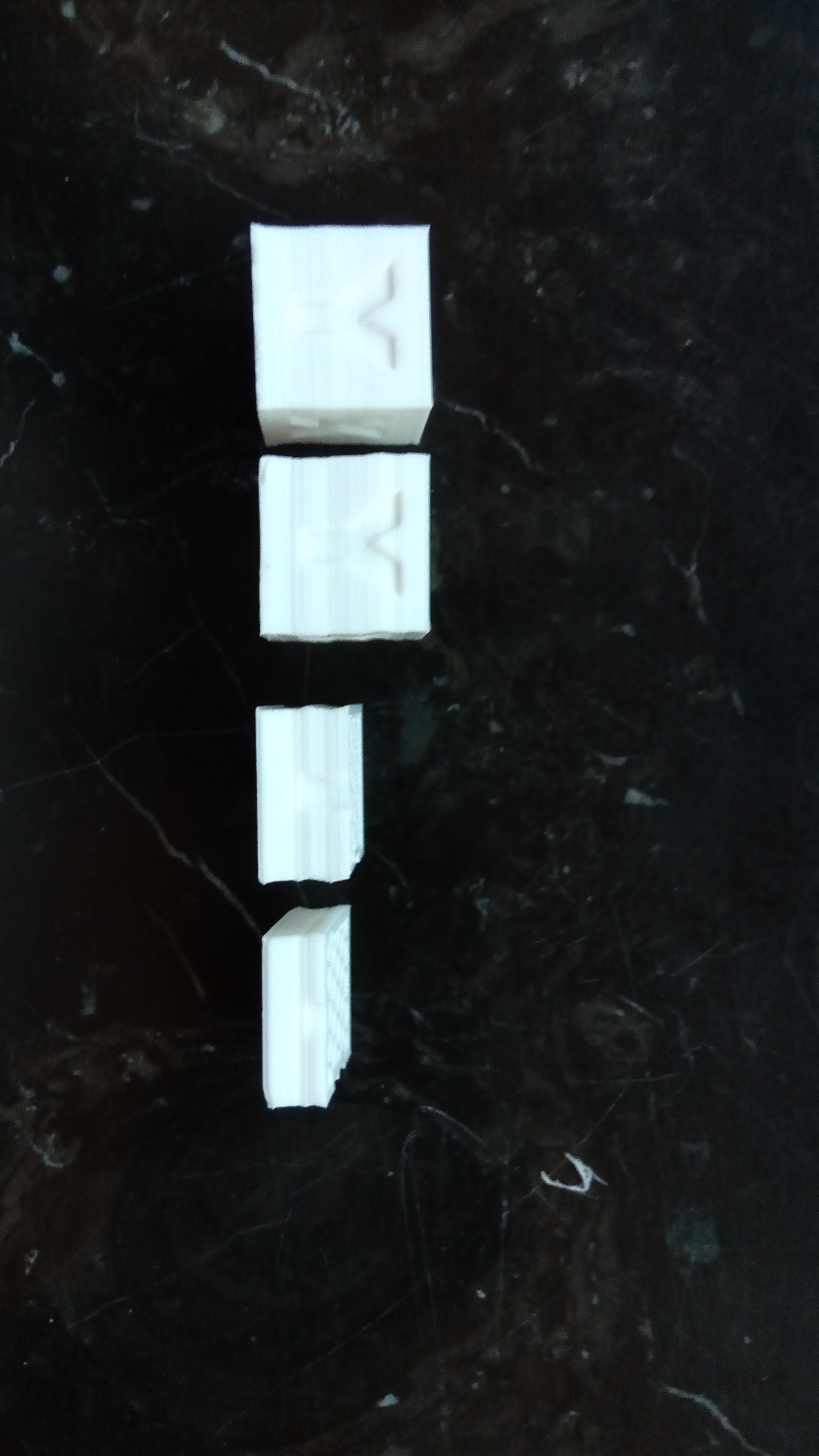
cruwaller helped me, seems there was a bug which was fixed recently. Left cube is with fixed version.
NeelD87
on 3 Mar 2018
@cruwaller I don't know what you did with the latest commit but my Z axis is now working :-) and finally I'm testing the new TMC2130, very happy!
Thank you anyway.
Andrea
andrea7376
on 5 Mar 2018
@andrea7376 good to hear.
happy printing :)
cruwaller
on 6 Mar 2018
@andrea7376 Did you manage to correctly set up these drivers? I worked on it all weekend and nothing good came out of it :/ Can you please share your config and tell me what branch you are using? Thanks :)
 alekssobolewski
on 18 Mar 2018
alekssobolewski
on 18 Mar 2018
@alekssobolewski I'm using the @cruwaller fork for lpc176x, it work really well, I use an arduino board with ramps,I use four 2130 with 1/32 step max and interpolation for all motor...tomorrow I will post the config file, anyway you can start with the config supplied in the example.
andrea7376
on 18 Mar 2018
@andrea7376 Thanks for answer :) I'm waiting for your config then. I have problem with bed heater using lpc176x fork, so maybe your config will solve my problem. Due to error during heating I never successfully started print with this fork.
alekssobolewski
on 18 Mar 2018
I'd like to give klipper a try with my set of tmc2130's. My understanding is that with ramps and all 3 jumpers you get 16 hardware usteps, and the settings in config for steps is the interpolation usteps? or are we configuring hardware steps that way im confused.
@andrea7376 Your comment confuses me, you are running 32 hardware usteps and 256 interpolation how? I'm running drv8825's atm with all 3 jumpers, so 32 usteps. My understanding was all 3 jumpers on tmc2130 is 16 ustep.
I have hit a wall with mcu_steps exceeded already with my mega2560. This is on a custom rail corexy with very light hotend, mega2560/ramps1.4 and a orange pi pc plus(1.3ghz quad armv7). 5k accel, 500 travel, 200 print speed(all). It made it within 10 minutes of finishing a print before failing with steps exceeded error. I think this is a poor way to handle that error, but for a different issue thread.
drv8825s are loud, vibrate a lot, and seem to leave that noise pattern in my prints at high speeds. Slower speeds are still noisier than should be, but leave no marks on print. I've come to conclusion that drv8825 is fine for Z and E, but X/Y is better for Trinamic. Perhaps extruder would benefit but i don't immediately see how.
Would running the tmc2130 over drv8825 improve my situation with step limit? I am thinking to run 16 ustep at hardware then interpolation, which in theory should free a lot of steps/s. With mcu step limit speeds printer started showing minimal signs of ghost/ringings, so for non-aesthetic parts this is acceptable or even faster. Under conditions as such the drivers needed force air cooling and heatsinks, steppers ok, but extruder needed heatsink was reaching past 70c at casing. This ofc is within spec, but hotter than I prefer with plastic mounting, and ofc kept at motor/driver current ratings with margin.
 ml0w
on 19 Mar 2018
ml0w
on 19 Mar 2018
@marcel0lowrie The ustep configuration is made inside the print.cfg like the current and all te other feature of the tmc2130.
andrea7376
on 19 Mar 2018
@ml0w you only configure klipper for tmc if you use them with jumpers removed, which is SPI mode. Then they need to be configured via SPI commands which is done by the klipper tmc driver.
With three jumpers they mimic standard drivers (like A49xx) softwate-wise and need no special handling.
This works without tmc driver section in klipper.
hg42
on 19 Mar 2018
@andrea7376 Can you please send me your config?
alekssobolewski
on 19 Mar 2018
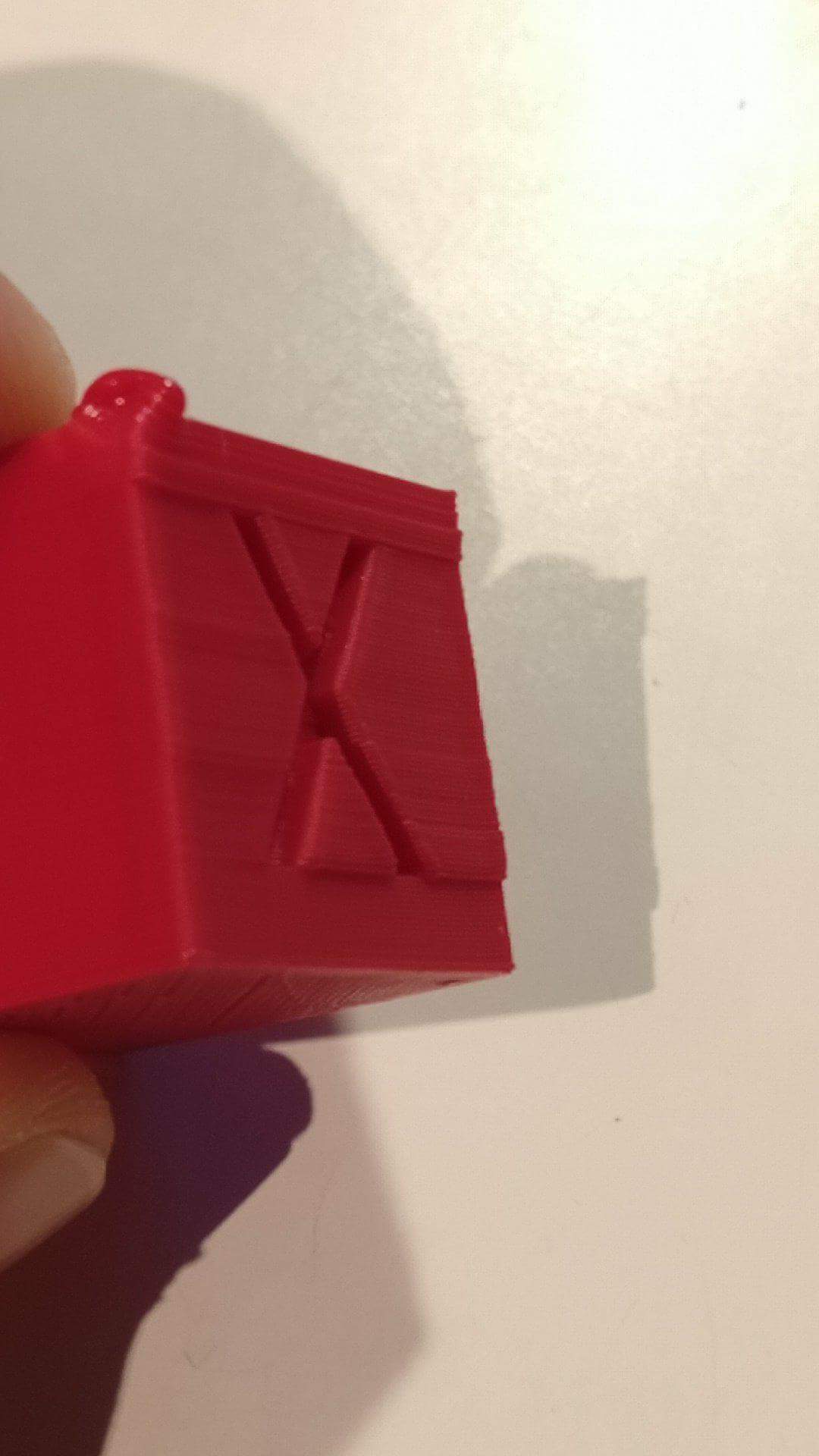
That is how my calibration cube looks like on X axis after disabling SPI. On Marlin it looks normal.
Can somebody please help me?
alekssobolewski
on 19 Mar 2018
my experience when changing to klipper and tmc2130 (at the same time, from Smoothieware and Marlin) was, that I had to choose lower acceleration settings and I could use higher speeds instead (using tmc2130 without SPI).
I am not sure why...with steps being more exact, both should allow faster settings.
May be because I use very low current settings, because I don't like the tmc2130 (from Watterott) to become more than warm (I don't like fans...).
I use max_accel=1000. However this depends on many factors. For my corexy printer (heavily modified x5s) the printing speed depends mostly on the extruder (with a LV8729 or A4983). With my geared (~ 5:1) extruder I can go higher. My limit is the heater or the filament. With higher speeds the quality at corners often degrades. So at the end I print at about 80-100mm/s but I can choose much higher travel speed (didn't optimize this, because I want to print quiet, but 200-300 is no problem).
hg42
on 19 Mar 2018
@alekssobolewski
@marcel0lowrie
printer.txt
This is my working config for the @cruwaller fork.
andrea7376
on 19 Mar 2018
@andrea7376 Thanks! 👍
alekssobolewski
on 22 Mar 2018
Will the @cruwaller Fork ever be merged to master? Can't understand why not. If it is working reliably, there is no reason to develop it from the bottom up again. How does this make sense? Might as well invest the time in developing other parts of the firmware even further.
tiziano149
on 4 Apr 2018
@cruwaller Hi, I need to tune the PID but the autotuning M303 function is not working in your fork.
It set the temperature but not the output resulting in a timeout.
Thank you.
Edit.
Tested also: PID_CALIBRATE HEATER=extruder0 TARGET=200
same result:
Recv: !! Heating error! current temp 20.4013420834, last 20.1743037305
Recv: !! Internal error on command:"PID_CALIBRATE"
andrea7376
on 7 Apr 2018
@andrea7376 I think it would be good to open this question as an issue on cruwallers own fork, as it is not related to the original Klipper from Kevin or to this specific issue's topic discussing TMC2130 support.
Thanks.
tiziano149
on 8 Apr 2018
@cruwaller has issues disabled, not sure if this is intentional
hg42
on 8 Apr 2018
@hg42 Ah I see! I think it still would be good to open a separate issue then, as other users won't be able to find this thread as this topic is very unrelated to the original issue.
And it really makes me wonder why @cruwaller has issues deactivated, I don't really get him.
So he is building his own fork, but has no interest in merging his changes? Especially as it is not a major makeover of the original firmware, but rather smaller improvements. Isn't the purpose of github exactly that?
Would be good if he could tell what his plans are. Doesn't look really realistic to ping-pong between Kevin and Cruwaller's fork.
tiziano149
on 8 Apr 2018
I think disabled issues is the default for forks. You can create PRs, though.
@cruwaller added a lot of things, bigger features like tmc2130, lpc1768 and also some valuable smaller changes. As far as I know, he discussed with Kevin early and Kevin didn't like most of these. E.g. M204 is already present in cruwallers fork. But Kevin doesn't like gcode and doesn't want to add those standards.
Cruwaller recently did a second try on smaller things and I think none of several PRs were accepted. Take a look yourself.
Kevin had some good reasons, why he didn't want to accept the PRs. But they did not come to an agreement. And at the end the result makes the point, does the code diverge or is it kept together.
I also created some PRs early and didn't feel like it was welcome.
I discussed with Kevin early about solutions to this in an issue. I think plugins could help to give more freedom to implementers and allow Kevin to continue his way, without being bothered by gcode etc.
At least @cruwaller uses such plugins.
I am not sure who implemented the infrastructure (which certainly could be taken further). But there is no official plugin definition and no official method how they can be published (e.g. via github repos or simply added to the main repo with measures to allow different implementations of the same thing via versioning and namespaces).
I had a lot of ideas about that, but Kevin did not show interest.
It is obvious, this situation will diverge even more.
@cruwaller cannot catch up with Kevin and vice versa if basic things (e.g. logger) are not agreed upon.
Merging is a pain in the ..., if you have to always look at so much small differences.
I admit I understand Kevin's reasons, but something must change.
hg42
on 8 Apr 2018
@tiziano149 Please, before convict someone, also in childish ways, I would like to suggest you to read all the comment right here and why not the code written by cruwaller.
He did a great and deep job where Kevin didn't for many reason.
For our bad luck Kevin and cruwaller didn't seem to find a solution yet, I hope in the providence because in my opinion thie great work that is Klipper, started from the great work and intuition of Kevin, need both of them.
Regards.
andrea7376
on 9 Apr 2018
@andrea7376 I mainly agree with you, but I don't think @tiziano149 was saying something childish.
Nobody can see what @cruwaller and @KevinOConnor were (and are) talking, so we can only guess. I first thought something similar like "why the hell doesn't cruwaller create pull requests"? But I didn't know the preceding discussions.
That said, I think communicating with both is a better strategy (which I did).
From what I know, it's a mixed problem...something around having not enough spare time (family, kids) and different ways to do things (cruwaller more practical, Kevin more strict and based on theory).
I tried to find solutions but I was also stopped by Kevin's strict way of thinking (no offense).
I switched to cruwallers fork for several reasons:
- I want to use some features of his fork (tmc2130, lpc1768, STM32, better SPI, eventually thermocouples)
- his way of coding and thinking fits to mine
- my patches are accepted (I need them for my printers)
- some of his patches were more or less the same like mine
Now, the situation is not satisfying.
If I merge something from Kevin's repo, I have to review a lot of conflicts each time and because I do not have all hardware, I cannot test if it really works for everyone.
This is the reason why I don't publish my mixed branch on my own fork.
And I guess this might also be another reason why cruwaller doesn't create PRs.
On long-term, the fork will drift away even more (and there may also appear other forks with the same problems).
Btw. from a quick look at some commits, I think that Kevin has created the current so called plugin architecture. So he indeed invested some time into this. Good.
But I think it's not driven far enough to solve the problem.
E.g. it doesn't hide enough implementation details and there is no defined standard way how developers should provide standalone plugins.
Currently the code looks more like a way to make some parts of the code more independent (and yes, this is the first step for plugins).
There is no way to handle conflicting implementations with the same name (-> "namespaces", e.g. origins or domains) or to separate development versions from stable versions (-> "channels", this could be solved by the name itself, like "plugin_name" vs. "plugin_name_beta", but this should be added to a standard definition).
Now someone might say "just offer some PRs". Right, I would do and I already tried.
After some PRs were rejected, I changed my strategy and created issues to first find a common base to work on. But even that was rejected.
But my attempts show that Kevin doesn't seem to like my way of thinking at all. It doesn't make sense to put work into something that is rejected anyways.
That's my current overall feeling (and probably also cruwaller's).
To be clear, I respect Kevin's reasons and finally it is his code apart from some extensions.
Examples:
Kevin thinks that certain gcodes are not necessary and he doesn't like gcode at all.
He also doesn't use gcode commands while printing and rejects that this can be necessary or even make any sense.
But respecting his thoughts doesn't mean others don't need this.
E.g. if a slicer produces (more or less standard) gcodes, and they are not configurable, there is no way to solve this.
There are a lot of people (like me) that calibrate some things while printing the skirt and want to adjust parameters while printing if something doesn't run like expected. This might not be ideal, but it can rescue a 20 hour print instead of throwing it away.
In my case my heat bed or my homing procedures need different default constants that are deeply embedded in the code. So I have to carry around patches instead of simply changing my config.
Kevin thinks, so called "special" cases (= not his own printers?) don't need config options. I could agree with that eventually, but then I would expect the constants not to be buried in the code but extracted in a single source file or less ideal at the top of each implementation. I do not understand why I have to discuss about this.
Now, if there would be a clear way to provide plugins (e.g. clean interface) and publish them independent of the main repo (or alternatively fro now they could be accepted as PRs without big discussions), then at least some of these problems (like gcode aliases) wouldn't create a conflict. Other problems are more difficult but solving them would make the code cleaner.
hg42
on 10 Apr 2018
@hg42 Thank you very much for shedding some light into these Issues. It's really sad to see this diverging so much.
@andrea7376 Andrea I think you misinterpreted me. I have been following this post for a long time now, and I think many agree that there still is a lot of confusion about this. No one knows what is happening behind the scenes. I think we all appreciate the work that both @KevinOConnor and @cruwaller are doing, and in no way my intention was to discredit any one of them, but I think we should be more included in the decisions regarding this.
Obviously, in the end it's Kevin's original code, but listening to what the users have to say, and making compromises or finding agreements is crucial in any product development, especially if the amount of feedback is enormous, coming from multiple sides.
What might have come off as childish was merely my frustration of being in the dark and that we didn't receive any public response regarding these from neither of them.
I think if these compromises are not made (and I obviously don't know the whole backstory and Kevin's reasoning for rejecting G-Code) the project may fail simply because it's to much of a hassle to use, especially when for casual users Marlin is "Good Enough" and to be fair, it works.
I really hope that a Plugin Architecture may solve this, and it really makes me curious to know what reasons there are for avoiding G-Code. (Personally I agree with @hg42 on live-tuning parameters during a print)
Obviously there is a lot of feature-creep going on, but I feel that the main structure of the Firmware is not yet finished, yet there are many features being worked on which are rather a commodity.
tiziano149
on 10 Apr 2018
to be clear, Kevin likes his kind of textual commands instead of gcode, something like:
COMMAND_NAME FOO=bar BAR=foo
I am not a friend of all those number either. But I think it is a problem to break the standard. If the slicer emits such commands (start code etc.) it may break on the way to the printer. E.g. software in between could optimize, compress, sort parameters etc. and this doesn't work with those commands, though I personally didn't see such a case, yet. I think, each textual command should have an alias.
There would be solutions like octoprint handles actions, they are comments for other software (however this could bebremoved from the stream).
But my main concern is about the handling while printing.
Generally I think, klipper is still in heavy development and not ready for average end users. I think a lot of issues and talk on this repo originates from this.
hg42
on 10 Apr 2018
btw. Klipper will probably not die, it will only be delayed or it may be replaced by something equivalent if developing too slow.
hg42
on 10 Apr 2018
The GPL rocks.
 theopensourcerer
on 10 Apr 2018
theopensourcerer
on 10 Apr 2018
On Sun, Apr 08, 2018 at 11:34:05AM -0700, Harald wrote:
@cruwaller added a lot of things, bigger features like tmc2130, lpc1768 and also some valuable smaller changes. As far as I know, he discussed with Kevin early and Kevin didn't like most of these. E.g. M204 is already present in cruwallers fork. But Kevin doesn't like gcode and doesn't want to add those standards.
Cruwaller recently did a second try on smaller things and I think none of several PRs were accepted. Take a look yourself.
Kevin had some good reasons, why he didn't want to accept the PRs. But they did not come to an agreement. And at the end the result makes the point, does the code diverge or is it kept together.
I review all the pull requests that I receive, and I do accept them
after review. When I review, I'm primarily looking for any defects
that may be introduced, though I will also look for things that may be
long-term maintenance issues (eg, lack of copyright notices, mixed
coding style in the same code, lack of documentation, adding of dead
code). This type of review I think is worthwhile as it helps keep the
code flexible for future users and developers.
I know some other projects take a different approach, and they're more
likely to accept a pull request without much comment. There are pros
and cons to both approaches, but my personal experience is that the
review has high value in the long term.
I'd very much like to pull in some of the big ticket features
mentioned above - for example, tmc2130, lpc1768, and thermocouples. I
do ask that they be submitted, reviewed, areas of concern be
discussed, etc. I'm certainly willing to work together on any areas
of concern.
I also created some PRs early and didn't feel like it was welcome.
I appologize if you did not feel welcome. It's a challenge to do code
reviews - I want to be clear on the issues I'm raising, but I don't
want to diminish the effort or appear as if I'm rejecting a
contributor.
On Tue, Apr 10, 2018 at 12:03:47PM +0000, Harald wrote:
Nobody can see what @cruwaller and @KevinOConnor were (and are) talking, so we can only guess. I first thought something similar like "why the hell doesn't cruwaller create pull requests"? But I didn't know the preceding discussions.
There has been no substantial "behind the scenes conversations".
(We've only exchanged a few words on IRC, and nothing more than a
couple of sentences on the topic of contributions.) The pull requests
that were submitted and their conversations are in the github history.
I think this issue may have gotten a bit off-topic. I'd certainly
like to see the tmc2130s supported, but I lack the hardware to do it
myself. I'd appreciate a pull request with the support, but if you
take on that challenge, expect some questions and answers during the
review.
Cheers,
-Kevin
KevinOConnor
on 10 Apr 2018
@KevinOConnor thanks for your clear statements.
It seems like I overestimated your communication with @cruwaller
May I ask if you disagreed with him on some topics?
I ask, because I try to understand what's going on and want think about how this could be solved.
I generally respect and appreciate your reviews. It's what I meant with "good reasons". May be I should have made that point more clear. But my comments are too long anyways...so I tried to keep it short.
On the other hand I don't agree on some things.
hg42
on 11 Apr 2018
I agree this is too off-topic in this issue.
So where could we discuss such things? General strategies like plugins etc.
That's one of those things...I once opened a more general issue for plugins to have a place for this topic...but you closed it without pointing to an alternate communication channel. So the discussion simply stopped. Later you added some support for plugins (the "extras" folder).
You want to keep the issue list short. Instead I would suggest to add labels for different kinds of issues and also keep those open, that stand for feature requests or more general topics.
With labels you can clearly separate them from bugs.
I think issues work well for that and are better than creating additional unrelated communication channels elsewhere.
These discussions have a direct relation to the code. With issues linking to code or other issues or pull requests is easy. And you can also link from a PR or another issue to the discussion or a specific comment. I think this is very powerful and convenient.
hg42
on 11 Apr 2018
According to TMC2130.
I plan to use it with @cruwaller's code, but I am still using the standalone mode (without SPI).
This means, I am not familiar with this part of the code, yet.
However, I remember some things, that must be resolved:
the TMC2130 implementation
- uses SPI and cruwaller made bigger additions to the SPI code (I think for the thermocouple)
- he added spibus.c, spi.c (you have it in gpio.c)
- you have spi_config, spi_transfer
- he has spi_init, spi_get_config, spi_set_config, spi_transfer, spi_send, spi_read
- uses klippy/extras/driver (a directory/module you don't have)
- this may also be related to cruwaller's "simplify module loading" PR. I am not sure why cruwaller closed it.
There are also some general things like cruwaller using "self.logger" and you are using "logging" directly.
@cruwaller extended this to show the source object of logged lines (with hierarchical names).
This is a change distributed over many files (all logged classes) and lines (all log outputs).
hg42
on 11 Apr 2018
command_send_spi_message both sends and returns the spi data. Do we really need separate commands for read/write as spi is always both?
I do see the need to be able to config the spi for different modes/speeds per connected device.
 wizhippo
on 11 Apr 2018
wizhippo
on 11 Apr 2018
On Tue, Apr 10, 2018 at 07:17:30PM -0700, Harald wrote:
It seems like I overestimated your communication with @cruwaller
May I ask if you disagreed with him on some topics?
I'm not aware of any conflict.
On Wed, Apr 11, 2018 at 02:19:22AM +0000, Harald wrote:
I agree this is too off-topic in this issue.
So where could we discuss such things? General strategies like plugins etc.That's one of those things...I once opened a more general issue for plugins to have a place for this topic...but you closed it without pointing to an alternate communication channel. So the discussion simply stopped. Later you added some support for plugins (the "extras" folder).
In issue #68 I pointed to the mailing list. That's still my best
recommendation.
You want to keep the issue list short. Instead I would suggest to add labels for different kinds of issues and also keep those open, that stand for feature requests or more general topics.
With labels you can clearly separate them from bugs.I think issues work well for that and are better than creating additional unrelated communication channels elsewhere.
These discussions have a direct relation to the code. With issues linking to code or other issues or pull requests is easy. And you can also link from a PR or another issue to the discussion or a specific comment. I think this is very powerful and convenient.
I think github issues work best for conversations around well defined
topics that are being actively worked on and that will likely be
completed at some point. I don't think they are a good fit for items
that aren't being worked on or will likely never be "finished". These
issues clutter the list of active topics and make it harder for
newcomers to join the project. I don't feel labels provide a
substantial improvement.
Cheers,
-Kevin
KevinOConnor
on 11 Apr 2018
discussions in a mailing list are usually less organized. Most people do not maintain the subjects.
But most of all I see the mailing list as a place for average users, while github is clearly for developers.
Heavy developer discussions will probably disturb other communication and vice versa.
You always get notifications for all topics.
I think, most projects have a different mailing list for developers (*-dev) or they communicate directly on github.
One important reason is the automatic linking between different issues and related PRs by simply mentioning them. This communicates to both threads, that there is something related. So you can easily jump from the discussion to related parts. E.g. the s-curve discussion linked a Marlin PR and they appeared in our thread. All without any effort.
Another important reason is labeling.
You can clearly express categorization. And there can be multiple labels on the same entry. E.g. "Urgent", "Deal Breaker", "Bug", "Request", "Future", "Risky", etc.
Please have a look at Marlin, it is quite easy to filter by one or multiple labels.
Marlin has a mature system of labels indicating what is the topic ("T: 32bit..."), which component is affected ("C: Motion"), which functionality ("F: TMC2130") the state of the issue ("S: Please Test"), if it's a bug ("Bug: Confirmed!"), the printer type ("K: Delta"), what should come next ("Needs: Feedback"), pull request info ("PR: Improvement"). I found it works very well, when I entered Marlin's world for some weeks only. My interest was captured by a link in another repo pointing to the 32bit thread (a very long issue). While reading there I could easily jump to related issues and PRs and after minutes I found what was breaking my first test.
Orientation was very easy with this labeling system and the automatic links.
From my experience developers can handle lots of topics by concentrating on those they want or need. Otherwise they couldn't handle complexity in the code either.
It works for Marlin with currently 456 open issues.
If you want to make it easy for developers to find certain things, label it that way!
The nice thing is, the labels are extendable.
Btw., why should the topic "plugins" be endless and remain unfinished? I think at some point it will be implemented.
It may be a long-term topic. But this doesn't mean it's unimportant or not directly related to the code.
hg42
on 11 Apr 2018
@wizhippo in fact spi_send and spi_read* are not used anywhere in cruwaller's current code (branch lpc1768, which should be his most current branch).
Not sure why they exist. But they are implemented in each target.
hg42
on 11 Apr 2018
Hi, Kevin.
Do you plan stealthchop support for tmc2130 in SPI mode? I use fork from the cruwaller, there is excellent support for tmc2130, but the project looks dead.
 vlaps
on 26 Apr 2018
vlaps
on 26 Apr 2018
On Thu, Apr 26, 2018 at 03:41:33AM -0700, vlaps wrote:
Do you plan stealthchop support for tmc2130 in SPI mode? I use fork from the cruwaller, there is excellent support for tmc2130, but the project looks dead.
Alas, my status is unchanged - I'd like to see this supported, but I
don't have any immediate plans to work on it myself.
Cheers,
-Kevin
KevinOConnor
on 27 Apr 2018
PLS add support for TMC2130 and Rambo Einsy, TMC2130 are depending on SPI and probably won´t even turn on, on the main fork.
I have heard alot of good things about klipper but I can´t use it if I´m not able to control the TMC2130 settings
 Elocai
on 10 May 2018
Elocai
on 10 May 2018
There is tmc2130 branch. The spi code has recently been updated. I have updated the code based on master and this is working for me. https://github.com/wizhippo/klipper/tree/tmc2130. Not as many features as cruwallers such as sensorless homing but it works. Just remember as I missed the current is specified in amp not milliamps.
wizhippo
on 10 May 2018
@wizhippo thank you for your fast response. Would you be so kind to tell a new user which changes I have to make to use this branch?
I followed this tutorial (https://youtu.be/ZtDrTktA72Y) , and found a dead end at the first command to install klipper in raspi
"git clone https://github.com/KevinOConnor/klipper" here I replaced the url, with the url of the fork and got the error message
"remote: Not Found
fatal: repository 'https://github.com/KevinOConnor/klipper/tree/work-lpc176x-20180508/' not found"
it´s obvios that I´m doing something wrong. I used this fork as my understanding after reading this thread that this is the one which is still alive and the tmc2130 fork merged into.
Also I need the change the registers, as I´m coming from marlin and the hysteresis settings like toff were quite important to my use, are they implemented in your fork?
I can live without sensorless homing, as it´s a pain to set up right, but without changing the parameter in the tmc2130 this would be a nogo for me. thx in advance
Elocai
on 10 May 2018
you usually clone the whole repo (including those branches). Then you have to switch to the branch.
Something like
cd klipper   # first git checkout jump into the repo directory
git checkout work-lpc176x-20180508
or use a git client to do that, like gitkraken (easier) or smartgit (more operations/power).
also see: https://git-scm.com/docs/git-checkout
hg42
on 10 May 2018
git clone https://github.com/KevinOConnor/klipper
./klipper/scripts/install-octopi.sh
cd klipper
git checkout work-lpc176x-20180508
cd ~/klipper/
make menuconfig
[...]
make
sudo service klipper stop
make flash FLASH_DEVICE=/dev/ttyACM0
sudo service klipper start
Is this the order I should type commands in rasp?
Elocai
on 10 May 2018
I once wrote scripts for these parts, so I am not used to the exact commands.
Basically you insert the checkout command before doing something with the code (here it is make...). And the checkout must be executed inside the klipper repo directory.
So derived from your commands it would be
[...]
cd ~/klipper/
git checkout work-lpc176x-20180508
make menuconfig
[...]
But while reading some git docs:
https://git-scm.com/docs/git-clone
I realized that it's much easier to add the branch name to the clone command, so use all the documented commands and only replace git clone... with this:
git clone --branch work-lpc176x-20180508 https://github.com/KevinOConnor/klipper
@hg42 thx I think I was able to install and flash the fw, sending "stus" over octopi terminal seemed to work as expected, now I´ll go and try to transfer my settings over from marlin and will give a feedback later in this thread or the other prusa mk3 thread (which uses the same board and drivers as mine)
thx for your help, hope this will work as I think
Elocai
on 10 May 2018
Just to be clear, it seems @Elocai wants the work-tmc2130-20180217 branch. (Not the lpc176x branch.)
KevinOConnor
on 10 May 2018
@KevinOConnor after reading this thread I got the impression that the work-tmc2130-20180217 branch was merged into the lpc176x branch, which still support avr boards and so. Pls tell me if I´m wrong and how to change branches. Also sry if I was impolite or anything, it´s just alot to digest when going from marlin to klipper.
Elocai
on 10 May 2018
I guess that is confusing. Both cruwaller and I have various development branches. We've been working on merging them recently. My work-lpc176x-20180508 branch has only smoothieboard related stuff (no tmc stuff). My work-tmc2130-20180217 branch has only tmc2130 stuff. So, if you want to test with my tmc2130 development (very basic tmc2130 support - no frills), then you want my work-tmc2130-20180217 branch.
@hg42's directions will work. I generally use these (basically equivalent) steps:
cd ~/klipper ; git fetch ; git checkout origin/work-tmc2130-20180217 ; sudo service klipper restart
KevinOConnor
on 10 May 2018
@KevinOConnor yes, so I was on the wrong branch thx. I´ll try to set it up and tell if I encounter something.
I´ll probably need some time to setup a working config file, have to look in this thread if the one postet are useful to me. Or is there a good start with a Rambo Einsy?
Elocai
on 10 May 2018
Here´s the shematic of the board
Physical endstops on XYZ(min), Bowden Setup, Nozzle Fan, Part Cooling fan, print volume 300x300x400 (CR10)
Target:
Microstepping (for testing) 16
Current 750 ma
mode: spreadcycle
hysteresis setting to set -> t.off (24V)
I try to make a config file, step by step, but this is very confusing. The Examples here in this thread use older code, where definitions and names have changed or are refering to a diffrent fork(?). The provided examples, don´t include any with tmc2130 as far as i can tell. Also there seems to be no documentation or guide´s :/
Change of plan, building a config out of examples doesn´t got me anywhere (no coherence or no useful examples)
Enounted Problems: alot, nowhere to start
I really don´t know what to do, this seems to be bigger pain to make it work then I would have imagined.
Things that work: showing Temperature
Things that dont work: everything else
state of the config file atm -> removed, found alot of conflicts resulting because of a diffrent branch uses a totally diffrent structure and laguage
so after a day of trying everything, I give up on creating a config file, it´s to difficult. And it seems that features are missing or I wasn´t able to find them.
@KevinOConnor If you be so kind to provide one, just tell me which information you need.
Elocai
on 10 May 2018
On my work-tmc2130-20180217 branch, the documentation is in config/example-extras.cfg. Other (standard) parameters are documented in config/example.cfg. You don't want to mix the examples from other branches.
Unfortunately, the tmc2130 is not currently supported. The development branch is very raw, and is intended for those wishing to help develop the code and/or get their "hands dirty" with in-depth testing. There's been some progress recently, so it's possible we'll get this into the mainline branch in a couple of weeks.
Cheers,
-Kevin
KevinOConnor
on 10 May 2018
@KevinOConnor
I could give you all the feedback/information if you want, but I´m not able to create a config file that works. I checked the config/example.cfg but wasn´t able to recreate the necessary file for my usecase nor where I able to find the parameters I needed to setup correctly. The whole procedure was very difficult, and let to nothing. There is just alot of confusion, and alot of stuff that I can´t follow.
Guess I´ll have to wait, try other branches or just go back to marlin and invest in a 32bit Board.
Tell me if you want to try to create a file, so I can try it for you. I think it would be a lot easier for you than for me.
The benefit for you would be that you could support one of the most well known/appreciated printers on the market, the Prusa MK3 as I have the same board&drivers connected the same way. Except I also have mechanical endstops and maybe the direction of some motors are diffrent but nothing which could be difficult to change.
Elocai
on 10 May 2018
@Elocai cruwaller has a lot of extensions also affecting the config file. He also changed some of the config structure to support his extensions. And he added features for the config file.
E.g. he allows to use steps_per_mm as alternative to step_distance.
Therefore you need to strictly separate examples for cruwaller's code from those for Kevin's code.
If you only use examples from the branch you are using, this should be ok.
Examples in this thread seem to be for cruwaller's code.
hg42
on 11 May 2018
@hg42 yes I realised that something was off, didn´t expectet them to be that much different, I guess I would try his branch for now, I´ve found examples which make sense and could work better for me.
Could you tell me the commands I have to use to change to his branch? Obviosly my expierience with Raspberry and Github is quite low. I´m not sure how to uninstall, and reinstall to get to the other branch.
thx in advance and sry for the inconvenience.
Elocai
on 11 May 2018
it's always the same command with repo-user and branch-name replaced:
git clone --branch branch-name https://github.com/repo-user/klipper
Note:
- you need to remove the klipper directory before cloning (or rename it to something like klipper-KevinOConnor)
- switching branches from the same user is described above. But this does not work for "switching" repos.
- cruwallers fork is highly experimental, I think it is not very suitable for normal users, though it works
hg42
on 11 May 2018
thx.
well it provides all the basic features that actually should and are implented in other FWs.
And also the settings used are coherant to other FWs too, which makes it the first choice to start for a user which is coming from Marlin/Smoothieware.
ATM every FW can be considered experimental, because every FW is. There is no perfect printer yet so it will take time till good standarts and rules are extablished, before that using what is practical is the way to go
also just an update, I was able to make it run and print on Kevins TMC2130 fork, but I have to fight with an insane amount of over extrusion and don´t understand why it does it *
*edit: was able to "fix" it by using a flow value of 50% in the slicer, which could be cosidered more of an dirty trick than an actual fix
And I think the work Kevin and his contributers have done is spectacular, the community and organisation needs to grow. I don´t know if you realise but this here is a gold mine for 3D-Printing.
There are so many people with an Raspi sitting in front of their Printer, the Octopi community is huge, and when they find out that they can use the Rasps CPU for calculation and getting alot more precision and performance out of their toy than this here will grow at an incredible speed.
Even though I´m kind of easy annoyed, so far I enjoyed the ride but there are some corners which need to be smoothen out before a big community should get their hands on this.
As far as I know I still have an acc on prusa´s forum and there like 4 Threads about Klipper, where everyone thought this looks great and failed to implement it. Now that TMC2130s are kinda supported and their Board also, I will probably give them a hint to check it out the new devolepments here.
Elocai
on 12 May 2018
Work-tmc2130-20180217 branch.
X and Y axes TMC2130 via SPI.
Everything works well.
You can add a setting to activate the mode stealthChop?
A high-pitched whistle in the spreadcycle mode kills my ears.
 Alexdad76
on 12 May 2018
Alexdad76
on 12 May 2018
@Alexdad76 are you on 12V or 24V? And the high pitched noise you here can be lowered by changing the TMC2130 Hysteresis behavior, but atm I didn´t played araound with them and don´t know where they are hidden in the FW. Will report next week when I found them
My settings are off to atm, my motor get "warm" which they normally don´t and the reason is the same as the one for the noise
Elocai
on 13 May 2018
@Elocai , standard 12V. Remade a couple of drivers of the standalone mode(simply soldered the SPI bridge). Connect СFG1 to 5V, all jumpers on the RAMPS are removed (activated stealthChop mode, Microsteps 4 Interpolation to 256 μsteps), there is no such noise.
But:
stealthChop mode - you need to lower the speed - after 150 mm / s start skipping steps (self-made CoreXY).
spreadCycle mode - no skipping of steps even up to 300 mm / s (possibly more).
Alexdad76
on 13 May 2018
@Alexdad76
What CPU you have, a 2560?
And your 2130s run over SPI right?
Stealthchop mode shall not be used for high speeds, it's not reliable at that also it handles high accelarations badly, but the 2130s have a Hybrid-Mode where they automatically can switch to SpreadCycle when speed reaches a certain threshold, therefore would allow in your example using StealthChop till 150mm/s then using Spreadcycle and when set there is even a 3rd mode that goes even higher but at cost of precision. Afaik this is not implented right now on kevins fork (didn't checked though).
The noise you expierience is probably the chopper frequency of the 2130s. The audibility is depending on your supply Voltage (12V is not prefered, 24V+ would be better), the inductance of your motors and 3 parameters set over SPI to the 2130s.
I will look into the set values as I believe they are a bit off for me, my motors do some noises (some high pitched sound) and get warm both things they wouldn't do with my own used parameters normally, I didn't set them in Klipper for now.
I'll probably be able to tell you later or tomorrow what you could try to change that behavior. Maybe I would need @KevinOConner 's help to find them if implented (TOFF, HEND, HSTRT, TBL, PWM_FREQ...)
Elocai
on 13 May 2018
@AlexDad76
Ok I checked.
First here are some assumptions, don't do anything if anything of the following is wrong:
You run on an Atmega2560 @ 16 MHz,
12V, TMC2130 are controlled over SPI and you're on Kevin´s TMC2130 fork with the newest version.
I don't know how Klipper loads and set files so I assume it just loads the file after a service restart. In klippy/extras/tmc2130.py some values could be a bit off, the value in particular you want to change is called "TOFF" and is set to 5, which means the chopper frequency is set to around above ~20 kHz, try setting it to 4, if you still hear the noise try 3 (don't try lower values!), restarting the sercive after changes were made of course. If it doesn't help revert back to 5.
A higher chopper frequency could reduce efficiency and reliability, you could exlierience steploss and a lower torque, 3 was fine for me but depending on your setup the printer could behave diffrently, it worked well for me on 24V.
Check temperature of the motors just in case and beware you're doing changes at your own risk. Report back if it helped. I will look more into it in the following days.
Elocai
on 13 May 2018
Can we have the current tmc branch merged to master? I know it does not have all the bells and whistles but it does work. I have over 50 hours of print time using it. I would like to have current features such as temperature_fan and find I have to keep merging them into my own branch. I also suggest closing this issue and creating a new ones for specific additional tmc support such as stealthchop and sensorless homing as this issue is getting very long and harder to follow.
wizhippo
on 14 May 2018
@wizhippo could you please share your config file? I'm having trouble to configure my tmc2130s... The Z axis is stuck on 200mm and seems to try to move in the wrong direction when I try to home... It did not occur with klipper on my old A4988s nor with tmcs with marlin... I'm probably setting something wrong...
 kpadilha
on 15 May 2018
kpadilha
on 15 May 2018
@kpadilha https://gist.github.com/wizhippo/4b791636ff0397ee3159e0684ae54cf6.
I'm running an MKS Gen 1.4 board.
wizhippo
on 15 May 2018
@KevinOConnor Not sure if you saw the post above about merging the current tmc branch into master. If not can we merge master into the tmc branch when new features are added?
wizhippo
on 17 May 2018
On Thu, May 17, 2018 at 10:21:49AM -0700, Douglas Hammond wrote:
@KevinOConnor Not sure if you saw the post above about merging the current tmc branch into master. If not can we merge master into the tmc branch when new features are added?
I did see it, but I wanted to add a few more config options before
merging to master. I've just updated the work-tmc2130-20180217 to do
that.
cd ~/klipper ; git fetch ; git checkout origin/work-tmc2130-20180217 ; sudo service klipper restart
If this branch looks okay, then I'll merge it into master.
Thanks,
-Kevin
KevinOConnor
on 17 May 2018
Great. I'll try it out tonight. The only setting that I would like that I see missing is the threshold setup.
wizhippo
on 17 May 2018
Arduino+RAMPS, X-Y TMC2130 over SPI, 12V, SPREADCYCLE.
2 hours of printing - everything is fine. Travel - 300 mm/s, print speed - 40-80 mm/s
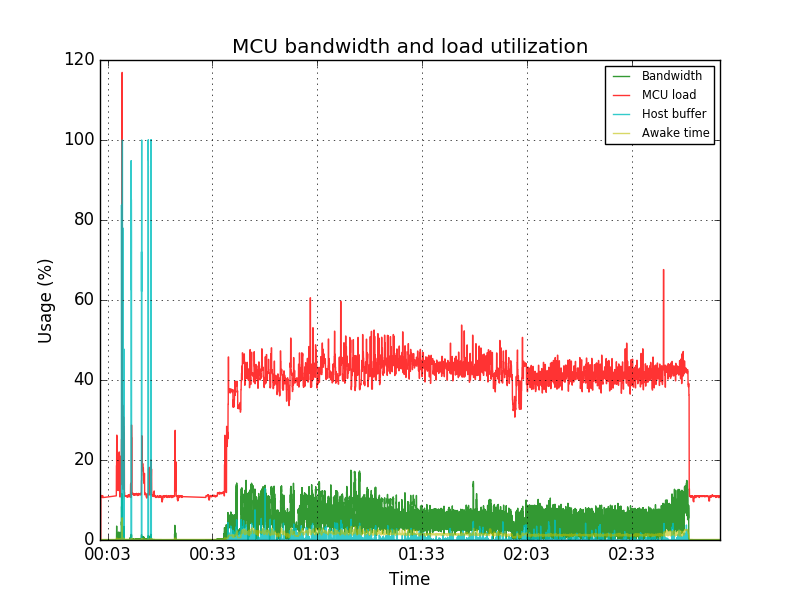
I really need tuning velocity threshold (TPWMTHRS) - since almost all of the print goes below 100 mm / s, we can use stealthChop. And for travel - 300 mm / s - spreadCycle.
Alexdad76
on 20 May 2018
On Sun, May 20, 2018 at 10:38:36AM -0700, Alexdad76 wrote:
Arduino+RAMPS, X-Y TMC2130 over SPI, 12V, SPREADCYCLE.
2 hours of printing - everything is fine. Travel - 300 mm/s, print speed - 40-80 mm/s
Okay, thanks. I merged the work-tmc2130-20180217 into the master
branch.
I really need tuning velocity threshold (TPWMTHRS) - since almost all of the print goes below 100 mm / s, we can use stealthChop. And for travel - 300 mm / s - spreadCycle.
Understood. That (and sensorless homing) aren't difficult to add, but
I'm not sure if I'll get a chance to look at it.
-Kevin
KevinOConnor
on 21 May 2018
Hello everyone.. :)
Im new to klipper firmware, but so far i see some major improvements. However i would like to know that if i bought tmc2130 would it be able to sense resistance and auto home? i think its one of the main advantages to this driver.. :)
thanks for the firmware btw, its really great!! :)
 supernielsen
on 22 May 2018
supernielsen
on 22 May 2018
On Mon, May 21, 2018 at 11:32:15PM -0700, supernielsen wrote:
Hello everyone.. :)
Im new to klipper firmware, but so far i see some major improvements. However i would like to know that if i bought tmc2130 would it be able to sense resistance and auto home? i think its one of the main advantages to this driver.. :)
Alas, "sensorless homing" on the tmc2130 is not currently supported in
Klipper.
-Kevin
KevinOConnor
on 22 May 2018
I would be interested in trying this on my Mk3 if we can get sensorless homing working since there isn't currently an easy way to setup endstops on the Prusa i3 Mk3. I also have an Azteeg GT x5 but I think I'm going to attempt Marlin 2.0 on that one.
I'm feeling rather experimental here lately.
 Zaf9670
on 22 May 2018
Zaf9670
on 22 May 2018
I implemented some code for tmc2130 TPWMTHRS and sensorless homing. I don't have the hardware to test this, so proceed with caution. It's on a new work-tmc2130-20180522 branch:
cd ~/klipper ; git fetch ; git checkout origin/work-tmc2130-20180522 ; sudo service klipper restart
If you test with sensorless homing, be sure to also set the driver_SGT parameter so that homing sensitivity is set. There is some details in the config/example-extras.cfg file. I've also updated the config/generic-einsy-rambo.cfg file on that branch.
-Kevin
EDIT: Also, if you test sensorless homing, set the axis homing_retract_dist=0 to disable the second homing attempt.
KevinOConnor
on 23 May 2018
@KevinOConnor The sensorless homing works for me with a really low driver_SGT value of 2.
wizhippo
on 23 May 2018
For corexy does it take into account that both X/Y endstops are involved? Just playing with it and it seems pretty touchy and not sure if that may be part of the issue.
wizhippo
on 23 May 2018
On Wed, May 23, 2018 at 05:09:42AM -0700, Douglas Hammond wrote:
For corexy does it take into account that both X/Y endstops are involved? Just playing with it and it seems pretty touchy and not sure if that may be part of the issue.
No, it wasn't doing that. I added some additional code to turn on
stall detection of both steppers if on corexy.
cd ~/klipper ; git fetch ; git checkout origin/work-tmc2130-20180522 ; sudo service klipper restart
-Kevin
KevinOConnor
on 23 May 2018
I'll keep trying. With that change and using the same drive_SGT of 2 I know get Failed to home y: Timeout during endstop homing I'll try some other values later tonight.
wizhippo
on 23 May 2018
No success with other settings. The changes cause timeouts.
wizhippo
on 23 May 2018
On Wed, May 23, 2018 at 02:47:49PM -0700, Douglas Hammond wrote:
No success with other settings. The changes cause timeouts.
Ah, okay. Thinking about this further, the corexy changes I made were
not valid. The code turned on stall detection for both steppers, and
would stop both steppers if either one stalled. However, the homing
code will wait for both steppers to report a stall - only one has to
stall for the home to be considered complete.
For now, I've backed out the corexy specific code from the
work-tmc2130-20180522 branch. I suspect basic cartesian and delta
sensorless homing will work okay with the current support.
It would require a bit more python code to get corexy sensorless
homing working properly. For now, I think I'll leave that coding to
yourself or someone else with the hardware.
Separately, were you able to confirm the stealthchop threshold works
okay?
-Kevin
KevinOConnor
on 24 May 2018
I have reverted to your most recent changes and all is working.
I have enabled stealthchop and tried different thresholds 60 100 200 400. I may not have the best tuned parameters for it. I do hear a different, not quite sure it is kicking in at the correct speed though. I'll have to create a test gcode to do so. Will let you know.
wizhippo
on 24 May 2018
Ok I took the values from marin and added a few more settings to match the marlin such as setting autoscale. It is working well now. Not sure if you are interested in those changes https://gist.github.com/wizhippo/ba9a5ea341c5785c9638bea99312326c. Can say the autoscaling made any huge difference.
wizhippo
on 24 May 2018
When stealthchop_threshold (> 0) is enabled:
- There were crunches when moving diagonally (at any speed).
- The beginning and the end of the movement became very sharp, like a blow.
When stealthchop_threshold (#) is off:
- Any movement is almost noiseless.
- Start and end movement is soft.
CoreXY.
Alexdad76
on 24 May 2018
@Alexdad76 Not sure if it helps but here are the settings I used and have great success with now. I do have active cooling.
[tmc2130 stepper_x]
cs_pin: ar53
microsteps: 16
run_current: 1.000
diag1_pin: !ar3
driver_SGT: 4
stealthchop_threshold: 100
driver_IHOLDDELAY: 8
driver_TPOWERDOWN: 128
driver_BLANK_TIME_SELECT: 1
driver_TOFF: 5
driver_HEND: 2
driver_HSTRT: 3
wizhippo
on 24 May 2018
On Wed, May 23, 2018 at 08:15:02PM -0700, Douglas Hammond wrote:
Ok I took the values from marin and added a few more settings to match the marlin such as setting autoscale. It is working well now. Not sure if you are interested in those changes https://gist.github.com/wizhippo/ba9a5ea341c5785c9638bea99312326c. Can say the autoscaling made any huge difference.
It did make a difference, or it did not make a difference?
Okay, thanks. What if we let the user specify the parameters for
PWMCONF (see updated work-tmc2130-20180522 branch)? The Marlin values
look very close to the chip defaults anyway.
-Kevin
KevinOConnor
on 24 May 2018
On Thu, May 24, 2018 at 03:33:52AM -0700, Alexdad76 wrote:
When stealthchop_threshold (> 0) is enabled:
- There were crunches when moving diagonally (at any speed).
- The beginning and the end of the movement became very sharp, like a blow.
When stealthchop_threshold (#) is off:
- Any movement is almost noiseless.
- Start and end movement is soft.
CoreXY.
What was your config? I just noticed that the default TOFF was
incorrect (it should have been TOFF=4 not TOFF=1). If you didn't
specify a TOFF manually, you should probably pull the latest code and
retry.
Otherwise, do you think the stealthchop code is incorrect, or do you
think it just needs to be tuned for your motors?
-Kevin
KevinOConnor
on 24 May 2018
AllowIng the user to modify pwmconf is best route. I did not measure forces but I did notice that my sensorless homing seemed not as abrupt and I had to increase the SGT from my first tuning. Great addition again thanks for the project.
wizhippo
on 24 May 2018
I chose the parameters by ear, and by
https://www.trinamic.com/fileadmin/assets/Products/ICs_Documents/TMC2130_datasheet.pdf
[stepper_x]
step_pin: ar54
dir_pin: ar55
enable_pin: !ar38
step_distance: .01
endstop_pin: ^ar3
position_endstop: 0
position_max: 190
homing_speed: 50

[tmc2130 stepper_x]
cs_pin: ar63
microsteps: 8
run_current: .6
hold_current: .1

interpolate: True
#stealthchop_threshold: 50

driver_IHOLDDELAY: 8
driver_TPOWERDOWN: 128
driver_BLANK_TIME_SELECT: 1
driver_TOFF: 4
driver_HEND: 0
driver_HSTRT: 7
Your current looks pretty low. Especially the hold current. Usually it’s about %70. I had skipping until after .8
wizhippo
on 24 May 2018
Is hold_current used during movements? I expected that only for holding in a state without movement.
Or during braking, too?
Alexdad76
on 24 May 2018
On Thu, May 24, 2018 at 09:44:30AM -0700, Alexdad76 wrote:
[stepper_x]
step_pin: ar54
dir_pin: ar55
enable_pin: !ar38
step_distance: .01
endstop_pin: ^ar3
position_endstop: 0
position_max: 190
homing_speed: 50[tmc2130 stepper_x]
cs_pin: ar63
microsteps: 8
FYI, I found a problem with stealthchop_threshold - it wasn't using
the proper microsteps setting - this would have caused an incorrect
velocity to be used. I'm not sure if that would explain the odd
behavior you were seeing though. It should be fixed on the
work-tmc2130-20180522 branch now.
-Kevin
KevinOConnor
on 24 May 2018
I do not know why but when I set
run_current = .8
hold_current = .3
tmc2130 on the Y axis burned out ...
I do have active cooling too.
But I have a couple more :-)
Alexdad76
on 24 May 2018
I got the odd clicking, this happens when the movement is on the boarder of the threshold. For example with a threshold of 100 and a movement of 90mms I hear the clicks. The movement is ok, just the audible clicks are heard. The latest tmcbranch is working.
@Alexdad76 They burned out? They have over temperature protection.
wizhippo
on 25 May 2018
Yes, I also read this, but the fact is a fact. Looks like melted micro-contacts around the chip. Presumably, low-temperature solder is used (purchased at the FYSETC Official Store)
Alexdad76
on 25 May 2018
the chip protects itself, but this doesn't help outside the chip.
hg42
on 25 May 2018
On Fri, May 25, 2018 at 02:30:31AM -0700, Alexdad76 wrote:
Yes, I also read this, but the fact is a fact. Looks like melted micro-contacts around the chip. Presumably, low-temperature solder is used (purchased at the FYSETC Official Store)
Ouch!
It doesn't sound like this is due to a software error though, so I've
merged the changes on the work-tmc2130-20180522 branch to the master
branch.
-Kevin
KevinOConnor
on 25 May 2018
I'm going to close this issue, as it seems basic tmc2130 support is now merged and working.
KevinOConnor
on 29 May 2018
Good afternoon. I've trying to use sensorless homing with the TMC2130 but it seems like the driver is not detecting it has reached the endstop.
If while homing I connect the diag1 pin to power manually, the printer stops, so the interrupt detection is working.
The .cfg file is this:
``[stepper_x]
step_pin: ar54
dir_pin: ar55
enable_pin: !ar38
step_distance: 0.00625
endstop_pin: tmc2130_stepper_x:virtual_endstop
position_endstop: 0
position_max: 200
homing_retract_dist: 1
[tmc2130 stepper_x]
cs_pin: ar40
run_current: 0.5
microsteps: 8
diag1_pin: ar3
interpolate: 1
driver_SGT: 2
[stepper_y]
step_pin: ar60
dir_pin: !ar61
enable_pin: !ar56
step_distance: 0.00625
position_endstop: 0
position_max: 200
homing_retract_dist: 1
endstop_pin: tmc2130_stepper_y:virtual_endstop
[tmc2130 stepper_y]
cs_pin: ar42
run_current: 0.5
microsteps: 8
diag1_pin: ar14
interpolate: 1
driver_SGT: 2```
Is there something wrong with this configuration?
 nicozorza
on 18 Jun 2018
nicozorza
on 18 Jun 2018
@nicozorza
This is what I used:
[tmc2130 stepper_x]
cs_pin: ar40
microsteps: 32
run_current: 0.800
hold_current: 0.500
stealthchop_threshold: 200
driver_SGT: 10
diag1_pin: ^!ar3
[stepper_x]
step_pin: ar54
dir_pin: ar55
enable_pin: !ar38
step_distance: .00625
endstop_pin: tmc2130_stepper_x:virtual_endstop
endstop_pin: ^ar2
position_endstop: 0
position_max: 200
homing_speed: 40
homing_retract_dist: 0
^!ar3 means there is a pull up resistor and the signal is inverted..
I have an arduino 2560 with ramps 1.4.
I had to remap the CS pins (in Marlin) because I have a display with SD card reader. The display is not needed for Klipper but I'm continiously switching between Klipper and Marlin 2.0
 fbitto
on 19 Jun 2018
fbitto
on 19 Jun 2018
hi guys, I'm new to Klipper so I went through Alex's guide,
I went on and pasted Kevin's TMC2130 config (https://github.com/KevinOConnor/klipper/blob/master/klippy/extras/tmc2130.py) but I'm getting this error when I try G28 - why is it saying all of this is missing?
Send: G28
Recv: // File contains parsing errors: /home/pi/printer.cfg
Recv: // [line 96]: 'import math, logging, collections\n'
Recv: // [line 97]: 'import bus\n'
Recv: // [line 108]: '}\n'
Recv: // [line 113]: ']\n'
Recv: // [line 124]: '}\n'
Recv: // [line 129]: '}\n'
Recv: // [line 132]: '}\n'
Recv: // [line 145]: '}\n'
Recv: // [line 149]: '}\n'
Recv: // [line 154]: '}\n'
Recv: // [line 158]: '}\n'
Recv: // [line 178]: '}\n'
 Ofr3d
on 1 May 2019
Ofr3d
on 1 May 2019
@Ofr3d Please open a new issue and attach your log file. The file you've linked is the python module that enables support for the TMC2130. It is not a config file, and you shouldn't be copying anything from there. All config files are in the config directory, and the TMC2130 example is in example-extras.cfg.
 jakep82
on 1 May 2019
jakep82
on 1 May 2019
Related issues
 smokez89
·
4Comments
smokez89
·
4Comments
 talfari
·
5Comments
KevinOConnor
·
6Comments
talfari
·
5Comments
KevinOConnor
·
6Comments
 jannoke
·
3Comments
jannoke
·
3Comments
 LazaroFilm
·
6Comments
LazaroFilm
·
6Comments
Most helpful comment
Will the @cruwaller Fork ever be merged to master? Can't understand why not. If it is working reliably, there is no reason to develop it from the bottom up again. How does this make sense? Might as well invest the time in developing other parts of the firmware even further.