Kiwix-android: Bottom Toolbar hide text in Help screen
Is it a ?
Bug Report
Bug Report
Step 1: Are you ready to report?
- Yes
Step 2: What is your environment?
- version of the software you use : Android Studio 3.0.1
- device / operating system : Micromax/5.0
Step 3: Describe the problem:
When bottom toolbar is enabled then on help screen the bottom most text is not visible
as Bottom toolbar is on it.
- What do you obtain? A copy of the error message or a screenshot is always useful.
Screenshot
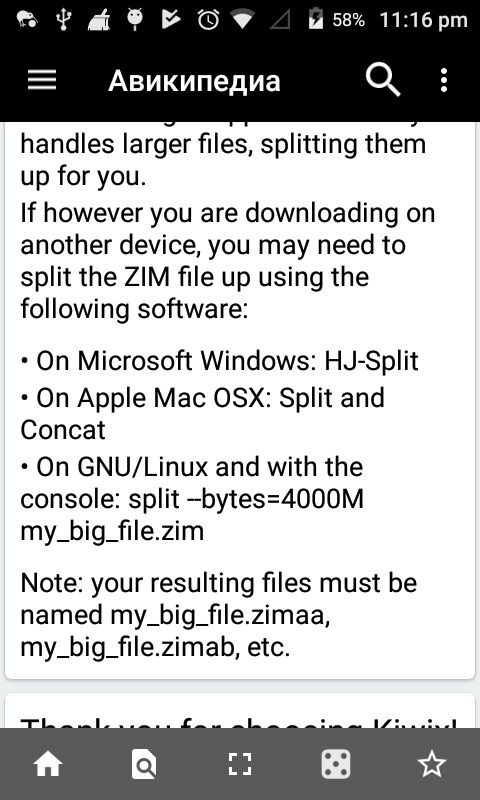
Steps to reproduce:
- From settings enable bottom toolbar
Then go to help and scroll to bottom
What should be the behaviour from your point of view? How do you expect the service to work?
The text should be visible to user.
I would like to work on it :)
 jb1998
All 15 comments
@jb1998 I saw two option related to this in settings, first to enable the toolbar and the second is to make it visible/ or not while scrolling so i think that solves the issue.
 GeVic
on 3 Mar 2018
GeVic
on 3 Mar 2018
@GeVic That option is also not working.
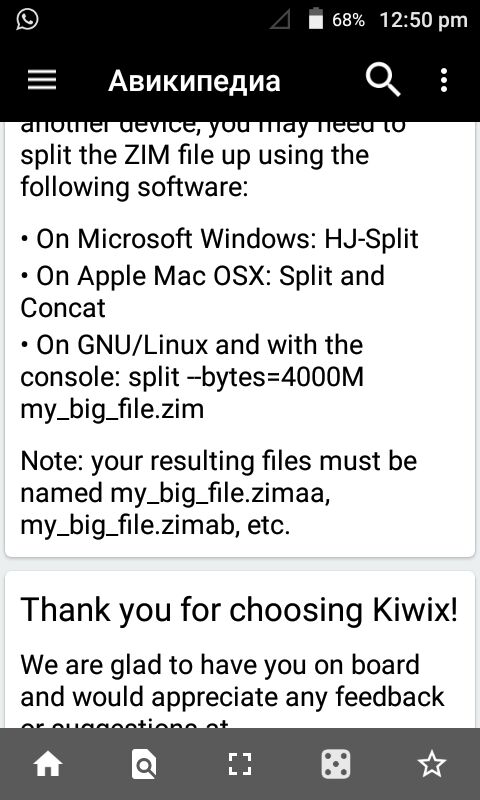
The above screenshot in the issue has option "Keep Toolbar Visible" off and by it last 5-6 lines are not visible.
By turning this option on last 2 lines are not visible. So problem is still there.
Below is screenshot when "Keep Toolbar Visible" option is turned on
jb1998
on 3 Mar 2018
@jb1998 Please go head and fix this.
 brijeshshah13
on 3 Mar 2018
brijeshshah13
on 3 Mar 2018
@jb1998 @brijeshshah13 It's working for me. I made it run on emulator too. It stills shows no problem to me.
GeVic
on 3 Mar 2018
@GeVic Can you please attach a screenshot?
brijeshshah13
on 3 Mar 2018
@brijeshshah13 yeah sure, here you go

GeVic
on 3 Mar 2018
@GeVic As you can notice from the previous comments, the issue is concerned with the Help screen and not with the content screen.
brijeshshah13
on 3 Mar 2018
@brijeshshah13 Are you talking about the kiwix app (on play store) because when i ran this on studio, there is no help button there.
GeVic
on 3 Mar 2018
@GeVic Nope, I'm too building it from the studio. It is in the menu options. Please make sure you are using the kiwixDebug build variant.
brijeshshah13
on 3 Mar 2018
@brijeshshah13 @mhutti1
According to me we can have 2 things-
1) When "Keep Toolbar Visible" is enabled then both bottom and top toolbar are fixed on screen. So we can make the top toolbar fixed on screen when "Keep Toolbar Visible" is enabled and bottom toolbar hides on scrolling.
2) If we want both bottom and top toolbar fixed on screen when "Keep Toolbar Visible" is enabled then we can leave the bottom space equal to bottom toolbar space when "Keep Toolbar Visible" is enabled or we can make background of bottom toolbar transparent.
Please let me know which one is more intuitive??
jb1998
on 4 Mar 2018
@jb1998 I think the first one will be a more cleaner and better approach. @mhutti1 What are your views?
brijeshshah13
on 4 Mar 2018
I don't really mind. Implement a solution that is both easy to understand and efficient while keeping the current features.
 mhutti1
on 5 Mar 2018
mhutti1
on 5 Mar 2018
Update : I am putting space in bottom dynamically.This is kind of straight solution to the problem.
The user has enabled "Keep Toolbar Visible" for easy usage of options so it is kept fixed until user disable this option.
So now bottom toolbar may be enabled or disabled but bottom text is now visible.
The solution is simple,this issue was with help screen so whenever help screen is called I am programmatically putting space below and when we leave the help screen then bottom space is removed.
Below is gif showing this :
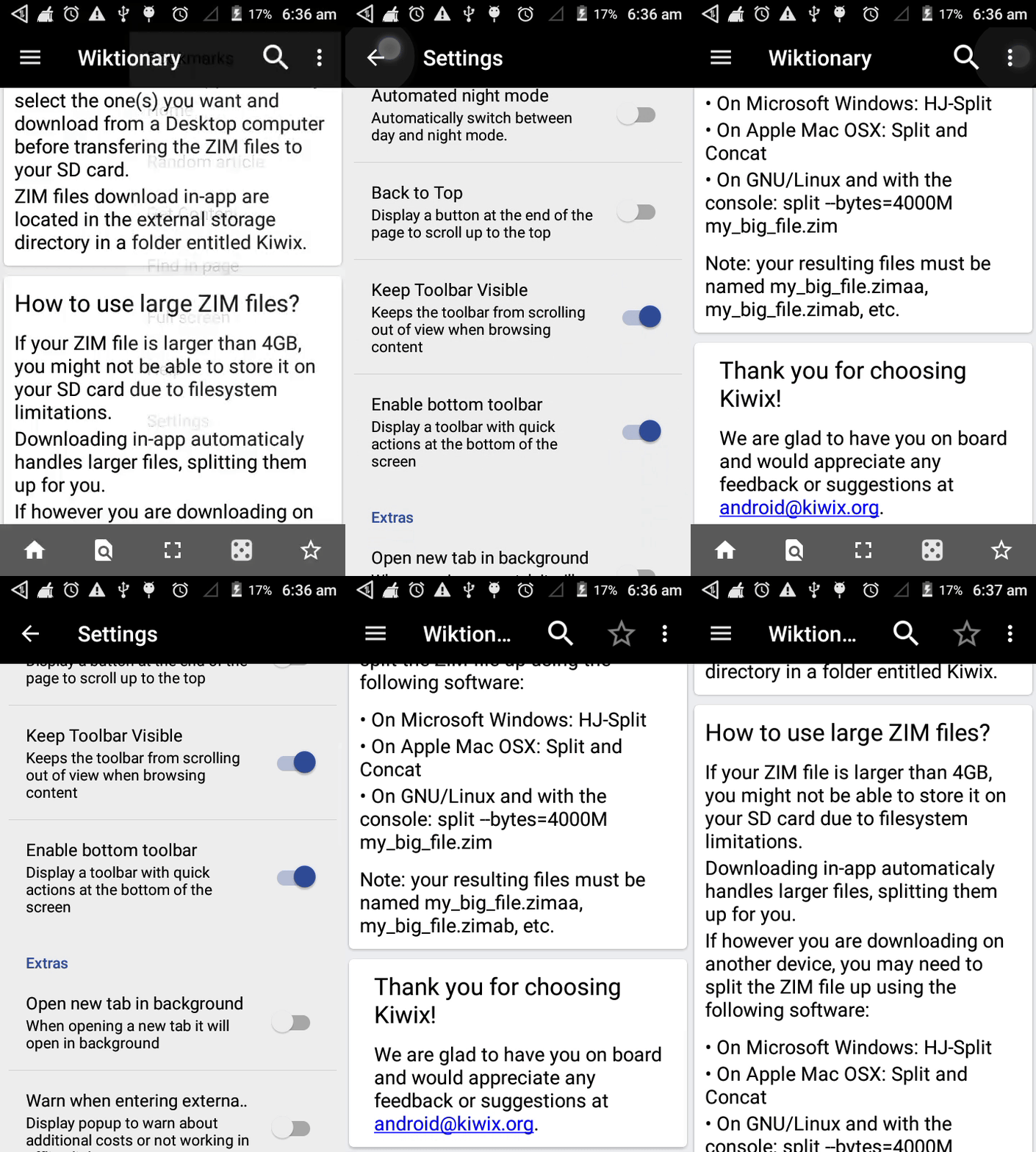
I am facing a small problem : The space comes up at bottom after checking if bottom toolbar is enabled and we are in help screen.
Initially when app starts then space is not added although I have written code for it in Oncreate.It is added on pressing help option only.
Just debugging that part,rest looks fine :)
jb1998
on 8 Mar 2018
I fixed this issue in pull request : #604
But due to changes in master branch of kiwix-android in last few days after merging conflicts the Travis CI test was done but the screen in my device have some empty space on the top.
I am looking out what is causing that because my code is straight forward of dynamically adding bottom space and removing it when bottom toolbar is enabled and disabled.
If anyone see anything please do let me know :)

jb1998
on 11 Mar 2018
Made redundant by #803.
 abdulwd
on 26 Aug 2018
abdulwd
on 26 Aug 2018
Related issues
 Popolechien
·
4Comments
Popolechien
·
4Comments
 kelson42
·
6Comments
kelson42
·
6Comments
 sonusourav
·
5Comments
sonusourav
·
5Comments
 Frans-Lukas
·
4Comments
Frans-Lukas
·
4Comments
 danielzgtg
·
4Comments
danielzgtg
·
4Comments