Kiwix-android: Language name overlapping with the number of files
Is it a ?
[x] Bug Report
[ ] Feature Request
Bug Report
Step 1: Are you ready to report?
- Your issue may already be reported! Please search on the issue track before creating one.
- [x] I have tested with the last (dev) version of the software. ( If not, and if possible, run your test again with the most recent version available.)
Step 2: What is your environment?
- version of the software you use : 2.3 Build: 55
- device: Moto G4 plus
Step 3: Describe the problem:
When you open the dialog to select the language, the language name overlaps with the number of files.
Steps to reproduce:
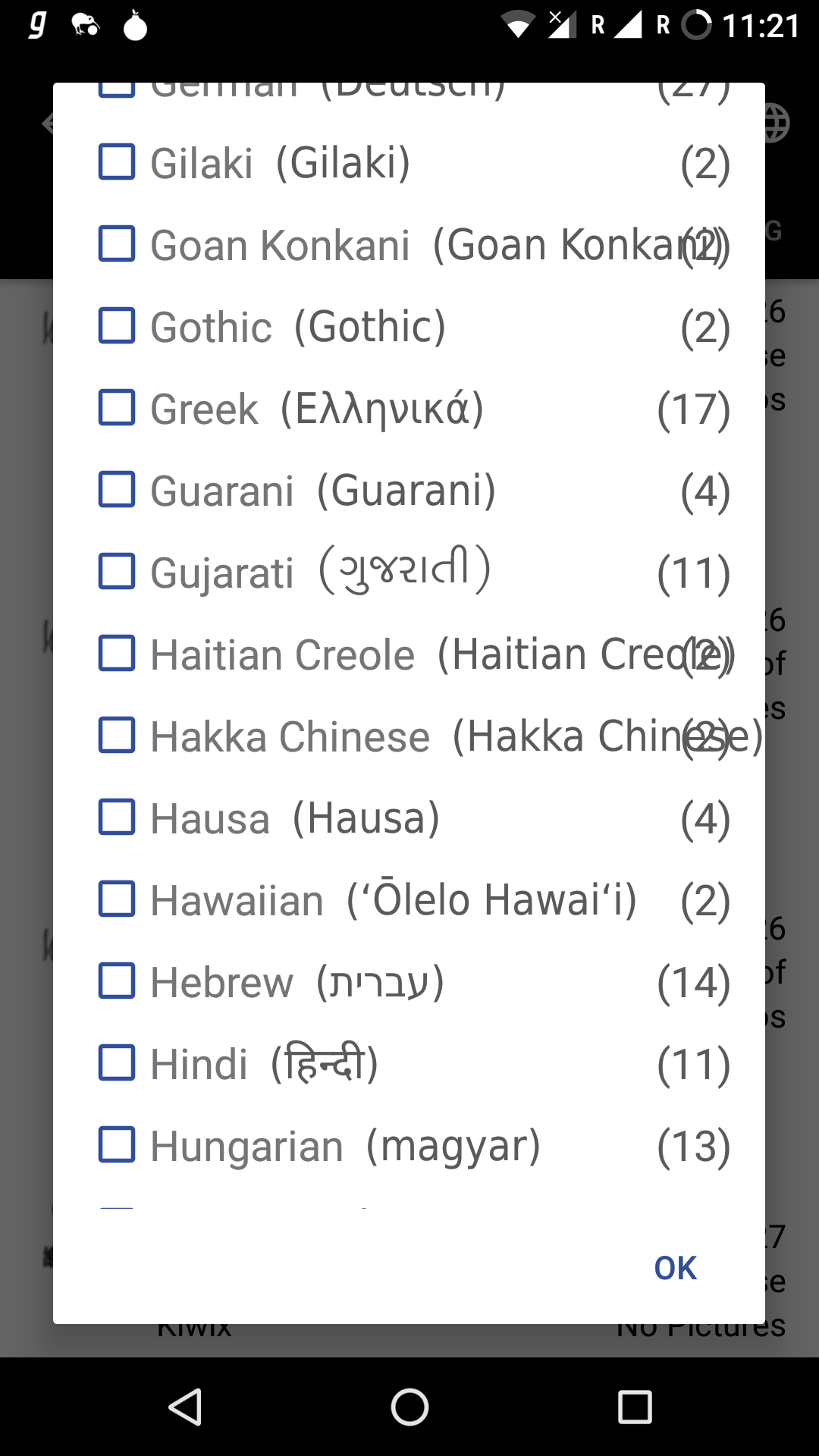
- What should be the behavior from your point of view? How do you expect the service to work?
The text should resize so that no overlap takes place.
Are you willing to work on the issue?
Yes.
@mhutti1 @kelson42 @brijeshshah13 @srv-twry Please review.
 harshvardhan-takawale
All 11 comments
Can I work on this issue?
 harsh-2711
on 28 Feb 2018
harsh-2711
on 28 Feb 2018
@harshvardhan-takawale What is your proposed solution for this problem ?
@harsh-2711 It is already assigned. Please find another issue to work on.
 dr0pdb
on 28 Feb 2018
dr0pdb
on 28 Feb 2018
@srv-twry I have thought of a few approaches. Please let me know which one to follow.
1) Ellipsize
2) Horizontally scrolling text
3) Autosizing textview (but that will only be effective with newer phones- API 26)
harshvardhan-takawale
on 28 Feb 2018
I would go for Ellipsize. Let's wait for other's suggestions.
dr0pdb
on 28 Feb 2018
Appologies, Accidently closed it.
dr0pdb
on 28 Feb 2018
We must not use ellipsize as the whole information is important. You can display name of the language in brackets in next line.
 abdulwd
on 28 Feb 2018
abdulwd
on 28 Feb 2018
@harshvardhan-takawale @srv-twry I think the approach suggested by @abdulwd would be the best as the whole info matters. Still, wait until @mhutti1 reviews it.
 brijeshshah13
on 28 Feb 2018
brijeshshah13
on 28 Feb 2018
Another vote for @abdulwd
 RajaVamsi11
on 28 Feb 2018
RajaVamsi11
on 28 Feb 2018
@mhutti1 @brijeshshah13 @srv-twry @abdulwd @RajaVamsi11 I have one more idea. Can we shift the "localized name" below the "language name"?
harshvardhan-takawale
on 1 Mar 2018
@harshvardhan-takawale That's what I said. :)
If you want to do it for every item, it will increase the size of the list too much. So it would be better to show the localized name in next line if the text is long.
abdulwd
on 1 Mar 2018
@abdulwd I'll have to think how to do that as it would require different layout file for some items only. Also, the size if the list won't increase even if we move all the localized names below as the height of the layout is already fixed as "?android:attr/listPreferredItemHeightSmall", it's just that the text will be a bit smaller for localized name .
harshvardhan-takawale
on 1 Mar 2018
Related issues
 siddharth2010
·
4Comments
siddharth2010
·
4Comments
 Frans-Lukas
·
3Comments
brijeshshah13
·
4Comments
Frans-Lukas
·
3Comments
brijeshshah13
·
4Comments
 chstdu
·
6Comments
chstdu
·
6Comments
 kelson42
·
6Comments
kelson42
·
6Comments
Most helpful comment
We must not use ellipsize as the whole information is important. You can display name of the language in brackets in next line.