Kitty: Colorspace of truecolor renderings
Some neofetch information:
- OS: macOS Mojave 10.14.6 18G2022 x86_64
- Host: MacBookPro11,5
- Kernel: 18.7.0
- Shell: zsh 5.7.1
- CPU: Intel i7-4980HQ (8) @ 2.80GHz
- GPU: AMD Radeon R9 M370X, Intel Iris Pro
- Kitty: 0.15.1
My configs are essentially untouched, so this should be pretty easily reproducible.
When launching vim inside of kitty with termguicolors enabled, you can see that vim is using hex colors for highlighting (not 256 color, or anything lesser). If MacVim is launched, you will see the same hex colors for similar highlight groups.
However, you will notice that although the colors are VERY close between kitty+vim and MacVim... something is off.
After reading through this issue with iTerm2 (https://gitlab.com/gnachman/iterm2/issues/3989), I ran some tests.
It appears that MacVim and iTerm2 render colors in the proper color space, as is verified via mac's color utility. However, you will notice that kitty is slightly off.
In some quick/hacky tests, I converted my configured color values from sRGB to RGB. Then, the colors were rendered properly. So, it seems we are assuming the colors are in RGB space, when in reality most colors are in the sRGB space.
 jbbudzon
All 27 comments
I think this has something to do with the fact, that OpenGL is not color managed. See https://developer.apple.com/library/archive/technotes/tn2313/_index.html#//apple_ref/doc/uid/DTS40014694-CH1-NONCOLORMANAGEDFRAMEWORKS-OPENGL___EXPLICIT_COLOR_MANAGEMENT_EXAMPLE.
To fix this we would need to convert color spaces before rendering colors in OpenGL or to write a shader that does this.
 Luflosi
on 4 Jan 2020
Luflosi
on 4 Jan 2020
There is no such thing as a "proper" colorspace. You can choose to
interpret RGB triples as sRGB or device dependent RGB according to
application. Terminals existed long before sRGB and therefore as far as
I know the "proper" thing to do is interpret RGB triples as device
dependent colors not sRGB. If there is some documentation/specification
somewhere that says that terminals should interpret colors in sRGB
rather than device dependent RGB I will be interested in learning about
it.
 kovidgoyal
on 5 Jan 2020
kovidgoyal
on 5 Jan 2020
Perhaps make it optional, off by default?
 ctrlcctrlv
on 8 Jan 2020
ctrlcctrlv
on 8 Jan 2020
There are various considerations here. Do you map colors in the shaders, which is pretty expensive since it has to be done per pixel, or on the CPU when colors are received. And if you do the latter, there are subtleties, like what to do with RGB colors received from applications, if you transform them then the application querying current color would receive a different value.
Or perhaps in the vertex shader rather than the fragment shader so that it is at least per cell not per pixel.
kovidgoyal
on 8 Jan 2020
Also is this actually only required on macOS or linux as well?
kovidgoyal
on 8 Jan 2020
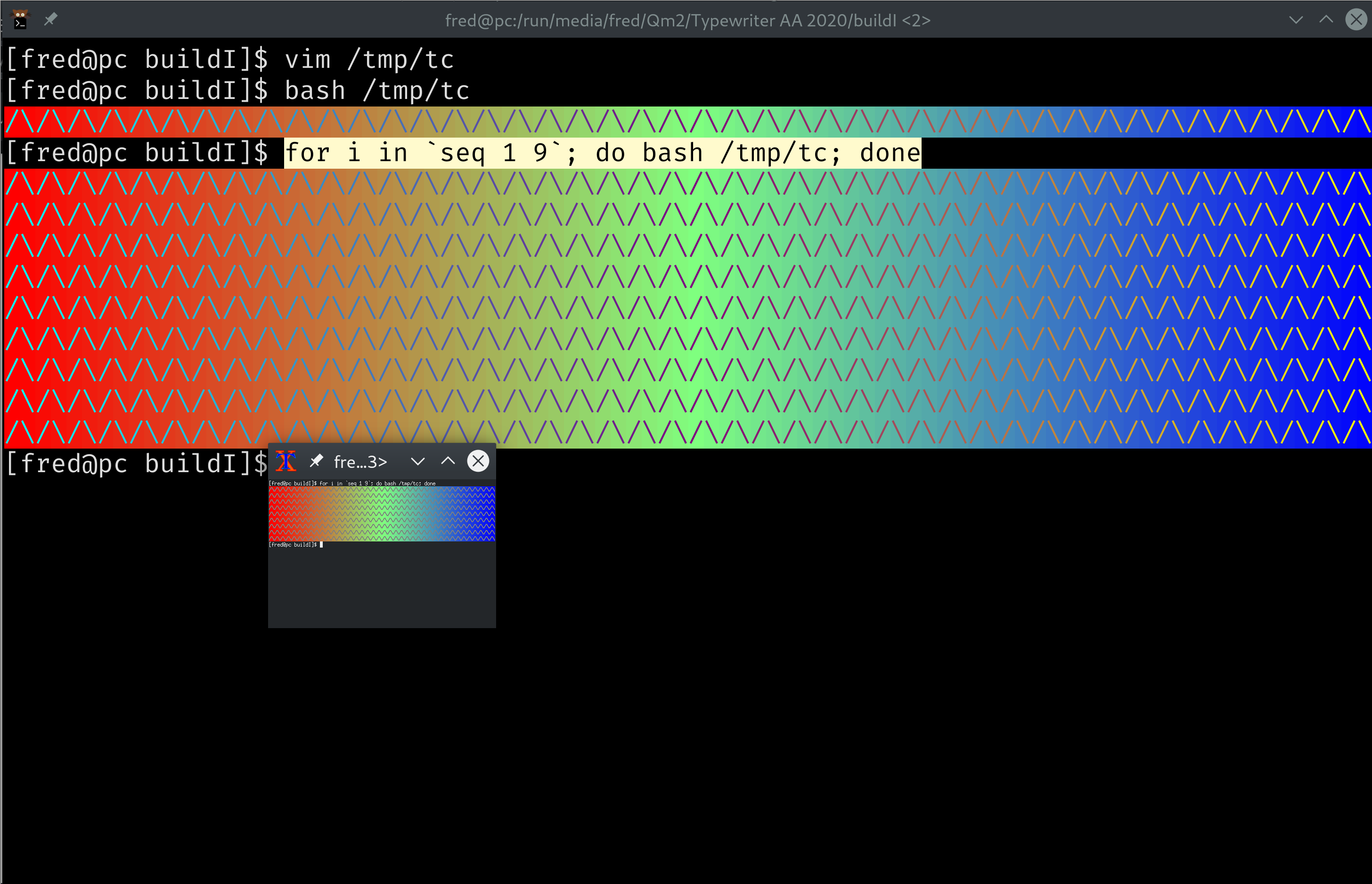
It's definitely needed on Linux too; I can't think of another reason the colors of Kitty would differ from those of Xterm, yet they do.
ctrlcctrlv
on 8 Jan 2020
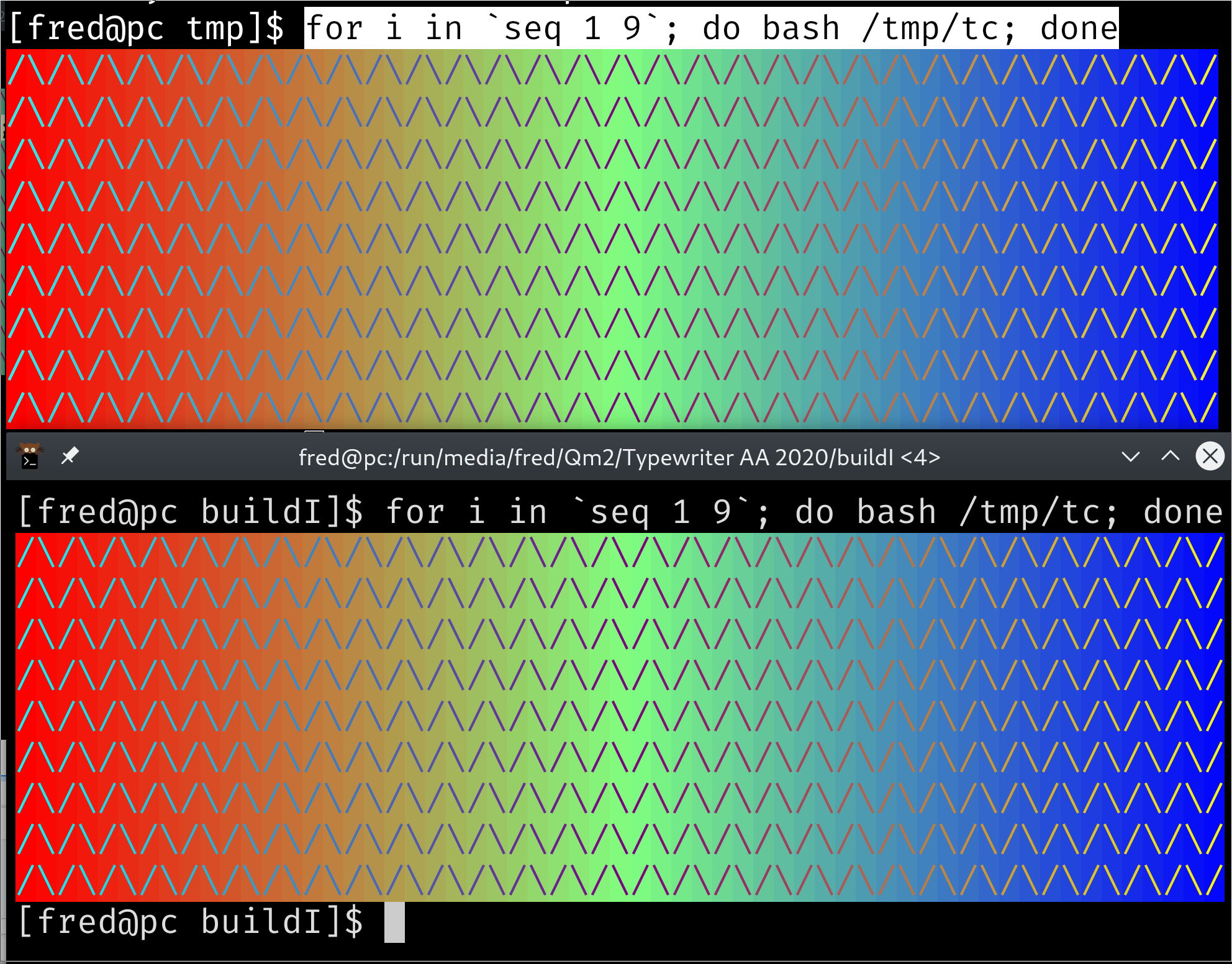
Here's a more fair comparison.
Top is Konsole; bottom, Kitty.
ctrlcctrlv
on 8 Jan 2020
Umm I cant actually see a difference in those colors, maybe my color
vision is not so good. Can you create an example using a single color
where the difference is more noticeable? Probably easiest with a gray
shade such as #262626 mentioned in the iterm bug report.
kovidgoyal
on 8 Jan 2020
Sorry for the noise, I both misunderstood how the script worked, then misjudged how many columns were in both in terminals. The colors are the same on my installation.
ctrlcctrlv
on 8 Jan 2020
I would also love to learn more about this topic, and understand what's the desired role of terminals. Some random questions, some of which might not apply to Kitty:
Would truecolor values (SGR 38;2 / 48;2) require the same color adjustment as altered palette entries (OSC 4, followed by SGR 30..37 and friends)?
SGR 38;2 / 48;2 have some fields for color space, while OSC 4 doesn't. What do those values mean exactly, and which values correspond to the same behavior as implemented by OSC 4?
Would OSC 4 report back the original unmangled colors, that is, the exact ones potentially set by a previous OSC 4?
Would the default RGB codes (default palette values), as taken from the terminal's config file, also undergo such color mapping?
What is the right point in the stack to perform the color mapping, and why do we believe it is the terminal? We're definitely seeing a stack of components, the terminal somewhere in the middle. Inside it there is another application running, outside it there's the graphical toolkit and the display server.
Let's suppose the application running inside wishes to display a particular exact color. Why is it not that application's responsibility to convert? This question becomes more prominent with apps that can work in the terminal or can display their native window too. Emacs and Vim are two well-known examples. So, would they need to implement the desired color space only for the graphical version, and not for the terminal one? Why not for both, and make the terminal already receive the RGB according to the desired color space and leave it intact?
Or let's look at the other direction: why is it any of the terminal's or the hosted application's job, and not of some outer level, let's say the graphical toolkit, or the display server (something like xgamma)?
Whenever I read a piece of documentation, let's say GTK methods dealing with RGB colors, or I look at the .css files that describe the look of GTK apps, how do I ever know whether the RGB values there are supposed to correspond to the pre-mapping or post-mapping values?
How do we make sure that the mapping always occurs exactly once? In my world, an RGB is a fixed value that remains fixed everywhere, and sure displays on everyone's screens slightly differently. I know that this is not sufficient for those doing precise color work, and I believe that's where color spaces come into play. But how don't we end up with a system where many times something breaks, e.g. you take a screenshot and then display it in an image viewer, won't it end up being "double mangled" or so?
 egmontkob
on 8 Jan 2020
egmontkob
on 8 Jan 2020
You are asking many good questions, but Apple is the problem. They make the lives of all developers most miserable. They are the Microsoft of our time; they reject standards, erect digital walls and apply to their users digital handcuffs; surely they will not hear our words.
So, while I like your train of thought, it's not wrong to also throw the users of Apple products a bone once in a while. They are in a digital jail already, no need for us to punish them for the misdeeds of their warden.
ctrlcctrlv
on 8 Jan 2020
Thanks for your input! Even though I'd like to avoid politics as much as possible, you probably provided just the right amount for us to put things in their proper context.
That being said, I'd still prefer if there was a bit of thinking and consensus across some macOS terminals (Kitty, iTerm2, shall I also list Terminal.app here?) and some popular apps (e.g. Emacs, Vim) on _whose_ responsibility it is to implement color spaces.
I don't want to end up with a hypothetical situation where let's say Kitty and Vim believe it's the terminal's, iTerm2 and Emacs believe it's the app's, so the Kitty+Vim and the iTerm2+Emacs combos work correctly, the iTerm2+Vim combo doesn't mangle the colors, and the Kitty+Emacs combo double-mangles them. :)
egmontkob
on 8 Jan 2020
As best as I can tell, this is macOS specific and the "best" solutionis
to just assume RGB colors from any source are not in sRGB 2.2 and apply
the correction to the colors in the vertex shader, since macOS expects
colors output from the shaders to be in sRGB 2.2
Linux as far as I can tell does not have this expectation, so nothing
needs to be done there.
However, I am no expert on these issues so am leaving this open for more
discussion.
kovidgoyal
on 8 Jan 2020
I've already learned a lot from you guys, thanks! :) I wasn't even sure that Linux and Windows were unaffected.
Also then it seems relatively clear to me that mapping should be the terminal's job, correct?
egmontkob
on 8 Jan 2020
On Wed, Jan 08, 2020 at 02:22:19AM -0800, egmontkob wrote:
I've already learned a lot from you guys, thanks! :) I wasn't even sure that Linux and Windows were unaffected.
No idea about windows. Linux seems to be unaffected.
Also then it seems relatively clear to me that mapping should be the terminal's job, correct?
Yes, seems that way to me. There is no way for the application running
in the terminal to know what kinds of colors the OS the terminal is
running on expects.
kovidgoyal
on 8 Jan 2020
@Luflosi you want to give it a shot? Make ifdefs in the vertex shaders, and adjust the colors as per the link you posted. Set the define on macOS in window.py
kovidgoyal
on 8 Jan 2020
https://developer.apple.com/library/archive/technotes/tn2313/_index.html lists the solutions for this issue. I think taking the squareroot of color values will be close while setting the colorspace on the window manager's backing store would be ideal, and either of those approaches will work well enough that if a user complains you can remind them that they are in a terminal, not in photoshop :)
 anicolao
on 11 Aug 2020
anicolao
on 11 Aug 2020
I now believe that kitty may already be behaving correctly for pretty much everything except images. I measured the colors using "Digital Color Meter", which ships with macOS, set to "Show native values" (translated from German by me). When I set the background color in kitty.conf to some value, Digital Color Meter shows this exact value. iTerm2 and Alacritty behave almost exactly the same, differing by at most a value of one (e.g. 38 instead of 39) in my testing. If I set the color space of the background color in Terminal.app to sRGB using the little gear icon in the color picker menu, it also behaves the same. If I set a CSS value in a browser and measure the color, I get the same result in Safari, Firefox and Chrome as well.
That said, I may be wrong as I now feel like I understand color spaces even less after spending another hour reading up on them.
Luflosi
on 11 Aug 2020
This website has an easy to consume test for image display: https://kornel.ski/en/color
It certainly shows that the graphics protocol does not correctly display PNG images. Only the PNG that is already in SRGB is correct in kitty. The rules for PNG are clear: there is a color space in the file, and it is the job of whatever program is displaying the PNG to convert from that colorspace to the colorspace of the output device; in this case, kitty itself, since OpenGL doesn't have colorspace support and is essentially the "output device".
A possible "fix" for this is to not support PNG decode in kitty, or to specify that the colorspace in the PNG file will be ignored and treated as sRGB. This, coupled with the suggestion to use convert -colorspace srgb <sourceimage> <outputimage> before transmitting images as PNGs would make it unnecessary to do colorspace conversion in kitty itself. Most people are probably using icat and icat already depends on convert so it's trivial to fix there.
The website shown above contains adobe.png anon.png gamma.png odd.png srgb.png which make the colorspace issues quite easy to verify using kitty +kitten icat.
anicolao
on 11 Aug 2020
No, if PNG images are not being correctly gamma processed, the correct fix is to call png_set_gamma() when decoding them in kitty. Not pre-processing them via ImageMagick.
kovidgoyal
on 11 Aug 2020
Sure, I think we agree. That's why the word "fix" is in quotes. The correct fix is definitely for kitty to process the file.
While we're talking about correct fixes, the RGBA formats should have documentation that say the pixels must already be in sRGB. No need to colour convert those then, if you put the onus on the client. Adding colourspace support to kitty itself for those does not seem worthwhile to me.
anicolao
on 11 Aug 2020
I took a minute to verify that background colours in kitty are rendered correctly on my Mac using the same colour swatches as the website above. The colour values are:
background #c08800
background #88c088
background #ff8888
background #4088c0
and these all render fine. So the only issue that remains open here is colorspace for PNG data transmission.
While I was testing I hit quite a few bugs with having the wrong images displayed, in some cases partial images that had previously been displayed. I am assuming this has to do with the DOS limit in the graphics protocol and is a known problem. If it's not a known problem, I could possibly create a repro case for it. It will probably be an issue for me when I am actually using kitty for real as opposed to playing with it as one of the main points for me is to be able to cat images to my terminal from remote workstations.
anicolao
on 11 Aug 2020
There definitely are not any wrong image displayed known issues.
kovidgoyal
on 11 Aug 2020
Well I committed code to handle PNG images that have gamma specified in their metadata, which means kitty now renders three out of five of your test images with the same colors. The remaining two use color profiles, processing those is a bit too much work, at least for me, patches are welcome.
Am closing this issue since the original problem with colors is no longer reporducible. If someone wants to followup on the PNG issue, please open a separate bug report.
kovidgoyal
on 11 Aug 2020
Actually, turns out adding support for color profiles also is trivial with the inclusion of lcms2, now done.
kovidgoyal
on 12 Aug 2020
So the only issue that remains open here is colorspace for PNG data transmission.
@anicolao Have you by chance tested SGR colors? I had a simple script I found online for outputting.
Just curious if you tested this and it worked for you, or you simply hadn't tried it out!
Reason I ask is in my tests, for whatever reason, the background color always seemed to render at the proper color. It was other things (like SGR, which is used by vim/tmux for terminal true color) that posed issues for me specifically.
awk 'BEGIN{
    s="/\\/\\/\\/\\/\\"; s=s s s s s s s s;
    for (colnum = 0; colnum<77; colnum++) {
        r = 255-(colnum*255/76);
        g = (colnum*510/76);
        b = (colnum*255/76);
        if (g>255) g = 510-g;
        printf "\033[48;2;%d;%d;%dm", r,g,b;
        printf "\033[38;2;%d;%d;%dm", 255-r,255-g,255-b;
        printf "%s\033[0m", substr(s,colnum+1,1);
    }
    printf "\n";
}'
@jbbudzon kitty 18 renders these colours correctly, and tip of tree renders the images to match. Here's an example (the offset blocks are the image; the stripes are the characters), built today:

Here's the behaviour in kitty 18 (stripes are OK, image is wrong):
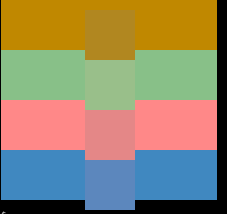
Here's the test file, to see the effect on my mac I approximated the font size to make the blocks match up:
kitty --config=NONE -o font_size=9
$ gzcat colortest.gz
Related issues
 jasminabasurita
·
3Comments
jasminabasurita
·
3Comments
 bewzaalex
·
3Comments
bewzaalex
·
3Comments
 RedBeard0531
·
4Comments
RedBeard0531
·
4Comments
 crocket
·
4Comments
crocket
·
4Comments
 lazarcf
·
4Comments
lazarcf
·
4Comments