kitty color display unexpectedly differs from URxvt/XTerm
% kitty --debug-config
kitty 0.11.3 created by Kovid Goyal
Linux midna 4.14.0-3-amd64 #1 SMP Debian 4.14.17-1 (2018-02-14) x86_64
Running under: X11
Debian GNU/Linux buster/sid \n \l
Loaded config files: /home/michael/.config/kitty/kitty.conf

Config options different from defaults:
color0                Color(red=46, green=52, blue=54)
color1                Color(red=204, green=0, blue=0)
color10               Color(red=138, green=226, blue=52)
color11               Color(red=252, green=233, blue=79)
color12               Color(red=114, green=159, blue=207)
color13               Color(red=238, green=56, blue=218)
color14               Color(red=52, green=226, blue=226)
color15               Color(red=238, green=238, blue=236)
color2                Color(red=78, green=154, blue=6)
color3                Color(red=196, green=160, blue=0)
color4                Color(red=52, green=101, blue=164)
color5                Color(red=239, green=51, blue=192)
color6                Color(red=4, green=181, blue=184)
color7                Color(red=211, green=215, blue=207)
color8                Color(red=85, green=87, blue=83)
color9                Color(red=239, green=41, blue=41)
cursor_blink_interval 0
foreground            Color(red=211, green=211, blue=211)
scrollback_lines      32768
sync_to_monitor       False
Changed shortcuts:
         shift+control+n KeyAction(func='new_os_window_with_cwd', args=())
In my ~/.config/kitty/kitty.conf, I used:
#: black
color0 #2E3436
color8 #555753
#: red
color1 #CC0000
color9 #EF2929
#: green
color2 #4E9A06
color10 #8AE234
#: yellow
color3 #C4A000
color11 #FCE94F
#: blue
color4 #3465A4
color12 #729FCF
#: magenta
color5 #EF33C0
color13 #EE38DA
#: cyan
color6 #04B5B8
color14 #34E2E2
#: white
color7 #D3D7CF
color15 #EEEEEC
I use the same color scheme with URxvt and XTerm via my ~/.Xresources:
URxvt*color0  : #2E3436
URxvt*color8  : #555753
! red
URxvt*color1  : #CC0000
URxvt*color9  : #EF2929
! green
URxvt*color2  : #4E9A06
URxvt*color10 : #8AE234
! yellow
URxvt*color3  : #C4A000
URxvt*color11 : #FCE94F
! blue
URxvt*color4  : #3465A4
URxvt*color12 : #729FCF
! magenta
URxvt*color5  : #EF33C0
URxvt*color13 : #EE38DA
! cyan
URxvt*color6  : #04B5B8
URxvt*color14 : #34E2E2
! white
URxvt*color7  : #D3D7CF
URxvt*color15 : #EEEEEC

XTerm.vt100.color0: #2E3436
XTerm.vt100.color8: #555753
! red
XTerm.vt100.color1: #CC0000
XTerm.vt100.color9: #EF2929
! green
XTerm.vt100.color2  : #4E9A06
XTerm.vt100.color10 : #8AE234
! yellow
XTerm.vt100.color3  : #C4A000
XTerm.vt100.color11 : #FCE94F
! blue
XTerm.vt100.color4  : #3465A4
XTerm.vt100.color12 : #729FCF
! magenta
XTerm.vt100.color5  : #EF33C0
XTerm.vt100.color13 : #EE38DA
! cyan
XTerm.vt100.color6  : #04B5B8
XTerm.vt100.color14 : #34E2E2
! white
XTerm.vt100.color7  : #D3D7CF
XTerm.vt100.color15 : #EEEEEC
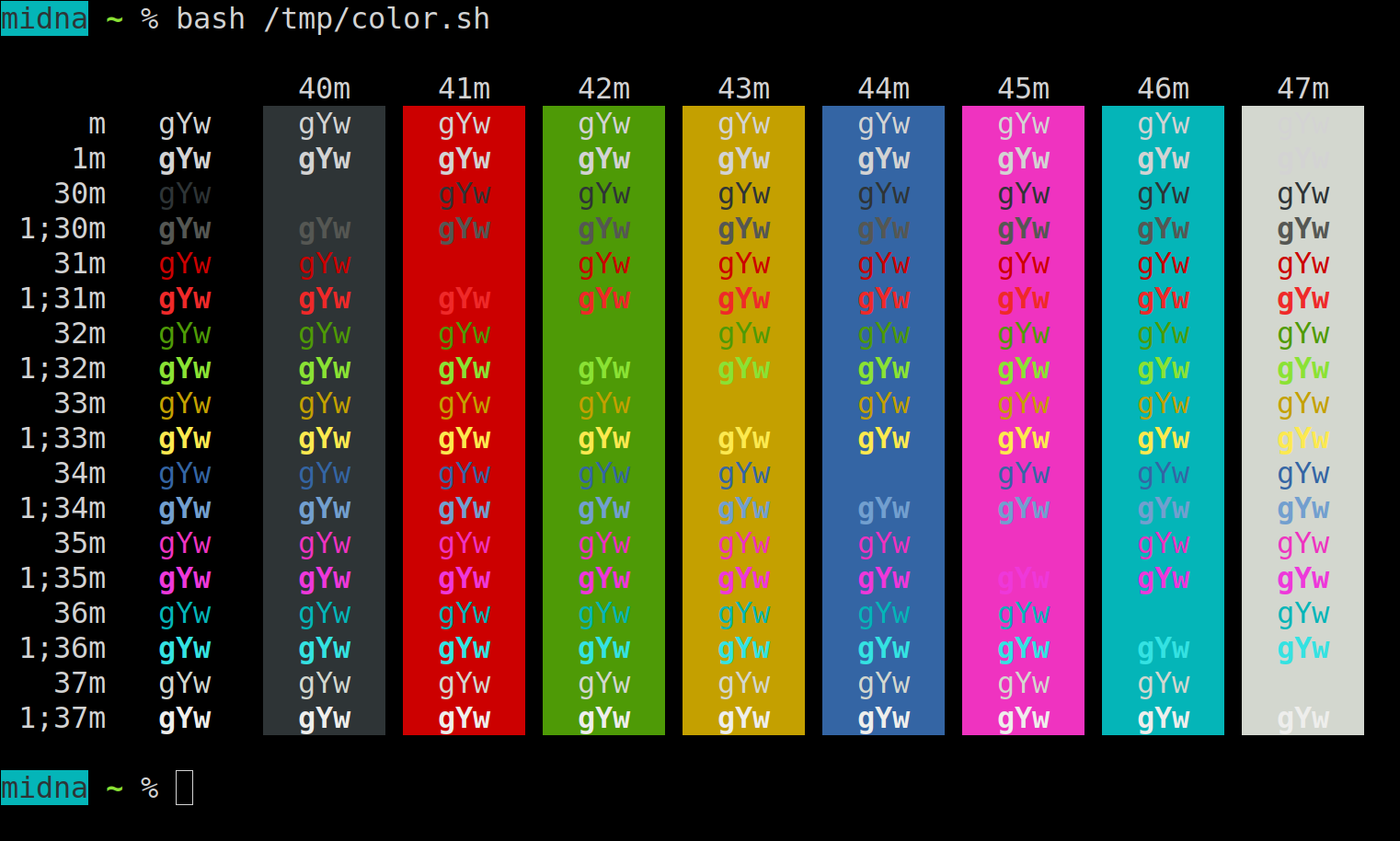
When running https://gist.github.com/jhermsmeier/3559136 in URxvt or XTerm, I see:
When running the script in kitty, I see:
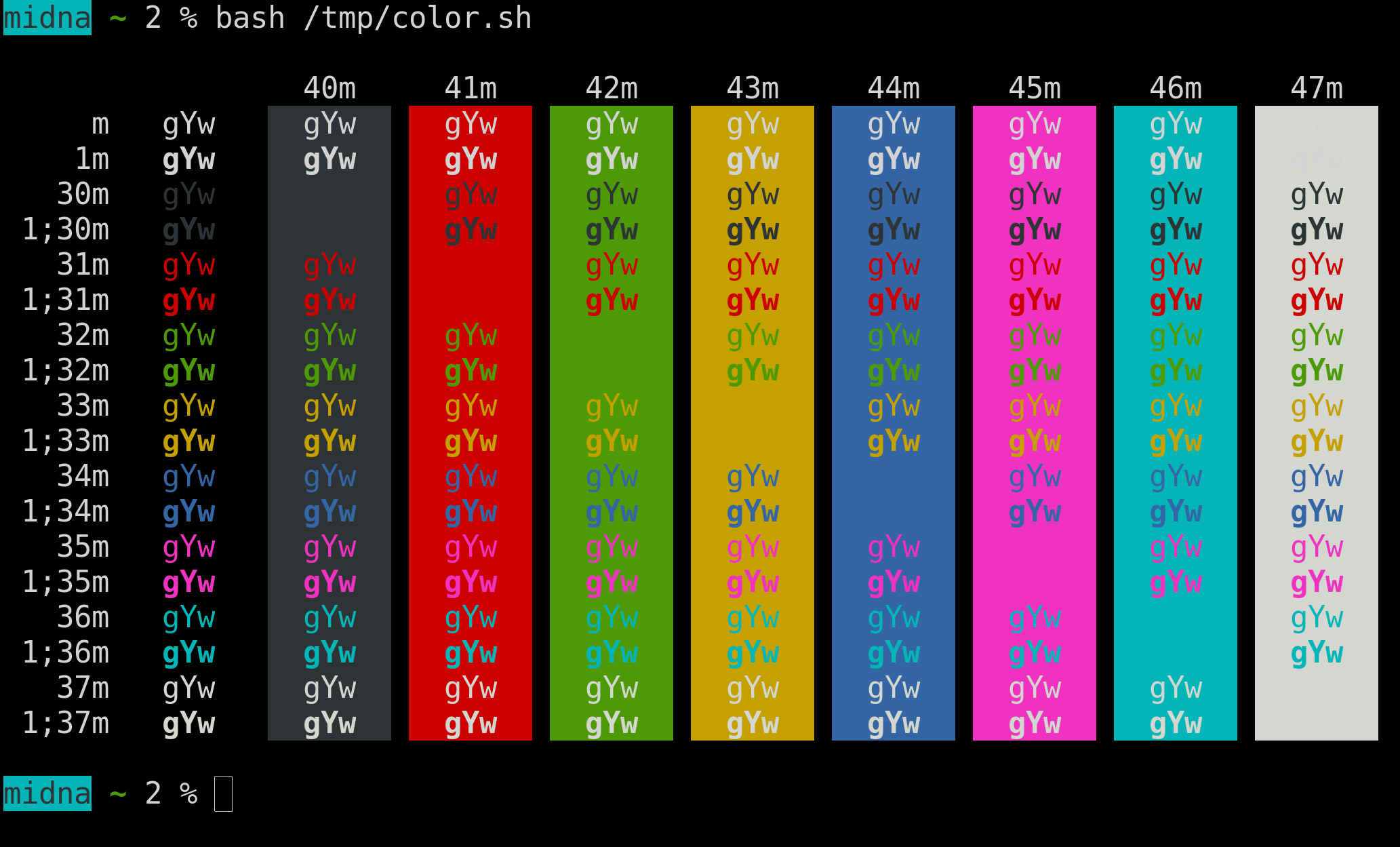
As you can see, in kitty, the 34m and 1;34m lines (for example) look the same, even though they don’t in other terminals.
Am I configuring this wrong, or is this a bug in kitty?
Thanks!
 stapelberg
All 2 comments
dup of #197
 kovidgoyal
on 31 Jul 2018
kovidgoyal
on 31 Jul 2018
To summarize: Dont use 1;34m for the bright variant of the color, use 94m (i.e. 1;3<number>m is the same as 9<number>m)
1 is used for Bold. Some terminals historically did not support bold fonts so they rendered 1 as "bright" instead. This is a mis-feature that makes it impossible to use bold fonts in terminal programs, so kitty does not implement it. https://en.wikipedia.org/wiki/ANSI_escape_code#SGR_(Select_Graphic_Rendition)_parameters
kovidgoyal
on 1 Aug 2018
Related issues
 Ulrar
·
3Comments
Ulrar
·
3Comments
 Jomik
·
4Comments
Jomik
·
4Comments
 lazarcf
·
4Comments
lazarcf
·
4Comments
 RedBeard0531
·
4Comments
RedBeard0531
·
4Comments
 metalelf0
·
4Comments
metalelf0
·
4Comments
Most helpful comment
To summarize: Dont use 1;34m for the bright variant of the color, use 94m (i.e.
1;3<number>mis the same as9<number>m)1 is used for Bold. Some terminals historically did not support bold fonts so they rendered 1 as "bright" instead. This is a mis-feature that makes it impossible to use bold fonts in terminal programs, so kitty does not implement it. https://en.wikipedia.org/wiki/ANSI_escape_code#SGR_(Select_Graphic_Rendition)_parameters