Kitty: kitten request: copy/type/open anything on the screen (extrakto/easymotion style)
I hope you don't mind me creating a kitten request - this is something I want and I think it will benefit a lot of people in the community. It doesn't have to be you @kovidgoyal who implements this, I might get to make it myself in the future, or I might inspire someone to implement this sooner 🙂
The basic idea is the following: you have [a word / a file path / a url / a line] in your terminal window, you want to [copy to clipboard / type in terminal without copying it to clipboard / open with xdg-open].
A special case of this (
url->open) is already achievable withurl_hintskitten, this new kitten is more generic and will probably replaceurl_hints
One good example where this comes in handy is the Azure CLI tool. When you want to login, you type az login in the terminal and it outputs the following:
$ az login
To sign in, use a web browser to open the page https://microsoft.com/devicelogin and enter the code CTBADBSBW to authenticate.
I want to copy the code to clipboard and then open the URL with only using keyboard.
My first inspiration comes from the extrakto tmux plugin. This is actually quite a good plugin, with kitty I can finally get rid of tmux, I'm only sorry to leave this plugin.
I'll reuse their gif to demonstrate part of how it works:
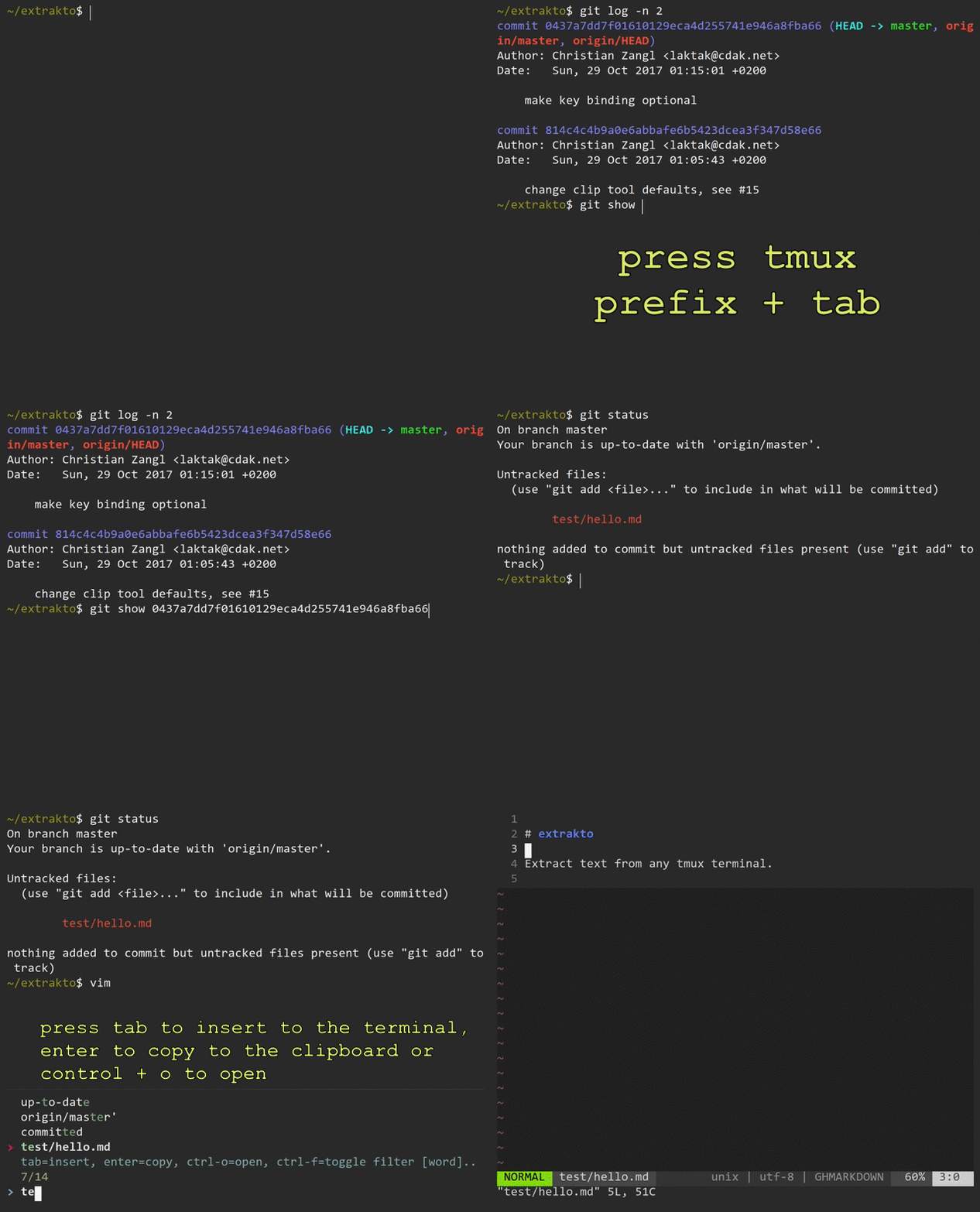
Not everything is captured in this gif, here are the important points:
- It has 4 modes which you can switch in real time, modes mean what you want to find: a word / a file path / a url / a line.
- You can type and candidates will be filtered out in real time
- It has 3 actions, which you choose also in real time after you found a match: copy to clipboard / type in terminal without copying it to clipboard / open with
xdg-open
For a new kitten I would actually propose a different UI, the concept of easymotion vim/emacs plugins. This is more similar to how url_hints kitten looks, I'll try to demonstrate in a gif:

I made this gif with a help of vim-smalls vim plguin, which is very cool by the way.
Now with all the inspiration above, here's my current vision of this new kitten that I want to see:
1. Start and choose the mode
UPDATE: this can be achieved with multi-key shortcuts, see comments below.
I would have a few key combinations that choose a mode, e.g.:
map ctrl+shift+e        run_simple_kitten text <kitten_name> --mode word
map ctrl+shift+f        run_simple_kitten text <kitten_name> --mode file
map ctrl+shift+u        run_simple_kitten text <kitten_name> --mode url
map ctrl+shift+l        run_simple_kitten text <kitten_name> --mode line
Pressing any of the above shortcuts makes the "snapshot" of the current screen and removes all colors:
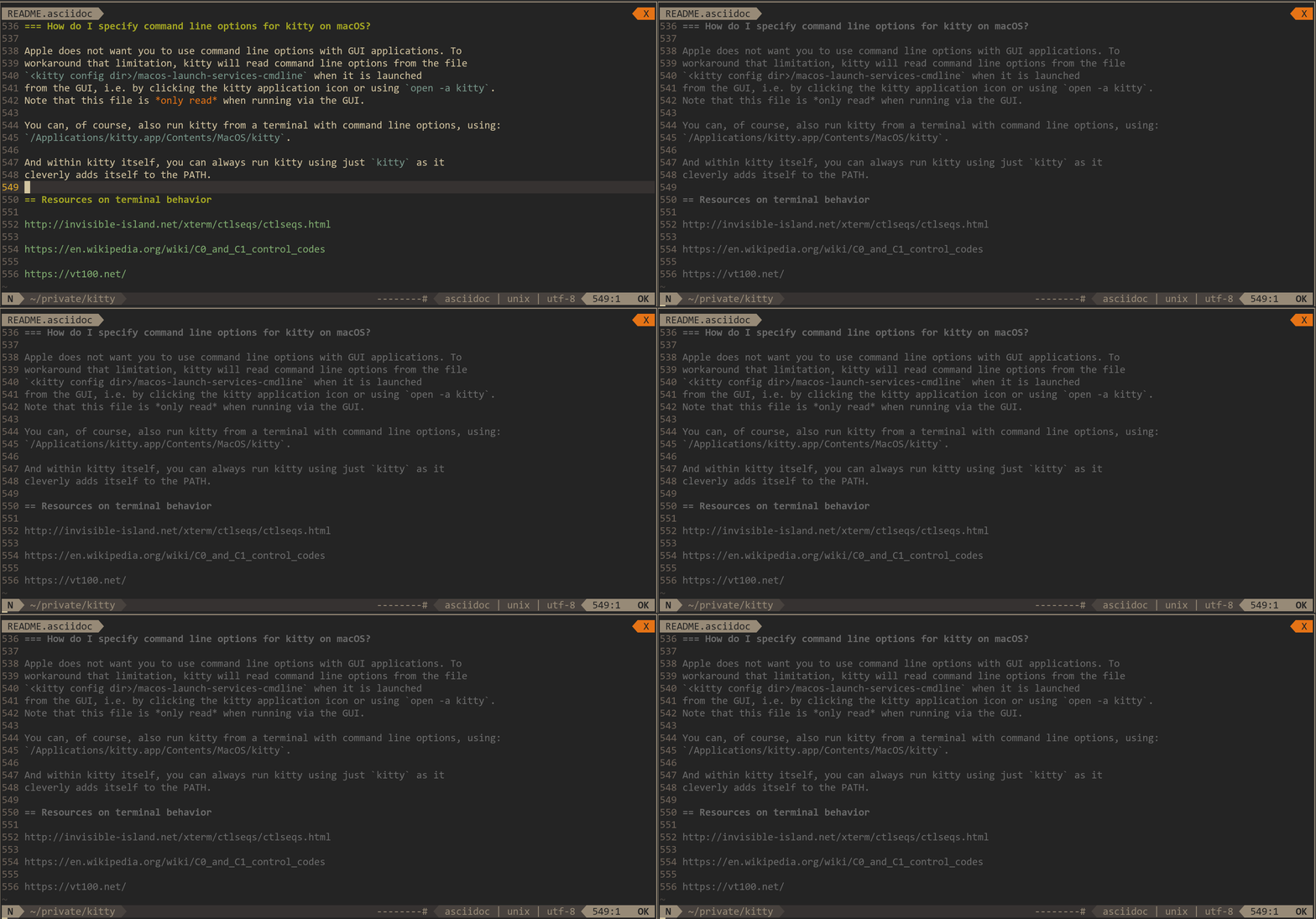
Alternatively we can have one shortcut, but when pressing it, on top of the greyed-out window a new popover dialog appears:
Choose a mode:

(u) url
(f) file path
(w) word
(l) line
And pressing one of the u, f, w or l will use the corresponding mode.
2. Filter candidates to find a matching entry
Suppose I started the --mode url one. Then I start typing a "filter" (e.g. ://), and after a 0.5s after I stopped typing, matching entries are highlighted:
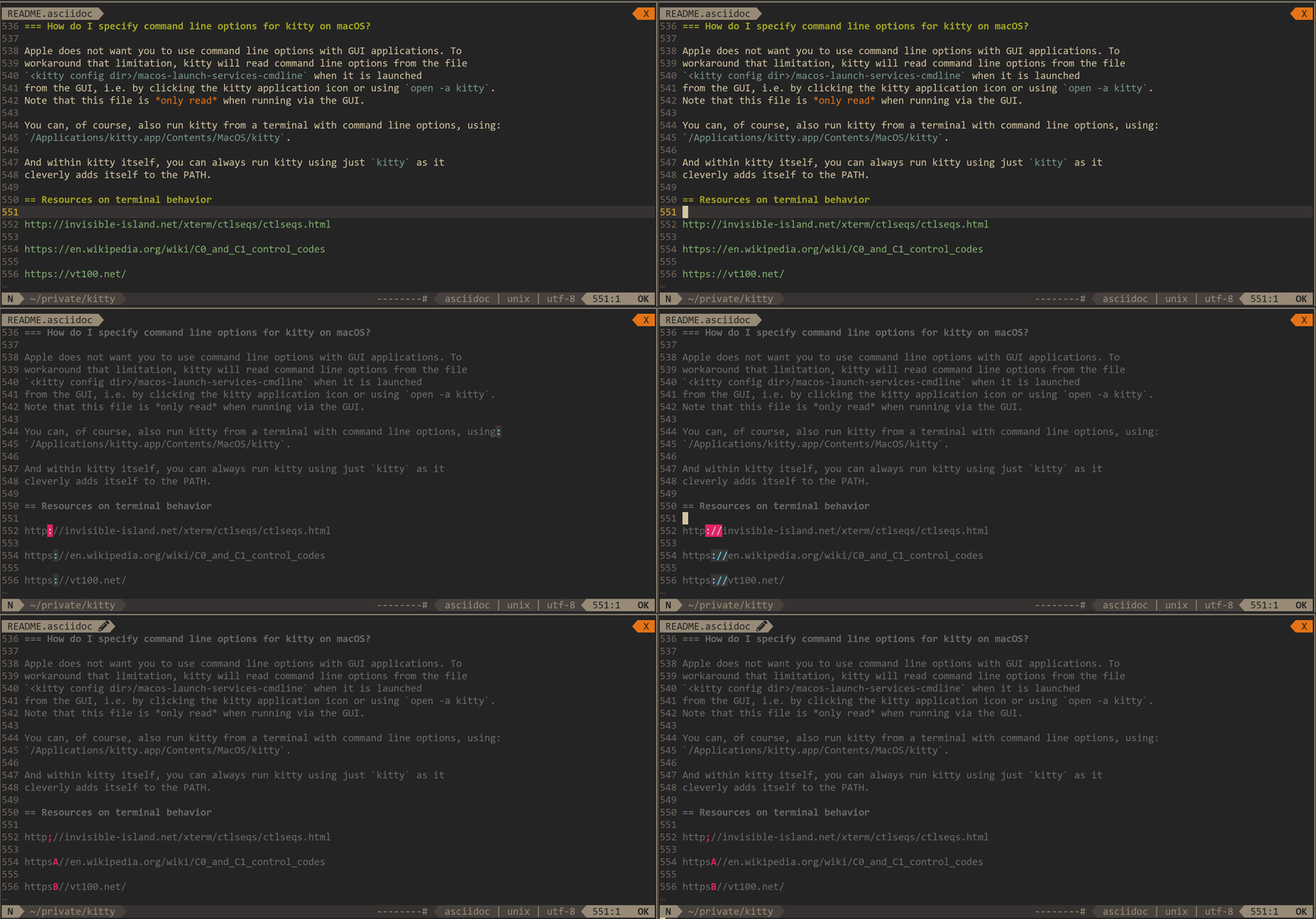
Press Esc once and you are temporarily back in "filtering mode", you can continue typing to narrow down the filter, which after 0.5s will again turn into highlighting the matching entries. Press Esc twice and you cancel and exit the kitten. I really suggest to try vim-smalls plugin to experience this workflow first-hand, it may sound confusing, but it is actually very intuitive.
3. Choose an action for the matching entry
UPDATE: this can be achieved with multi-key shortcuts, see comments below.
Finally, we need to act on the matching entries. You press a character that identifies the match, and a popover dialog appears:
Choose the action:

(c) Copy to clipboard
(o) Open
(t) Type
Pressing the c, o or t will do the corresponding action on the matched word / file path / url / line.
This turned out to be quite a big description, I hope it makes sense. Please tell me if something is not clear, and I'll try to explain it better.
 maximbaz
All 10 comments
Just FYI for your particular example, you can do this already using the regex mode of the url_hints kitten. Something like:
url_hints --regex <expression to match URL and code> --program <some script that knows what to do with the URL and code>
Not to mention that kitty already allows you to pass the contents of the screen, or indeed any arbitrary selected text to any program of your choice.
That said I have no objections to having a more interactive/generic selection kitten in addition to url_hints. So I'll leave this ticket open for anyone that wants to implement it.
 kovidgoyal
on 11 Apr 2018
kovidgoyal
on 11 Apr 2018
Thanks for pointing that out!
I'll think I will be able to make something useful with the help of these additional options. With --program I am able to get the match in the clipboard, can you suggest a way to get the match be pasted in the terminal (ideally without copying it to clipboard)? I am fine with putting it to "selection", but I can't figure out how to issue paste_from_selection afterwards...
The main goals of the described improvements would be:
- to make filtering more interactive to allow reducing the number of candidates (especially needed for a generic "word" mode that often has lots of matches, see picture below)
- to reduce the number of needed shortcuts by showing dialogs that are asking for mode and action - currently I would need
4 (regexes) * 3 (programs) = 12 new shortcutsto implement all described scenarios, which is a bit too many 😉
An example of the amount of matches for the very generic "word" regex. I know it can be optimized to reduce the noise, but it is here to just showcase the general issue that I want to solve with realtime filtering:

maximbaz
on 11 Apr 2018
There isn't any way to insert the text from the kitten into the terminal automatically, short of copying to clipboard/selection and then using the paste shortcut in the terminal. It's on my TODO list to replace run_simple_kitten with run_kitten that will allow for defining actions more generally and also running kittens that are not part of kitty.
As for 2. use the new multi-key shortcuts. Something like:
map ctrl+shift+e>f1 first combination
map ctrl+shift+e>f2 second combination
...
It becomes essentially the same thing as launching the interactive kitten and then pressing keys to select modes/actions.
kovidgoyal
on 11 Apr 2018
FYI implementation of run_kitten is done. And the url_hints kitten can now insert text into the terminal directly by using the special program name -
kovidgoyal
on 11 Apr 2018
Thanks for the hint with multi-key shortcuts, and for implementing the - to insert match in the terminal.
The mult-key shortcuts is almost exactly what I had in mind when I proposed showing a dialog with options, I don't actually need to see the dialog, I can remember my own shortcuts.
Making some kind of interactive filtering is still desirable, but I think url_hints kitten is already generic enough that you should consider renaming it 😉 And replacing the message "No URLs found" with something like "No matches found".
maximbaz
on 11 Apr 2018
I have renamed the kitten to hints. I'm closing this as there isn't much point to creating a new kitten anymore. At some point, I'll get around to improving the docs for the hints kitten to show some examples of using it to select lines/paths/words with multi-key bindings.
kovidgoyal
on 12 Apr 2018
Here's my current config, in case someone finds it useful:
map ctrl+shift+l>u>o      run_kitten text url_hints --regex "(https?://|git@|git://|ssh://|s*ftp://|file:///)[a-zA-Z0-9?=%/_.:,;~@!#$&()*+-]*"
map ctrl+shift+l>u>c      run_kitten text url_hints --regex "(https?://|git@|git://|ssh://|s*ftp://|file:///)[a-zA-Z0-9?=%/_.:,;~@!#$&()*+-]*" --program kitty-copy-to-clipboard
map ctrl+shift+l>u>t      run_kitten text url_hints --regex "(https?://|git@|git://|ssh://|s*ftp://|file:///)[a-zA-Z0-9?=%/_.:,;~@!#$&()*+-]*" --program -
map ctrl+shift+l>f>c      run_kitten text url_hints --regex "(?=[ \\t\\n]|\"|\\(|\\[|<|\\')?(~/|/)?([-a-zA-Z0-9_+-,.]+/[^ \t\n\r|:\"'$%&)>\\]]*)" --program kitty-copy-to-clipboard
map ctrl+shift+l>f>t      run_kitten text url_hints --regex "(?=[ \\t\\n]|\"|\\(|\\[|<|\\')?(~/|/)?([-a-zA-Z0-9_+-,.]+/[^ \t\n\r|:\"'$%&)>\\]]*)" --program -
map ctrl+shift+l>w>c      run_kitten text url_hints --regex "[^][(){}\u2500-\u27BF\uE000-\uF8FF \\t\\n\\r]+" --program kitty-copy-to-clipboard
map ctrl+shift+l>w>t      run_kitten text url_hints --regex "[^][(){}\u2500-\u27BF\uE000-\uF8FF \\t\\n\\r]+" --program -
map ctrl+shift+l>l>c      run_kitten text url_hints --regex ".+" --program kitty-copy-to-clipboard
map ctrl+shift+l>l>t      run_kitten text url_hints --regex ".+" --program -
The mnemonic is "locate > url / file / word / line > copy / open / type".
Regexes are copied from extrakto plugin, I haven't looked into how optimal they are.
kitty-copy-to-clipboard is a shell script in my $PATH, I wish it could be part of kitty itself, maybe as a different special command just like -:
#!/usr/bin/env sh

echo "$@" | xclip -selection clipboard
I still have a _feeling_ that interactive filtering might be a good addition to this kitten, however I'm not sure yet - will get back to this thought once I get used to these shortcuts.
maximbaz
on 12 Apr 2018
You use --program=@ for copy to clipboard
kovidgoyal
on 12 Apr 2018
Thanks! I've also just noticed that you added more types to the kitten itself, word, path and line! I will try those out 😉
maximbaz
on 12 Apr 2018
 dawsers
Related issues
 jasminabasurita
·
3Comments
jasminabasurita
·
3Comments
 reed-jones
·
4Comments
reed-jones
·
4Comments
 Ulrar
·
3Comments
Ulrar
·
3Comments
 skosch
·
3Comments
skosch
·
3Comments
 crocket
·
4Comments
crocket
·
4Comments
Most helpful comment
Here's my current config, in case someone finds it useful:
The mnemonic is "locate > url / file / word / line > copy / open / type".
Regexes are copied from extrakto plugin, I haven't looked into how optimal they are.
kitty-copy-to-clipboardis a shell script in my$PATH, I wish it could be part of kitty itself, maybe as a different special command just like-:I still have a _feeling_ that interactive filtering might be a good addition to this kitten, however I'm not sure yet - will get back to this thought once I get used to these shortcuts.