now that we can show images in the kitty terminal (awesome), can we get support for background images?
 rtorresware
All 108 comments
Not something I care about, personally. But it should be trivial to implement. Patches welcome.
 kovidgoyal
on 6 Nov 2017
kovidgoyal
on 6 Nov 2017
Would love if this had a toggle for current wallpaper + dim. Only feature keeping me from kitty full time :)
 coxley
on 15 Sep 2018
coxley
on 15 Sep 2018
+1 need Fallout PipBoy-terminal background image support... going fully transparent against the desktop wallpaper results in horribly broken anti-aliasing and looks like garbage on MacOS.
(On a side note - defaulting to pure-black background hurts peoples eyes. You can't focus in to a black-hole, and you should have something for the eyes to focus on if you want to avoid eye-strain... a nice grey would be a better default, imho)
If I find time, I'll try to work on this. Are there PNG and JPG image loaders already in the codebase?
 teratorn
on 13 Nov 2018
teratorn
on 13 Nov 2018
@teratorn #1005 describes your anti-aliasing issue.
I agree that the black background color is not very good but I'm not sure it should be changed since this is personal preference and most people will probably change it anyways and might not like a different default color any more than the current one.
 Luflosi
on 13 Nov 2018
Luflosi
on 13 Nov 2018
@teratorn kitty already links against libpng and uses it for its graphics protocol. just search for the png headers to see where and how it is used. As for staring into black, I strongly disagree. I find it very relaxing for my eyes. Not to mention that monitors displaying a black color are not black holes, they still emit light.
kovidgoyal
on 14 Nov 2018
I've just swapped to using kitty today and I'm loving it; much better than all the other options I've tried in linux. I came here to ask for exactly this feature since I like having pokemon images in my terminal like a nerd.
If it's something you think is trivial to implement @kovidgoyal I'll gladly have a crack at it sometime soon if you can give me some vague pointers about where to be looking in your codebase to build it. I'm a python dev but not a C dev so I might scratch my head a bit if it involves much C.
 giftig
on 11 Jan 2019
giftig
on 11 Jan 2019
Well, this will definitely require a fair bit of C code. You will need to load the PNG image usingthe same code that does it for kitty's exisint image display capabilities (see grahoics.c) and then display it in the kitty graphics shader in shaders.c. This will all be C code, I'm afraid.
kovidgoyal
on 13 Jan 2019
I need coins
 jason81474
on 4 May 2019
jason81474
on 4 May 2019
will this ever be done?
 dagadbm
on 11 Jun 2019
dagadbm
on 11 Jun 2019
What about an option to specify an alternate background color for inactive windows? I'd like to use less opacity on my inactive windows, to let backgrounds show through... Did I miss an option to do this?
 disruptek
on 1 Jul 2019
disruptek
on 1 Jul 2019
@disruptek that question is not related to background image. Please open a new issue so we can keep this thread focused on one specific request (all be it a pipe dream at this point).
 sukima
on 3 Jul 2019
sukima
on 3 Jul 2019
@disruptek you can partway do that if you run inside tmux and set the colours appropriately
 fenetikm
on 24 Sep 2019
fenetikm
on 24 Sep 2019
I have been trying for hours to enable backgroundimage=yes in both the .ini file and using the registry. Can someone tell me how to enable this feature? If this feature is not yet available, how is the screenshot on this page possible?
 miaXcova
on 6 Dec 2019
miaXcova
on 6 Dec 2019
@miaXcova this is a wrong kitty. here's the one you're looking for https://github.com/cyd01/KiTTY/
 SolitudeSF
on 6 Dec 2019
SolitudeSF
on 6 Dec 2019
I did a bit of looking into this, as many have asked for this feature, and while I think it's cool, I don't think it essential. But I'm happy to work on something many people want as long as it's cool—after the failure of #2259, I think it best I work on things that will actually be of the greatst practical benefit for Kitty's users.
_After all_, my work is supported by grant.
Obviously, as @kovidgoyal mentioned, the best way in is through the existing Kitty graphics protocol. So I dug around in graphics.c. I think actually have everything we need already, if it were to just be done with a particularly clever Python script.
The icat kitten is a good starting point. Just use IM to turn down the opacity of input image, draw it to screen (center vertically), make sure that z-index is negative, and draw your text on top. Hook screen clearing event to do this again whenever needed.
One missing ingredient I can think of is that z-index is only defined as "integer" - this is a big problem for interoperability if we want to put an image at the bottom below which no image can be drawn, because I don't know if it's a Python integer, or if it's a C integer, if a certain size is guaranteed, and the spec doesn't specify.
However, once we clear up that problem...I don't think C is really necessary...
 ctrlcctrlv
on 8 Jan 2020
ctrlcctrlv
on 8 Jan 2020
You cant use the graphics protocol for this, as that means doing a clear
would delete the image. The background image has to be stored specially
not as one of the graphics protocol images.
kovidgoyal
on 8 Jan 2020
Hook screen clearing event to do this again whenever needed.
If it's not possible to hook this, it would need to be made so
ctrlcctrlv
on 8 Jan 2020
On Wed, Jan 08, 2020 at 01:59:24AM -0800, Fredrick Brennan wrote:
Hook screen clearing event to do this again whenever needed.
If it's not possible to hook this, it would need to be made so
There are many such events, as well as many ways to clear images in the
graphical protocol as well. It should certainly be possible to tag an
image as "undeletable" but this seems like a hack. It means that onehas
to make sure all the various ways that exist of deleting images dont
delete the special image, search graphics.c for clear and delete to see
how many there are. And there there is the whole alternate screen thing.
One has to make sure the background image remains visible when swapping
between main and alternate screen.
Why not just have a special slot for a background image? I know you dont
mind writing a bit of C :))
kovidgoyal
on 8 Jan 2020
I don't mind :)
I guess I'll just add it to GraphicsManager struct, then allocate it as needed in grman_alloc (based on something I'll probably add to global state)...the type can be Image *...the thing is scaling, not sure how I'll do that, as the example code uses ImageMagick. And surely some users are going to want tiling and not scaling. And I also have to think about DPI
ctrlcctrlv
on 8 Jan 2020
On Wed, Jan 08, 2020 at 02:23:06AM -0800, Fredrick Brennan wrote:
I don't mind :)
I guess I'll just add it to GraphicsManager struct, then allocate it as needed in grman_alloc (based on something I'll probably add to global state)...the type can be
Image *...the thing is scaling, not sure how I'll do that, as the example code uses ImageMagick. And surely some users are going to want tiling and not scaling. And I also have to think about DPI
Yeah there are a lot of details to consider, which is why I never
bothered with tackling this issue. You also need to consider what
a background image means w.r.t. multiple windows in a tab, tab bar,
borders, margins, padding, etc.
kovidgoyal
on 8 Jan 2020
Clearly many people want this, so I will have a draft PR by the end of the week.
I'll let you know if I think a choice I make could be controverisal before I make it so no code is wasted.
There's a lot to consider but it's worth it! Towards making kitty the most complete terminal. alacritty, termite etc move out of the way, there's a new king in town :crown: :joy:
ctrlcctrlv
on 8 Jan 2020
On Wed, Jan 08, 2020 at 02:40:13AM -0800, Fredrick Brennan wrote:
Clearly many people want this, so I will either have a draft PR by the end of the week.
Cool, I look forward to it.
I'll let you know if I think a choice I make could be controverisal before I make it so no code is wasted.
Am happy to discuss if so. And am also happy to make fixups in your PR
myself if needed, so you wont have to revisit the code. As I did for
your OpenType PR.
There's a lot to consider but it's worth it! Towards making
kittythe most complete terminal.alacritty,termiteetc move out of the way, there's a new king in town :crown: :joy:
There are other terminals besides kitty!! Who knew :))
kovidgoyal
on 8 Jan 2020
Would this mean that this KiTTY would be a fork of the other KiTTY from a certain place in time, or do both share the same base code with minor changes?
Would the real Slim KiTTY please stand up... please stand up...
Also, to clarify what I was hoping for with a background image (image or solid color) would have been to change the opacity so that the background transparency could be controlled while the text and window frame remained at full visibility. The way transparency works now is it changes the entire window text, frame and all. It's just nice to be able to see through windows when most of the window will be black anyway. Rocking 6 monitors and still never enough screen real estate.
miaXcova
on 8 Jan 2020
We have nothing to do with the cyd01 kitty.
Background opacity isn't really on the table here. The image can be made opaque...on Kitty's default background, usually black. We'll have to figure out background opacity in another issue, this really is not the place to discuss it.
ctrlcctrlv
on 8 Jan 2020
On Wed, Jan 08, 2020 at 04:44:35AM -0800, Fredrick Brennan wrote:
Background opacity isn't really on the table here. The image can be made opaque...on Kitty's default background, usually black. We'll have to figure out background opacity in another issue, this really is not the place to discuss it.
Actually, kitty already has background_opacity (see kitty.conf) no
reason it should not apply to the background image as well.
kovidgoyal
on 8 Jan 2020
Would be good if people actually read the config file before claiming kitty doesn't support something :wink:
I need to stop taking user complaints at face value.
ctrlcctrlv
on 8 Jan 2020
Sorry for not clarifying in my previous post. I wasn't complaining, but asking if something was possible. I read and tweaked the config file and found an earlier version where the background image was working, but the opacity setting worked only for the image and did nothing for the window transparency.
As @kovidgoyal said, this is not the thread for such a discussion, and forgive my confusion as I thought the two were related.
miaXcova
on 8 Jan 2020
Good progress is being made. The first problem has been overcome, and I understand how Kitty renders to the screen much better now.

ctrlcctrlv
on 10 Jan 2020
That's gratifying :)
kovidgoyal
on 10 Jan 2020
With #2271 out of the way I'm once again wondering if a "persist" flag which makes images survive screen clearing isn't the best way to implement this.
It would make the images window-local rather than kitty-global, and would play well with the session system, where users could set different backdrops for different tabs, or even configure more complex set ups where they cycle through images throughout the day, like a slideshow.
Are you totally against this @kovidgoyal ?
ctrlcctrlv
on 11 Jan 2020
There will be no way to have a background image stretch across multiple
windows (by this I mean windows in a tab). This will probably look
pretty bad. You will basically have tiled images with borders between
them, rather than a true background image that stretches under all
windows.
And there is still the problem of making sure both that all sites that
remove images know about persistent images and dealing with
main/alternate screen transitions, you actually have two grman objects
per Screen. These are not major problems of course, just additional
state to keep track of.
I think we need to first settle on the desired semantics. Should bg
images be per kitty window, per kitty tab, per kitty OS Window or per
kitty process.
On Fri, Jan 10, 2020 at 10:26:19PM -0800, Fredrick Brennan wrote:
With #2271 out of the way I'm once again wondering if a "persist" flag which makes images survive screen clearing isn't the best way to implement this.
It would make the images window-local rather than kitty-global, and would play well with the session system, where users could set different backdrops for different tabs, or even configure more complex set ups where they cycle through images throughout the day, like a slideshow.
Are you totally against this @kovidgoyal ?
--
You are receiving this because you were mentioned.
Reply to this email directly or view it on GitHub:
https://github.com/kovidgoyal/kitty/issues/163#issuecomment-573287423
--
Dr. Kovid Goyal
https://www.kovidgoyal.net
https://calibre-ebook.com
kovidgoyal
on 11 Jan 2020
My vote is per kitty window, set in session file.
ctrlcctrlv
on 11 Jan 2020
On Fri, Jan 10, 2020 at 11:01:27PM -0800, Fredrick Brennan wrote:
My vote is per kitty window, set in session file.
Well, in that case, setting it in the session file is not going to be
enough. You will need to add it to the launch command so people can
create windows with specific images, and the remote
control protocol and probably as a kitty.conf setting that
applies to all newly created windows in that process, unless overridden.
As for my vote, I am neutral, since I will personally never use this
feature.
kovidgoyal
on 11 Jan 2020
Let's leave it for a little while so other people can comment on their
preferences, the tradeoff from a user perspective is:
With image-per-window you can set different images in every kitty
window, but you cannot have a single image underlie neighboring kitty
windows.
With image per tab you can set different images in different tabs but
not different images in windows inside a tab. But you can have a single
image stretch across all windows in a tab.
If you are interested in this feature and have apreference, vote now or
forever hold your peace.
kovidgoyal
on 11 Jan 2020
I'm happy with leaving it up to the users. I'm happy to implement either per OS window or per kitty window.
ctrlcctrlv
on 11 Jan 2020
I vote per window.
miaXcova
on 11 Jan 2020
Hello friends—I will begin implementation of per-kitty window background images, the voting is closed, that's what I decided on.
ctrlcctrlv
on 14 Jan 2020
Looking at it more for the last half hour or so, I'm unfortunately not sure how to implement this in a sane way, even with #2271 solved.
The graphics protocol is not the way:
When resetting the terminal, all images that are visible on the screen must be cleared. [...] When scrolling the screen (such as when using index cursor movement commands, or scrolling through the history buffer), images must be scrolled along with text.
I'd be breaking many assumptions with a "persist" flag.
So it means maybe even the GraphicsManager itself is not the place to be putting this.
So then in shaders.c? In draw_cells_interleaved_premult and so on? Maybe using blit_vertex_array and drawing on top of that? Because I can't use any of the GraphicsManager stuff, it all assumes the same stuff as the graphics protocol.
Option parsing is simple, and we seem to have functions for inflating PNG into a bitmap in memory, but I don't know that I know enough OpenGL to get us all the way there. Sorry.
ctrlcctrlv
on 15 Jan 2020
Yes, as I said storing a background in graphics manager is very hacky.
For the architecture of the actual solution:
1) reuse the code in graphics.c to sentd the image data to the GPU
2) store the texture id for the image on the Window object, since it is
per window, but probably have some mechanism to share across all windows in
the process to avoid sending data of the same image more than once to
the GPU
3) change the Window/OSWindow destructors to de-allocate the image.
Maybe use reference counting to free the image texture only when no
windows are using it anymore.
4) Create a simple shader that draws the background image. You can base
it of the GRAPHICS_ALPHA_MASK_PROGRAM see draw_centered_alpha_mask
but you will need to ad duniforms for scaling vs tiling, any applied
tint, etc.
5) in the draw_cells function take the existence of the background image
into consideration when deciding to call draw_cells_interleaved
6) In draw_cells_interleaved(_premult) simply add an extra draw call
that uses the shader from (4) to draw the background image before doing
anything else.
7) Create a config option for kitty.conf as well as a command for the
remote control protocol in cmds.py to set the background image.
8) Deal with detaching of windows. When a windows is detached. When a
window is detached to move it to another OS Window, if its background
image already exists in that os window, release it and take a reference
to that os windows image. If not, then add it to the os window and you
might have to resend the image data as well, depends on the detail of
how the graphics vao is shared, I dont remember of the top off my head.
On Tue, Jan 14, 2020 at 11:40:43PM -0800, Fredrick Brennan wrote:
Looking at it more for the last half hour or so, I'm unfortunately not sure how to implement this in a sane way, even with #2271 solved.
The graphics protocol is not the way:
When resetting the terminal, all images that are visible on the screen must be cleared. [...] When scrolling the screen (such as when using index cursor movement commands, or scrolling through the history buffer), images must be scrolled along with text.
I'd be breaking many assumptions with a "persist" flag.
So it means maybe even the GraphicsManager itself is not the place to be putting this.
So then in shaders.c? In
draw_cells_interleaved_premultand so on? Maybe usingblit_vertex_arrayand drawing on top of that? Because I can't use any of the GraphicsManager stuff, it all assumes the same stuff as the graphics protocol.Option parsing is simple, and we seem to have functions for inflating PNG into a bitmap in memory, but I don't know that I know enough OpenGL to get us all the way there. Sorry.
--
You are receiving this because you were mentioned.
Reply to this email directly or view it on GitHub:
https://github.com/kovidgoyal/kitty/issues/163#issuecomment-574535576
--
Dr. Kovid Goyal
https://www.kovidgoyal.net
https://calibre-ebook.com
kovidgoyal
on 15 Jan 2020
Good plan. I'm going to need to study some toy GLFW programs as well, and understand better how OpenGL manages textures. As I understand it, if I can manage to load the (PNG) image in as a texture, (which is no problem, much of this code already exists) I should be able to get tiling and scaling for free just by correct use of shaders, vertices and GL parameters.
ctrlcctrlv
on 15 Jan 2020
Yes, you just need to upload the data, and then the shader can instruct
the GPU to do scaling/tiling automatically. Pretty much all modern OpenGL
tutorials start with drawing a simple image using a shader.
On Wed, Jan 15, 2020 at 04:38:26AM -0800, Fredrick Brennan wrote:
Good plan. I'm going to need to study some toy GLFW programs as well, and understand better how OpenGL manages textures. As I understand it, if I can manage to load the (PNG) image in as a texture, (which is no problem, much of this code already exists) I should be able to get tiling and scaling for free just by correct use of shaders, vertices and GL parameters.
--
You are receiving this because you were mentioned.
Reply to this email directly or view it on GitHub:
https://github.com/kovidgoyal/kitty/issues/163#issuecomment-574641679
--
Dr. Kovid Goyal
https://www.kovidgoyal.net
https://calibre-ebook.com
kovidgoyal
on 15 Jan 2020
Thank you for your patience, and for laying out an architecture. FontForge just uses Cairo and GDK (component of GTK) to draw to screen. My first work with OpenGL at all was this year. This is a bit out of my element but I believe I can do it if I apply myself to your instructions.
ctrlcctrlv
on 15 Jan 2020
You're welcome. OpenGL is an awful, awful API, but it's kind of a fun
challenge to overcome. I myself had to learn OpenGL from scratch for
building kitty. Keep in mind that kitty has to run on very old OpenGL
3.3 drivers (macOS).
On Wed, Jan 15, 2020 at 04:48:27AM -0800, Fredrick Brennan wrote:
Thank you for your patience, and for laying out an architecture. FontForge just uses Cairo and GDK (component of GTK) to draw to screen. My first work with OpenGL at all was this year. This is a bit out of my element but I believe I can do it if I apply myself to your instructions.
--
You are receiving this because you were mentioned.
Reply to this email directly or view it on GitHub:
https://github.com/kovidgoyal/kitty/issues/163#issuecomment-574645149
--
Dr. Kovid Goyal
https://www.kovidgoyal.net
https://calibre-ebook.com
kovidgoyal
on 15 Jan 2020
:smile: Woo!
coxley
on 15 Jan 2020
I've continued working on it...but am fighting with OpenGL and am not sure what I'm doing wrong.
Under Nvidia drivers, this patch crashes with a segmentation fault.
Under Mesa drivers, this patch doesn't draw anything, but doesn't crash.
Note: Even if the drawing is fixed, this patch is a super rough draft; there are no frees, or reference counting, et cetera.
Can you help please @kovidgoyal? The buggy function is draw_bg, and this patch is meant to be applied against 43326c9bd03044cb5cb6f00fd8b372becf2d206b
Config
background_image ~/tmp/Quiapo1.png
background_image_layout scaled
background_image_opacity 0.9
Patch ipsum
diff --git a/kitty/config_data.py b/kitty/config_data.py
index a3dbfeb2..c74ef888 100644
--- a/kitty/config_data.py
+++ b/kitty/config_data.py
@@ -822,6 +822,29 @@ of windows set :opt:`dynamic_background_opacity` to :code:`yes` (this is off by
 default as it has a performance cost)
 '''))

+def startup_session(x):
+    if x.lower() == 'none':
+        return
+    x = os.path.expanduser(x)
+    x = os.path.expandvars(x)
+    if not os.path.isabs(x):
+        x = os.path.join(config_dir, x)
+    return x
+
+
+o('background_image', 'none', option_type=startup_session, long_text=_('''
+Path to a background image. Must be PNG.'''))
+
+o('background_image_layout', 'tiling', option_type=choices('tiling', 'scaled'),
+long_text=_('''
+How to lay out the background image.'''))
+
+o('background_image_opacity', 0.5, option_type=positive_float, long_text=_('''
+Background image opacity, between 0.0 and 1.0 inclusive. This
+can only ever decrease a background's opacity, if the image is already
+semi-transparent, "1" is interpreted as the image's current transparency.'''))
+
+
 o('dynamic_background_opacity', False, long_text=_('''
 Allow changing of the :opt:`background_opacity` dynamically, using either keyboard
 shortcuts (:sc:`increase_background_opacity` and :sc:`decrease_background_opacity`)
@@ -942,16 +965,6 @@ The default is to check every 24 hrs, set to zero to disable.
 '''))


-def startup_session(x):
-    if x.lower() == 'none':
-        return
-    x = os.path.expanduser(x)
-    x = os.path.expandvars(x)
-    if not os.path.isabs(x):
-        x = os.path.join(config_dir, x)
-    return x
-
-
 o('startup_session', 'none', option_type=startup_session, long_text=_('''
 Path to a session file to use for all kitty instances. Can be overridden
 by using the :option:`kitty --session` command line option for individual
diff --git a/kitty/data-types.h b/kitty/data-types.h
index aabe751d..15cd687f 100644
--- a/kitty/data-types.h
+++ b/kitty/data-types.h
@@ -55,6 +55,7 @@ typedef enum MouseTrackingModes { NO_TRACKING, BUTTON_MODE, MOTION_MODE, ANY_MOD
 typedef enum MouseTrackingProtocols { NORMAL_PROTOCOL, UTF8_PROTOCOL, SGR_PROTOCOL, URXVT_PROTOCOL} MouseTrackingProtocol;
 typedef enum MouseShapes { BEAM, HAND, ARROW } MouseShape;
 typedef enum { NONE, MENUBAR, WINDOW, ALL } WindowTitleIn;
+typedef enum { TILING, SCALED } BackgroundImageLayout;

 #define MAX_CHILDREN 512
 #define BLANK_CHAR 0
diff --git a/kitty/gl.c b/kitty/gl.c
index cd623c8e..dc9c229a 100644
--- a/kitty/gl.c
+++ b/kitty/gl.c
@@ -38,6 +38,20 @@ check_for_gl_error(void UNUSED *ret, const char *name, GLADapiproc UNUSED funcpt
     }
 }

+void GLAPIENTRY
+MessageCallback( GLenum source,
+                 GLenum type,
+                 GLuint id,
+                 GLenum severity,
+                 GLsizei length,
+                 const GLchar* message,
+                 const void* userParam )
+{
+  fprintf( stderr, "GL CALLBACK: %s type = 0x%x, severity = 0x%x, message = %s\n",
+           ( type == GL_DEBUG_TYPE_ERROR ? "** GL ERROR **" : "" ),
+            type, severity, message );
+}
+
 void
 gl_init() {
     static bool glad_loaded = false;
@@ -63,6 +77,8 @@ gl_init() {
         if (gl_major < OPENGL_REQUIRED_VERSION_MAJOR || (gl_major == OPENGL_REQUIRED_VERSION_MAJOR && gl_minor < OPENGL_REQUIRED_VERSION_MINOR)) {
             fatal("OpenGL version is %d.%d, version >= 3.3 required for kitty", gl_major, gl_minor);
         }
+    glEnable(GL_DEBUG_OUTPUT);
+    glDebugMessageCallback( MessageCallback, 0 );
     }
 }

@@ -364,6 +380,7 @@ bind_vao_uniform_buffer(ssize_t vao_idx, size_t bufnum, GLuint block_index) {

 void
 unmap_vao_buffer(ssize_t vao_idx, size_t bufnum) {
+    printf("Unmapping VAO %li\n", vao_idx);
     ssize_t buf_idx = vaos[vao_idx].buffers[bufnum];
     unmap_buffer(buf_idx);
     unbind_buffer(buf_idx);
diff --git a/kitty/graphics.c b/kitty/graphics.c
index b1d49515..0e0c0928 100644
--- a/kitty/graphics.c
+++ b/kitty/graphics.c
@@ -29,10 +29,18 @@ static bool send_to_gpu = true;
 GraphicsManager*
 grman_alloc() {
     GraphicsManager *self = (GraphicsManager *)GraphicsManager_Type.tp_alloc(&GraphicsManager_Type, 0);
-    self->images_capacity = 64;
+    self->images_capacity = self->capacity = 64;
+    if (OPT(background_image) != NULL) { self->images_capacity++; self->capacity++; }
     self->images = calloc(self->images_capacity, sizeof(Image));
-    self->capacity = 64;
     self->render_data = calloc(self->capacity, sizeof(ImageRenderData));
+    printf("Bg image is %s\n", OPT(background_image));
+    if (OPT(background_image) != NULL) {
+        if (access(OPT(background_image), F_OK) != -1) {
+            log_error("File %s does exist", OPT(background_image));
+        } else {
+            log_error("File %s does not exist", OPT(background_image));
+        }
+    }
     if (self->images == NULL || self->render_data == NULL) {
         PyErr_NoMemory();
         Py_CLEAR(self); return NULL;
@@ -248,6 +256,39 @@ add_trim_predicate(Image *img) {
     return !img->data_loaded || (!img->client_id && !img->refcnt);
 }

+bool png_path_to_bitmap(uint8_t** data, unsigned int* width, unsigned int* height, size_t* sz) {
+    const char* path = OPT(background_image);
+    if (access(path, R_OK) != 0) {
+        log_error("File %s, (requested background image,) does not exist (%d)", path, errno);
+        return false;
+    }
+    FILE* fp = fopen(path, "r");
+    if (fp == NULL) {
+        log_error("File %s, (requested background image,) could not be opened", path);
+        return false;
+    }
+    fseek(fp, 0L, SEEK_END);
+    size_t filesize = ftell(fp);
+    *data = calloc(filesize, sizeof(char));
+    fseek(fp, 0L, SEEK_SET); // rewind() deprecated on some platforms
+    fread(*data, sizeof(char), filesize, fp);
+    fclose(fp);
+    png_read_data d;
+    memset(&d, 0, sizeof(png_read_data));
+    inflate_png_inner(&d, *data, filesize);
+    if (!d.ok) {
+        log_error("File %s, (requested background image,) not readable by libpng", path);
+        return false;
+    }
+    free(*data);
+    *data = d.decompressed;
+    *sz = d.sz;
+    *height = d.height; *width = d.width;
+    //send_image_to_gpu(tex_id, data, 0, 0, false, true);
+    return true;
+}
+
+
 static inline Image*
 find_or_create_image(GraphicsManager *self, uint32_t id, bool *existing) {
     if (id) {
diff --git a/kitty/graphics.h b/kitty/graphics.h
index 16af6923..bc0b8abc 100644
--- a/kitty/graphics.h
+++ b/kitty/graphics.h
@@ -55,6 +55,12 @@ typedef struct {
     size_t used_storage;
 } Image;

+typedef struct {
+    uint32_t texture_id;
+    unsigned int height, width;
+    uint8_t* bitmap;
+} BackgroundImage;
+
 typedef struct {
     float vertices[16];
     uint32_t texture_id, group_count;
@@ -71,6 +77,8 @@ typedef struct {
     Image *images;
     size_t count, capacity;
     ImageRenderData *render_data;
+    Image bgimage;
+    ImageRenderData bgimage_rd;
     bool layers_dirty;
     // The number of images below MIN_ZINDEX / 2, then the number of refs between MIN_ZINDEX / 2 and -1 inclusive, then the number of refs above 0 inclusive.
     size_t num_of_below_refs, num_of_negative_refs, num_of_positive_refs;
@@ -93,3 +101,4 @@ void grman_scroll_images(GraphicsManager *self, const ScrollData*, CellPixelSize
 void grman_resize(GraphicsManager*, index_type, index_type, index_type, index_type);
 void grman_rescale(GraphicsManager *self, CellPixelSize fg);
 void gpu_data_for_centered_image(ImageRenderData *ans, unsigned int screen_width_px, unsigned int screen_height_px, unsigned int width, unsigned int height);
+bool png_path_to_bitmap(uint8_t** data, unsigned int* width, unsigned int* height, size_t* sz);
diff --git a/kitty/screen.c b/kitty/screen.c
index dac33f41..802e46e2 100644
--- a/kitty/screen.c
+++ b/kitty/screen.c
@@ -111,6 +111,18 @@ new(PyTypeObject *type, PyObject *args, PyObject UNUSED *kwds) {
         self->historybuf = alloc_historybuf(MAX(scrollback, lines), columns, OPT(scrollback_pager_history_size));
         self->main_grman = grman_alloc();
         self->alt_grman = grman_alloc();
+
+        BackgroundImage* bgimage = calloc(1, sizeof(BackgroundImage));
+        size_t size;
+        bool has_bg = png_path_to_bitmap(&bgimage->bitmap, &bgimage->width, &bgimage->height, &size);
+        if (has_bg) {
+            printf("Sending image to GPU (%dx%d)\n", bgimage->width, bgimage->height);
+            bgimage->texture_id = 0;
+            send_image_to_gpu(&bgimage->texture_id, bgimage->bitmap, bgimage->width, bgimage->height, false, true);
+            printf("Texture ID we got was %d, len %lu\n", bgimage->texture_id, size);
+            self->bgimage = bgimage;
+        }
+
         self->grman = self->main_grman;
         self->pending_mode.wait_time = 2.0;
         self->disable_ligatures = OPT(disable_ligatures);
diff --git a/kitty/screen.h b/kitty/screen.h
index 307eb47b..c1f7340b 100644
--- a/kitty/screen.h
+++ b/kitty/screen.h
@@ -86,6 +86,7 @@ typedef struct {
     unsigned int history_line_added_count;
     bool *tabstops, *main_tabstops, *alt_tabstops;
     ScreenModes modes;
+    BackgroundImage *bgimage;
     ColorProfile *color_profile;
     monotonic_t start_visual_bell_at;

diff --git a/kitty/shaders.c b/kitty/shaders.c
index 818895b5..59c87ff7 100644
--- a/kitty/shaders.c
+++ b/kitty/shaders.c
@@ -7,6 +7,8 @@

 #include "fonts.h"
 #include "gl.h"
+#include "png-reader.h"
+#include <png.h>
 #include <stddef.h>

 enum { CELL_PROGRAM, CELL_BG_PROGRAM, CELL_SPECIAL_PROGRAM, CELL_FG_PROGRAM, BORDERS_PROGRAM, GRAPHICS_PROGRAM, GRAPHICS_PREMULT_PROGRAM, GRAPHICS_ALPHA_MASK_PROGRAM, BLIT_PROGRAM, NUM_PROGRAMS };
@@ -22,6 +24,7 @@ typedef struct {

 static const SpriteMap NEW_SPRITE_MAP = { .xnum = 1, .ynum = 1, .last_num_of_layers = 1, .last_ynum = -1 };
 static GLint max_texture_size = 0, max_array_texture_layers = 0;
+//static uint8_t *bg_image = NULL;

 SPRITE_MAP_HANDLE
 alloc_sprite_map(unsigned int cell_width, unsigned int cell_height) {
@@ -204,6 +207,7 @@ create_cell_vao() {

 ssize_t
 create_graphics_vao() {
+    printf("CGV CGV CGV\n");
     ssize_t vao_idx = create_vao();
     add_buffer_to_vao(vao_idx, GL_ARRAY_BUFFER);
     add_attribute_to_vao(GRAPHICS_PROGRAM, vao_idx, "src", 4, GL_FLOAT, 0, NULL, 0);
@@ -325,6 +329,20 @@ cell_prepare_to_render(ssize_t vao_idx, ssize_t gvao_idx, Screen *screen, GLfloa
     return changed;
 }

+static void
+draw_bg(int program, ssize_t vao_idx, ssize_t gvao_idx, BackgroundImage *bgimage) {
+    bind_program(program);
+    bind_vertex_array(gvao_idx);
+    glActiveTexture(GL_TEXTURE0 + GRAPHICS_UNIT);
+    printf("Drawing image with ID %d;\n", bgimage->texture_id);
+
+    glEnable(GL_SCISSOR_TEST);
+    glBindTexture(GL_TEXTURE_2D, bgimage->texture_id);
+    glDrawArrays(GL_TRIANGLE_FAN, 0, 4);
+    glDisable(GL_SCISSOR_TEST);
+    bind_vertex_array(vao_idx);
+}
+
 static void
 draw_graphics(int program, ssize_t vao_idx, ssize_t gvao_idx, ImageRenderData *data, GLuint start, GLuint count) {
     bind_program(program);
@@ -400,6 +418,10 @@ draw_cells_interleaved(ssize_t vao_idx, ssize_t gvao_idx, Screen *screen) {
     glUniform1ui(cell_program_layouts[CELL_BG_PROGRAM].draw_bg_bitfield_location, 3);
     glDrawArraysInstanced(GL_TRIANGLE_FAN, 0, 4, screen->lines * screen->columns);

+    if (screen->bgimage != NULL) {
+        draw_bg(GRAPHICS_PROGRAM, vao_idx, gvao_idx, screen->bgimage);
+    }
+
     if (screen->grman->num_of_below_refs) {
         draw_graphics(GRAPHICS_PROGRAM, vao_idx, gvao_idx, screen->grman->render_data, 0, screen->grman->num_of_below_refs);
         bind_program(CELL_BG_PROGRAM);
@@ -443,6 +465,10 @@ draw_cells_interleaved_premult(ssize_t vao_idx, ssize_t gvao_idx, Screen *screen
     glEnable(GL_BLEND);
     BLEND_PREMULT;

+    if (screen->bgimage != NULL) {
+        draw_bg(GRAPHICS_PREMULT_PROGRAM, vao_idx, gvao_idx, screen->bgimage);
+    }
+
     if (screen->grman->num_of_below_refs) {
         draw_graphics(GRAPHICS_PREMULT_PROGRAM, vao_idx, gvao_idx, screen->grman->render_data, 0, screen->grman->num_of_below_refs);
         bind_program(CELL_BG_PROGRAM);
@@ -555,10 +581,10 @@ draw_cells(ssize_t vao_idx, ssize_t gvao_idx, GLfloat xstart, GLfloat ystart, GL
     );
 #undef SCALE
     if (os_window->is_semi_transparent) {
-        if (screen->grman->count) draw_cells_interleaved_premult(vao_idx, gvao_idx, screen, os_window);
+        if (screen->grman->count || screen->bgimage != NULL) draw_cells_interleaved_premult(vao_idx, gvao_idx, screen, os_window);
         else draw_cells_simple(vao_idx, gvao_idx, screen);
     } else {
-        if (screen->grman->num_of_negative_refs || screen->grman->num_of_below_refs) draw_cells_interleaved(vao_idx, gvao_idx, screen);
+        if (screen->bgimage != NULL || screen->grman->num_of_negative_refs || screen->grman->num_of_below_refs) draw_cells_interleaved(vao_idx, gvao_idx, screen);
         else draw_cells_simple(vao_idx, gvao_idx, screen);
     }
 }
diff --git a/kitty/state.c b/kitty/state.c
index a73d9603..edb00143 100644
--- a/kitty/state.c
+++ b/kitty/state.c
@@ -101,6 +101,7 @@ add_tab(id_type os_window_id) {

 static inline void
 create_gpu_resources_for_window(Window *w) {
+    printf("Creating VAOs...\n");
     w->render_data.vao_idx = create_cell_vao();
     w->render_data.gvao_idx = create_graphics_vao();
 }
@@ -415,6 +416,16 @@ window_title_in(PyObject *title_in) {
     return ALL;
 }

+static BackgroundImageLayout bglayout(PyObject *layout_name) {
+    const char *name = PyUnicode_AsUTF8(layout_name);
+    switch(name[0]) {
+        case 't': return TILING;
+        case 's': return SCALED;
+        default: break;
+    }
+    return TILING;
+}
+
 static MouseShape
 pointer_shape(PyObject *shape_name) {
     const char *name = PyUnicode_AsUTF8(shape_name);
@@ -483,6 +494,9 @@ PYWRAP1(set_options) {
     S(cursor_blink_interval, parse_s_double_to_monotonic_t);
     S(cursor_stop_blinking_after, parse_s_double_to_monotonic_t);
     S(background_opacity, PyFloat_AsFloat);
+    S(background_image_opacity, PyFloat_AsFloat);
+    S(background_image_layout, bglayout);
+    S(background_image, (char*)PyUnicode_AsUTF8);
     S(dim_opacity, PyFloat_AsFloat);
     S(dynamic_background_opacity, PyObject_IsTrue);
     S(inactive_text_alpha, PyFloat_AsFloat);
diff --git a/kitty/state.h b/kitty/state.h
index fad1745a..c11336a1 100644
--- a/kitty/state.h
+++ b/kitty/state.h
@@ -37,6 +37,11 @@ typedef struct {
     int adjust_line_height_px, adjust_column_width_px;
     float adjust_line_height_frac, adjust_column_width_frac;
     float background_opacity, dim_opacity;
+
+    char* background_image; //path
+    BackgroundImageLayout background_image_layout;
+    float background_image_opacity;
+
     bool dynamic_background_opacity;
     float inactive_text_alpha;
     float window_padding_width;
try using --debug-gl
kovidgoyal
on 18 Jan 2020
Yup, have done. I run kitty like this when developing:
CFLAGS="-g -O0 -Wno-error=unused-parameter" make&&DISPLAY=:1 LC_ALL=en_US.UTF-8 gdb -ex 'run --debug-gl' kitty/launcher/kitty
The :1 display is Xephyr running a software-only GL, for comparison against Nvidia.
ctrlcctrlv
on 18 Jan 2020
I'm afraid it's going ot be a little while before I have time to look at
this.
kovidgoyal
on 18 Jan 2020
That's okay, I'll let you know if I end up figuring it out myself. I'm still thinking about it. Apparently on Windows Nvidia is now providing symbol tables for their drivers. But not on Linux.
I guess the problem is probably related to using the gvao to draw this. I might need to create another vao? The problem goes away if bind_vertex(gvao_idx); is removed in draw_bg function.
ctrlcctrlv
on 19 Jan 2020
The problem might also be in the texture loading. On Mesa nothing is visibly different, so that makes me believe I messed something up there. Perhaps I should work on getting it on the screen in Mesa then it'll be fixed under Nvidia. :p
ctrlcctrlv
on 19 Jan 2020
Well to debug issues with textures the approach I use is:
1) First simplify the shader to simply output a solid color.
2) Run it and make sure it is working as expected.
Then to debug issues with displaying textures, first use a simple solid
color image and upload to GPU and then just add the bare minimum code to
the shader to display that image. Call the shader (and disable all other
draw calls) and see if you can get it to display the image.
Once you have that working, then try to enable the other draw calls and
see where it stops working.
kovidgoyal
on 19 Jan 2020
Update:
I am still getting a segmentation fault on Nvidia, but I've managed to draw to the screen on Mesa.
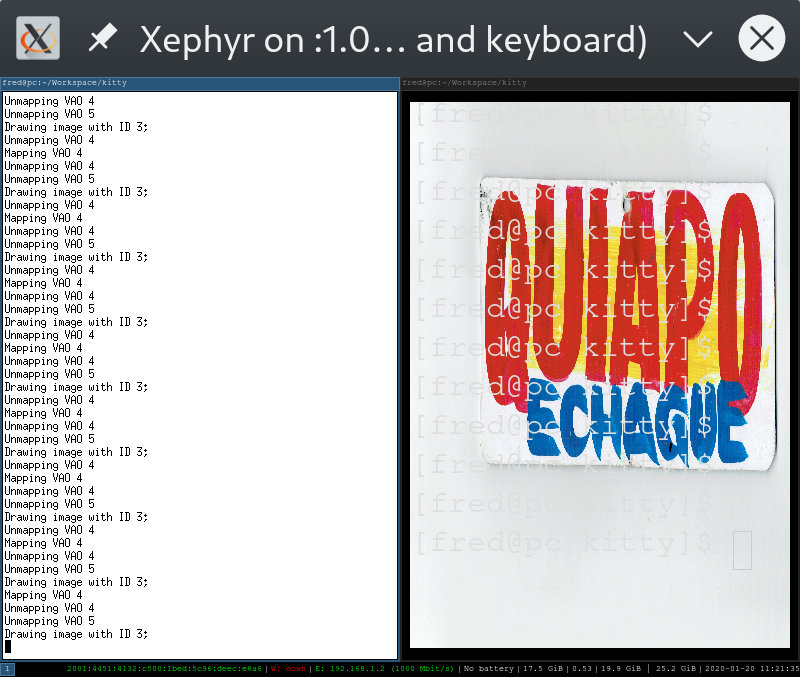
The problem is definitely with the gvao_idx VAO. That's where I'm going to focus all of my energy, on figuring out how this is supposed to work. The gvao_idx is somehow improperly initialized, which Mesa doesn't seem to care about, but Nvidia does.
diff --git a/kitty/gl.c b/kitty/gl.c
index dc9c229a..6a37142b 100644
--- a/kitty/gl.c
+++ b/kitty/gl.c
@@ -361,6 +361,7 @@ alloc_vao_buffer(ssize_t vao_idx, GLsizeiptr size, size_t bufnum, GLenum usage)

 void*
 map_vao_buffer(ssize_t vao_idx, size_t bufnum, GLenum access) {
+    printf("Mapping VAO %d\n", vao_idx);
     ssize_t buf_idx = vaos[vao_idx].buffers[bufnum];
     bind_buffer(buf_idx);
     return map_buffer(buf_idx, access);
diff --git a/kitty/shaders.c b/kitty/shaders.c
index 59c87ff7..624062ac 100644
--- a/kitty/shaders.c
+++ b/kitty/shaders.c
@@ -419,6 +419,9 @@ draw_cells_interleaved(ssize_t vao_idx, ssize_t gvao_idx, Screen *screen) {
     glDrawArraysInstanced(GL_TRIANGLE_FAN, 0, 4, screen->lines * screen->columns);

     if (screen->bgimage != NULL) {
+        static ImageRenderData data = {.group_count=1};
+        gpu_data_for_centered_image(&data, 800, 600, screen->bgimage->width, screen->bgimage->height);
+        send_graphics_data_to_gpu(1, gvao_idx, &data);
         draw_bg(GRAPHICS_PROGRAM, vao_idx, gvao_idx, screen->bgimage);
     }
By the way, as we can see, it looks rather strange. I might end up fixing this by creating my own VAO, a third VAO for the entire OS Window, and drawing my texture on that rather than attempting to re-purpose the graphics VAO. Comments welcome!
ctrlcctrlv
on 20 Jan 2020
I could be off base here, but do you actually need a VAO at all? Since
there are only four vertices involved, you could just set them via
uniforms.
kovidgoyal
on 20 Jan 2020
No, you're not off base at all. That's not a bad idea.
ctrlcctrlv
on 20 Jan 2020
Unfortunately it doesn't seem possible to use constant vertices because gl-wrapper.h doesn't have glBegin or glEnd. :(
ctrlcctrlv
on 21 Jan 2020
Then I suggest storing the vao_idx on OSWindow and using that.
kovidgoyal
on 21 Jan 2020
So, making a new VAO?
ctrlcctrlv
on 21 Jan 2020
yes, you cant really use the graphics vao since that is designed for the
graphics shader, unless you want to re-use the grpahics shader in which
case, you will have to deal with intializing it when there are no
graphics apart from the bg image.
kovidgoyal
on 21 Jan 2020
I've made some more progress using a new VAO!
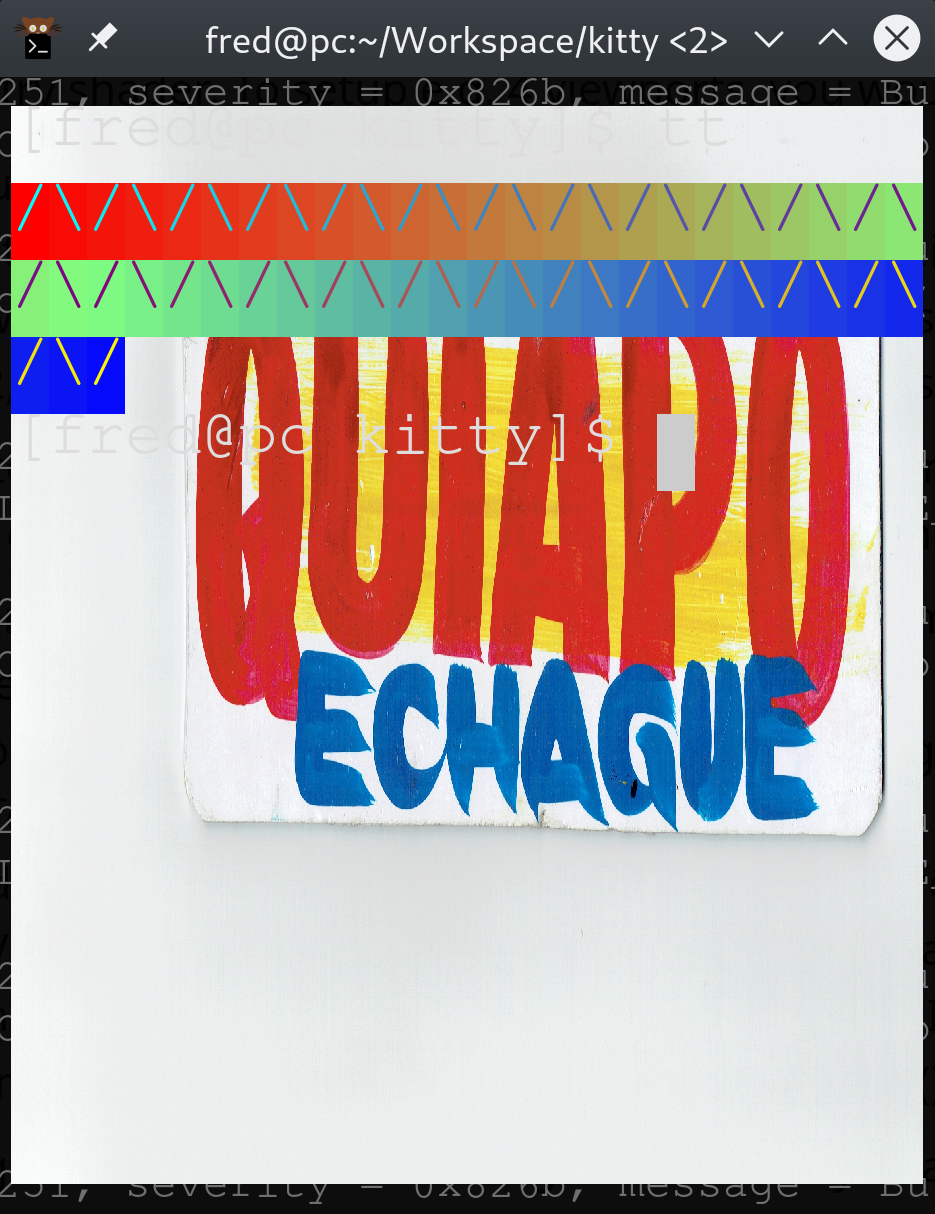
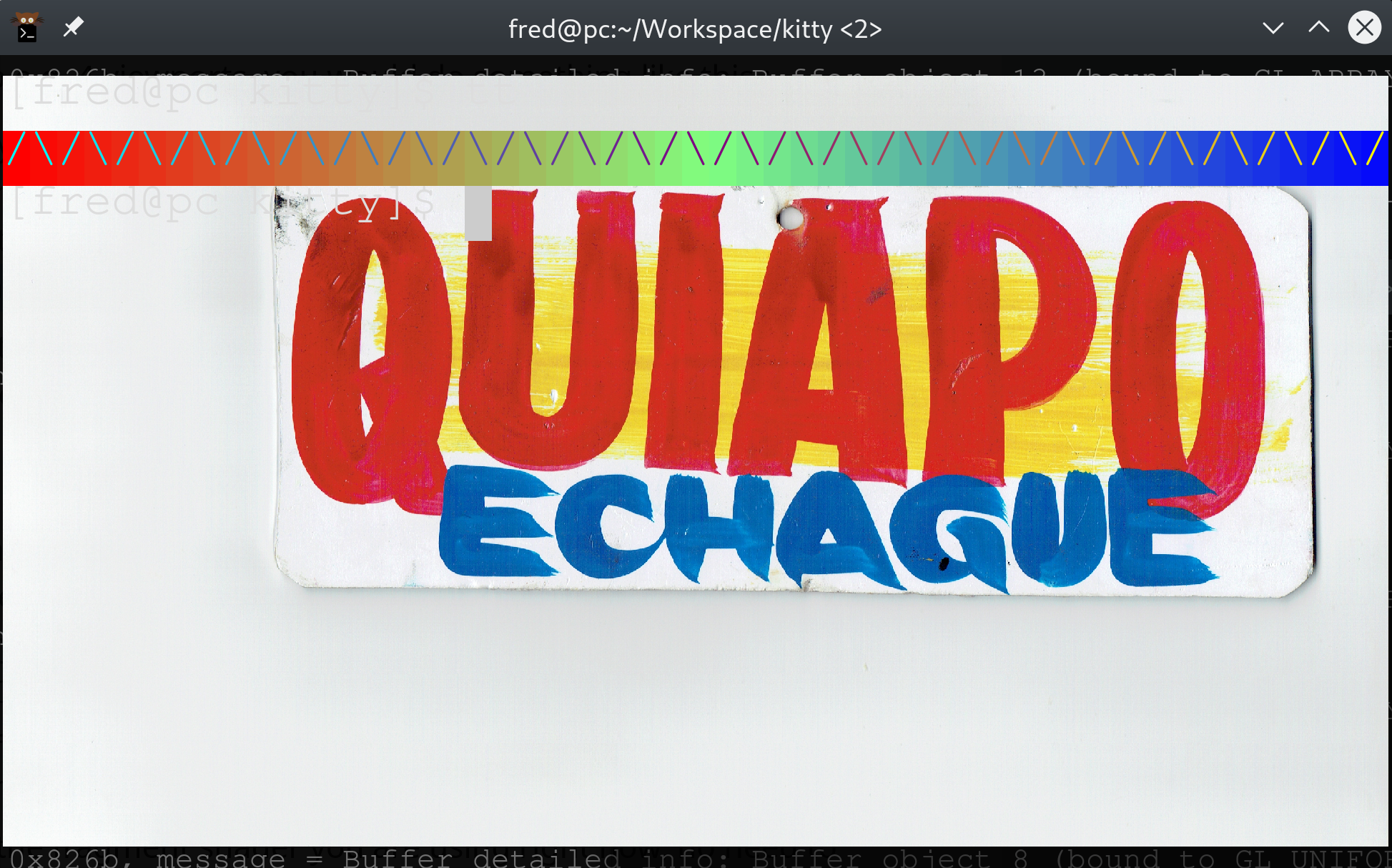
However, that progress has led to a new question, which I'm hoping you can answer. My new VAO is unconnected to the graphics VAO, yet it seems like it's still somehow being constrained to the size of the graphics VAO and not the size of the OS window? What's up with that?
Is glViewport related?
ctrlcctrlv
on 23 Jan 2020
The viewport is defined as the full OS Window. You want your background image constrained to a single kitty window, which may or may not be the same size as a full OS Window. So you use xstart, ystart, dx and dy (from the cell shader) to determine the vertices at which to draw the background image. If you do that correctly, your background image should be drawn over the entire cell area of the kitty window, excluding any padding/margins.
kovidgoyal
on 23 Jan 2020
(Actually, I hope you don't mind, but I've decided that the background image should cover multiple kitty windows, and should be on the OS window. I am sorry for being indecisive. The little poll we held wasn't really conclusive because the users made no distinction between an OS window and a kitty window, so I now have no idea what they even meant.)
ctrlcctrlv
on 23 Jan 2020
Here's an example with multiple kitty windows:
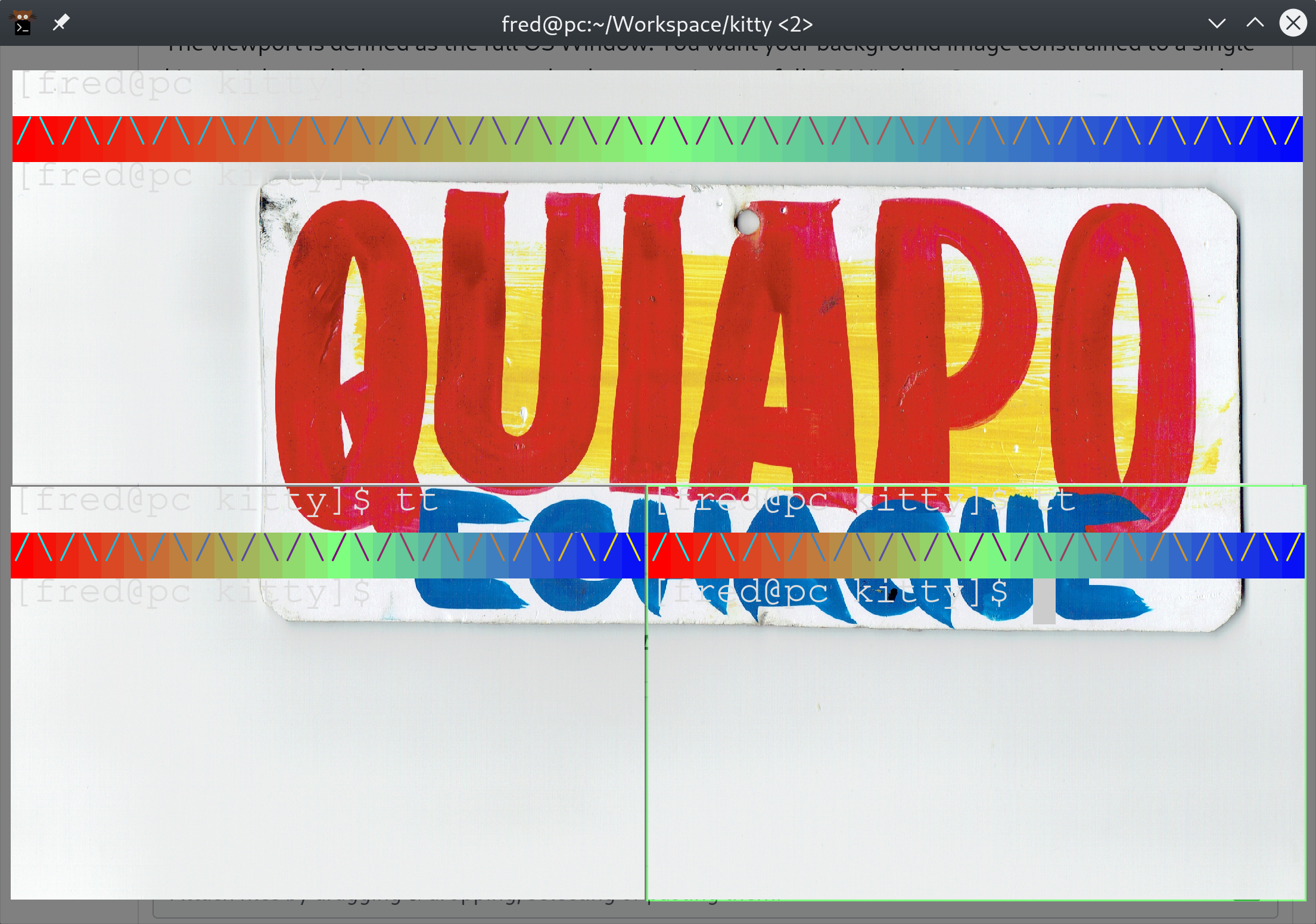
I wonder how to remove the padding?
ctrlcctrlv
on 23 Jan 2020
look at the borders program that draws blank rects. You will likely need
to change things to not draw the blank rects at the edges of the
oswindow.
kovidgoyal
on 23 Jan 2020
Oh. So you mean, my whole image is getting drawn, but then it's getting blanked, which I would have recognized had my test image had a more obvious border.
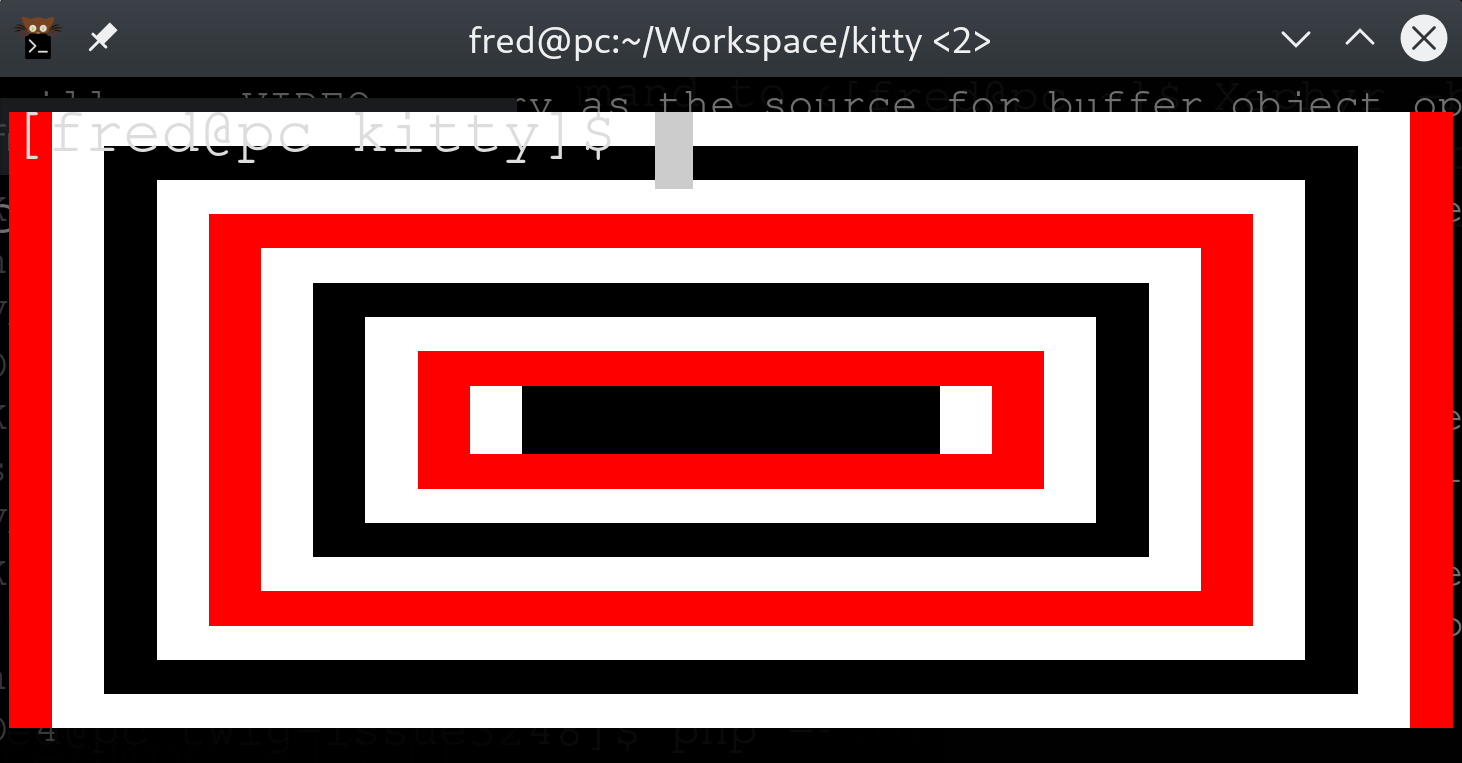

We can see Kitty (left) is not drawing the red border (right) because it's being blanked, _NOT_ because of a call to glViewport or another constraint on the draw area. Thanks @kovidgoyal !
ctrlcctrlv
on 23 Jan 2020
So, if the blanking is done in the borders (GLSL) program, why doesn't:
gl_Position = vec4(0,0,0,0);
stop it? Not the most elegant solution, but that it doesn't work surprises me.
ctrlcctrlv
on 23 Jan 2020
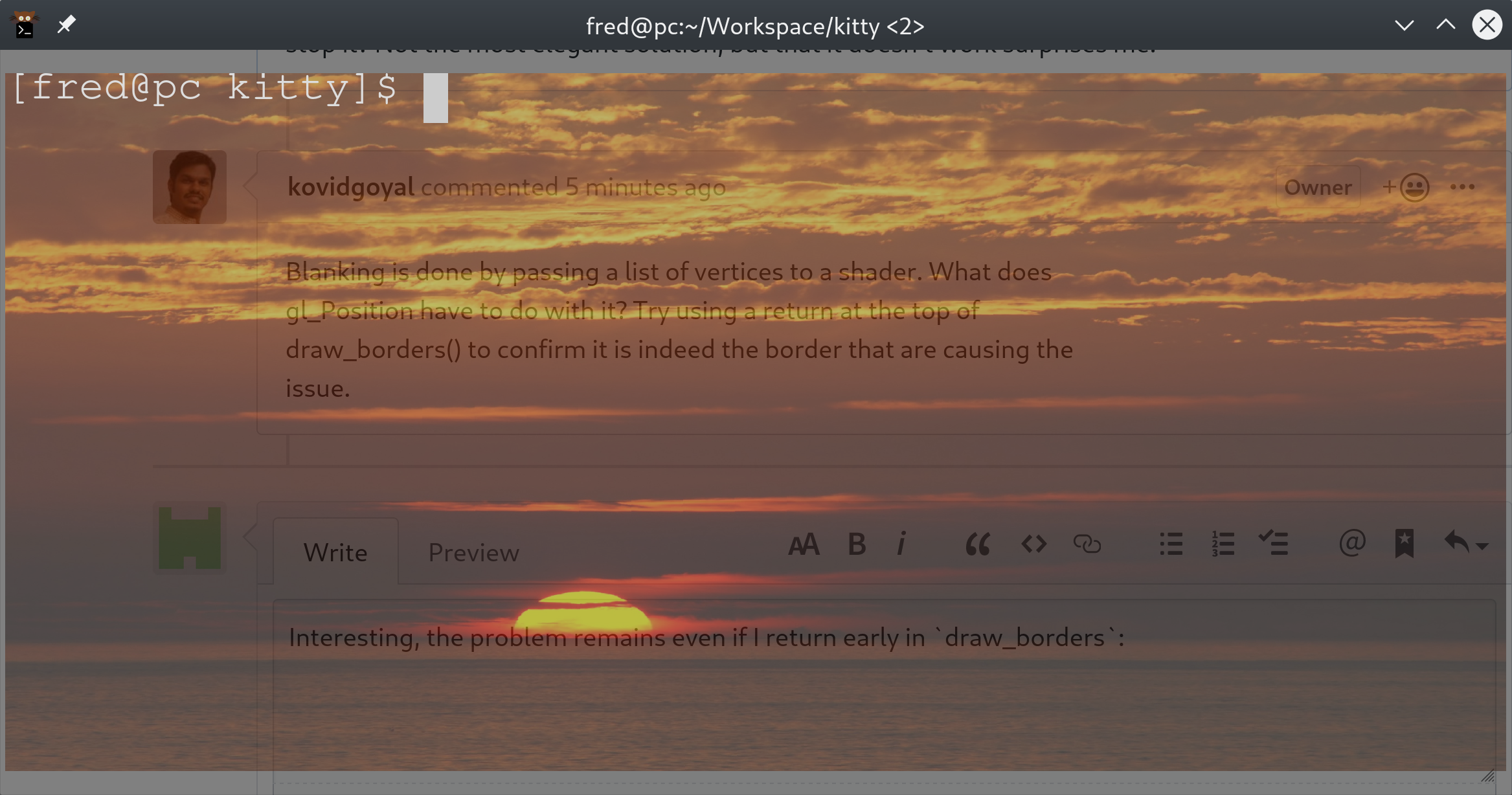
Blanking is done by passing a list of vertices to a shader. What does
gl_Position have to do with it? Try using a return at the top of
draw_borders() to confirm it is indeed the border that are causing the
issue.
kovidgoyal
on 23 Jan 2020
Interesting, the problem remains even if I return early in draw_borders:
ctrlcctrlv
on 23 Jan 2020
comment out all the draw calls except the one that draws the background image to find the culprit.
kovidgoyal
on 23 Jan 2020
Thank you, that was a big help. I've determined that the problem has something to do with the offscreen framebuffer; if I instead force Kitty to use draw_cells_interleaved, the problem goes away. Unless you know off hand how to fix it, I'll keep digging.
ctrlcctrlv
on 23 Jan 2020
By the way, the problem _is not_:
-        glTexImage2D(GL_TEXTURE_2D, 0, GL_RGBA, os_window->viewport_width, os_window->viewport_height, 0, GL_RGBA, GL_UNSIGNED_BYTE, 0);
+        glTexImage2D(GL_TEXTURE_2D, 0, GL_RGBA, os_window->window_width, os_window->window_height, 0, GL_RGBA, GL_UNSIGNED_BYTE, 0);
This has no visible effect :-)
ctrlcctrlv
on 23 Jan 2020
check the glScissor call in _premult()
kovidgoyal
on 23 Jan 2020
You found it! Indeed, draw_cells sets the glScissor. A simple change to the definition of SCALE(w,x) from viewport to window is not enough, however. More investigation will be needed, but that's the problem :-)
glScissor is definitely needed though, it renders weird without it.
ctrlcctrlv
on 23 Jan 2020
glscissor is needed. you will need to call disable scissor before drawing your background image and then enable scissor after.
kovidgoyal
on 23 Jan 2020
Unfortunately, that doesn't seem to work. I have a book on OpenGL, I'm going to need to delve into what GL_SCISSOR_TEST actually does to figure out why
ctrlcctrlv
on 23 Jan 2020
Actually, I really think that the problem is the framebuffer. Right, draws are done off screen? So we can't just disable and enable the scissor test, because we are drawing everything at once. :-S
Even this:
if (screen->bgimage != NULL) {
   GLint params[4];
   glGetIntegerv(GL_SCISSOR_BOX, params);
   glScissor(0, 0, os_window->window_width, os_window->window_height);
   draw_bg(GRAPHICS_PREMULT_PROGRAM, vao_idx, gvao_idx, screen->bgimage);
   glScissor(params[0], params[1], params[2], params[3]);
}
Is essentially a no-op, because when we draw everything later, the glScissor will be what it was set to in draw_cells!
If, however, immediately after enabling the scissor test, we call:
glScissor(0, 0, os_window->window_width, os_window->window_height);
We get somewhat decent output. Only problem is that if it has an alpha channel that goes away as we type (but only in the border). Fixing that should be simple, I'd hope...I just don't know how, sorry.
If you are too busy to answer, though, I will continue the research later today
ctrlcctrlv
on 23 Jan 2020
Here is the output, by the way :-)
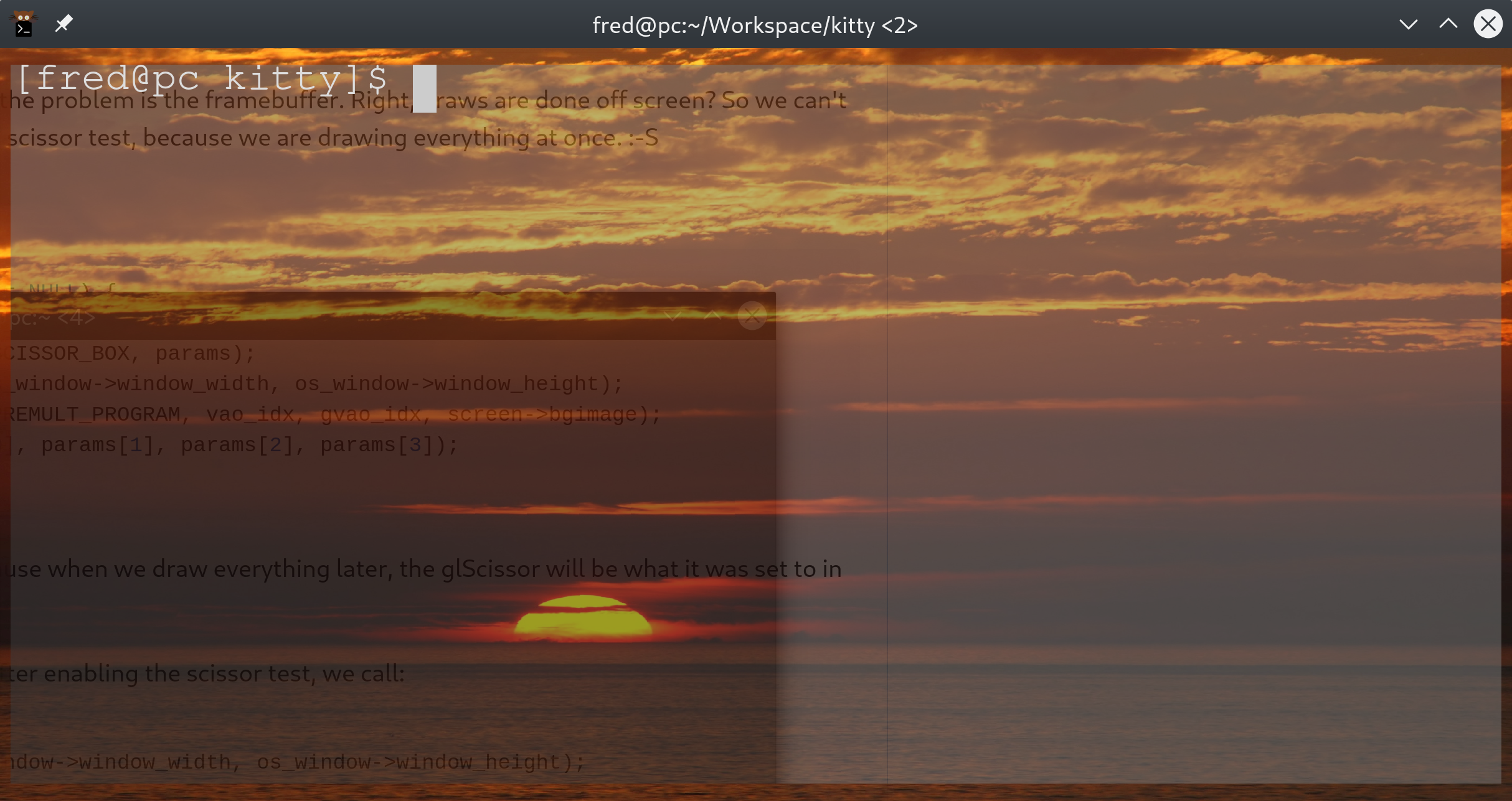
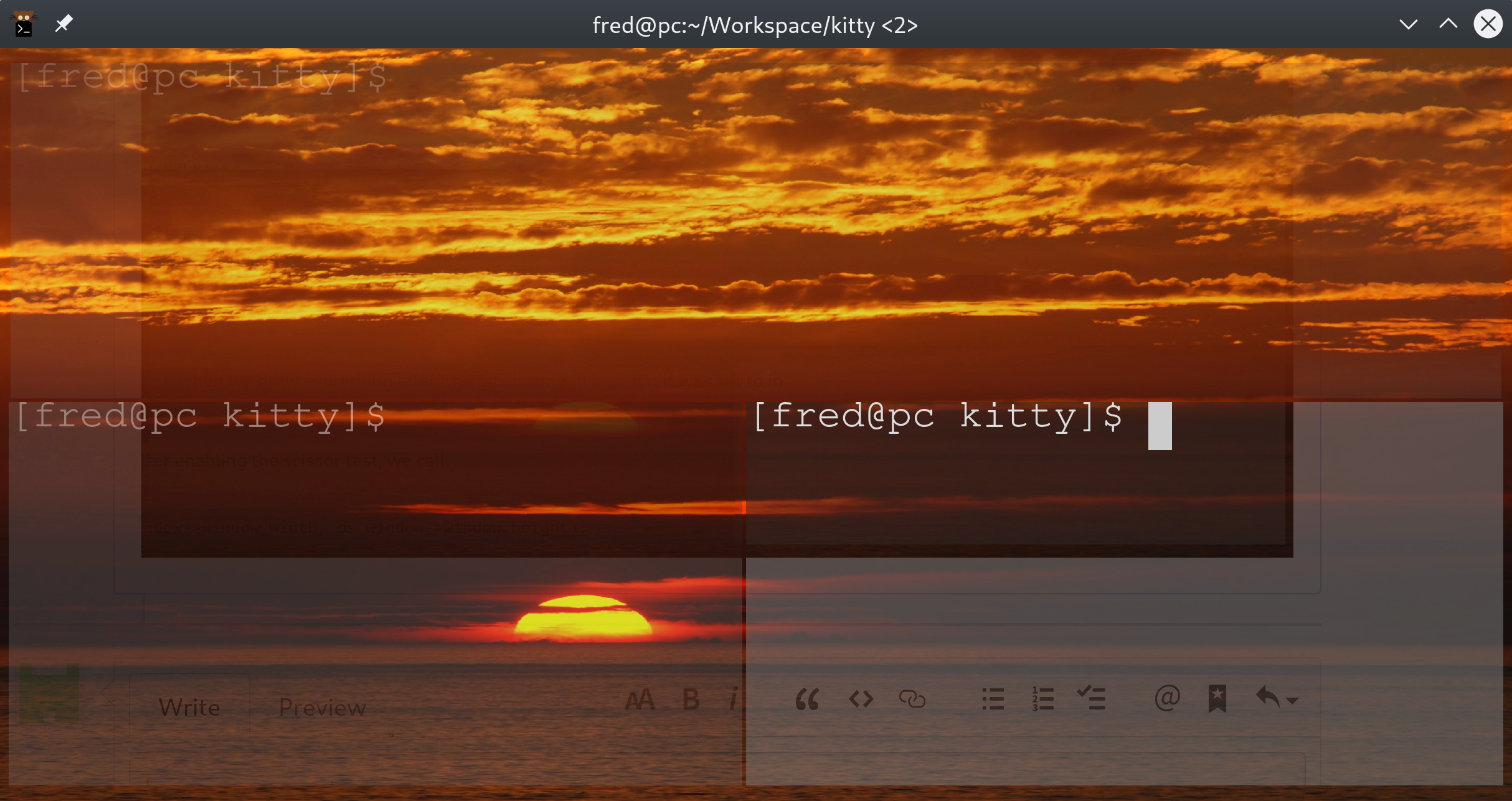
Oh, and it definitely should be mentioned that this "somewhat decent" output is decidedly less decent with multiple kitty windows
ctrlcctrlv
on 23 Jan 2020
I dont really see how this can be fixed. The scissor is meant to restrict
drawing to the area of a single kitty window. You want to draw over
the entire OS Window. For one thing, you cant use draw_cells for that,
since draw_cells is called per kitty window not per OSWindow. You have
some alternatives:
1) draw images per kitty window
2) draw only the section of the image that lies under the window in draw
cells and draw the rest in before calling any draw_cells, i.e. in
draw_borders
kovidgoyal
on 23 Jan 2020
One possibility is to forget the work I did in #2271. Consider it a donation to the graphics protocol, but not good for much else.
Then do draw_bg underneath the default cell color, in render_os_window proper, before the call to draw_cells.
As far as configuration is concerned, this means that by default setting a background_image will do nothing; it only has an effect when background_opacity < 1. If we detect a background_image when background_opacity is 1, we can spit out a warning.
ctrlcctrlv
on 23 Jan 2020
On Thu, Jan 23, 2020 at 01:26:34AM -0800, Fredrick Brennan wrote:
One possibility is to forget the work I did in #2271. Consider it a donation to the graphics protocol, but not good for much else.
Then do
draw_bgunderneath the default cell color, inrender_os_windowproper, before the call todraw_cells.
Just draw the background image in draw_borders, then in draw_cells check
if a background image is present, and if so set background_opacity=0 for
the draw call.
kovidgoyal
on 23 Jan 2020
Thank you @kovidgoyal, I'll look into that. I have no idea why some people don't like you. You've more than shown you're willing to put time in if I'm willing to, even for a feature you'll never personally use. Can't really ask for more than that from a free project, and in my experience most maintainers would have told me to go figure it out myself and send them a patch five times by now :-P
ctrlcctrlv
on 23 Jan 2020
On Thu, Jan 23, 2020 at 01:53:24AM -0800, Fredrick Brennan wrote:
Thank you @kovidgoyal, I'll look into that. I have no idea why some people don't like you. You've more than shown you're willing to put time in if I'm willing to, even for a feature you'll never personally use. Can't really ask for more than that from a free project, and in my experience most maintainers would have told me to go figure it out myself and send them a patch five times by now :-P
I love working with people that have demonstrated a good level of effort
and commitment. I always try to give such the response it deserves.
kovidgoyal
on 23 Jan 2020
I've got it around 99% working now. There's one final bug: the outside border doesn't appear until an event happens (resize, click, keyboard event). I'm not sure what's causing that but will continue the patch tomorrow.
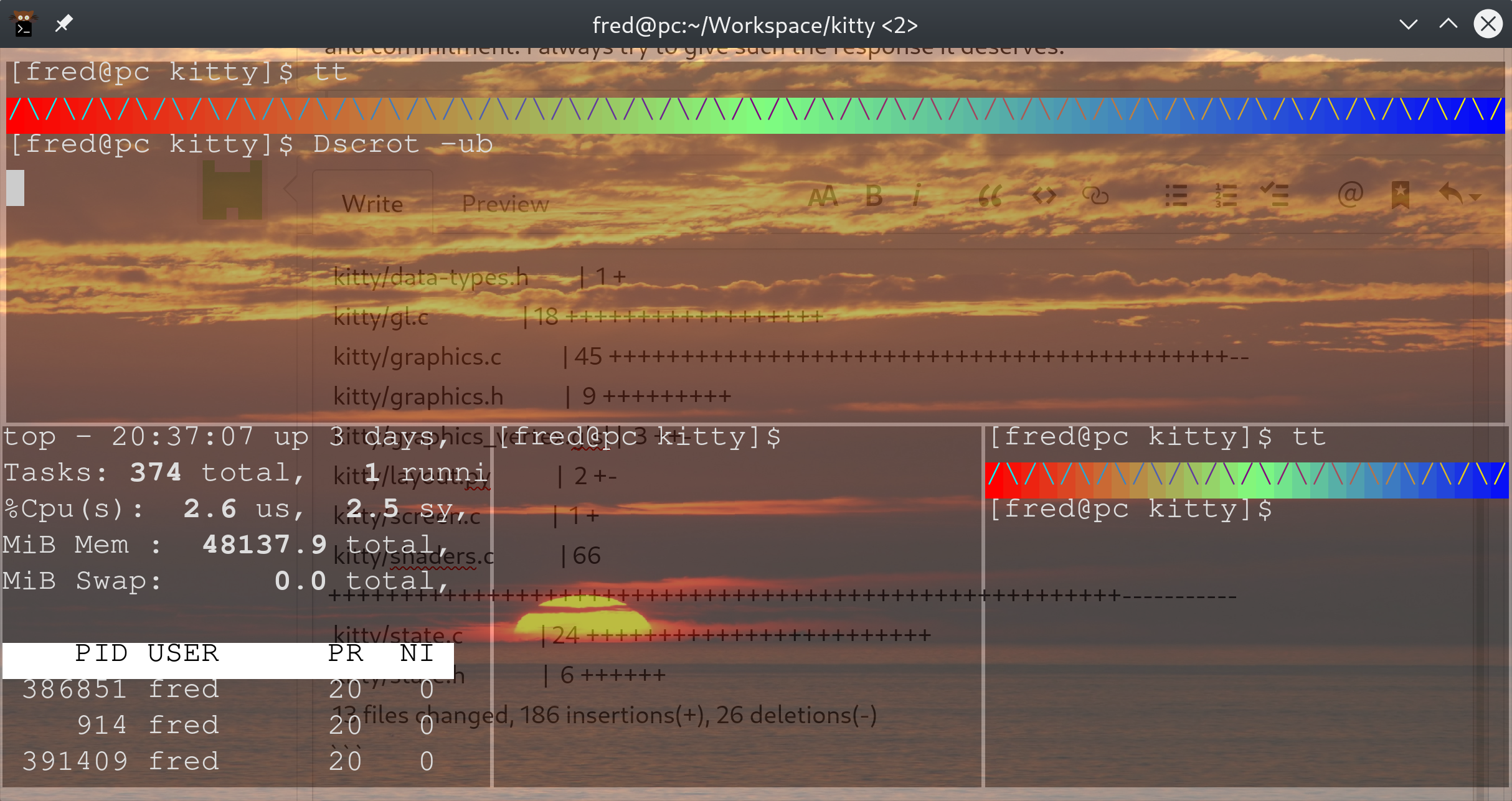
 kitty/border_vertex.glsl   |  2 ++
 kitty/child-monitor.c      |  2 +-
 kitty/config_data.py       | 33 +++++++++++++++++++++++----------
 kitty/data-types.h         |  1 +
 kitty/gl.c                 | 18 ++++++++++++++++++
 kitty/graphics.c           | 45 +++++++++++++++++++++++++++++++++++++++++++--
 kitty/graphics.h           |  9 +++++++++
 kitty/graphics_vertex.glsl |  3 ++-
 kitty/layout.py            |  2 +-
 kitty/screen.c             |  1 +
 kitty/shaders.c            | 66 +++++++++++++++++++++++++++++++++++++++++++++++++++++++-----------
 kitty/state.c              | 24 ++++++++++++++++++++++++
 kitty/state.h              |  6 ++++++
 13 files changed, 186 insertions(+), 26 deletions(-)
I expect this patch will be ≈250 lines.
ctrlcctrlv
on 23 Jan 2020
Cool, good progress :)
kovidgoyal
on 23 Jan 2020
I've implemented tiling, meaning that this is finally feature complete.
I also fixed the bug where it looked different until you pressed a key. And now that #2311 is in, multiple windows work fine too!
Unless I find a showstopping bug in the next few hours of use I'll open a PR today. :-)
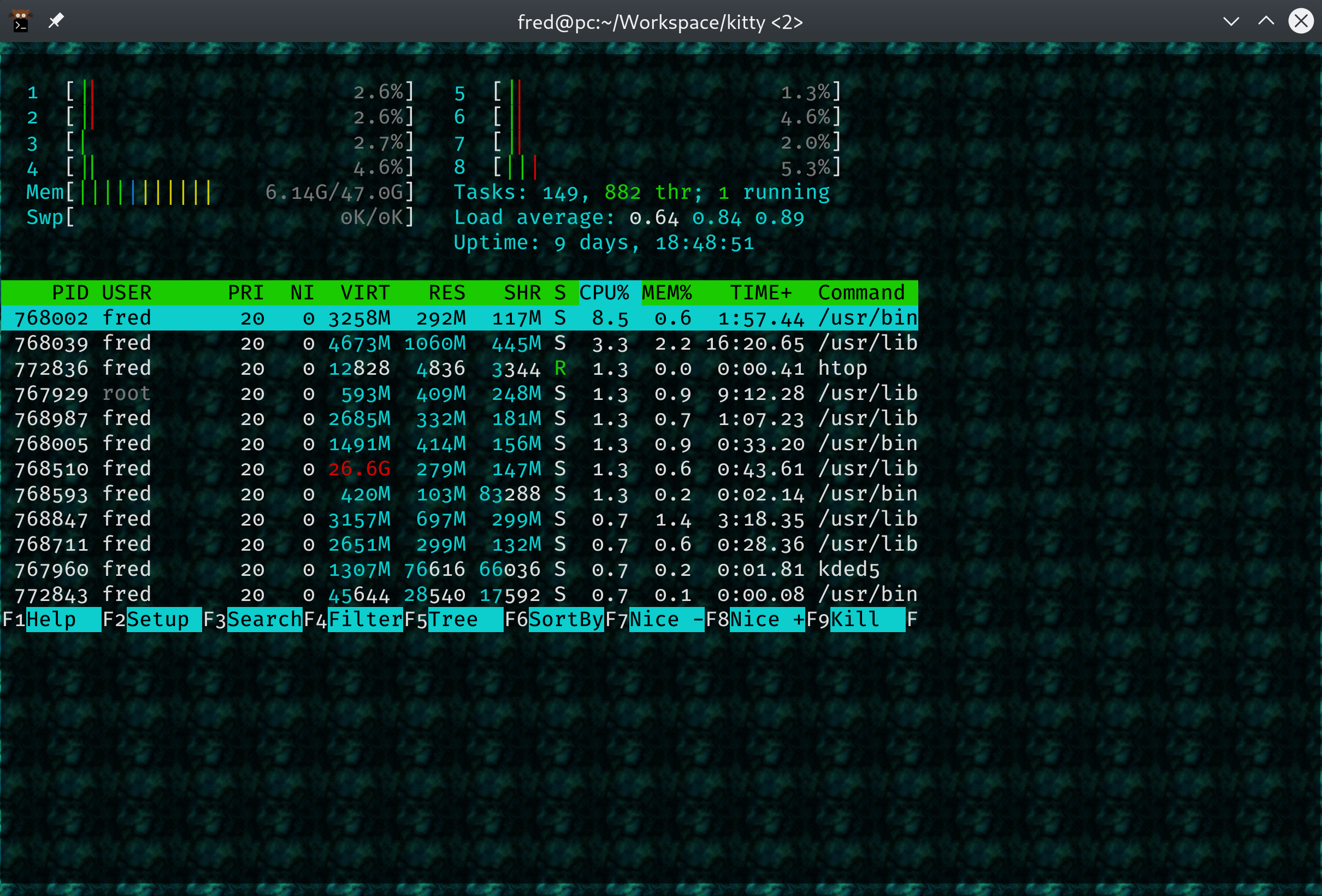
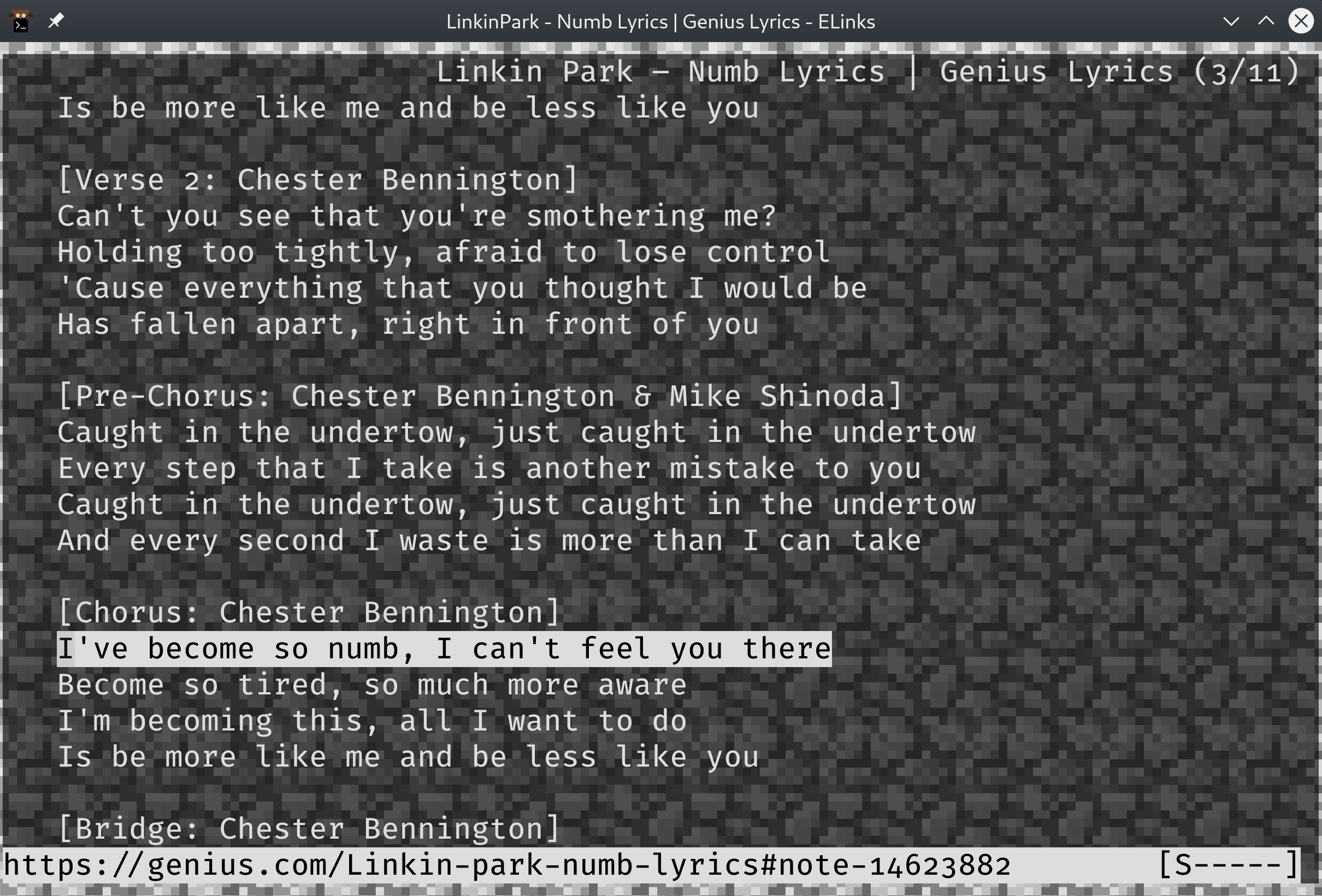
Thank you @kovidgoyal for all the help! I almost came to you again with this tiling thing but I finally understood texture coordinates vs. VAO coordinates so didn't need to.
ctrlcctrlv
on 30 Jan 2020
Cool, well done :) and hope you enjoyed the journey.
kovidgoyal
on 30 Jan 2020
This is absolutely beautiful. Thank you for working on this!
 ritiek
on 8 Mar 2020
ritiek
on 8 Mar 2020
Hello thanks again for this very nice feature.
I have try to use it
add option background_image in my kitty.conf
but it don't work.
I didn't found any documentation of it on the main web site.
Please could you provide any example on how to use it.
Thanks.
 ranska
on 16 Mar 2020
ranska
on 16 Mar 2020
background_image does not support jpeg images. What image format did you try to use?
Luflosi
on 16 Mar 2020
And you need to run from master since this feature is not released yet.
kovidgoyal
on 17 Mar 2020
@Luflosi I used png.
I write in kitty.conf
background_image "/from_root/path/image.png"
@kovidgoyal you're right (my version was the last released).
So on ubuntu 18.04
after installing depedency like said here https://sw.kovidgoyal.net/kitty/build.html
it was other dependency asked dbus, wayland-protocol, lib-png
so I do.
And after remove " around the file name like
background_image /from_root/path/image.png
It works !
Thanks a lot for your rapide comment ! :)
optional question..
Is it possible to change the background on the fly with command line or is it only from kitty.conf ?
Again thanks a lot for your help.
ranska
on 17 Mar 2020
yes there is a remote control command to change background image.
kovidgoyal
on 17 Mar 2020
Sorry, little late to the party. Will portion of the image change depending on where the terminal is open on the window? To simulate "pseudo-transparency" for the wallpaper.
coxley
on 8 Apr 2020
No. kitty has real transparency, use it.
kovidgoyal
on 9 Apr 2020
Without a compositor? Some people can't use them. :\
coxley
on 10 Apr 2020
On Fri, Apr 10, 2020 at 09:42:41AM -0700, Codey Oxley wrote:
Without a compositor? Some people can't use them. :\
That's a pity, but I'm afraid not one I think terminal emulators should
be in the business of compensating for.
kovidgoyal
on 10 Apr 2020
The idea of scaling the image to the size of the monitor, and then having the terminal window act as a "viewport", is somewhat appealing to me. I don't think it necessarily needs to be meant to replace a compositor. If you want tips in implementing it @coxley, I can give you some
ctrlcctrlv
on 11 Apr 2020
When I add option background_image in my kitty.conf, but it doesn't work.
I didn't found any documentation of it on the main web site.
It does not work for me either
I did not put quotations.
 AVCADO
on 8 May 2020
AVCADO
on 8 May 2020
Did you make sure to use a PNG image? Other formats like JPEG don't work.
Luflosi
on 8 May 2020
I did use PNG.
AVCADO
on 8 May 2020
background_image /home/AVCADO/Pictures/backgrounds/doge-space.png
This is what I have.
AVCADO
on 8 May 2020
Did you restart kitty after changing the config? Post the output of kitty --debug-config.
Luflosi
on 8 May 2020
kitty 0.14.3 created by Kovid Goyal
Linux nickPC 5.3.0-51-generic #44-Ubuntu SMP Wed Apr 22 21:09:44 UTC 2020 x86_64
Ubuntu 19.10 \n \l
DISTRIB_ID=Ubuntu
DISTRIB_RELEASE=19.10
DISTRIB_CODENAME=eoan
DISTRIB_DESCRIPTION="Ubuntu 19.10"
Loaded config files: /etc/xdg/kitty/kitty.conf, /home/nick/.config/kitty/kitty.conf
[129 13:20:24.627499] Ignoring unknown config key: bolt_font
[129 13:20:24.627526] Ignoring unknown config key: background_image
[129 13:20:24.627539] Ignoring unknown config key: background_image_layout
Running under: X11

Config options different from defaults:
update_check_interval 0.0
Your version of kitty is too old. The background image feature was introduced in 0.17.0 and you're using 0.14.3. Either try to update your Ubuntu to a version which has a newer kitty or see https://sw.kovidgoyal.net/kitty/binary.html.
Luflosi
on 8 May 2020
The newest version is 0.14.3.
AVCADO
on 8 May 2020
The newest version of kitty in Ubuntu eoan (19.10) is 0.14.3. In Ubuntu focal (20.04LTS) it's 0.15.0 and in Ubuntu groovy, which hasn't been released yet, it will be 0.17.3. Just uninstall kitty with apt remove kitty or so and then install the truly latest version with the instructions from https://sw.kovidgoyal.net/kitty/binary.html.
Luflosi
on 8 May 2020
The idea of scaling the image to the size of the monitor, and then having the terminal window act as a "viewport", is somewhat appealing to me. I don't think it necessarily needs to be meant to replace a compositor. If you want tips in implementing it @coxley, I can give you some
That'd be perfect, @ctrlcctrlv :)
coxley
on 27 May 2020
That'd be perfect, @ctrlcctrlv :)
I second this. I _can_ use a comp manager but don't want to. I much prefer pseudo-transparency a-la urxvt for both performance and aesthetic reasons.
 polypus74
on 20 Jun 2020
polypus74
on 20 Jun 2020
Related issues
 Askannz
·
3Comments
Askannz
·
3Comments
 crocket
·
4Comments
crocket
·
4Comments
 Jomik
·
4Comments
Jomik
·
4Comments
 lazarcf
·
4Comments
lazarcf
·
4Comments
 reed-jones
·
4Comments
reed-jones
·
4Comments
Most helpful comment
Would love if this had a toggle for current wallpaper + dim. Only feature keeping me from
kittyfull time :)