Issue description:
Hello,
I have to create a select with icons + text, such as fontawesome field.
Looking and thinking I found the solution visible in the code section.
Do you confirm that it is really the only solution at the moment?
Because this solition has a small problem, as you can see from the images
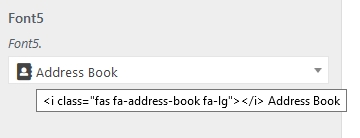

In short, the html code to display the icon is also included in the title attribute
A future solution to implement, could be to insert an array to specify:
- The main text.
- The text before and the text after the text of point 1.
Example:
'choices' => array(
            'fa-user'  =>  array(
                           'before'=> '<i class="fas fa-user fa-lg"></i>',
                           'text'=> esc_attr__( 'User', 'test' ),
                           'after'=> 'to select'
              ),
)
Result:
<span class="select2-selection__rendered" id="select2-9d7v-container"
role="textbox" aria-readonly="true" title="User">
      <i class="fas fa-address-book fa-lg"></i> User to select
</span>
Version used:
3.0.25
Using theme_mods or options?
theme_mods
Code to reproduce the issue (config + field(s))
Kirki::add_field( 'theme_config_id', array(
    'type'        => 'select',
        'settings'    => 'font5_test_setting',
        'label'       => esc_attr__( 'Font5', 'test' ),
        'description' => esc_attr__( 'Font5.', 'test' ),
        'section'     => 'test_section',
        'default'     => 'fa-address-book',
        'choices'     => array(
            'fa-address-book'   =>  esc_attr__( '<i class="fas fa-address-book fa-lg"></i> Address Book', 'quick' ),
            'fa-anchor'         =>  esc_attr__( '<i class="fas fa-anchor fa-lg"></i> Anchor', 'test' ),
            'fa-user'           =>  esc_attr__( '<i class="fas fa-user fa-lg"></i> User', 'test' ),
            'fa-balance-scale'  =>  esc_attr__( '<i class="fas fa-balance-scale fa-lg"></i> Balance Scale', 'test' ),
            'fa-bath'           =>  esc_attr__( '<i class="fas fa-bath fa-lg"></i> Bath', 'test' ),
        )
) );
 mattedesing
All 8 comments
Instead of this:
esc_attr__( '<i class="fas fa-address-book fa-lg"></i> Address Book', 'quick' ),
try this:
sprintf( esc_attr__( '%s Address Book', 'quick' ), '<i class="fas fa-address-book fa-lg"></i>' )
By adding the icon inside the esc_attr__ function you're stripping it and it doesn't show. Moving it out of the function should fix the issue for you - and at the same time make traslations a lot easier since translators won't have to include the icon markup in the translations.
 aristath
on 19 Apr 2018
aristath
on 19 Apr 2018
I'm sorry to tell you, but your solution does not work. Doing so does not display icons in the select.
Maybe I'm wrong?
mattedesing
on 19 Apr 2018
Can you please try using the develop branch instead of the version from wordpress.org?
aristath
on 19 Apr 2018
Done. No changes.
Strange. In theory it should work even if I write directly:
'fa-address-book'` => '<i class="fas fa-address-book fa-lg"></i> Address Book'
But even so it does not work.
mattedesing
on 19 Apr 2018
Hello, any news about this little problem?
mattedesing
on 8 May 2018
I am also curious about this. I'd like to be able to filter the fontawesome list to only few choices (for example social media icons), and add custom labels to it.
Is this something you would consider for one of future releases?
 ghost
on 24 Jul 2018
ghost
on 24 Jul 2018
This is still a problem. I tried to use with radio control instead, but without success either...
Any idea how can we achieve this? The client saw the Fontawesome field and said "I want the same but with my icons instead"... And I dunno what to do... :(
 pisandelli
on 1 Nov 2019
pisandelli
on 1 Nov 2019
If I'm not mistaken this works in v4.0-beta.
If you want you can try using the develop branch
aristath
on 4 Nov 2019
Related issues
ghost
·
5Comments
 runnickrun
·
3Comments
runnickrun
·
3Comments
 manuelmoreale
·
3Comments
manuelmoreale
·
3Comments
 VladNov
·
6Comments
VladNov
·
6Comments
 stylethemes
·
6Comments
stylethemes
·
6Comments