About 3.0.10:
Version 3.0.10 started as a simple bugfix version but then I got ambitious and started adding more things... A LOT more!
The result was that the release was delayed and I apologise for that.
Most of the major refactoring commits have been reverted (they are now on a separate branch which will be version 3.1).
However, reverting 2 weeks of work and cherry-picking the ones that should be part of 3.0.10 was a long process.
All of the fixes should be part of 3.0.10, and while I'm testing it this weekend before I release v3.0.10 on Monday, I could use some help from the people that have reported those issues and/or use kirki on their themes.
You can get the 3.0.10-beta.1 version on https://github.com/aristath/kirki/archive/develop.zip (or just use the develop branch).
Need some help:
Tagging here the people that have reported issues in v3.0.9 and also people that contributed somehow (thank you guys).
@bawright @UsmanShahzad @JiveDig @carasmo @hellor0bot @MapSteps @tsquez @danielortiz
If you can test this beta version with your current products and make sure that there are no issues I'd appreciate it... The sooner I release v3.0.10, the sooner we can get back to v3.1 - and you're going to like what's being done there 😉
About 3.1:
v 3.1 rewrites almost all controls, includes a complete rewrite of the repeater control (it will now work as a wrapper for other controls instead of just a wrapper for input fields), it represents a significant performance improvement (though some of these improvements made it in 3.0.10) and will allow us to move forward with a better and more solid codebase. A lot of the code will be moved from PHP to JS, and that will allow our other modules (tooltips/postMessage etc) to be rewritten to further improve performance.
 aristath
All 39 comments
Hi,
I have just tested this beta release and none of the controls are working, typography, color picker, sliders none of them, is there any full stable release i can use at this moment as my customers are struggling with live preview and saving changes.
 CodeCurosity
on 26 Aug 2017
CodeCurosity
on 26 Aug 2017
@UsmanShahzad what do you mean they are not working? Could you please provide some more details?
Did you try hard-refreshing your browser (or just resetting the browser caches)?
If that doesn't work can you send me a copy of your theme so that I may test it?
The more details you provide the easier it will be to find the issue.
aristath
on 26 Aug 2017
Hi,
Yes i have tried everything and i also just e-mailed you the plugin, please take a look and give me your feedback, thanks.
CodeCurosity
on 26 Aug 2017
@UsmanShahzad thanks for sending your plugin.
Issue fixed in https://github.com/aristath/kirki/commit/c2837e4620da777312e8aeb0387a19f31fb34d9d
Can you please download the develop branch from https://github.com/aristath/kirki/archive/develop.zip and test this again?
aristath
on 26 Aug 2017
Just tried and controls are loading just fine but the live preview still doesn't work.
CodeCurosity
on 26 Aug 2017
@UsmanShahzad the problem was the use of suffix in your typography fields.
I just added a fix for that, it should be fine now. (commit https://github.com/aristath/kirki/commit/813f17a02d7ad11900f79fad5283d73e6be17334)
Thank you for reporting these issues, I would have missed them otherwise. However, if there are any more issues, please be more specific... "live previews doesn't work" forces me to search all your controls to find the ones that don't work. It would be more helpful if you could say for example something like "live preview for typography fields doesn't work. And here's some example code of a control that doesn't work". It would be a lot faster to just locate the issue and isolate it to the suffix argument if more info was provided in the first place. 👍
aristath
on 26 Aug 2017
Got it but the reason i didnt mention specific controls as when i tested it didnt work with any controls e.g sliders, color pickers but its very late here i will test tomorrow with the latest fix and update you.
CodeCurosity
on 26 Aug 2017
Hi, @aristath
It'll be my pleasure to beta test the new version. However I'm afraid, I won't be able to try it before Monday :(
 hellor0bot
on 27 Aug 2017
hellor0bot
on 27 Aug 2017
I've just given it a try :) Everything's working perfectly fine on my end.
Could you please clarify, what exactly "dynamic loading" of controls means?
Can't wait to use Kirki controls without the Kirki plugin itself in a new theme. Many thanks for your work.
hellor0bot
on 27 Aug 2017
Hi,
I also just tested again the controls and live preview is working perfectly, i will keep on testing and report any bugs if i find any ;-)
Keep up the great work :-)
CodeCurosity
on 27 Aug 2017
One issue:
Kirki::add_field(
    'theme_mod', array(
        'type'        => 'typography',
        'settings'    => 'typography_h1',
        'label'       => esc_html__( 'Heading 1', 'text-domain' ),
        'section'     => 'typography_headings',
        'default'     => array(
            'font-size'      => '3rem',
            'letter-spacing' => '-.15rem',
            'text-transform' => 'none',
        ),
        'transport'   => 'auto',
        'priority'    => 10,
        'output'      => array(
            array(
                'element' => 'h1, .post-standard .entry-title, .layout-fullwidth .archive-standard .post-featured .entry-title',
            ),
        ),
    )
);
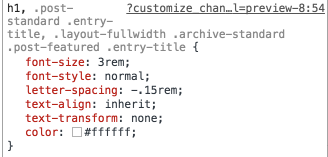
As you see, there's no color in the field, however it's being added in the CSS output.
Same applies to other attributes, font-style, etc.
hellor0bot
on 27 Aug 2017
@hellor0bot
I've just given it a try :) Everything's working perfectly fine on my end.
That's great to gear!
Could you please clarify, what exactly "dynamic loading" of controls means?
Normally when your browser loads the customizer page, it goes through all the controls, adds then HTML from the underscore.js templates it finds, then any extra scripts are triggered to make these controls function the way they need to (colorpicker scripts, event triggers and the rest of the control JS).
By "dynamic loading" I mean that when the customizer initially loads, NOTHING gets loaded for controls. The HTML for the controls is added dynamically via JS when the user expands the section containing that control. At the same time, any additional scripts the control has are triggered.
The result is that initial loading of the customizer is much faster, and that becomes more apparent if you use hundreds of controls.
Dynamic controls give kirki the ability to scale a lot better 👍
@UsmanShahzad
I also just tested again the controls and live preview is working perfectly, i will keep on testing and report any bugs if i find any ;-)
Thank you for testing!!
@hellor0bot
One issue:
As you see, there's no color in the field, however it's being added in the CSS output.
Same applies to other attributes, font-style, etc.
Should be fixed on the develop branch (commit https://github.com/aristath/kirki/commit/ac771f06573a5f5918723e6ac09c24065eef8e45)
I never was able to replicate this issue even though it was reported by others as well, could you please let me know if that last commit fixed it for you?
aristath
on 27 Aug 2017
Great work on the update. I know pushing out a new release can be a pain.
I downloaded the beta this morning and uploaded it to my local test server. The dimension issue seems to be corrected, thank you very much. For reference here is the link to the thread https://wordpress.org/support/topic/dimension-control-not-outputting-percentage-based-value/
Now it seems that I have a new issue. I have _tooltips_ applied to every single control I am using and they were all working fine before I applied the beta. After applying the beta it seems that every other tooltip is working.
For some controls it's the first and third tooltip working, for others it's the second and fourth
 tsquez
on 27 Aug 2017
tsquez
on 27 Aug 2017
Also,
I created a new local server, set it up as I always do with no plugins except for kirki.
I activated the theme I am working on, and the default dimension is not being applied. The default I have for the dimension controls is 100%, however it is only applying 100 without the % symbol.
tsquez
on 27 Aug 2017
this is what I have for one of my dimension controls for the footer:
xxxxxx_Kirki::add_section( 'footer_widgets_section', array(
    'title'       => esc_attr__('Footer Widget Layout','xxxxxx'),
    'panel'       => 'xxxxxx_footer_widget_options',
    'priority'    => 1,
    'capability'  => 'edit_theme_options',
) );
xxxxxx_Kirki::add_field( 'theme_customizer', array(
    'type'        => 'dimension',
    'settings'    => 'footer_widget_width',
    'label'       => esc_attr__('Footer Widgets Main Container Width','xxxxxx'),
    'tooltip'     => esc_attr__('Set the width of the container that holds the Footer Widget area. Default is 100%.','xxxxxx'),
    'section'     => 'footer_widgets_section',
    'default'     => '100%',
    'priority'    => 1,
    'transport'   => 'auto',
    'output'      => array(
        array(
            'element' => '.footer-widgets.grid-container',
            'function' => 'css',
            'property' => 'max-width',
        ),
    ),
) );
xxxxxx_Kirki::add_field( 'theme_customizer', array(
    'type'        => 'dimension',
    'settings'    => 'inside_footer_widget_width',
    'label'       => esc_attr__('Footer Widgets Inner Container Width','xxxxxx'),
    'tooltip'     => esc_attr__('Set the width of the inner Footer Widgets container. Default is 100%.','xxxxxx'),
    'section'     => 'footer_widgets_section',
    'default'     => '100%',
    'priority'    => 2,
    'transport'   => 'auto',
    'output'      => array(
        array(
            'element' => '.inside-footer-widgets',
            'function' => 'css',
            'property' => 'max-width',
        ),
    ),
) );
But like I stated, when uploading and activating the theme, the default is not being applied.
The xxxx represents the name of the theme I am creating. Should I use xxxxxx_Kirki or just Kirki?
tsquez
on 27 Aug 2017
Now it seems that I have a new issue. I have tooltips applied to every single control I am using and they were all working fine before I applied the beta. After applying the beta it seems that every other tooltip is working.
Should be fixed now after the last commit (https://github.com/aristath/kirki/commit/d92a4d4b840daaed2887855320024bfac82efcfb)
I activated the theme I am working on, and the default dimension is not being applied. The default I have for the dimension controls is 100%, however it is only applying 100 without the % symbol.
Use 100%% as per our previous discussion on https://wordpress.org/support/topic/dimension-control-not-outputting-percentage-based-value/#post-9350377
aristath
on 27 Aug 2017
So the dimension control isn't fixed yet? I still have to use 100%% - In our discussion you stated that you had pushed a fix for this:
The solution is to use %% instead of % for the default value.
I pushed a fix on https://github.com/aristath/kirki/commit/a886aed13e1897500a2f702a289548847417b2f2 (will be included in the next release) for this.
Until 3.0.10 is released you can manually apply that change in your copy.
So I still have to use 100%%. Will I have to use this all the time or once 3.0.10 is released I wont have to use 100%%?
I'm confused now...lol 😕
tsquez
on 27 Aug 2017
My bad, I should have explained this better in my reply on w.org
This is a bug on WordPress-Core, and using %% is still the recommended method for theme-mods: https://core.trac.wordpress.org/ticket/34290#comment:1
The fix I pushed in https://github.com/aristath/kirki/commit/a886aed13e1897500a2f702a289548847417b2f2 simply allows you to use %% for the default value without any other implications.
So I still have to use 100%%. Will I have to use this all the time or once 3.0.10 is released I wont have to use 100%%?
You will have to use this all the time, regardless of the Kirki version you use. This is something that will have to be fixed in wp-core, not kirki.
aristath
on 27 Aug 2017
Ah OK got yah...now it makes sense
tsquez
on 27 Aug 2017
OK but I did the same thing, created a new server and I am still getting 100 as the width when 100%% is set : .top-sidebar.grid-container{max-width:100;}.
Really frustrating...lol
tsquez
on 27 Aug 2017
That's weird... seems to be working fine for me.
Try saving the value again?
aristath
on 27 Aug 2017
I did however, I should not have to do that. If someone downloads the theme, uploads it and then activates it the css should show .top-sidebar.grid-container{max-width:100%;} not the .top-sidebar.grid-container{max-width:100;} and the user should not have to go into the customizer and re-enter the value and or re-save, it should just show 100%
tsquez
on 27 Aug 2017
@tsquez in a fresh WP installation I added this:
Kirki::add_field( 'kirki_demo', array(
    'type'        => 'dimension',
    'settings'    => 'inside_footer_widget_width',
    'label'       => esc_attr__('Footer Widgets Inner Container Width','xxxxxx'),
    'tooltip'     => esc_attr__('Set the width of the inner Footer Widgets container. Default is 100%.','xxxxxx'),
    'section'     => 'footer_widgets_section',
    'default'     => '100%%',
    'priority'    => 2,
    'transport'   => 'auto',
    'output'      => array(
        array(
            'element' => '.inside-footer-widgets',
            'function' => 'css',
            'property' => 'max-width',
        ),
    ),
) );
Without even going to the customizer to save the options etc, this is the css I'm getting on the frontend:
<style id='kirki-styles-kirki_demo-inline-css' type='text/css'>
.inside-footer-widgets{max-width:100%;}
</style>
So I'm not exactly sure what goes on in your case, perhaps something is cached? It seems to be working fine for me.
aristath
on 27 Aug 2017
hmmmm I'll play a little more and see what I can find if anything....it may be a cache issue. Overall working good.
tsquez
on 27 Aug 2017
Just dropping this here. Upon refresh I see this happening a lot, of course clearing cache fixes the issue. Has anyone else seen this before or is it just me...lol
tsquez
on 28 Aug 2017
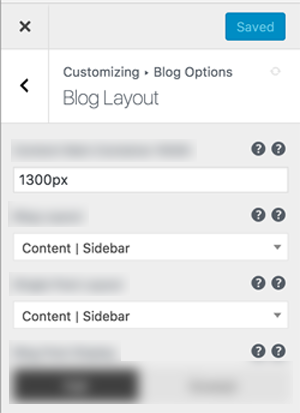
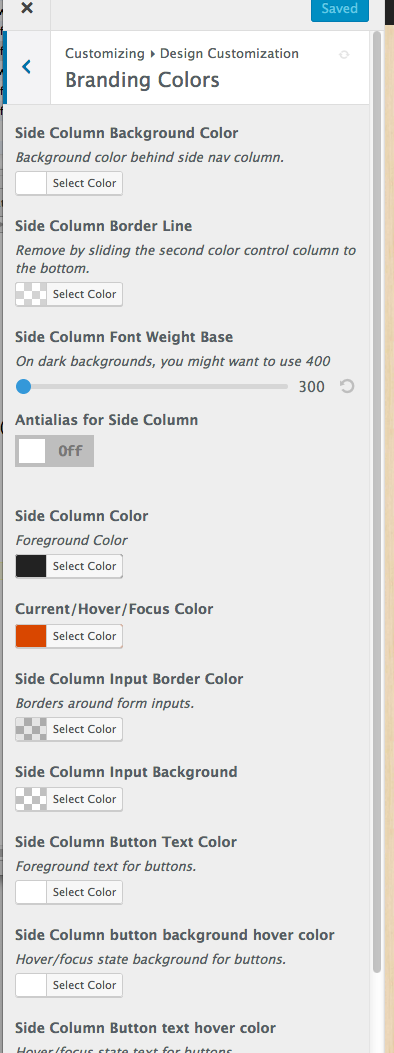
With Kirki plugin (the one from Wordpress repo), the customizer loads fast, with is beta, it takes 40-50 seconds to load and it looks like this and no changes happen at all. The one I'm using in the repo, works fine (second image). I get no errors but since it takes forever to load, I can't really test this very well and no changes are being made either.
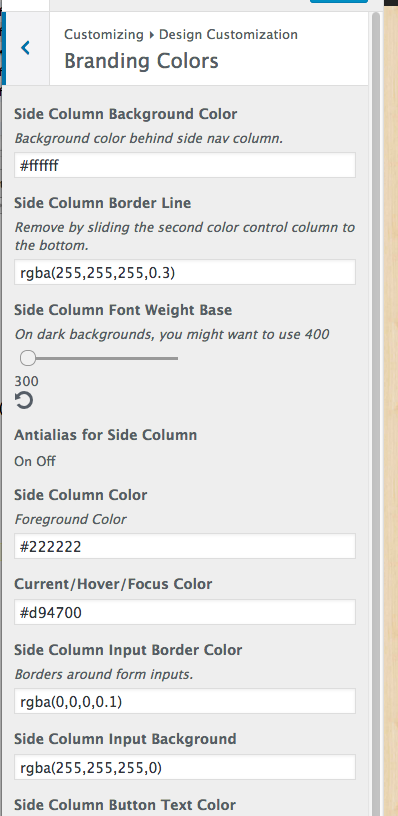
Version in repo, not Beta
 carasmo
on 28 Aug 2017
carasmo
on 28 Aug 2017
@carasmo Had the same problem. You'll have to package the dependencies... check #1501
 bawright
on 28 Aug 2017
bawright
on 28 Aug 2017
@bawright -- Thanks! That fixed it.
carasmo
on 28 Aug 2017
@tsquez
Just dropping this here. Upon refresh I see this happening a lot, of course clearing cache fixes the issue. Has anyone else seen this before or is it just me...lol
I just pushed commit https://github.com/aristath/kirki/commit/2ec840e9b4f2a1915ea6c5151abfe071d14289a8 that fixes this. 👍
@carasmo thanks for finding the time to test this!
If you find anything wrong (new issues or something that was supposed to be fixed in this version) let me know.
I'll wait for any comments you guys have, and if everything is fine I should be releasing this update tomorrow. Otherwise I'll fix any issues you report and release as soon as humanly possible 😄
aristath
on 28 Aug 2017
So far so good! I am very sleepy today, so I may have missed something, but it works great!
carasmo
on 29 Aug 2017
Yep so far so good, working nicely and seems faster. Great work amigo.
Just one thing and I am not sure about this. The tooltips seem to be working great. If I remember correctly before when you clicked on a tooltip it would pop open and then if you could clicked anywhere on the screen it would close.
Now it seems that you click the tooltip it opens correctly but when you click anywhere on the page it does not close. It seems you have to click the little tooltip circle with the question mark for it to close?
Is this the way you intended it to be or?
tsquez
on 29 Aug 2017
Now it seems that you click the tooltip it opens correctly but when you click anywhere on the page it does not close. It seems you have to click the little tooltip circle with the question mark for it to close?
For the time being this is the intended behaviour.
In 3.1 the plan is to completely change the tooltips implementation and have it work like the native WP help toggle on the top of the customizer. But this will have to wait for the controls to be refactored first, so for 3.0.10 the current implementation will have to do. 👍
aristath
on 29 Aug 2017
Oh OK no worries, didn't know if it was a bug or not...lol - AWESOME!!!
tsquez
on 29 Aug 2017
Can you put the Kirki logo piggy back when refresh is the transport?
carasmo
on 29 Aug 2017
aristath
on 29 Aug 2017
Thanks!
carasmo
on 29 Aug 2017
Hi Ari. I have an some error.
Did not parse stylesheet at 'http://localhost:8888/wordpress/assets/css/kirki-styles.css' because non CSS MIME types are not allowed in strict mode.
 vlthemes
on 7 Sep 2017
vlthemes
on 7 Sep 2017
I finally found some time to test the beta, the color fields look a bit off. Not 100% sure if this is related to the beta.
Kirki::add_field( 'my_config', array(
    'type'        => 'color',
    'settings'    => 'my_setting',
    'label'       => __( 'This is the label', 'my_textdomain' ),
    'section'     => 'my_section',
    'default'     => '#0088CC',
    'priority'    => 10,
    'choices'     => array(
        'alpha' => true,
    ),
) );
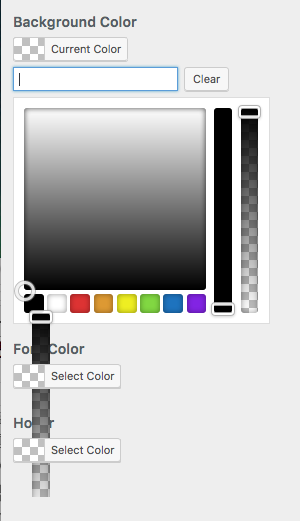
 MapSteps
on 8 Sep 2017
MapSteps
on 8 Sep 2017
@MapSteps I'm unable to replicate this one...
aristath
on 16 Sep 2017
Related issues
 ghost
·
5Comments
ghost
·
5Comments
 rahulv3a
·
3Comments
rahulv3a
·
3Comments
 fakrulislam
·
3Comments
fakrulislam
·
3Comments
 daviedR
·
6Comments
daviedR
·
6Comments
 Vishal-Deshpande
·
3Comments
Vishal-Deshpande
·
3Comments
Most helpful comment
So far so good! I am very sleepy today, so I may have missed something, but it works great!