Kirki: Request Feature: Repeater Improvements & Support all fields
Hey guys!
I am editing this issue to get better understood.
Repeater is a very powerful feature. In my case it has helped me to ban the Custom Post Types, which I was using to feed the Slides Homepage to Custom slideshow and custom Sections. Today I have used repeater for use, turning. I think it will get much more powerful after receiving improvements like:
- [ ] Support all kirki fields
- [ ] These fields with active_Callback support and other arguments (except settings and section)
- [ ] Support for repeater in repeater (nesting)
- [ ] Repeater items with unique DOM class
- [ ] Validation of required fields
This will help a lot in building modern and powerful themes.
 AdsonCicilioti
All 27 comments
I took a quick look at the repeater code, and it seems that each control type has to be implemented individually.. It doesn't seem hard to do so, but it probably doesn't scale really well..
I'll play with it a little when I have time to see if I can come up with something.
 danielortiz
on 3 Jul 2017
danielortiz
on 3 Jul 2017
It doesn't seem hard to do so, but it probably doesn't scale really well.
The repeater field was originally built with a specific use-case in mind.
Since then a lot more people have started using it and at some point it will probably have to be rebuilt from the ground-up using a completely different concept.
Right now the repeater is a wrapper for input fields, and Ideally a repeater would be wrapper for other customizer controls.
Not sure how to do that yet though... Perhaps add an opening pseudo-control before the child-controls, then a closing pseudo-control after the child controls, and this way "mark" the repeater contents. Then duplication etc can be handled via jQuery, BUT the problem is how to properly save the multiple rows etc the way they are saved now.
I'm Still thinking about ways to implement and refactor repeaters. I've been thinking about it for months in the back of my head but I haven't come up with any viable solutions.
 aristath
on 3 Jul 2017
aristath
on 3 Jul 2017
Yea, I thought a similar approach.. this way we could create groups of settings. On the theme I'm developing, I'm doing something very similar to what you mention here
https://aristath.github.io/blog/customize-templates-using-kirki
It works great, but yea, it'd be nice if the page templates options were inside the repeater field, very similar to what happens on widget settings.
That'd be cool for sure..I could try to help
danielortiz
on 3 Jul 2017
I could use the help... 👍
If you come up with any ideas on how to handle this I'm all ears!!
aristath
on 3 Jul 2017
You guys are awesome!
Kirki has everything to become the ACF Customizer API
Too bad I will only collaborate with my vision of use as a designer and basic frontend. I'm following here, and trying to cooperate in what I can! ;)
AdsonCicilioti
on 3 Jul 2017
@aristath sure
I'll try digging a little how the widgets thing is done..maybe that helps
danielortiz
on 3 Jul 2017
Support for repeater in repeater (nesting)
that'd be tricky.. even ACF struggles a bit with nested repeater in my opinion due to the size it may get. Space on customizer is very limited. That'd need to be really well thought. Probably doable, though
danielortiz
on 4 Jul 2017
One level only. If possible.
AdsonCicilioti
on 4 Jul 2017
Support all kirki fields
As mentioned above it will require a complete rewrite and it's not as easy as it may seem at first
These fields with active_Callback support and other arguments (except settings and section)
Please elaborate
Support for repeater in repeater (nesting)
... Why????
Validation of required fields
Validation or sanitization?
This will help a lot in building modern and powerful themes.
The above all seem a bit extreme... They would be useful if you want to create a page-builder in the customizer, but themes?? I don't see how.
aristath
on 4 Jul 2017
As mentioned above it will require a complete rewrite and it's not as easy as it may seem at first
Ok. This is only my vision.
Please elaborate
Sorry, I Dont know how.
... Why????
Then I'll try to explain how I've used Kirki and how i feel this need.
Validation of required fields
Validation.
The above all seem a bit extreme... They would be useful if you want to create a page-builder in the customizer, but themes?? I don't see how.
like as Layers
AdsonCicilioti
on 4 Jul 2017
... Why????
I can see some use cases for that, but yea, it might be taking customizer too deep.
Let's say we have a front page sections, and inside one of these, there's a repeater for social networks.
That's one situation where nested repeaters would be handy.
Though I think nesting repeaters should be avoided, since it could get really messy, and maybe social links customization on this example should be elsewhere, that also relies on how opinionated/complex Kirki is intended to be 🤔. Some things are better to be kept simple.
You can do all kind of acrobatics with ACF for example, but is ACF something to aim for in the first place?
@aristath I've been thinking if the repeater that handles single controls and the one that handles control groups should be the same. Maybe it should be split into repeater (which would do what this one already does), and grouprepeater or something like that 🤔.
danielortiz
on 5 Jul 2017
What is required to enable wpeditor, multicolor, and multicheck on repeater?
I'm trying to learn how fields are built on repeater, but my knowledge does not allow me to move forward in looking for a proposal.
I built a repeater with many fields, which could be much simpler if more fields worked. Everything works fine, but the textarea field does not load shortcodes, which frustrated me a lot in the current development stage of a theme.
Now I do not know if I go back to working with metaboxes and CPT, or I expect someone to propose an improvement to enable these features.
I thank you all.
AdsonCicilioti
on 7 Jul 2017
For you to understand better how repeater can improve and become a content building tool.
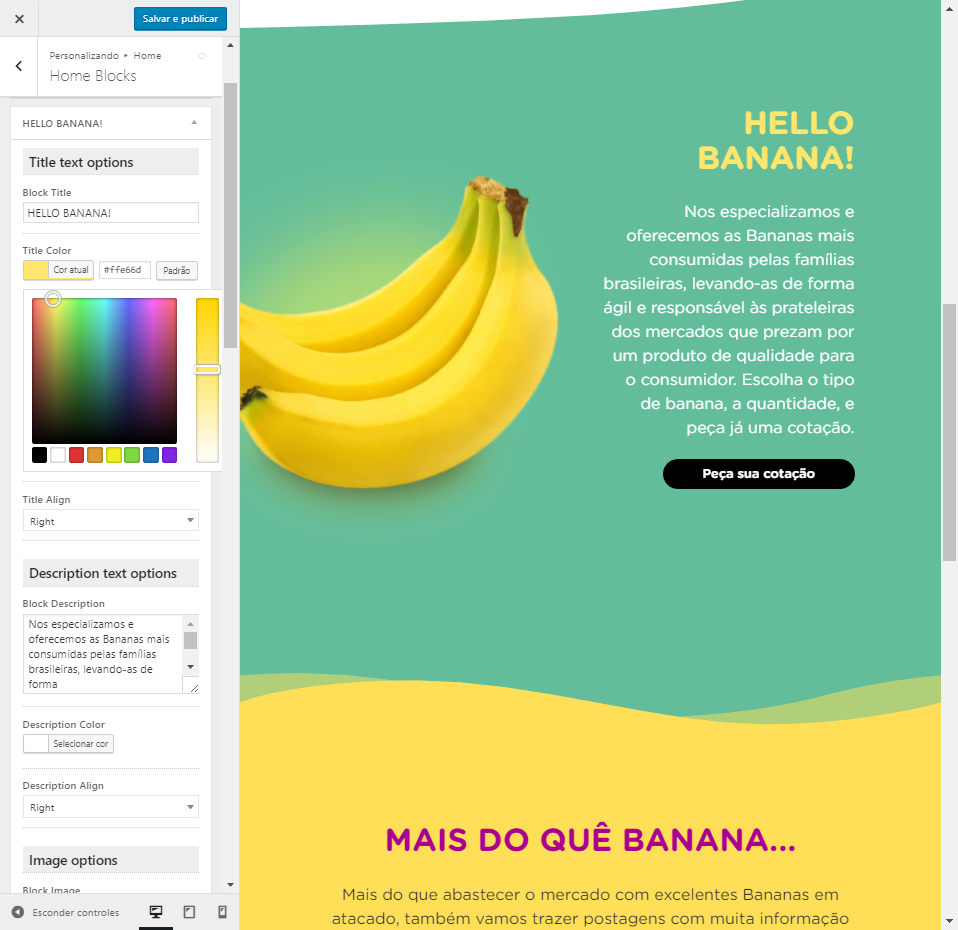
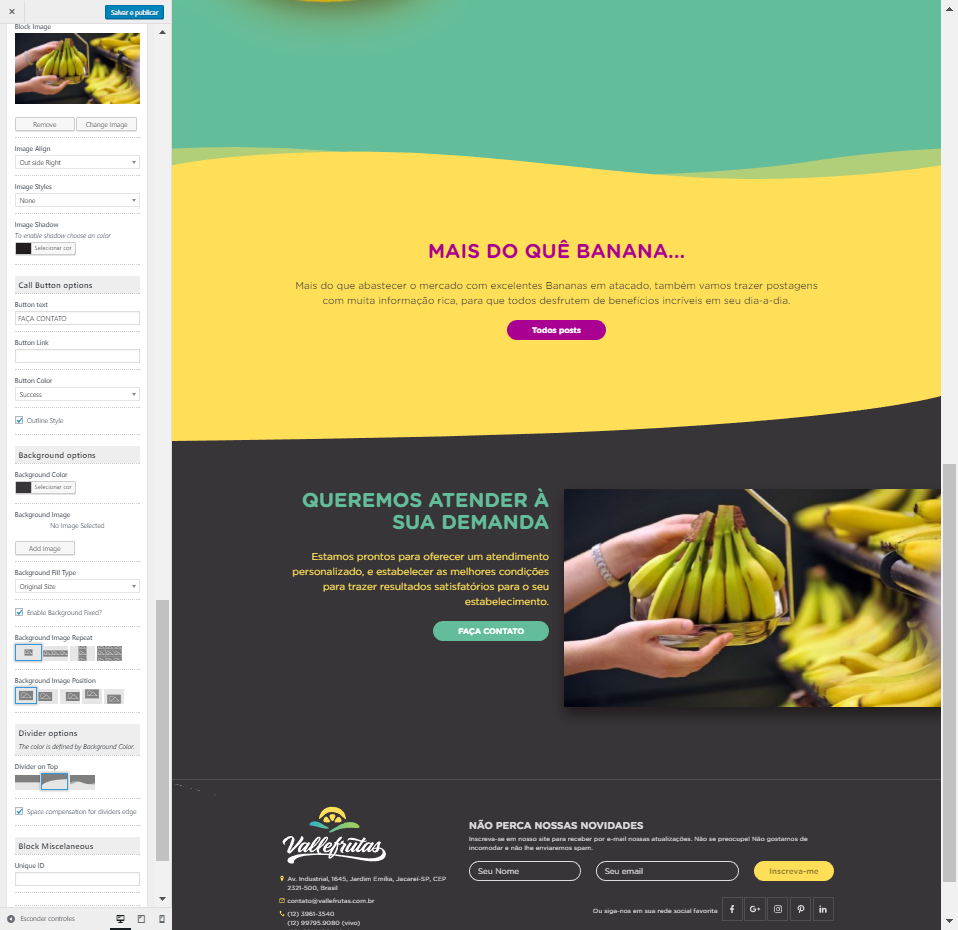
Fields required could also gain support in the repeater, so some fields appear only when requested.
AdsonCicilioti
on 7 Jul 2017
How do you output the textfield contents in your template?
Can you post the code you're using to echo that here?
aristath
on 7 Jul 2017
Try something like
echo do_shortcode( html_entity_decode( 'YOUR CONTENT HERE' ) );
Yep! Thanks! Shortcode Working with echo do_shortcode wrapping the get_theme_mod.
AdsonCicilioti
on 7 Jul 2017
I was thinking about this one today and the screenshots you posted...
Though it is possible to do it the way you do it right now with a repeater, I feel it would be better if the page content in your example contained a widget area, and then users were simply adding widgets to it. You'd of course have to create a couple custom widgets that behave the way you have the repeaters set-up now.
Kirki may be used to create a content-builder but that is not what it was designed to do.
Theme-Options and content-building are completely different concepts.
Just my 2 cents...
aristath
on 8 Jul 2017
Ok @aristath! It is too much to believe that everyone will have the same thought about their purpose. So with me I saw the possibility of using this way, others also can. But Regardless of the purpose for which it was created, kirki can go much further, and these fields deserved to be functioning in repeater. It looks like it's a little over. I'm sure you'll still think about this possibility, even if it's not for creating content. About Widgets, they can also be worked in Customizer. Does it exclude the possibility of kirki expanding its support for Widgets?
AdsonCicilioti
on 10 Jul 2017
@AdsonCicilioti Great design btw, I've also often 'abused' the Customizer for content building but the truth is that it is not made for that yet, this will probably change in the near future with Gutenberg...
If you don't want to do it with widgets (the Genesis way) an alternative solution could be to make the various sections as pages and you could pull the content in the front page from the customizer.
This way all the text controls will come from tinymce directly and the 'bananas' could be the featured image.
You could easily write a function to handle multiple sections and with a filter you could easily change the number of sections per theme requirements, take a look at Twentyseventeen for reference.
In the customizer you could add the layout controls, colors and separators styling for each section..
If you need to implement a 100% front-end experience you could integrate xwp customize posts in your workflow.
Just my 2 cents.
 antek83
on 10 Jul 2017
antek83
on 10 Jul 2017
this will probably change in the near future after Gutemberg...
Amen!
When this is added in WP-Core things will also be a lot easier... https://github.com/xwp/wp-customize-posts
aristath
on 10 Jul 2017
@antekdesign Awesome this concept! What better way for my case?
AdsonCicilioti
on 10 Jul 2017
@AdsonCicilioti in my opinion there is not an absolute better way but if the main problem here is to reduce the number of fields and have tinymce available I would do it with pages powered sections.
You could preset for example 3 sections available by default and 3 sections hidden that will appear when the user thicks a box (add a new section with jquery magic not really a real repeater but it works) each section could have it's own styling controls for bg color, separator etc.. but all the text formatting, text allignment, title, featured image and shortcodes are done from within the page itself, this will save you a lot of fields.
You could also use the sortable field in order to move the sections up and down and toggle visibility or you could make each section within a function and use add_action('homepage' 'your_function'); this way you would move them up and down and toggle visibility with woocommerce homepage control the same way that Storefront does...
Possibilities are endless, it all depends from what you want to achieve at the end.
Hope this helps
antek83
on 11 Jul 2017
pages powered sections
I used Custom Post Types (Home Blocks) with custom meta boxes that carried the customization values for each block. That would be better than pages powered sections, right?
You could preset for example 3 sections available by default and 3 sections hidden that will appear when the user thicks a box
It does not seem to be a good Way.
I really think the Cutomizer proposal is beautiful, because it shows in real time what we have changed and created. In a way I totally ignore the fact that the database is a mess, or not for that purpose, to offer the best experience in creating content for the Homepage. I do not care about it! There are only a few sections for a single page - the Homepage.
Possibilities are endless, it all depends from what you want to achieve at the end.
The ideal would be to bring the creation interface of my Home Blocks (CPT) to the Customizer, and to see the magic happen automatically whenever you create or modify a block.
AdsonCicilioti
on 11 Jul 2017
@AdsonCicilioti I suppose I did not properly explain what I meant.
All of what I suggested can be done from within the customizer and with live preview.
Check out the Twentyseventeen theme and you will see that you can pull content from pages into the homepage from within the customizer.
If you need an example on how to setup a field like that with Kirki let me know and I will be happy to provide some code samples.
This way is exactly the way that Squarespace uses to build home pages and if there is one thing that they've got right above all is the UX.
Creating a CPT for something that you can do with what's already there seems unnecessary.
The jquery thing was an idea to keep your customizer panel tidy, you basically create the fields for 6 homepage sections but you show only 3 by default, the others are there but are hidden.
Add a checkbox that says something like: 'add new section', and write a jquery function that shows the controls for that section if the checkbox is ticked.
I did this in the past in options pages I suppose it can be done in the customizer too, similarly on how the core background field works, if you add an image it shows extra controls :) maybe @aristath already implemented something like this in Kirki but I don't know. It should not be too hard to do by hand anyways.
The last two things, sortable and homepage control also work directly within the customizer with live preview and would greatly enhance both the UX and the customisation capabilities of the theme. @aristath wrote a great tutorial on how to use the sortable field. Basically you create a file for each homepage section and with the sortable field you could move them up and down and toggle their visibility from the customizer with live preview. The tutorial can be copied and pasted you only have to change the files names and the folder name to match your theme.
Woocommerce homepage control works in a similar fashion but will require you to add the homepage hook to your front-page.php file
do_action('homepage');
Then you would have to create a function for each of the 6 sections, something like:
function homepage_section_1() {
// do stuff here
}
And hook your functions to the homepage hook:
add_action('homepage', 'homepage_section_1');
The plugin will create a panel in the customizer that will show all the sections you hooked to the homepage action hook and will give you the ability to drag and drop them up and down and toggle their visibility with live preview from the Customizer.
This is how Storefront the woocommerce official theme handles homepage sections.
Let me know if you need anymore help :)
antek83
on 11 Jul 2017
OK! I would like examples yes!
Today I am looking for an intuitive way of creating content, I was excited about Customizer and Kirki, but I see that everything is still very shallow. I really got carried away! Thank you very much for your attention. I will consider all the suggestions and apply the best solution for what I need to offer in my current theme.
AdsonCicilioti
on 11 Jul 2017
@AdsonCicilioti Not sure what you were expecting to find but basically the way I suggested you allows you to do exactly what you were doing in the designs you've posted with less tan half of the fields you used and waaaay more design flexibility 🙄.
Anyways I will poste you a sample of how I did setup a dropdown-pages field as soon as I land home tomorrow night 👍🏻 Maybe it will clarify things a bit.
Good luck with your theme
antek83
on 11 Jul 2017
@AdsonCicilioti Hi Adson sorry for the delay I've been overwhelmed for a few days but a promise is a promise.
This is how you setup a dropdown-pages field
Kirki::add_field( 'your-config', array(
    'type'        => 'dropdown-pages',
    'settings'    => 'your-settings',
    'label'       => __( 'Field Label', 'your-textdomain' ),
    'section'     => 'your-section',
    'priority'    => 10,
) );
The generated select box will show all the pages you have on your website.
Pages are nothing more than a post type, that's the reason why I thought it was useless to create one just for the home page blocks.
You can get the value of the field the usual way:
$selected_id = get_theme_mod('your-settings');
The above code will give you the id of the page you selected.
The next step is getting the title & content of the selected page.
$page_id = get_post($selected_id);

$content = $page_id->post_content;

$content = apply_filters('the_content', $content);

$content = str_replace(']]>', ']]>', $content);

$title        =  $page_id->post_title;
The 'trick' here is the apply_filters('the_content', '$content');
This will automatically render: Shortcodes, Oembed, Iframes, custom html and everything else you put in your page, that's why I said it will save you a lot of fields...
Now you have your stuff you can display it the normal way like:
<h1><?php echo $title; ?></h1>
<div><?php echo $content; ?></div>
Same way you can create a link to a specific page but in this case is enough to have the $selected_id
<?php echo get_page_link($selected_id); ?>
If you need to get the featured image from the page you selected you can do:
$url = wp_get_attachment_url( get_post_thumbnail_id($selected_id) );
Basically with one kirki field you have: title, rich text editor content, shortcodes and the bananas..
You add the background color and the separator and with 3 fields you have covered the section.
Everything is done from the customizer with live preview, it is easier to manage and maintain than 40 different fields and since the content comes directly from the page TinyMCE you can do almost everything with it.
I hope this helps you and clarifies what I meant.
Good Luck
antek83
on 16 Jul 2017
Related issues
 runnickrun
·
3Comments
runnickrun
·
3Comments
 stylethemes
·
6Comments
stylethemes
·
6Comments
 ravishakya
·
7Comments
ravishakya
·
7Comments
 Vishal-Deshpande
·
3Comments
Vishal-Deshpande
·
3Comments
 ghost
·
5Comments
ghost
·
5Comments
Most helpful comment
The repeater field was originally built with a specific use-case in mind.
Since then a lot more people have started using it and at some point it will probably have to be rebuilt from the ground-up using a completely different concept.
Right now the repeater is a wrapper for input fields, and Ideally a repeater would be wrapper for other customizer controls.
Not sure how to do that yet though... Perhaps add an opening pseudo-control before the child-controls, then a closing pseudo-control after the child controls, and this way "mark" the repeater contents. Then duplication etc can be handled via jQuery, BUT the problem is how to properly save the multiple rows etc the way they are saved now.
I'm Still thinking about ways to implement and refactor repeaters. I've been thinking about it for months in the back of my head but I haven't come up with any viable solutions.