Kind: Helm: rabbitmq-ha deployment fails to discover k8s nodes
What happened:
When deploying stable/rabbitmq-ha chart via helm the pod fails during startup with following error:
2019-09-11 09:21:15.580 [info] <0.226.0> Node database directory at /var/lib/rabbitmq/mnesia/rabbit@rabbit-rabbitmq-ha-0.rabbit-rabbitmq-ha-discovery.default.svc.cluster.local is empty. Assuming we need to join an existing cluster or initialise from scratch...
2019-09-11 09:21:15.580 [info] <0.226.0> Configured peer discovery backend: rabbit_peer_discovery_k8s
2019-09-11 09:21:15.581 [info] <0.226.0> Will try to lock with peer discovery backend rabbit_peer_discovery_k8s
2019-09-11 09:21:15.581 [info] <0.226.0> Peer discovery backend does not support locking, falling back to randomized delay
2019-09-11 09:21:15.581 [info] <0.226.0> Peer discovery backend rabbit_peer_discovery_k8s does not support registration, skipping randomized startup delay.
2019-09-11 09:21:15.632 [info] <0.226.0> Failed to get nodes from k8s - 404
2019-09-11 09:21:15.633 [error] <0.225.0> CRASH REPORT Process <0.225.0> with 0 neighbours exited with reason: no case clause matching {error,"404"} in rabbit_mnesia:init_from_config/0 line 164 in application_master:init/4 line 138
2019-09-11 09:21:15.633 [info] <0.43.0> Application rabbit exited with reason: no case clause matching {error,"404"} in rabbit_mnesia:init_from_config/0 line 164
{"Kernel pid terminated",application_controller,"{application_start_failure,rabbit,{bad_return,{{rabbit,start,[normal,[]]},{'EXIT',{{case_clause,{error,\"404\"}},[{rabbit_mnesia,init_from_config,0,[{file,\"src/rabbit_mnesia.erl\"},{line,164}]},{rabbit_mnesia,init_with_lock,3,[{file,\"src/rabbit_mnesia.erl\"},{line,144}]},{rabbit_mnesia,init,0,[{file,\"src/rabbit_mnesia.erl\"},{line,111}]},{rabbit_boot_steps,'-run_step/2-lc$^1/1-1-',1,[{file,\"src/rabbit_boot_steps.erl\"},{line,49}]},{rabbit_boot_steps,run_step,2,[{file,\"src/rabbit_boot_steps.erl\"},{line,49}]},{rabbit_boot_steps,'-run_boot_steps/1-lc$^0/1-0-',1,[{file,\"src/rabbit_boot_steps.erl\"},{line,26}]},{rabbit_boot_steps,run_boot_steps,1,[{file,\"src/rabbit_boot_steps.erl\"},{line,26}]},{rabbit,start,2,[{file,\"src/rabbit.erl\"},{line,910}]}]}}}}}"}
Kernel pid terminated (application_controller) ({application_start_failure,rabbit,{bad_return,{{rabbit,start,[normal,[]]},{'EXIT',{{case_clause,{error,"404"}},[{rabbit_mnesia,init_from_config,0,[{file
This seems like the the k8s node discovery is not working for some reason.
What you expected to happen:
RabbitMQ deployment started up correctly.
How to reproduce it (as minimally and precisely as possible):
kind create cluster
export KUBECONFIG="$(kind get kubeconfig-path)"
kubectl apply -f rbac-config.yaml
helm init --upgrade --wait --service-account tiller
helm install stable/rabbitmq-ha --name rabbit
rbac-config.yaml:
apiVersion: v1
kind: ServiceAccount
metadata:
  name: tiller
  namespace: kube-system
---
apiVersion: rbac.authorization.k8s.io/v1
kind: ClusterRoleBinding
metadata:
  name: tiller
roleRef:
  apiGroup: rbac.authorization.k8s.io
  kind: ClusterRole
  name: cluster-admin
subjects:
  - kind: ServiceAccount
    name: tiller
    namespace: kube-system
Anything else we need to know?:
Environment:
- kind version: (use
kind version): v0.5.1 - Kubernetes version: (use
kubectl version):
Client Version: version.Info{Major:"1", Minor:"15", GitVersion:"v1.15.2", GitCommit:"f6278300bebbb750328ac16ee6dd3aa7d3549568", GitTreeState:"clean", BuildDate:"2019-08-05T09:23:26Z", GoVersion:"go1.12.5", Compiler:"gc", Platform:"linux/amd64"}
Server Version: version.Info{Major:"1", Minor:"15", GitVersion:"v1.15.3", GitCommit:"2d3c76f9091b6bec110a5e63777c332469e0cba2", GitTreeState:"clean", BuildDate:"2019-08-20T18:57:36Z", GoVersion:"go1.12.9", Compiler:"gc", Platform:"linux/amd64"}
- Docker version: (use
docker info):
Client:
 Debug Mode: false

Server:
 Containers: 1
  Running: 1
  Paused: 0
  Stopped: 0
 Images: 82
 Server Version: 19.03.2
 Storage Driver: overlay2
  Backing Filesystem: extfs
  Supports d_type: true
  Native Overlay Diff: true
 Logging Driver: json-file
 Cgroup Driver: cgroupfs
 Plugins:
  Volume: local
  Network: bridge host ipvlan macvlan null overlay
  Log: awslogs fluentd gcplogs gelf journald json-file local logentries splunk syslog
 Swarm: inactive
 Runtimes: runc
 Default Runtime: runc
 Init Binary: docker-init
 containerd version: 894b81a4b802e4eb2a91d1ce216b8817763c29fb
 runc version: 425e105d5a03fabd737a126ad93d62a9eeede87f
 init version: fec3683
 Security Options:
  seccomp
   Profile: default
 Kernel Version: 5.2.11-200.fc30.x86_64
 Operating System: Fedora 30 (Thirty)
 OSType: linux
 Architecture: x86_64
 CPUs: 8
 Total Memory: 15.56GiB
 ID: XSSP:U7WK:W2J4:LPU5:5CEV:7HQF:DEBG:WML2:MKZY:XC33:GOBX:SYDR
 Docker Root Dir: /var/lib/docker
 Debug Mode: false
 Registry: https://index.docker.io/v1/
 Labels:
 Experimental: false
 Insecure Registries:
  127.0.0.0/8
 Live Restore Enabled: false
- OS (e.g. from
/etc/os-release):
NAME=Fedora
VERSION="30 (Thirty)"
ID=fedora
VERSION_ID=30
VERSION_CODENAME=""
PLATFORM_ID="platform:f30"
PRETTY_NAME="Fedora 30 (Thirty)"
ANSI_COLOR="0;34"
LOGO=fedora-logo-icon
CPE_NAME="cpe:/o:fedoraproject:fedora:30"
HOME_URL="https://fedoraproject.org/"
DOCUMENTATION_URL="https://docs.fedoraproject.org/en-US/fedora/f30/system-administrators-guide/"
SUPPORT_URL="https://fedoraproject.org/wiki/Communicating_and_getting_help"
BUG_REPORT_URL="https://bugzilla.redhat.com/"
REDHAT_BUGZILLA_PRODUCT="Fedora"
REDHAT_BUGZILLA_PRODUCT_VERSION=30
REDHAT_SUPPORT_PRODUCT="Fedora"
REDHAT_SUPPORT_PRODUCT_VERSION=30
PRIVACY_POLICY_URL="https://fedoraproject.org/wiki/Legal:PrivacyPolicy"
 fhaifler
All 14 comments
kind clusters have RBAC enabled (which is the default with kubeadm and most Kubernetes clusters for some time now), does this deployment have permission to get the nodes?
 BenTheElder
on 11 Sep 2019
BenTheElder
on 11 Sep 2019
The deployment creates role, rolebinding and serviceaccount to access endpoints k8s resource. So the rules should be set up and ready to use. The same deployment works when deploying to GKE with RBAC enabled. I have compared RBAC related configuration between kind and GKE deployments and didn't notice any differences.
RBAC summary:
$ kubectl describe serviceaccount rabbit-rabbitmq-ha                                                                                                                                                                                14:54:33
Name:                rabbit-rabbitmq-ha
Namespace:           default
Labels:              app=rabbitmq-ha
                     chart=rabbitmq-ha-1.25.0
                     heritage=Tiller
                     release=rabbit
Annotations:         <none>
Image pull secrets:  <none>
Mountable secrets:   rabbit-rabbitmq-ha-token-wl6s2
Tokens:              rabbit-rabbitmq-ha-token-wl6s2
Events:              <none>

$ kubectl describe role rabbit-rabbitmq-ha                                                                                                                                                                                          14:54:50
Name:         rabbit-rabbitmq-ha
Labels:       app=rabbitmq-ha
              chart=rabbitmq-ha-1.25.0
              heritage=Tiller
              release=rabbit
Annotations:  <none>
PolicyRule:
  Resources  Non-Resource URLs  Resource Names  Verbs
  ---------  -----------------  --------------  -----
  endpoints  []                 []              [get]

$ kubectl describe rolebinding rabbit-rabbitmq-ha                                                                                                                                                                                   14:55:57
Name:         rabbit-rabbitmq-ha
Labels:       app=rabbitmq-ha
              chart=rabbitmq-ha-1.25.0
              heritage=Tiller
              release=rabbit
Annotations:  <none>
Role:
  Kind:  Role
  Name:  rabbit-rabbitmq-ha
Subjects:
  Kind            Name                Namespace
  ----            ----                ---------
  ServiceAccount  rabbit-rabbitmq-ha
Moreover the strange thing is that the same deployment is working for my colleague using Ubuntu and lower version of docker (18.x). Couldn't it be somehow related to docker version?
fhaifler
on 11 Sep 2019
Moreover the strange thing is that the same deployment is working for my colleague using Ubuntu and lower version of docker (18.x). Couldn't it be somehow related to docker version?
At most I'd expect some performance differences, but this is going to vary from machine to machine anyhow.
2019-09-11 09:21:15.632 [info] <0.226.0> Failed to get nodes from k8s - 404
this error seems to be reported upstream often, it looks like it's not resilient to this sort of error, it's not uncommon that an API server may temporarily be unavailable even on production clusters...
https://github.com/rabbitmq/rabbitmq-peer-discovery-k8s/issues/29
https://github.com/rabbitmq/rabbitmq-server/issues/1627
BenTheElder
on 11 Sep 2019
see also https://github.com/rabbitmq/rabbitmq-peer-discovery-k8s/issues/20
is it possible to get more debug info out of this process? also can you get the api server logs? kind export logs ... this seems more likely to be a rabbitmq chart issue of some sort.
BenTheElder
on 11 Sep 2019
@fhaifler it's working for me with the same docker version, as Ben is mentioning it should be interesting to upload the logs exported from the kind cluster
 aojea
on 11 Sep 2019
aojea
on 11 Sep 2019
@BenTheElder I see. It seems thought that they have different error status codes returned (not 404, but 403), but still it can be related. Unfortunately for me this problem is not temporary and persists no matter how long I leave the kind cluster running.
@aojea Thank you for trying it out. Maybe it's some weirdness specific to my system, I couldn't identify the culprit though.
The exported kind logs are below:
kind-export.zip
fhaifler
on 12 Sep 2019
The K8s Plugin can't query the endpoint.
it fails here
404 means endpoint not found as:
{
  "kind": "Status",
  "apiVersion": "v1",
  "metadata": {

  },
  "status": "Failure",
  "message": "endpoints \"fake_end_point\" not found",
  "reason": "NotFound",
  "details": {
    "name": "fake_end_point",
    "kind": "endpoints"
  },
  "code": 404
Maybe there is a permission problem, try to execute:
kubectl get ep
you should see:
NAME                           ENDPOINTS                                                        AGE
rmq-ha-rabbitmq-ha             10.244.1.27:4369,10.244.1.29:4369,10.244.1.30:4369 + 6 more...   70m
rmq-ha-rabbitmq-ha-discovery   10.244.1.27:4369,10.244.1.29:4369,10.244.1.30:4369 + 6 more...   70m
inside a pod try to execute:
curl -v --cacert /var/run/secrets/kubernetes.io/serviceaccount/ca.crt -H "Authorization: Bearer $(cat /var/run/secrets/kubernetes.io/serviceaccount/token)" https://kubernetes.default.svc.cluster.local:443/api/v1/namespaces/stage/endpoints/rmq-ha-rabbitmq-ha-discovery
the result should be:
  "kind": "Endpoints",
  "apiVersion": "v1",
  "metadata": {
    "name": "rmq-ha-rabbitmq-ha-discovery",
    "namespace": "stage",
    "selfLink": "/api/v1/namespaces/stage/endpoints/rmq-ha-rabbitmq-ha-discovery",
    "uid": "a408877a-4e78-4f94-bc7f-2cd006d21b4b",
    "resourceVersion": "220998",
    "creationTimestamp": "2019-09-12T12:20:45Z",
    "labels": {
      "app": "rabbitmq-ha",
      "chart": "rabbitmq-ha-1.32.0",
      "heritage": "Tiller",
      "release": "rmq-ha"
    },
    "annotations": {
      "endpoints.kubernetes.io/last-change-trigger-time": "2019-09-12T12:27:04Z"
    }
  },
  "subsets": [
    {
      "addresses": [
        {
          "ip": "10.244.1.27",
          "hostname": "rmq-ha-rabbitmq-ha-0",
          "nodeName": "slave-node",
          "targetRef": {
            "kind": "Pod",
            "namespace": "stage",
            "name": "rmq-ha-rabbitmq-ha-0",
            "uid": "7ab037a3-2f4b-4062-b347-4c42f26df142",
            "resourceVersion": "220448"
          }
        },
        {
          "ip": "10.244.1.29",
          "hostname": "rmq-ha-rabbitmq-ha-1",
          "nodeName": "slave-node",
          "targetRef": {
            "kind": "Pod",
            "namespace": "stage",
            "name": "rmq-ha-rabbitmq-ha-1",
            "uid": "66883411-41c9-4ca9-9ac4-69e7f60118b8",
            "resourceVersion": "220947"
          }
        },
        {
          "ip": "10.244.1.30",
          "hostname": "rmq-ha-rabbitmq-ha-2",
          "nodeName": "slave-node",
          "targetRef": {
            "kind": "Pod",
            "namespace": "stage",
            "name": "rmq-ha-rabbitmq-ha-2",
            "uid": "aa2c8988-6e8a-4c14-b7f1-b439d190be15",
            "resourceVersion": "220997"
          }
        }
      ],
      "ports": [
        {
          "name": "epmd",
          "port": 4369,
          "protocol": "TCP"
        },
        {
          "name": "http",
          "port": 15672,
          "protocol": "TCP"
        },
        {
          "name": "amqp",
          "port": 5672,
          "protocol": "TCP"
        }
      ]
    }
  ]
* Connection #0 to host kubernetes.default.svc.cluster.local left intact
root@ubuntu-cf4f9db78-95b4z:/#
I tried to deploy the charts different time in minikube and in k8s cluster without problems
 Gsantomaggio
on 12 Sep 2019
Gsantomaggio
on 12 Sep 2019
Heureka! I resolved the issue. Thanks to all for supporting me. When looking at the points from @Gsantomaggio I noticed that the internal DNS is going haywire and all outgoing network traffic is routed to single IP which then returns the 404 for everything. This seems to be caused by me having hostname of the host machine set to existing domain name and the outgoing traffic went instead of my host computer straight to server for the domain name. This was true for some reason also for cluster internal traffic, which then went to that server and getting 404.
After I changed hostname of my computer everything started to work as expected.
I don't know how the kind cluster DNS and network routing works, but is this behavior expected and desired? I would expect that the outgoing route from the kind cluster would be routed to IP address of the host and not it's hostname to avoid those collisions. There can be also collisions with hostname and names of services in the cluster, or I am mistaken?
fhaifler
on 13 Sep 2019
Heureka! I resolved the issue. Thanks to all for supporting me. When looking at the points from @Gsantomaggio I noticed that the internal DNS is going haywire and all outgoing network traffic is routed to single IP which then returns the 404 for everything. This seems to be caused by me having hostname of the host machine set to existing domain name and the outgoing traffic went instead of my host computer straight to server for the domain name. This was true for some reason also for cluster internal traffic, which then went to that server and getting 404.
After I changed hostname of my computer everything started to work as expected.
I don't know how the kind cluster DNS and network routing works, but is this behavior expected and desired? I would expect that the outgoing route from the kind cluster would be routed to IP address of the host and not it's hostname to avoid those collisions. There can be also collisions with hostname and names of services in the cluster, or I am mistaken?
can you describe more in detail the issue and your setup?
This seems to be caused by me having hostname of the host machine set to existing domain name and the outgoing traffic went instead of my host computer straight to server for the domain name.
what was your hostname and your /etc/resolv.conf?
aojea
on 13 Sep 2019
seems the issue was resolved, please feel free to reopen if necessary
/close
aojea
on 14 Sep 2019
@aojea: Closing this issue.
In response to this:
seems the issue was resolved, please feel free to reopen if necessary
/close
Instructions for interacting with me using PR comments are available here. If you have questions or suggestions related to my behavior, please file an issue against the kubernetes/test-infra repository.
 k8s-ci-robot
on 14 Sep 2019
k8s-ci-robot
on 14 Sep 2019
The primary issue is indeed resolved. After fiddling a bit with the hostnames I have noticed that when you set your hostname to a domain with wildcard DNS record for subdomains (e.g. github.github.io) then the whole network routing from pods goes haywire. I don't know why, but the fix is easy (just set different hostname) so I don't know if the cause is worth following now.
Thanks a lot for help.
fhaifler
on 16 Sep 2019
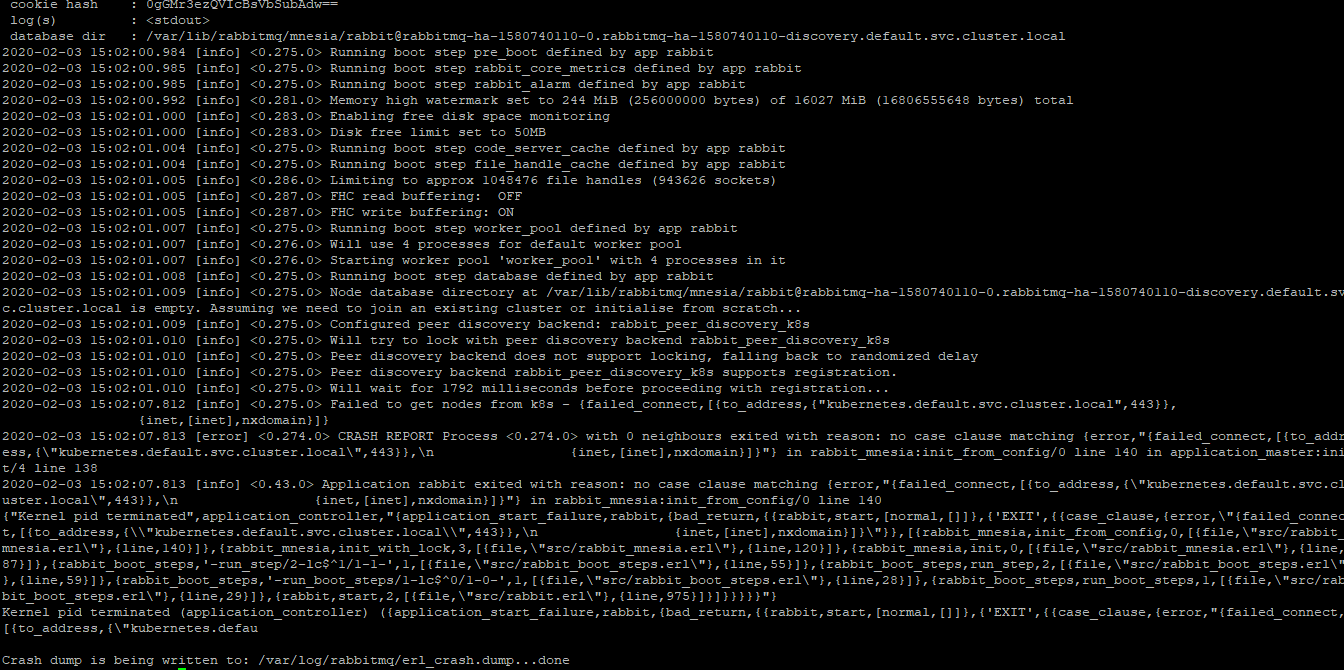
Hi Guys, we are not able to set up rabbitmq-ha. We have created a master node and 3 worker nodes on Azure VMs with CentOS. Logs are showing the K8S is not able to find the node to schedule the pod. Please find attached the log screenshot. Please help
 ajitkumartanwade
on 3 Feb 2020
ajitkumartanwade
on 3 Feb 2020
the problem is NXDOMAIN with this dns kubernetes.default.svc.cluster.local
Please follow this k8s documentation link to debug the DNS problems
Gsantomaggio
on 3 Feb 2020
Related issues
 cjwagner
·
3Comments
cjwagner
·
3Comments
 i3oc9i
·
3Comments
i3oc9i
·
3Comments
 leelavg
·
3Comments
leelavg
·
3Comments
 rajalokan
·
3Comments
rajalokan
·
3Comments
 tommyknows
·
3Comments
tommyknows
·
3Comments
Most helpful comment
The primary issue is indeed resolved. After fiddling a bit with the hostnames I have noticed that when you set your hostname to a domain with wildcard DNS record for subdomains (e.g. github.github.io) then the whole network routing from pods goes haywire. I don't know why, but the fix is easy (just set different hostname) so I don't know if the cause is worth following now.
Thanks a lot for help.