Kind: Cluster doesn't restart when docker restarts
When docker restarts or stop/start (for any reason), the kind node containers remain stopped and aren't restarted properly. When I tried to run docker restart <node container id> the cluster didn't start either.
The only solution seems to recreate the cluster at this point.
/kind bug
 vincepri
All 83 comments
Isn't this standard behavior with docker containers? (remaining stopped?)
kind does not run any daemon to mange the cluster, the commands create / delete "nodes" (containers) and run some tasks in them (like kubeadm init), they're effectively "unmanaged".
docker restart is not going to work, because creating a container is not just docker run, we need to take a few actions after creating the container.
What is the use case for this? These are meant to be transient test-clusters and it's probably not a good idea to restart the host daemon during testing.
"Restarting" a cluster is probably going to just look like delete + create of the cluster.
I'm not sure I'd even consider supporting this so much of a bug as a feature, "node" restarts are not really intended functionality currently.
 BenTheElder
on 5 Dec 2018
BenTheElder
on 5 Dec 2018
What is the use case for this?
+1 to this question.
docker restart in this case will act like a power grid restart on a bunch of bare metal machines.
so while those bare metal machines might come back up, not sure if we want to support this for kind.
for that to work i think some sort of state has to be stored somewhere...
 neolit123
on 5 Dec 2018
neolit123
on 5 Dec 2018
I've been using kind locally (using Docker for Mac) and when docker reboots or stops, the cluster has to be deleted and recreated. I'm perfectly fine with it, just thought this might be something we should look into.
The use case was to keep the cluster around even after I reboot or shut down my machine / docker.
vincepri
on 5 Dec 2018
Thanks for clarifying - this is certainly a hole in the usability but I'd hoped that clusters would be cheap enough to [create, use, delete] regularly.
This might be a little non-trivial to resolve but is probably do-able.
/priority backlog
/help
BenTheElder
on 5 Dec 2018
@BenTheElder:
This request has been marked as needing help from a contributor.
Please ensure the request meets the requirements listed here.
If this request no longer meets these requirements, the label can be removed
by commenting with the /remove-help command.
In response to this:
Thanks for clarifying - this is certainly a hole in the usability but I'd hoped that clusters would be cheap enough to [create, use, delete] regularly.
This might be a little non-trivial to resolve but is probably do-able.
/priority backlog
/help
Instructions for interacting with me using PR comments are available here. If you have questions or suggestions related to my behavior, please file an issue against the kubernetes/test-infra repository.
 k8s-ci-robot
on 5 Dec 2018
k8s-ci-robot
on 5 Dec 2018
I think I know how we can do this effectively, but I have no idea what to call the command that will fit with the rest of the CLI 🙃
cc @munnerz
Something like kind restart cluster maybe?
BenTheElder
on 6 Dec 2018
restart seems it fits well with the other create/delete cluster commands, what's the idea you had? Wondering if it actually fits the restart word or it's something more.
vincepri
on 6 Dec 2018
It should roughly be:
- list the containers matching the cluster name
- for each ...
- docker {re}start
- run the pre-boot fixes (mounts)
- signal the entrypoint to boot
- optionally
--waitfor the control-plane like create
It'll look similar to create but skip a lot of steps and swap creating the containers for list & {re}start
We can also eventually have a very similar command like kind restart node
BenTheElder
on 6 Dec 2018
I like that approach, and the node restart also sounds nice and could cover other use cases.
vincepri
on 6 Dec 2018
/remove-kind bug
/kind feature
neolit123
on 12 Dec 2018
Something like
kind restart clustermaybe?
@BenTheElder I want to try it.
/assign
 tao12345666333
on 13 Dec 2018
tao12345666333
on 13 Dec 2018
@tao12345666333: GitHub didn't allow me to assign the following users: tao12345666333.
Note that only kubernetes-sigs members and repo collaborators can be assigned.
For more information please see the contributor guide
In response to this:
Something like
kind restart clustermaybe?@BenTheElder I want to try it.
/assign
Instructions for interacting with me using PR comments are available here. If you have questions or suggestions related to my behavior, please file an issue against the kubernetes/test-infra repository.
k8s-ci-robot
on 13 Dec 2018
/lifecycle active
thanks @tao12345666333
neolit123
on 13 Dec 2018
for the impatient, this seems to work for now after docker restarts:
docker start kind-1-control-plane && docker exec kind-1-control-plane sh -c 'mount -o remount,ro /sys; kill -USR1 1'
FixMounts has a few mount --make-shared, not sure if they are really required.
 clkao
on 17 Feb 2019
clkao
on 17 Feb 2019
The make shared may not be required anymore, those are related to mount propagation functionality in kubelet / storage. It looks like with a tweak to how docker runs on the nodes we might not need those.
We should check with hack/local-up-cluster.sh (IE @dims) on this as well, they have it still as well.
https://github.com/kubernetes/kubernetes/blob/07a5488b2a8f67add543da72e8819407d8314204/hack/local-up-cluster.sh#L1039-L1040
  # configure shared mounts to prevent failure in DIND scenarios
  mount --make-rshared /
I've also been thinking about ways we can make things like docker start just work.
The /sys remount is especially unfortunate, but I don't think we can do much about it easily because specifying a /sys mount clashes with --privileged (and we still need the latter).
BenTheElder
on 17 Feb 2019
:+1: for the new restart cluster command!
 hjacobs
on 23 Mar 2019
hjacobs
on 23 Mar 2019
The restart cluster command will make kind the top of his class. Without it, it's a painful process to build test envs upon since restarting the whole process means re-downloading all the docker images from scratch, a lengthy process.
 amwais
on 23 Mar 2019
amwais
on 23 Mar 2019
I will sent a PR next week. (
tao12345666333
on 23 Mar 2019
Looking forward! Is there any ticket for that, for tracking purposes?
amwais
on 23 Mar 2019
not yet. I will update to the progress here.
tao12345666333
on 23 Mar 2019
tentatively tracking for 0.3
BenTheElder
on 25 Mar 2019
I have sent a PR #408 .
tao12345666333
on 27 Mar 2019
/subscribe
 alexellis
on 15 Apr 2019
alexellis
on 15 Apr 2019
461 removed the SIGUSR1 and mount fix commands, docker start should ~work for single-node clusters, multi-node will require an updated #408 :sweat_smile:
BenTheElder
on 1 May 2019
/subscribe
 chaos234
on 4 May 2019
chaos234
on 4 May 2019
/subscribe
 qxhy123
on 4 May 2019
qxhy123
on 4 May 2019
/subscribe
 Todai88
on 3 Jun 2019
Todai88
on 3 Jun 2019
I created a cluster with kind create cluster but docker stop kind-control-plane && docker start kind-control-plane results in:
Initializing machine ID from random generator.
Failed to find module 'autofs4'
systemd 240 running in system mode. (+PAM +AUDIT +SELINUX +IMA +APPARMOR +SMACK +SYSVINIT +UTMP +LIBCRYPTSETUP +GCRYPT +GNUTLS +ACL +XZ +LZ4 +SECCOMP +BLKID +ELFUTILS +KMOD -IDN2 +IDN -PCRE2 default-hierarchy=hybrid)
Detected virtualization docker.
Detected architecture x86-64.
Failed to create symlink /sys/fs/cgroup/net_prio: File exists
Failed to create symlink /sys/fs/cgroup/net_cls: File exists
Failed to create symlink /sys/fs/cgroup/cpuacct: File exists
Failed to create symlink /sys/fs/cgroup/cpu: File exists

Welcome to Ubuntu Disco Dingo (development branch)!

Set hostname to <kind-control-plane>.
Failed to attach 1 to compat systemd cgroup /docker/f4818db97d67b00668cf91e203f2ebc0697210dd1bf6dddc82c866553bb3994c/init.scope: No such file or directory
Failed to open pin file: No such file or directory
Failed to allocate manager object: No such file or directory
[!!!!!!] Failed to allocate manager object.
Exiting PID 1...
 janwillies
on 17 Jun 2019
janwillies
on 17 Jun 2019
Thanks for the data point @janwillies. This is definitely not actually supported properly (yet?) and would/will require a number of fixes, some of which are in progress. In the mean time we've continued to push to make it cheaper to create / delete and test with clean clusters. When 0.4 releases we expect kubernetes 1.14.X to start in ~20s if the image is warm locally.
BenTheElder
on 17 Jun 2019
I would like to add two things:
Running docker start minio-demo-control-plane && docker exec minio-demo-control-plane sh -c 'mount -o remount,ro /sys; kill -USR1 1' worked for me 👍
Please add restart.
 carlisia
on 23 Jun 2019
carlisia
on 23 Jun 2019
Running docker start minio-demo-control-plane && docker exec minio-demo-control-plane sh -c 'mount -o remount,ro /sys; kill -USR1 1' worked for me 👍
On a recent version ( >= 0.3.0) it should just be docker start <node-name>. The rest is handled in the entrypoint.
Please add restart.
We'd like to, but it's not quite this simple to do correctly. 🙃 That snippet doesn't work for multi-node clusters (see previous discussion around IP allocation etc.). For single node clusters currently it would just be an alias to docker start $NODE_NAME. It's being worked on but is a bit lower priority than some Kubernetes testing concerns, ephemeral clusters are still recommended.
BenTheElder
on 23 Jun 2019
@carlisia As Ben said, we still recommend ephemeral clusters.
408 is processing the command to add restart command, but before that, we need to deal with some network related issues #484
tao12345666333
on 23 Jun 2019
I am still trying to find out if there is a better way to improve #484 :cat:
tao12345666333
on 23 Jun 2019
@tao12345666333 I think ephemeral clusters are good but not in 100% of use cases.
If you organise for example a workshop or a meetup, you would like to prepare everything in advance (some days before) and at the moment of the event, just spin up the cluster and that's it. Like I did many times with minikube.
Another example would be doing experiments. If I'm working for example with Calico, Cilium, Istio or else I don't want to deploy them every time I need to run a simple test. It would be way easier to have many clusters and a time and spin up which you need and then stop it again.
Do my samples make sense?
 bygui86
on 2 Sep 2019
bygui86
on 2 Sep 2019
@bygui86 Yes, I understand this requirement very well.
In fact, I have done some work at #408 and #484 . It was available at the time, but it does not seem to be the best solution. (now it's a bit out of date)
I still focus my attention on the Docker network to find the optimal solution.
tao12345666333
on 2 Sep 2019
Thanks for the effort guys!!
bygui86
on 2 Sep 2019
As a partial workaround to speed up pods creation in a re-created cluster I mount containerd as volume to host machine, thus it survives cluster recreation and docker images are not downloaded every time after restart. e.g. I use following config for cluster creation:
kind: Cluster
apiVersion: kind.sigs.k8s.io/v1alpha3
nodes:
- role: control-plane
  extraMounts:
  - containerPath: /var/lib/containerd
    hostPath: /home/me/.kind/cache/containerd
 gagara
on 22 Oct 2019
gagara
on 22 Oct 2019
Kind 0.5.1
When I restart my computer a running cluster seems to survive, it just has to be manually started:
# ... lets say we just booted our machine here ...

15:08:06 ~$ docker ps -a
CONTAINER ID        IMAGE                  COMMAND                  CREATED             STATUS                       PORTS               NAMES
5ffbccdcd61a        kindest/node:v1.15.3   "/usr/local/bin/entr…"   5 minutes ago       Exited (130) 2 minutes ago                       kind-control-plane

15:08:11 ~$ docker start 5ffbccdcd61a
5ffbccdcd61a

15:08:20 ~$ docker ps
CONTAINER ID        IMAGE                  COMMAND                  CREATED             STATUS              PORTS                                  NAMES
5ffbccdcd61a        kindest/node:v1.15.3   "/usr/local/bin/entr…"   5 minutes ago       Up 4 seconds        45987/tcp, 127.0.0.1:45987->6443/tcp   kind-control-plane

15:08:39 ~$ kubectl get namespaces
NAME              STATUS   AGE
default           Active   5m
foo               Active   3m36s  <------------ a namespace created prior to reboot
kube-node-lease   Active   5m3s
kube-public       Active   5m3s
kube-system       Active   5m3s
So It looked like the container had received SIGINT signal (130-128=2) before the machine shutted down.
When I restart docker, or manually stop/start node container, or send SIGINT to the node, it never recovers and reports Exited (129) or Exited (130) before I try to start the container and Exited (255) immediately after.
5:10:24 ~$ docker kill -s INT 5ffbccdcd61a
5ffbccdcd61a

15:10:52 ~$ docker ps -a
CONTAINER ID        IMAGE                  COMMAND                  CREATED             STATUS                       PORTS               NAMES
5ffbccdcd61a        kindest/node:v1.15.3   "/usr/local/bin/entr…"   8 minutes ago       Exited (129) 3 seconds ago                       kind-control-plane

15:14:33 ~$ docker start -a 5ffbccdcd61a
INFO: ensuring we can execute /bin/mount even with userns-remap
INFO: remounting /sys read-only
INFO: making mounts shared
INFO: clearing and regenerating /etc/machine-id
Initializing machine ID from random generator.
INFO: faking /sys/class/dmi/id/product_name to be "kind"
systemd 240 running in system mode. (+PAM +AUDIT +SELINUX +IMA +APPARMOR +SMACK +SYSVINIT +UTMP +LIBCRYPTSETUP +GCRYPT +GNUTLS +ACL +XZ +LZ4 +SECCOMP +BLKID +ELFUTILS +KMOD -IDN2 +IDN -PCRE2 default-hierarchy=hybrid)
Detected virtualization docker.
Detected architecture x86-64.

Welcome to Ubuntu Disco Dingo (development branch)!

Set hostname to <kind-control-plane>.
Failed to bump fs.file-max, ignoring: Invalid argument
Failed to attach 1 to compat systemd cgroup /docker/5ffbccdcd61ab1271cc7f237cfb04fe529e2d08d211440e486f998a755882e43/init.scope: No such file or directory
Failed to open pin file: No such file or directory
Failed to allocate manager object: No such file or directory
[!!!!!!] Failed to allocate manager object.
Exiting PID 1...

15:14:35 ~$ docker ps -a
CONTAINER ID        IMAGE                  COMMAND                  CREATED             STATUS                      PORTS               NAMES
5ffbccdcd61a        kindest/node:v1.15.3   "/usr/local/bin/entr…"   12 minutes ago       Exited (255) 1 second ago
Is there a way to manually stop/start the container, so that it would persist?
Thanks
 konstantin-dzreev
on 15 Nov 2019
konstantin-dzreev
on 15 Nov 2019
The main problem is that the container is not guaranteed to take the same IP that was assigned before the reboot, and that will break the cluster.
However, one user reported a working method in the slack channel
https://kubernetes.slack.com/archives/CEKK1KTN2/p1565109268365000
cscetbon 6:34 PM
@Gustavo Sousa what I use :
alias kpause='kind get nodes|xargs docker pause'
alias kunpause='kind get nodes|xargs docker unpause'
(edited)
 aojea
on 18 Nov 2019
aojea
on 18 Nov 2019
Thanks, I think I'm getting why this is not easy.
P.S.Pausing/unpausing seem to work until you stop/start the docker service, then it is the same problem again
konstantin-dzreev
on 19 Nov 2019
This is on my radar, we've just had some other pressing changes to tackle (mostly around testing kubernetes, the stated #1 priority and original reason for the project) and nobody has proposed a maintainable solution to the network issues yet. I'll look at this more this cycle.
BenTheElder
on 19 Nov 2019
I could be wrong... feel free to delete/ignore/flame if a miss something or if I'm completely disconnected from the reality....
I didn't know the inner working of Kind. I've also go over the #484 details which seems to focus on DNS feature to solve the issue... but I'm unsure if that track has been investigate:
Did creating a custom bridge network with defined ip range and assign static ip(outside of that range) to container would not solve the ip persistence issue? also using a network name format it would enable the removing of the network (when deleting a cluster) without keeping track of its creation...
In the following example I keep the first 31 ip for the dhcp/auto assign/dns of docker and use the remaining IP [32-254] for manual assignation. since the ip address is manually assign and out of the auto assign range it would never been high-jacked by another container so ip address would survive reboot/container restart/etc.
  docker network create --subnet 10.66.60.0/24 --ip-range 10.66.60.0/27 Kind-Net-[Clustername]
  docker run --net Kind-Net-[Clustername] --ip 10.66.60.[32-254] ... NodeName
the good news with that is that multiple cluster would be network isolated (one net per cluster)...
its also possible to subset logically that range (x.x.x.32-64->Ingress/loadbalancer, x.x.x.65-100->Control Plane, x.x.x101+ -> workplane)
its also possible to only use one bridge and put all node in the 200+ ip remaining in the selected scope... but for that it would be required to keep track of all currently deployed kind cluster node ip...
Source:https://docs.docker.com/engine/reference/commandline/network_connect/
 Stonedge
on 1 Dec 2019
Stonedge
on 1 Dec 2019
Did creating a custom bridge network with defined ip range and assign static ip(outside of that range) to container would not solve the ip persistence issue? also using a network name format it would enable the removing of the network (when deleting a cluster) without keeping track of its creation...
Thanks for sharing your thoughts, the problem with this approach is that it requires to keep the state and implement and IPAM that persist after reboots :/
aojea
on 1 Dec 2019
to me it seems tolerable if kind stores such state on disk.
k8s' IPAM is not part of k/utils though:
https://github.com/kubernetes/kubernetes/blob/master/pkg/registry/core/service/ipallocator/allocator.go
neolit123
on 1 Dec 2019
Unsubscribing as I'm getting so many pings from this thread, however I'm looking forward to 1.0 where this feature is scheduled to land. 👍
alexellis
on 1 Dec 2019
Local storage is fixed, working on this one again.
/assign
/lifecycle active
BenTheElder
on 11 Dec 2019
There is a network error after i restart the kindNode
kind version:0.6.2
Action: perform the cmd "reboot" in a container located in the kind cluster
The ip of the node is 172.17.0.2 after i restart the node but the kubelet cmd pram is (--node-ip=172.17.0.3)
 FlomeWorld
on 19 Dec 2019
FlomeWorld
on 19 Dec 2019
- This isn't supported yet.
- 0.6.2 is not a valid kind version??
On Wed, Dec 18, 2019, 18:58 Frankie notifications@github.com wrote:
There is a network error after i restart the kindNode
kind version:0.6.2
Action: perform the cmd "reboot" in a container located in the kind clusterThe ip of the node is 172.17.0.2 after i restart the node but the kubelet
cmd pram is (--node-ip=172.17.0.3)—
You are receiving this because you were assigned.
Reply to this email directly, view it on GitHub
https://github.com/kubernetes-sigs/kind/issues/148?email_source=notifications&email_token=AAHADKZBIVZOZ6PNPH4TEDDQZLPMPA5CNFSM4GIFD5P2YY3PNVWWK3TUL52HS4DFVREXG43VMVBW63LNMVXHJKTDN5WW2ZLOORPWSZGOEHIHD6I#issuecomment-567308793,
or unsubscribe
https://github.com/notifications/unsubscribe-auth/AAHADK5A7DES7O5REXORHB3QZLPMPANCNFSM4GIFD5PQ
.
BenTheElder
on 19 Dec 2019
Also invoking reboot in a kind node is a BAD idea, please don't do this.
Edit: to elaborate a bit ... Kind nodes share the kernel with your host. They are NOT virtual machines, they are privileged containers. Reboot is a kernel / machine level operation.
On Wed, Dec 18, 2019, 18:59 Benjamin Elder bentheelder@google.com wrote:
- This isn't supported yet.
- 0.6.2 is not a valid kind version??
On Wed, Dec 18, 2019, 18:58 Frankie notifications@github.com wrote:
There is a network error after i restart the kindNode
kind version:0.6.2
Action: perform the cmd "reboot" in a container located in the kind
clusterThe ip of the node is 172.17.0.2 after i restart the node but the kubelet
cmd pram is (--node-ip=172.17.0.3)—
You are receiving this because you were assigned.
Reply to this email directly, view it on GitHub
https://github.com/kubernetes-sigs/kind/issues/148?email_source=notifications&email_token=AAHADKZBIVZOZ6PNPH4TEDDQZLPMPA5CNFSM4GIFD5P2YY3PNVWWK3TUL52HS4DFVREXG43VMVBW63LNMVXHJKTDN5WW2ZLOORPWSZGOEHIHD6I#issuecomment-567308793,
or unsubscribe
https://github.com/notifications/unsubscribe-auth/AAHADK5A7DES7O5REXORHB3QZLPMPANCNFSM4GIFD5PQ
.
BenTheElder
on 19 Dec 2019
Sorry ,its 0.6.1
But what happened was that the kind node stop and my system was not rebooted.
FlomeWorld
on 19 Dec 2019
Dropping some thoughts:
Did creating a custom bridge network with defined ip range and assign static ip(outside of that range) to container would not solve the ip persistence issue? also using a network name format it would enable the removing of the network (when deleting a cluster) without keeping track of its creation...
Thanks for sharing your thoughts, the problem with this approach is that it requires to keep the state and implement and IPAM that persist after reboots :/
If we leverage user-defined docker networks, would it be possible to use the docker container names instead of IPs? This could remove the need of persisting the IPAM state by making conventions on networks and container names.
Alternatively, what about specifying the IPs explicitly in the Kind cluster config, does it make sense?
 fllaca
on 24 Dec 2019
fllaca
on 24 Dec 2019
+1 lets please get this done. We use KIND as a local SDK in a multi-node cluster that has been configured to match our higher environments in terms of setup and security. The process is phenomenal until a developer restarts and the entire cluster is rendered useless.
I understand this use case isn't exactly the one KIND is designed for, but shifting-left with such low overhead afforded to us with KIND has been a game-changer and we would hate to have to rever to a single minikube node.
 ewassef
on 14 Feb 2020
ewassef
on 14 Feb 2020
Hi, I am working on this but I've had to spend the past week oncall for the Kubernetes test-infra and handling a few high impact Kubernetes testing bugs #1248 #1331 ...
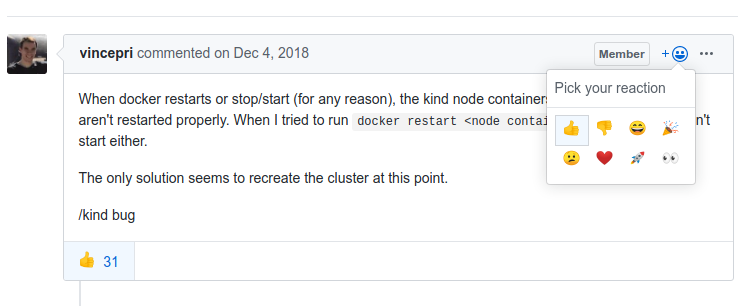
Please use github's native +1 mechanism to +1 so we can use the issue for discussion of the solution:
BenTheElder
on 14 Feb 2020
first small required fix https://github.com/kubernetes-sigs/kind/pull/1353
BenTheElder
on 21 Feb 2020
Next batch of PRs will be going out shortly. I had some other disruptions again (especially with kubernetes v1.18 code freeze PR reviews...), but I believe I have a workable approach for docker based nodes (which all current users are using, won't work with podman though!) inbound.
BenTheElder
on 15 Mar 2020
@BenTheElder Is this going to have only internal support for restarting the cluster if the docker daemon restarts, or is it also going to have some type of support from the CLI (e.g. kind stop cluster/kind start cluster or kind pause cluster/kind unpause cluster)?
 jorgemoralespou
on 16 Mar 2020
jorgemoralespou
on 16 Mar 2020
Just installed kind from default branch, and one node kind cluster works well after container restart. Have tried kill + start, and docker daemon restart. Thank you!
 skipor
on 16 Mar 2020
skipor
on 16 Mar 2020
To start with I'm focusing solely on having it automatically restart correctly, but once those fixes are in place I expect stop / start / pause / unpause will make sense as a future step.
BenTheElder
on 17 Mar 2020
This works:
$ docker ps -aq --filter 'label=io.x-k8s.kind.cluster' | awk '{print $1}' | xargs docker start
389fbc7f27c0
8234fdc273f5
 gaui
on 17 Mar 2020
gaui
on 17 Mar 2020
This works:
$ docker ps -aq --filter 'label=io.x-k8s.kind.cluster' | awk '{print $1}' | xargs docker start
389fbc7f27c0
8234fdc273f5
That works ONLY if the container gets assigned the same IP it had before it was stopped.
Docker uses the IPAM implemented in libnetwork and it doesn't guarantee the container will get the same IP.
aojea
on 17 Mar 2020
@aojea Ok, then we await a better solution. :smiley:
gaui
on 17 Mar 2020
it's coming! the next PR is out :-)
BenTheElder
on 18 Mar 2020
Hi @BenTheElder,
I'm probably missing something ... I thought the current version would handle the docker restarts and machine reboots ... I just pulled the current master branch and built it:
version: kind version 0.8.0-alpha+6bfc3befddadfa
host: Linux dell7740 4.15.0-1076-oem #86-Ubuntu SMP Wed Mar 4 05:40:20 UTC 2020 x86_64 x86_64 x86_64 GNU/Linux
docker: Docker version 19.03.8, build afacb8b7f0
kubectl: Client Version: version.Info{Major:"1", Minor:"17", GitVersion:"v1.17.2", GitCommit:"59603c6e503c87169aea6106f57b9f242f64df89", GitTreeState:"clean", BuildDate:"2020-01-18T23:30:10Z", GoVersion:"go1.13.5", Compiler:"gc", Platform:"linux/amd64"}
I create the new cluster and validate it...
```
...
$ kubectl cluster-info --context kind-test-cluster --kubeconfig /home/nrapopor/.kube/test-cluster.yaml
Kubernetes master is running at https://127.0.0.1:44203
KubeDNS is running at https://127.0.0.1:44203/api/v1/namespaces/kube-system/services/kube-dns:dns/proxy
To further debug and diagnose cluster problems, use 'kubectl cluster-info dump'.
$ docker-ps.sh
Container ID Names Image Size Status
------------ ----- ----- ---- ------
6180c79808d6 test-cluster-control-plane kindest/node:v1.17.2 3.06MB (virtual 1.25GB) Up About a minute
577e7580f797 test-cluster-worker kindest/node:v1.17.2 66.1kB (virtual 1.25GB) Up About a minute
3e4fe7b52fe4 test-cluster-worker2 kindest/node:v1.17.2 66.1kB (virtual 1.25GB) Up About a minute
c0143ffb01f1 test-cluster-worker3 kindest/node:v1.17.2 66.1kB (virtual 1.25GB) Up About a minute
````
I then stop and then start the docker service:
$sudo systemctl stop docker.service
$sudo systemctl start docker.service
$sudo systemctl status docker.service
● docker.service - Docker Application Container Engine
   Loaded: loaded (/lib/systemd/system/docker.service; enabled; vendor preset: enabled)
  Drop-In: /etc/systemd/system/docker.service.d
           └─env-file.conf
   Active: active (running) since Sun 2020-03-22 18:03:56 EDT; 7s ago
     Docs: https://docs.docker.com
 Main PID: 19073 (dockerd)
    Tasks: 23
   CGroup: /system.slice/docker.service
           └─19073 /usr/bin/dockerd -H fd:// --containerd=/run/containerd/containerd.sock
  ***removed extra status lines***
$ docker-ps.sh -a
Container ID  Names                       Image                 Size                     Status
------------  -----                       -----                 ----                     ------
6180c79808d6  test-cluster-control-plane  kindest/node:v1.17.2  3.06MB (virtual 1.25GB)  Exited (137) 41 seconds ago
577e7580f797  test-cluster-worker         kindest/node:v1.17.2  66.1kB (virtual 1.25GB)  Exited (137) 41 seconds ago
3e4fe7b52fe4  test-cluster-worker2        kindest/node:v1.17.2  66.1kB (virtual 1.25GB)  Exited (137) 41 seconds ago
c0143ffb01f1  test-cluster-worker3        kindest/node:v1.17.2  66.1kB (virtual 1.25GB)  Exited (137) 41 seconds ago
The containers do not restart ... so I attempt to start them manually
$ docker start test-cluster-control-plane test-cluster-worker test-cluster-worker2 test-cluster-worker3
test-cluster-control-plane
test-cluster-worker
test-cluster-worker2
test-cluster-worker3
First attempt to get cluster info:
````
$ kubectl cluster-info --context kind-test-cluster --kubeconfig /home/nrapopor/.kube/test-cluster.yaml
To further debug and diagnose cluster problems, use 'kubectl cluster-info dump'.
Unable to connect to the server: net/http: TLS handshake timeout
````
Second attempt:
````
$ kubectl cluster-info --context kind-test-cluster --kubeconfig /home/nrapopor/.kube/test-cluster.yaml
To further debug and diagnose cluster problems, use 'kubectl cluster-info dump'.
Unable to connect to the server: EOF
````
Check the containers ... they think they are running ...
$ docker-ps.sh -a
Container ID  Names                       Image                 Size                     Status
------------  -----                       -----                 ----                     ------
6180c79808d6  test-cluster-control-plane  kindest/node:v1.17.2  3.06MB (virtual 1.25GB)  Up About a minute
577e7580f797  test-cluster-worker         kindest/node:v1.17.2  66.1kB (virtual 1.25GB)  Up About a minute
3e4fe7b52fe4  test-cluster-worker2        kindest/node:v1.17.2  66.1kB (virtual 1.25GB)  Up About a minute
c0143ffb01f1  test-cluster-worker3        kindest/node:v1.17.2  66.1kB (virtual 1.25GB)  Up 59 seconds
I've added the zip of the exported logs ...
 nrapopor
on 22 Mar 2020
nrapopor
on 22 Mar 2020
I'm probably missing something ... I thought the current version would handle the docker restarts and machine reboots ... I just pulled the current master branch and built it:
No, as long as this issue is open this is not handled. There are more changes necessary for this to be handled correctly.
BenTheElder
on 23 Mar 2020
We have needed to restart a cluster several times, so I spent the time writing a script to restart the cluster and update the config accordingly
#!/usr/bin/env bash
KIND_CLUSTER="test"
KIND_CTX="kind-${KIND_CLUSTER}"

for container in $(kind get nodes --name ${KIND_CLUSTER}); do
      [[ $(docker inspect -f '{{.State.Running}}' $container) == "true" ]] || docker start $container
done
sleep 1
docker exec ${KIND_CLUSTER}-control-plane sh -c 'mount -o remount,ro /sys; kill -USR1 1'
kubectl config set clusters.${KIND_CTX}.server $(kind get kubeconfig --name ${KIND_CLUSTER} -q | yq read -j - | jq -r '.clusters[].cluster.server')
kubectl config set clusters.${KIND_CTX}.certificate-authority-data $(kind get kubeconfig --name ${KIND_CLUSTER} -q | yq read -j - | jq -r '.clusters[].cluster."certificate-authority-data"')
kubectl config set users.${KIND_CTX}.client-certificate-data $(kind get kubeconfig --name ${KIND_CLUSTER} -q | yq read -j - | jq -r '.users[].user."client-certificate-data"')
kubectl config set users.${KIND_CTX}.client-key-data $(kind get kubeconfig --name ${KIND_CLUSTER} -q | yq read -j - | jq -r '.users[].user."client-key-data"')
The client-cert and client-key shouldn't change but since I was already updating the port, which changes whenever the control-plane is restarted, it was just a safety check to update all of them
 slimm609
on 25 Mar 2020
slimm609
on 25 Mar 2020
Thanks @BenTheElder
I will wait ... Love Kind -- it will address all kinds of issues during QA deployments and perf testing ... I hoped we could prep clusters like GridGain and Kafka with large amount of data, and "wake" them up as needed for specific tests suites.
@slimm609 -- thanks! will try it
One thing I did notice with the current build: 0.8.0-alpha ... the port at least is sticky ...
Will flip back to 0.7.0 and will try your solution until all the fixes are in ...
Thanks,
Nick
nrapopor
on 26 Mar 2020
The host port is sticky on 0.8.0? Did it move to a low number port outside the docker random pool?
slimm609
on 26 Mar 2020
!/usr/bin/env bash
KIND_CLUSTER="test"
KIND_CTX="kind-${KIND_CLUSTER}"for container in $(kind get nodes --name ${KIND_CLUSTER}); do
[[ $(docker inspect -f '{{.State.Running}}' $container) == "true" ]] || docker start $container
done
sleep 1
docker exec ${KIND_CLUSTER}-control-plane sh -c 'mount -o remount,ro /sys; kill -USR1 1'
kubectl config set clusters.${KIND_CTX}.server $(kind get kubeconfig --name ${KIND_CLUSTER} -q | yq read -j - | jq -r '.clusters[].cluster.server')
kubectl config set clusters.${KIND_CTX}.certificate-authority-data $(kind get kubeconfig --name ${KIND_CLUSTER} -q | yq read -j - | jq -r '.clusters[].cluster."certificate-authority-data"')
kubectl config set users.${KIND_CTX}.client-certificate-data $(kind get kubeconfig --name ${KIND_CLUSTER} -q | yq read -j - | jq -r '.users[].user."client-certificate-data"')
kubectl config set users.${KIND_CTX}.client-key-data $(kind get kubeconfig --name ${KIND_CLUSTER} -q | yq read -j - | jq -r '.users[].user."client-key-data"')
Thanks works for me
 dpandhi-git
on 30 Mar 2020
dpandhi-git
on 30 Mar 2020
I still got Unable to connect to the server: EOF even after I do the tricks above. Any ideas?
 morningspace
on 30 Mar 2020
morningspace
on 30 Mar 2020
Sounds like you don’t have Yq or jq installed if getting EOF
slimm609
on 30 Mar 2020
@slimm609 Well, actually I skipped the lines of Yq calls because I noticed the credentials did not change in .kube/config, only the APIServer port is changed. So, I just manually updated the port, but still got the same Unable to connect to the server: EOF error. BTW: I use 0.7.0.
kind v0.7.0 go1.13.6 darwin/amd64
I would do a docker ps and make sure that the control plane is actually running and that the port matches
slimm609
on 30 Mar 2020
You also need to update the KIND_CLUSTER variable at the top to reference the name of your cluster.
slimm609
on 30 Mar 2020
Is there much more to be done to support this use case ?
Also, once this is complete will it mean that a separate docker network can be used for each kind cluster ? If so that would be fantastic. Would it then be possible to configure static ip addresses for each node container as well?
 cameronbraid
on 7 Apr 2020
cameronbraid
on 7 Apr 2020
i was finally able to get the unable to connect to the server: EOF error to occur and look into why that it. I haven't found the cause yet but when the control-plane restarts, its failing to restart etcd and kube-apiserver won't fully start up because it can't connect to etcd.
slimm609
on 7 Apr 2020
I think that the root cause is wrong IP addresses on control plane nodes. Control plane services (api server, etcd and so on) started by the kubelet as static pods and configured when cluster created, for example:
spec:
  containers:
  - command:
    - etcd
    - --advertise-client-urls=https://172.17.0.4:2379
    - --cert-file=/etc/kubernetes/pki/etcd/server.crt
    - --client-cert-auth=true
    - --data-dir=/var/lib/etcd
    - --initial-advertise-peer-urls=https://172.17.0.4:2380
    - --initial-cluster=kind-control-plane=https://172.17.0.4:2380
    - --key-file=/etc/kubernetes/pki/etcd/server.key
    - --listen-client-urls=https://127.0.0.1:2379,https://172.17.0.4:2379
    - --listen-metrics-urls=http://127.0.0.1:2381
    - --listen-peer-urls=https://172.17.0.4:2380
    - --name=kind-control-plane
When docker service restarts there is no guarantee that the IP addresses on control plane nodes and load balancer be the same as before restart and the etcd, api server and other services failed to startup.
As a workaround I use script like that:
#!/usr/bin/env bash

# 172.17.0.2 - worker
# 172.17.0.3 - external-load-balancer
# 172.17.0.4 - plane
# 172.17.0.5 - plane2
# 172.17.0.6 - worker3
# 172.17.0.7 - plane3


for CONTAINER in worker external-load-balancer control-plane control-plane2 worker3 control-plane3 worker2; do
    docker start kind-${CONTAINER}
    sleep 10
    docker exec -ti kind-${CONTAINER} ip a | grep 172.17
    echo
done
 loktionovam
on 7 Apr 2020
loktionovam
on 7 Apr 2020
The host port is sticky on 0.8.0? Did it move to a low number port outside the docker random pool?
Nope -- it was still the same as allocated at cluster creation ... not a low port at all
HTH,
Sorry was a little busy ...
Nick
nrapopor
on 14 Apr 2020
Is there much more to be done to support this use case ?
Mostly I need to find time to break it into sane PRs with a less brittle approach.
I hope to get back to that again in earnest this week and ship v0.8.0 with it by next week ... optimistically.
Also, once this is complete will it mean that a separate docker network can be used for each kind cluster ? If so that would be fantastic.
There's precedent for this approach in docker compose, however I think it will be easier for apps / tests etc. to interoperate if the default is to just use a fixed well-known network name and I think for most use cases the additional isolation is not really necessary.
Either way, if not initially we'll certainly have some way to override the network used in the future.
Would it then be possible to configure static ip addresses for each node container as well?
Not currently, no. This is also not reliably guarantee-able in general with docker anyhow. I would not recommend trying to do this.
I think that the root cause is wrong IP addresses on control plane nodes
Yes. We're going to take a different approach to working around this though (restarting them over and over may not even work anyhow).
Additionally: Currently the sanest looking approach (which I'm working on PR-ing) only supports docker, not the podman backend, and I'm not certain that IPv6 will work (or dualstack when that lands).
BenTheElder
on 14 Apr 2020
https://github.com/kubernetes-sigs/kind/issues/1471 was surprisingly involved to get a patch in for and slightly more critical. it's done now, this is back to the top.
BenTheElder
on 24 Apr 2020
the "last" PR is now out. it needs some more cleanup and more validation, but the basic implementation is more or less good enough now and in an open PR.
this will be ready before we ship kind v0.8.0
BenTheElder
on 24 Apr 2020
nominally fixed in https://github.com/kubernetes-sigs/kind/pull/1508 (after various preceding PRs...)
this will need some follow-up (mostly regarding ipv6 singlestack clusters).
it requires new node images.
FYI @alexellis
BenTheElder
on 25 Apr 2020
v0.8.0 will ship after follow up for this, I'm re-targeting for monday ideally.
BenTheElder
on 25 Apr 2020
@BenTheElder -- Many thanks! this will make our lives easier!!!. I was troubleshooting a weird Azure issue for the last couple of weeks, so had no time for anything else. But this is awesome news
nrapopor
on 26 Apr 2020
Related issues
 fgimenez
·
4Comments
fgimenez
·
4Comments
 figo
·
3Comments
figo
·
3Comments
 cig0
·
4Comments
cig0
·
4Comments
 csantanapr
·
4Comments
csantanapr
·
4Comments
 rflorenc
·
3Comments
rflorenc
·
3Comments
Most helpful comment
:+1: for the new
restart clustercommand!