Kimai2: Allow Showing Hourly Rate in Timesheet
Is your feature request related to a problem? Please describe.
No problem.
Describe the solution you'd like
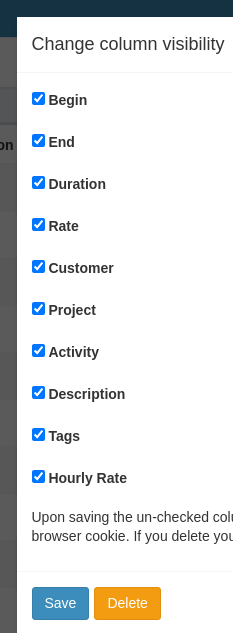
Clicking the Eye of Providence on the upper-right side of the "My times" page shows the available columns. One of them is "Rate" which appears to be the hourly rate multiplied by the hours clocked, but none of them appear to be "Hourly Rate".
Describe alternatives you've considered
An alternative is to divide the "Rate" by the "Duration" in my head to calculate the hourly rate. To get an accurate enough number would require more mental effort than I care to exert.
Screenshot
Notice the "Hourly Rate" added to the bottom. Maybe that is not the right place for such an option, but that's more or less how it should look.
After selecting that option, the timesheet should look like this:

 limitedAtonement
All 2 comments
If that is your normal hourly rate, I think you should sponsor that feature 😁
 kevinpapst
on 18 Dec 2020
kevinpapst
on 18 Dec 2020
There is a good deal of obfuscation in those screenshots, my friend!
limitedAtonement
on 18 Dec 2020
Related issues
 labor4
·
7Comments
labor4
·
7Comments
 heeen
·
4Comments
heeen
·
4Comments
 HeinzWuert
·
7Comments
kevinpapst
·
6Comments
HeinzWuert
·
7Comments
kevinpapst
·
6Comments
 miketubby
·
6Comments
miketubby
·
6Comments