Describe the bug
If I record time with the start button and want to measure it, then filtering by activity does not work.
To Reproduce
Steps to reproduce the behavior:
- Go to 'Start time recording from the button on the dashboard'
- choose the customer
- select the project
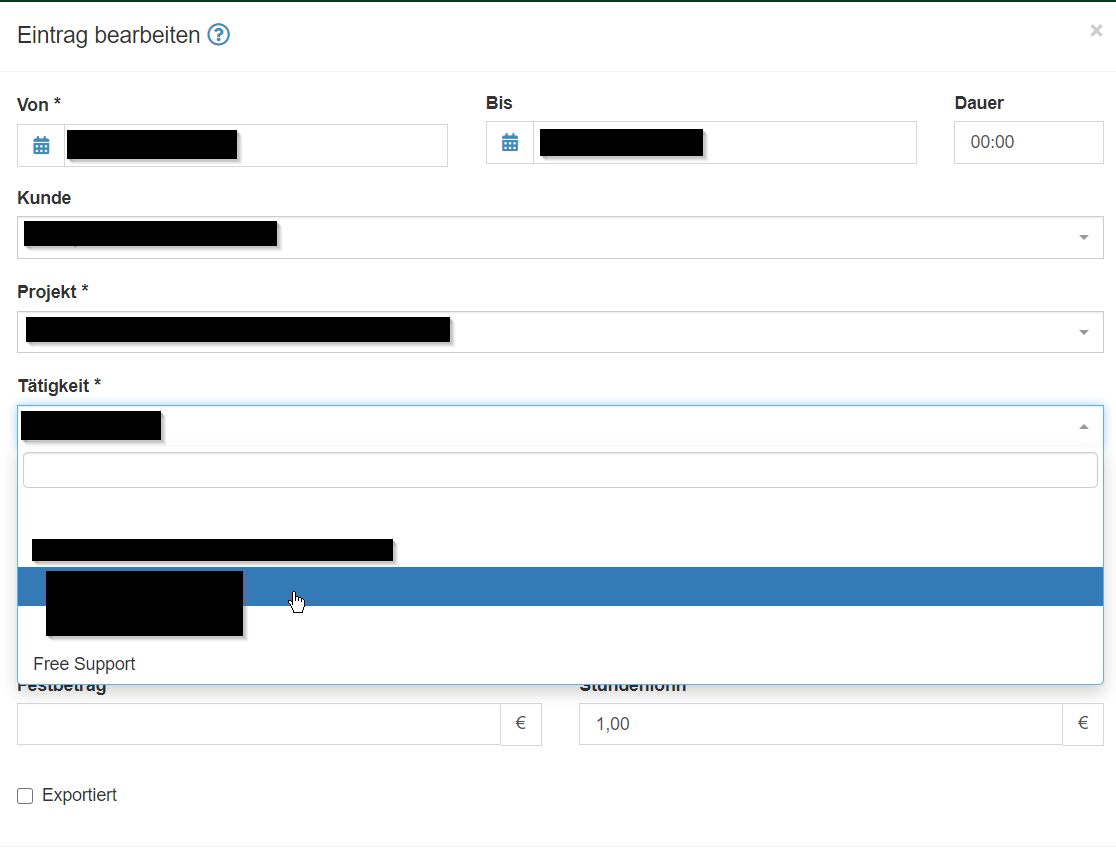
- here the activities are not shown, only globally available (here in the example "Free Support")
But if I now select free support and start the time tracking and then go to "My times" and edit the entry, I see that the filtering works.
I have migrated the data from version 1, the migration showed no errors.
The filtering also works for the customers and when I go to filter by activities, but not when I start a new time recording.
Screenshots

Desktop/Smartphone
Please complete the following information if this seems to be a frontend issue:
- Device: Laptop
- OS: Windows10
- Browser: Chrome
Additional context
Add any other context about the problem here.
- Kimai version 1.9 stable (Ayumi)
- PHP version 7.4.4
 janfix12
All 16 comments
Check your browsers javascript console and check the Kimai log file (doctor / Logs)
 kevinpapst
on 8 Jul 2020
kevinpapst
on 8 Jul 2020
Hi Kevin,
in the console I see Error 400 with message: Bad Request
In the Log i see this error:
2020-07-07 15:18:03] request.ERROR: Uncaught PHP Exception FOSRestBundleExceptionInvalidParameterException: "Parameter "project" of value "%project%" violated a constraint "Parameter 'project' value, does not match requirements 'd+'"" at /opt/kimai/vendor/friendsofsymfony/rest-bundle/Exception/InvalidParameterException.php line 68 {"exception":"[object] (FOS\RestBundle\Exception\InvalidParameterException(code: 0): Parameter "project" of value "%project%" violated a constraint "Parameter 'project' value, does not match requirements '\d+'" at /opt/kimai/vendor/friendsofsymfony/rest-bundle/Exception/InvalidParameterException.php:68)"} []
janfix12
on 8 Jul 2020
Is that a reproducible behavior in your installation?
Do you see it in the demo installation as well?
kevinpapst
on 8 Jul 2020
Yes I have installed the Version 1.18 and 1.19 fresh and then imported the v1 data with the usual way. And I tried once to upgrade from 1.18 to 1.19. The problem always occurred.
In the Kimai demo I cannot see this problem.
janfix12
on 8 Jul 2020
This is definitely not normal behavior, so we must find the reason.
So it is always happening for the create dialog and never with the edit dialog?
What is different between demo and your installation?
Which tracking mode do you use?
Did you customize anything? Which configs did you change?
How many customers and projects do you have?
Does it happen with every customer/project?
What is the name of your projects (probably special characters used)?
Probably a browser plugin going nuts?
kevinpapst
on 9 Jul 2020
Yes exactly only as soon as I start a new time recording the error comes, I want to edit this it works.
One big difference i can see is actually only in the webinterface. i have dots that don't look well placed in the demo are these not in the word. Also in the demo, as soon as i select the customer, the filter is applied, i.e. only the projects of the customer are shown.

- Standard mode
- actually only the ldap connection
- 11 customer and 28 projects
- I created a new customer with "test" and it didnt work, there are no special characters in the name of the customer
- I have also tried it in incognito mode with several browsers (Firefox, Chrome, Edge)
janfix12
on 9 Jul 2020
I have no clue whatsoever... can you give me access to your kimai so I can have a look myself?
kevinpapst
on 19 Jul 2020
No feedback, closing
kevinpapst
on 23 Jul 2020
Hi @kevinpapst I had a same issue in my Production env that in under construction,
Step to reproduce
- Create Timesheet entry.
- Select Customer
- Select Project
- Select Activity
- Select Task
Now Change the customer again now you will see all the entries you have selected does't change according to change happen in above fields. there is no option for refresh so we have to close and restart the same process to add timesheet entry to a specific activity and task.
So if we can add something like ajax or do refresh all the field according to the change happen that will be better.
 groovyrb
on 28 Jul 2020
groovyrb
on 28 Jul 2020
Seems there are multiple users who have the issue. @janfix12 @buoncri a 👍 is good to signal, but as I can only fix what I can see some input to allow me to reproduce it would be appreciated as well 😄
@groovyrb what do you mean with "Select task"? Are you talking about the "create timesheet" screen?
Everything seems to be working on my end, so I need more details. Is there a related error in your javascript console?
@janfix12 mentioned the log file error regarding the %project% parameter in the API - that is a strong indication, that the javascript has a problem. The parameter %project% should be replaced at least with an empty string. Seems it isn't and I have no clue why/how that could be.
I am literally blind and cannot fix what I cannot reproduce.
kevinpapst
on 28 Jul 2020
@kevinpapst what do you mean with "Select task"? Are you talking about the "create timesheet" screen?
This is new field which I have added according to my software requirement.
If you want I can create a user for you and will share you in personal so you can check why activity are not coming after first time change in customer.
groovyrb
on 28 Jul 2020
Yes please! I hope I can identify the problem in your system. You know my email :)
kevinpapst
on 28 Jul 2020
@groovyrb your issue comes from changing the API result structure. Check this JS component: https://github.com/kevinpapst/kimai2/blob/master/assets/js/plugins/KimaiSelectDataAPI.js#L77 which needs to be adapted to work with the new structure.
I am closing here again, as I cannot reproduce the issue with a clean Kimai installation.
Any input is welcome and I will reopen if someone has more infos.
kevinpapst
on 28 Jul 2020
Thanks for your valuable time will look into this. thank you so much
groovyrb
on 28 Jul 2020
Wrong line linked. Check that call: https://github.com/kevinpapst/kimai2/blob/master/assets/js/plugins/KimaiSelectDataAPI.js#L65
and from there on where the "data" object is used. It needs to be updated to use your result structure.
kevinpapst
on 28 Jul 2020
So I found one/two bugs in the javascript, both related to the same problem:
- select a project with activities and then select a customer that has no project
- maybe the same happens when no global activity is existing and a project without activity is selected (not sure about that one)
See #1894 for the changes.
I will merge them and you could please update your installation and check if anything changed @janfix12 ?
kevinpapst
on 16 Aug 2020
Related issues
 rarvin
·
3Comments
rarvin
·
3Comments
 ralfboernemeier
·
3Comments
ralfboernemeier
·
3Comments
 MakhPeter
·
5Comments
MakhPeter
·
5Comments
 miketubby
·
6Comments
miketubby
·
6Comments
 gimmesomethinggood
·
4Comments
gimmesomethinggood
·
4Comments
Most helpful comment
Hi @kevinpapst I had a same issue in my Production env that in under construction,
Step to reproduce
Now Change the customer again now you will see all the entries you have selected does't change according to change happen in above fields. there is no option for refresh so we have to close and restart the same process to add timesheet entry to a specific activity and task.
So if we can add something like ajax or do refresh all the field according to the change happen that will be better.