Kimai2: Calendar popup does not disappear
Describe the bug
Activity popup sometimes overlays other views and does not disappear, even when clicking on it.
To Reproduce
Steps to reproduce the behavior:
Not completely sure, but it looks like it is related to leaving your browser window when in the calendar view, doing something else with the browser, coming back and then creating a new timesheet entry.
A workaround (which is annoying) is to refresh the page or change view and coming back to the calendar view.
Screenshots
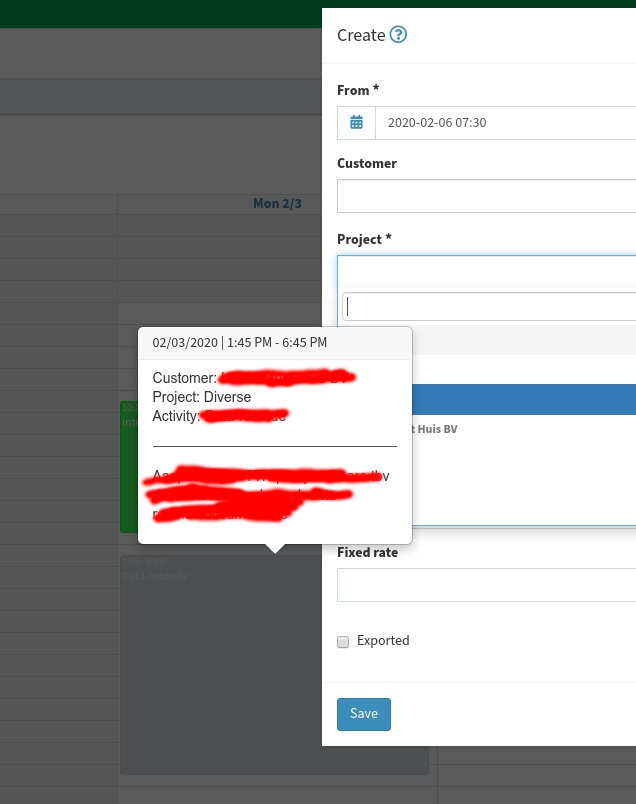

Desktop
- OS: Linux
- Browser Chromium
- Version 79
Additional context
- 1.7
 jaapcrezee
All 12 comments
Reported by multiple customers, even though I was never able to reproduce it.
There seems to be a problem with a timeout, more details can be found in the javascript console.
If a dev happens to see it, please share more infos
 kevinpapst
on 27 Feb 2020
kevinpapst
on 27 Feb 2020
If I see it again I'll make a js console dump and post it here.
jaapcrezee
on 27 Feb 2020
I am now running on Chromium Version 80.0.3987.116 (Official Build) Arch Linux (64-bit) and seem to be unable to reproduce it anymore.
jaapcrezee
on 27 Feb 2020

Unfortuantely I had the console not open so it only shows
0.1a6ffb43.js:1 Deprecation warning: use moment.updateLocale(localeName, config) to change an existing locale. moment.defineLocale(localeName, config) should only be used for creating a new locale See http://momentjs.com/guides/#/warnings/define-locale/ for more info.
D @ 0.1a6ffb43.js:1
(index):1 Autofocus processing was blocked because a document already has a focused element.
DevTools failed to parse SourceMap: chrome-extension://hdokiejnpimakedhajhdlcegeplioahd/sourcemaps/onloadwff.js.map
I think what I did to trigger it:
- create an entry for today; yesterday was still empty
- create an entry for yesterday
- all from the calendar view.
Hope this helps.
jaapcrezee
on 28 Feb 2020
Hi Kevin
I can adjust this behavior if you move the mouse over the existing time entry while saving a new time entry. Then the popup remains visible and can only be removed by refresh.
Regards Michael
 gises
on 28 Apr 2020
gises
on 28 Apr 2020
Another element that I think may help, I think I was able to reproduce this systematically!
I'm using latest 1.9 version and Firefox 76.0 (64-bit)
Rationale:
What I came to understand is that this behaviour:
- occurs upon the saving of a given task
- the popup that will be displayed and "stick" on the screen is the one that is directly under the cursor at the exact moment of the main detail popup fades out.
To reproduce:
- it's easier to witness in weekly presentation, though I think it the same in daily view as well.
- make sure to have a few tasks already filled in.
- add a new one
- when clicking on the save button, clickly move the cursors to another existing task without clicking on it
- when the main popup disappears, the popup associated to the other task will show up and stick.
This is a bit hard to describe, let me know if something is not clear here.
Thanks for the awesome work @kevinpapst btw, this tool is just great ;).
 dandelionmood
on 7 May 2020
dandelionmood
on 7 May 2020
Thanks for the detailed descriptions to all!
I am waiting for the https://fullcalendar.io to be released in v5, before I start working on the calendar again. Once this is done, I will post a link to a demo installation, so everyone can test.
kevinpapst
on 7 May 2020
Temporary fix (which works for us):
(Bear in mind we're not familiar with the language used in this project, so we looked for a fix we can implement without learning a new language!)
- We took this plugin: https://www.kimai.org/store/keleo-css-custom-bundle.html
- Duplicated it
- Changed everything "CSS" to "JS" and "Css" to "Js" and so on..
- In "\var\plugins\CustomJSBundle\ThemeEventSubscriber.php": Change the ThemeEvent to "ThemeEvent::JAVASCRIPT" and below that change the
Most helpful comment
Thanks for the detailed descriptions to all!
I am waiting for the https://fullcalendar.io to be released in v5, before I start working on the calendar again. Once this is done, I will post a link to a demo installation, so everyone can test.