Hi @kevinpapst, we are using Kimai to programatically create a timesheet for a given user via the API. The problem is that we need to set an API Key for each user in order to create the timesheet.
It would be grand if we could have a user with the permission to create timesheets for other users or a single API Token to access the whole API. Is there any chance this could be supported/implemented?
Thanks in advance
 aollok
All 10 comments
Should work if you use and user with role admin and if you set the user in the JSON.
 hmr-it-jr
on 15 Nov 2019
hmr-it-jr
on 15 Nov 2019
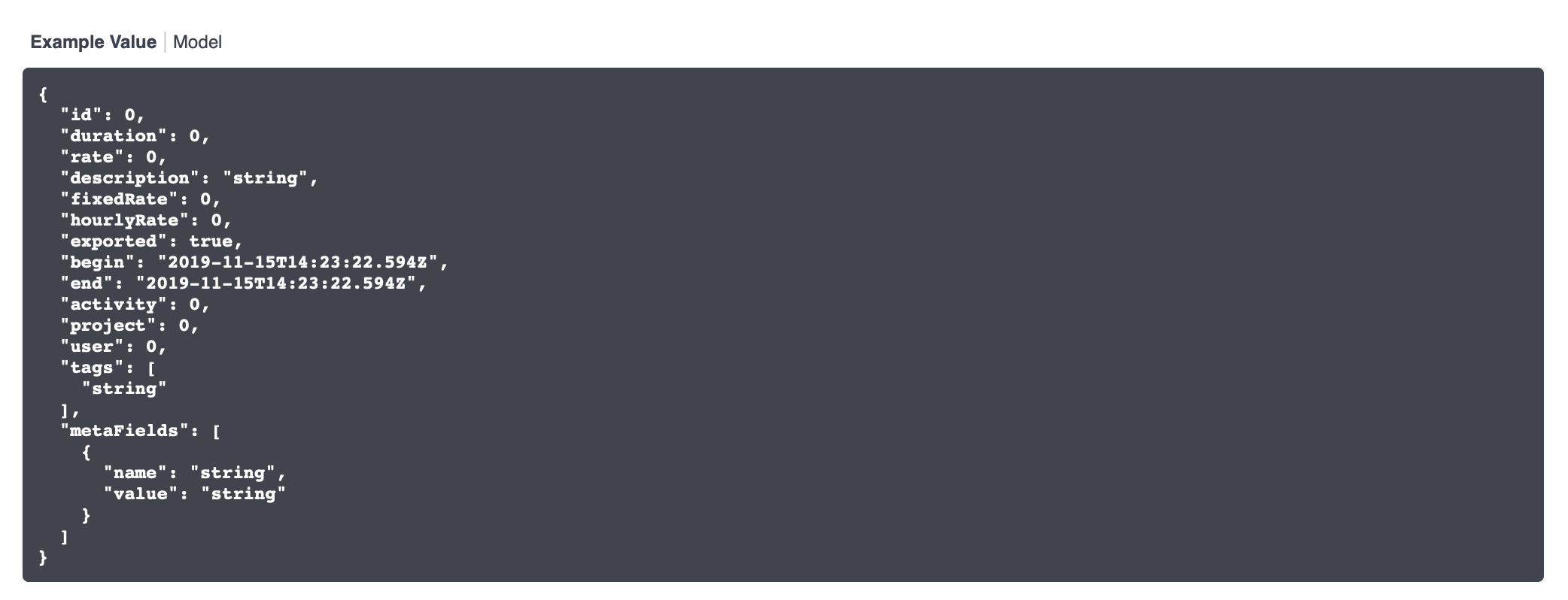
@hmr-it-jr is right, admins can set the user in the create timesheet post.
This info is missing in the API docs, as it is auto-generated without the correct permissions.
Check the response and use the fields you see there:
 kevinpapst
on 15 Nov 2019
kevinpapst
on 15 Nov 2019
Thank you for your replies @hmr-it-jr and @kevinpapst. I tried what you said (with admin and super-admin roles) and for some reason I cannot get it working. I don't know what I'm missing. I am getting the following response:
{
    "code": 400,
    "message": "Validation Failed",
    "errors": {
        "errors": [
            "This form should not contain extra fields."
        ],
        "children": {
            "begin": {},
            "end": {},
            "project": {},
            "activity": {},
            "description": {},
            "tags": {},
            "fixedRate": {},
            "hourlyRate": {},
            "exported": {}
        }
    }
}
This is my HTTP request:
POST /api/timesheets HTTP/1.1
Host: localhost:8001
Content-Type: application/json
X-AUTH-USER:  hello
X-AUTH-TOKEN:  pass1234
User-Agent: PostmanRuntime/7.19.0
Accept: */*
Host: localhost:8001

{
    "begin": "2019-11-18T15:00:00",
    "end": "2019-11-18T16:00:00",
    "project": "1",
    "activity": "1",
    "description": "hello",
    "tags": "hello, there",
    "exported": false,
    "user": 5
}
I could have sworn that it was already possible, seems it wasn't...
Please test/use the attached PR. It adds the user field to post and patch function.
kevinpapst
on 18 Nov 2019
It works perfect now, thank you very much!
aollok
on 18 Nov 2019
@hmr-it-jr could you test that change with your custom plugin?
This line in special changes an important behavior:
https://github.com/kevinpapst/kimai2/pull/1259/files#diff-6626903cab73c8bd1ec2715fbbe2bc94R319
Unsubmitted fields are now not set to null, what might results in different validation behavior (when not submitting all required fields) and I am not entirely sure about it.
kevinpapst
on 18 Nov 2019
@kevinpapst the PeriodInsertPlugin does still work - but I guess it's related to the fact, that I'm not using the API?
hmr-it-jr
on 19 Nov 2019
Maybe 😁 and what about app and the other commercial plugin (not listed in the store yet)?
kevinpapst
on 19 Nov 2019
At the QRCode app I'm not changing the user, so I guess it shouldn't be a problem.
hmr-it-jr
on 19 Nov 2019
This thread has been automatically locked since there has not been any recent activity after it was closed. Please open a new issue for related bugs. If you use Kimai on a daily basis, please consider donating to support further development of Kimai.
![lock[bot] picture](https://avatars1.githubusercontent.com/in/6672?v=4&s=40) lock[bot]
on 24 Jan 2020
lock[bot]
on 24 Jan 2020
Related issues
 derdeagle
·
5Comments
derdeagle
·
5Comments
 gimmesomethinggood
·
4Comments
gimmesomethinggood
·
4Comments
 rarvin
·
3Comments
rarvin
·
3Comments
 Recoil1980
·
5Comments
Recoil1980
·
5Comments
 heeen
·
4Comments
heeen
·
4Comments