Kimai2: Selection Field for Customer and Label for Visibility
Is your feature request related to a problem? Please describe.
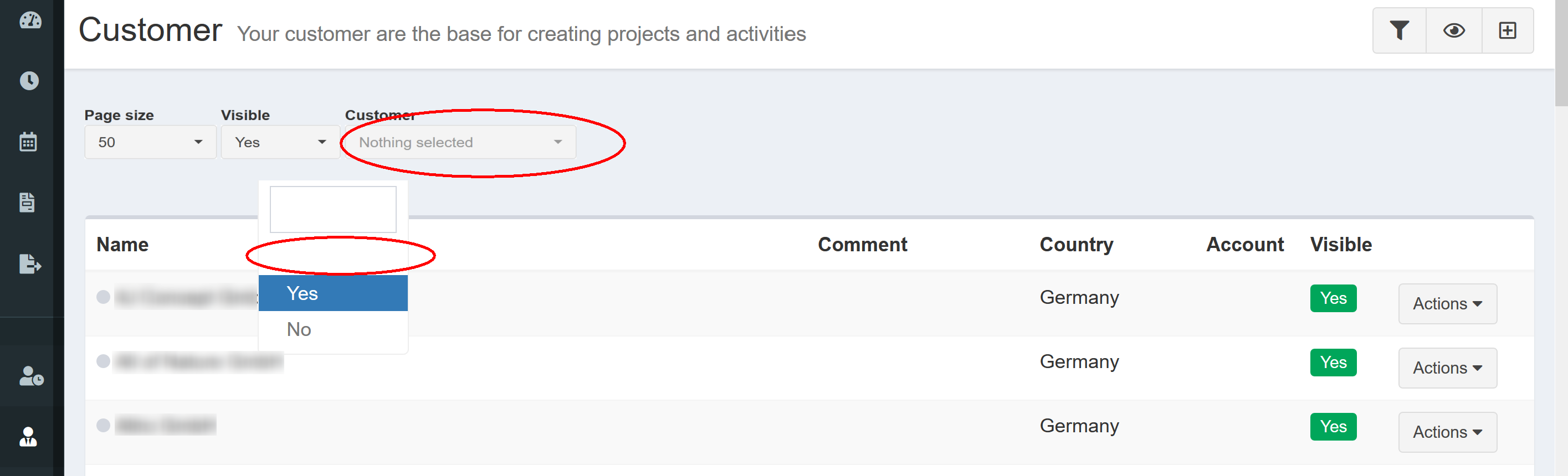
1) Under customer, there is no selection field to quickly browse to a customer (which makes it cumbersome to select a customer for modifications if you have many customers).
2) Generally, the drop down menu of visibility gives 3 options. However, only option two and three are labeled with "yes" and "no"
Describe the solution you'd like
1) Add a selection field "Customer" like it exists under Projects
2) Add a label "both" to the white selection field and maybe move it to the last position
 BeckeBauer
All 12 comments
- The selection field "Customer" on page Project works as a filter (that's why it's icon is a filter). There is no point filtering customers by customers. Every project has a 'parent' customer, that's why it's logical to show up on projects page but not on customers.
Maybe a searchbox would be useful. But you can just make the page size very big and search with your browser's built in search functionality with ctrl+F
- In a lot of other programs you can see this, that a selection box is empty, as it means 'unset' not both. You can see this empty dropdown everywhere in kimai, the only difference with visibility is that it defaults to Yes, not empty just like anywhere else.
 infeeeee
on 8 Jul 2019
infeeeee
on 8 Jul 2019
@infeeee
- Thank you for your opinion. In contrast to it, I see a point in filtering customers, otherwise I had not started the thread (as explained, it were quite handy to quickly select a customer if you need to change the address or want to add information like a phone number).
- It might be that other programs also have an unlabeled selection field beside labelled fields. However, I doubt that it's standard (at least for me it took a while to realise that there is a additional selection field at all).
I fully disagree that the field in the present case means 'unset' since unset would neither be 'yes' nor 'no'.
So, just unlike my issue...
BeckeBauer
on 8 Jul 2019
@BeckeBauer You might disagree, but @infeeeee is still right.
There are three visibility states: visibility, hidden and all (or in other words: not filtering for visibility).
This is not completely relevant for customers, but especially for projects and activties.
Please read the chapters in the documentation (which I added right now) why:
https://www.kimai.org/documentation/customer.html#visibility
https://www.kimai.org/documentation/project.html#visibility
https://www.kimai.org/documentation/activity.html#visibility
A quick edit select box for editing is a nice idea as well, but I am not sure how and where that could be added.
I have plans to add a global search box, which is capable of finding customers, projects and activities. So not exactly what you proposed, but it would achieve the same results.
 kevinpapst
on 8 Jul 2019
kevinpapst
on 8 Jul 2019
@Kevin: Maybe, the global search box could be placed under customers 😉
Regarding the label, I am aware that the states are visibility, hidden and all. That's why, I suggested a label for the third state and of course, do not mind if it is 'all' instead of 'both'. My intention was to have a label instead of a blank space; the name is fully up to you (or even no name since I now know that there is this third option 🤔)
BeckeBauer
on 8 Jul 2019
Aha, communication is not always easy through the internet ;-)
Well, actually "all" would be the technical correct phrase, as visible activites which are hidden through a hidden project are "visible but invisible".
How many customers do you have, that you need to search for one?
Or is it more "lazyness"? I mean, how often does someone have to update a customer?
A global search box is the only solution I want, maybe also a search box on the each admin page (but the filters are already getting too much).
kevinpapst
on 8 Jul 2019
On placing the global search: Snipe-it self-hosted asset management platform placed it's global search on the top bar, see this screenshot: https://snipeitapp.com/img/screenshots/screenshot-dashboard.png They use same/very similar ui.
I think this would fit well with kimai as well.
Also there are two other feature requests about search: #574 and #667.
infeeeee
on 8 Jul 2019
Thanks for cross linking!
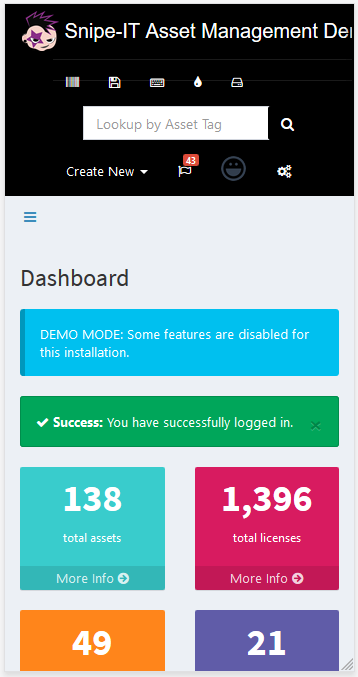
I wonder how it looks on mobile.
kevinpapst
on 8 Jul 2019
It's not the best, but usable:
infeeeee
on 8 Jul 2019
Brrrr ;-) Maybe having it in the sidebar (as the original AdminLTE theme proposed) is better:
https://adminlte.io/themes/AdminLTE/index2.html
kevinpapst
on 8 Jul 2019
Looks nice in the sidebar... (had to set the state to invisible for quite a view costumers recently and this how I stumbled over the 'missing filter' option - I thought it might be easy to add this option since there is a filter there but of course it would just support my laziness... )
BeckeBauer
on 8 Jul 2019
Search fields for all admin screens are now available in master
kevinpapst
on 4 Sep 2019
This thread has been automatically locked since there has not been any recent activity after it was closed. Please open a new issue for related bugs. If you use Kimai on a daily basis, please consider donating to support further development of Kimai.
![lock[bot] picture](https://avatars1.githubusercontent.com/in/6672?v=4&s=40) lock[bot]
on 3 Nov 2019
lock[bot]
on 3 Nov 2019
Related issues
 trentks
·
5Comments
trentks
·
5Comments
 roulious
·
4Comments
roulious
·
4Comments
 HeinzWuert
·
4Comments
HeinzWuert
·
4Comments
 MakhPeter
·
5Comments
MakhPeter
·
5Comments
 heeen
·
6Comments
heeen
·
6Comments
Most helpful comment
Brrrr ;-) Maybe having it in the sidebar (as the original AdminLTE theme proposed) is better:
https://adminlte.io/themes/AdminLTE/index2.html