Kimai2: Timezone is not working correctly
Describe the bug
When creating a new entry, timezone is not working correctly. I don't see any difference when changing the timezone in user settings.
We updated to the latest version. We did several things:
- Set the time in the container to UTC
- Set the time in the container to localtime
Combined with: - Set the timezone (in user settings) in the application to UTC
- Set the timezone (in user settings) in the application to localtime (in my case: Amsterdam).
Whatever we do, when creating a new entry, start time is one hour early (UTC). Nothing changes when doing one of the changes above.
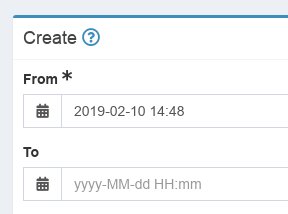
I created these screenshots (this one and the next below) around a quarter to four local time (a quarter to three utc).
When going to the calender view of this week, there is a red stripe on the current day / time. That stripe is really the current local time for me. The red stripe doesn't change place when changing to Amsterdam or UTC.
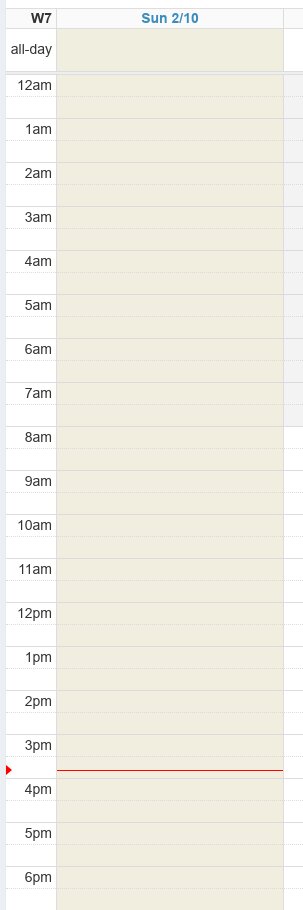
So it looks like nothing is happening actually when changing the timezone. And then I am only looking at what happens when creating a new entry.
However, it is great we can now start activities in the future, so it is not a problem if you change the time to +1 hour. Not how it should be ;)
To Reproduce
Steps to reproduce the behavior:
- Change the Timezone in User profile / Preferences to Amsterdam (or UTC).
- Change the server time to Amsterdam (or UTC).
- Go to My times
- Create a new entry with the '+' button on the right top.
- Look at the default time in the 'From' field.
- Repeat aboven steps for different timezones and different combinations.
- The 'default time' will not change to anything else than UTC.
Expected behavior
I expect the default time when starting a new entry to be the current local time.
Screenshots
See above.
Desktop (please complete the following information):
- OS: Linux
- Browser Chrome
- Version Kimai v2 - 0.7 stable (in an docker container).
 maaikez
All 12 comments
Wow, thanks for sharing this detailed report. That was a hard case of misunderstanding - problem with complex online discussions and a different language in between...
I finally understand your problem.
When working on that timezone update it never occurred to me, that changing the timezone should change the time displayed in the edit timesheet forms. Sounds stupid and maybe is ;-)
I'll check the forms and see, why it always displays the server time.
 kevinpapst
on 10 Feb 2019
kevinpapst
on 10 Feb 2019
Yes I was probably not very clear.
I don't know if this is an answer to https://github.com/kevinpapst/kimai2/pull/372#issuecomment-462141511 but when I add an event from 18:00 to 19:00, it will be on the correct place on the calendar, no matter if I change to UTC or Amsterdam.
Do you want to know more?
maaikez
on 10 Feb 2019
Nope, your initial post above was excellent and finally pointed me in the right direction.
I was too much concentrated on the migration process and the imported data from Kimai v1 when I made the first timezone changes and completely lost focus of the forms. I found the problems and will push a new branch soon.
Fingers-crossed that this is finally doing the correct thing. I hope you find some time for testing, as this is the first time for me handling timezones in such a way ... it seems that this topic is much more complicated than I thought.
kevinpapst
on 10 Feb 2019
I'd appreciate if you could test #555 and see how that one goes. The fixes concentrate on starting/stopping/editing/restarting timesheet entries.
Still open - and I am not sure how to handle that - are the filter queries.
Do I need to apply the users timezone to those as well, when limiting the result sets by date?
I guess I need to do some more testing there as well.
kevinpapst
on 10 Feb 2019
I'll try to test soon. And yes, timezones are always complicated. Just stick to UTC ;).
Would be nice to have the filter queries in the user's timezone indeed. I don't know how you fixed it, but can't you let the UI do the conversion? So the user selects the from / to time and the frontend will convert that to UTC and post it to the server. Server returns the records in UTC and the UI will show them in localtime.
maaikez
on 11 Feb 2019
Almost like that: I store the times in UTC - but together with the timezone they were recorded in.
Otherwise the information about the local time would be gone and could not be restored. The frontend always shows the "local time of recording". So it is not converted to the current-users timezone, but to the timezone they were created in.
Consider a team across multiple timezones. If the project manager checks all the times: should he see the times converted to his timezone or in the timezone they were recorded?
kevinpapst
on 11 Feb 2019
Any chance you can test it today? If not, no problem, but then I will merge it this afternoon and we can check afterwards.
Every day that passes by, first time user will get a buggy version... and the PR version is definitely better than master right now, maybe still not perfect though ^^
kevinpapst
on 13 Feb 2019
Ok I checked it.
I checked creating a new entry in 'my times'. That is working ok now (so I see the local time when starting an event, but only when I set the local time in my preferences).
In the calendar month view, you still see your current local time (the red line) (and not the timezone you changed to in the settings). Is that what you want?
maaikez
on 13 Feb 2019
Thanks!
From my experience servers (normally?) use the timezone in which the company is located that owns them. I guess that's why nobody before you found that problem. So yes, if you live in a different timezone than the one configured in your PHP, you need to set it explicitly in the preferences.
I don't know how to get that information otherwise. Javascript sees your timezone, but thats nothing I can use on the backend side.
In theory you could have a different timezone in Kimai than in your browser, but that is a strange edge-case and doesn't make a lot of sense!? I am not sure if the calendar really needs to be fixed.
Well yes, actually it should display the time used in Kimai ... which should be the same than your browsers time, otherwise we have more trouble than just this red line ;-) Let me see if that can be configured.
When you want to test a bit more, you could also check editing existing entries, start + stop and also have a look directly at the database entries. They should be in UTC and the timezone column should be filled correctly with your timezone, even after changes.
kevinpapst
on 13 Feb 2019
Yes that would be a bit strange, but why would you have that option then? You can send the timezone from javascript to the server to know in what timezone the user is at that moment? But it's indeed a corner case and not very important.
I did the things you asked in your last paragraph. It works like expected.
I created a record in UTC, changed the timezone in the preferences to localtime and changed the record. The record will stay in UTC (in the database). Is that what you expected?
If editing a record created in 'my' timezone, it will stay in 'my' timezone, so that is working as expected for me.
maaikez
on 13 Feb 2019
Thanks a lot for all your effort and valuable feedback 👍
I fixed the red indicator in the calendar, so I can merge that later, awesome!
kevinpapst
on 13 Feb 2019
This thread has been automatically locked since there has not been any recent activity after it was closed. Please open a new issue for related bugs. If you use Kimai on a daily basis, please consider donating to support further development of Kimai.
![lock[bot] picture](https://avatars1.githubusercontent.com/in/6672?v=4&s=40) lock[bot]
on 14 Apr 2019
lock[bot]
on 14 Apr 2019
Related issues
 rarvin
·
3Comments
kevinpapst
·
6Comments
rarvin
·
3Comments
kevinpapst
·
6Comments
 miketubby
·
6Comments
miketubby
·
6Comments
 gimmesomethinggood
·
4Comments
gimmesomethinggood
·
4Comments
 derdeagle
·
5Comments
derdeagle
·
5Comments