FYI, created a Docker container for kimai2 which is available at https://hub.docker.com/r/dysonsphere/kimai2/
Used php7.2-apache as base image everything is working as expected. Nice job on the tool!
I would like to keep the docker container updated with the latest releases, that can be done by manually updating the code using git inside the container and republishing it but an automated way would be even better.
Is there any automated build pipeline this project is using where I can hook my docker container so that it gets updated automatically with every release?
If there is no such build pipeline in place yet, are the core devs interested to have one?
PS: We love this tool during the evaluation phase and have decided to bundle it into one of our services packages.
 dysonspherelab
All 20 comments
Hi @dysonspherelab !
Nice, thanks! Could you submit a PR with the Dockerfile (and probably a short documentation chapter about how to use it) as well, so people can use it out-of-the-box?
Regarding the build pipeline, there is none yet. There is so much other stuff, which I wanted to tackle before that part. I could probably add a web hook to a service if that would help?
Could you share who is "we" and what is that "service package" you talk about?
 kevinpapst
on 29 Aug 2018
kevinpapst
on 29 Aug 2018
Hey @kevinpapst we are Dysonspherelab :) it is a cloud technology focused company and we are offering a managed devops service which bundles few software packages in which we have decided to use kimai2 for the open source time tracking solution.
I have provided very simple documentation in my docker hub read me. It goes like this:
Run the app container
docker run -d -p 80:80 --name kimai2 dysonsphere/kimai2
Now install all dependencies for Kimai 2:
sudo -u www-data composer install --no-dev --optimize-autoloader
Optionally create the database:
bin/console doctrine:database:create
Create all schema tables:
bin/console doctrine:schema:create
Make sure that upcoming updates can be correctly applied by setting the initial database version:
bin/console doctrine:migrations:version --add --all
Warm up the cache (as webserver user):
sudo -u www-data bin/console cache:warmup --env=prod
Create your first user with the following command. You will be asked to enter a password afterwards:
bin/console kimai:create-user username [email protected] ROLE_SUPER_ADMIN
Tip: You can skip the "create user" step, if you are going to import data from Kimai v1.
For available roles, please refer to the user documentation (https://github.com/kevinpapst/kimai2/blob/master/var/docs/users.md).
Most of it is just a simple copy paste fromyour read me :)
I would open a new PR for dockerizing the future builds, thanks
dysonspherelab
on 30 Aug 2018
Since I'm interested to run this thing on my Synology I wonder how the progress on the Docker-Image is?
 Haidy777
on 19 Sep 2018
Haidy777
on 19 Sep 2018
I am not using docker and haven't tested it. But did you give it a try?
Sounds as if the one from @dysonspherelab works ... even though in the future I would really prefer to use an official docker/debian base image and a simple Dockerfile.
kevinpapst
on 20 Sep 2018
I couldn't get the one from @dysonspherelab running. But created one myself yesterday based on the php:7.2-apache Image.
It's not fully functioning right now but hopefully I have some time this evening to get everything working.
If you want I could create a PR so that we could work on a "official".
Haidy777
on 20 Sep 2018
Yes please, that would be awesome @Haidy777 !
Kimai is fairly easy to setup and if we use SQLite we can provide a fully functional Dockerfile.
Even though I'd prefer nginx and phpfpm over Apache.
kevinpapst
on 20 Sep 2018
I couldn't get the one from @dysonspherelab running. But created one myself yesterday based on the php:7.2-apache Image.
@Haidy777 the docker image is working. Please tell more about the error you were facing while running the container?
I have not linked it with any external services like database using sqlite that uses docker file system only to store the data. But that is ephermal storage. It is part of our Devops package offering, which is a service we are going to launch soon.
dysonspherelab
on 20 Sep 2018
Added few screenshots for reference

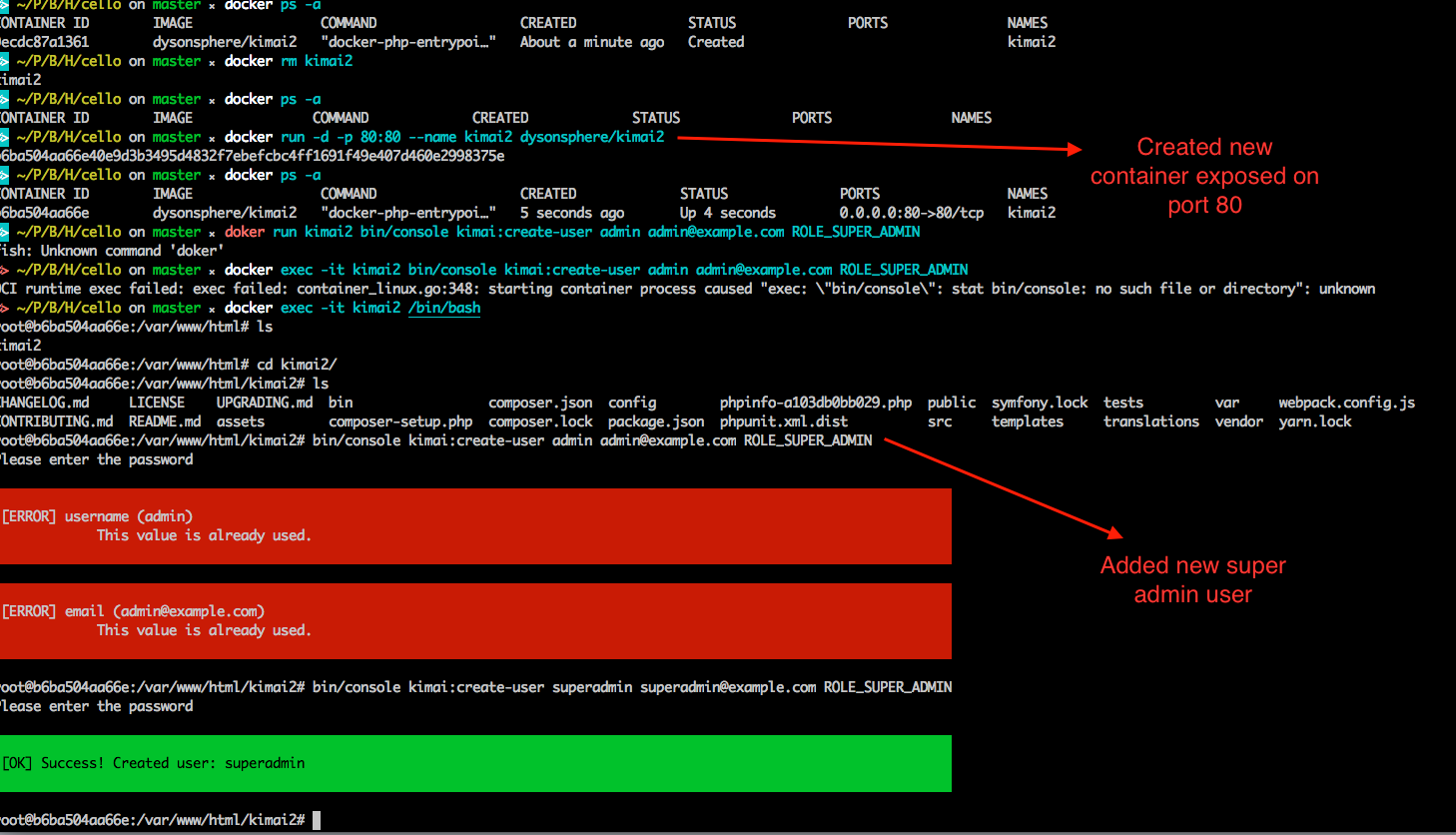

- container ran on port 80 using docker command: docker run -d -p 80:80 --name kimai2 dysonsphere/kimai2
- New super admin user created entering into the container and running the command: bin/console kimai:create-user username [email protected] ROLE_SUPER_ADMIN
- Kimai2 is accessible at port 80 on localhost
dysonspherelab
on 20 Sep 2018
@Haidy777 It would be really helpful if you could send us the logs from your Docker container.
docker logs [container_name]
dysonspherelab
on 20 Sep 2018
Oh! beg my pardon there was a confusion
I did used an external mysql db for the app, anyways here is my docker-compose.yaml file.
@kevinpapst you can include the docker-compose.yaml into the repository if you want to :)

dysonspherelab
on 20 Sep 2018
@dysonspherelab Thanks for your response, but I'm currently looking for a SQLITE-Version. Do you have the Source of your Dockerfile somewhere, I couldn't find it on Github / Dockerhub?
Haidy777
on 20 Sep 2018
@Haidy777 Let me walk you through the process I used to build this docker image. Also, your login will work once you will connect it to a mysql service, that was the confusion I mentioned earlier.
- I cloned the source
- created a base ubuntu16.04 docker container, lets call it app container
- created a base mysql 5.7 image
- sshd inside the app container
- installed php-7.2 and apache inside the app container
- Downloaded composer
- installed all dependencies, sudo -u www-data composer install --no-dev --optimize-autoloader
- created database, bin/console doctrine:database:create, inside connected mysql service
- created all the required schema, bin/console doctrine:schema:create
- ran the migraitons, bin/console doctrine:migrations:version --add --all
- warmed up the cache, sudo -u www-data bin/console cache:warmup --env=prod
- created super admin user, bin/console kimai:create-user username [email protected] ROLE_SUPER_ADMIN
- created new container out of running app, docker container commit
- pushed the new docker container to my dockerhub account
If you follow above steps exactly as it is you can get a docker container similar to mine.
So, if you want to use my container docker pull and run it, also run a mysql container, and start creating new users to access those.
Let me know if you need more info regarding this, thanks
dysonspherelab
on 21 Sep 2018
@dysonspherelab did you copy all source files into the container? or does the person who wants to run the container have to execute docker run -d -p 80:80 --name kimai2 dysonsphere/kimai2 in the Kimai directory?
kevinpapst
on 21 Sep 2018
all the source code is already present inside the container, the docker command has to be executed in users shell.
dysonspherelab
on 21 Sep 2018
Okay, then this is a different use-case scenario. Users could update it, but that requires a decent amount of Docker knowledge.
What I had in mind was more of a "developer" solution, probably even production ready - but with a mounted source directory.
kevinpapst
on 21 Sep 2018
Here's my take on it (with Nginx and FPM): https://github.com/felixhummel/kimai-in-docker/tree/kimai2
Let me know if you'd like to integrate this here.
 felixhummel
on 19 Oct 2018
felixhummel
on 19 Oct 2018
As Kimai does ship a Dockerfile now, I closed this issue.
But as we all know, Docker can be used in many ways and there is not "the one solution" that fits all.
So I added links to your solutions @dysonspherelab and @felixhummel here:
https://github.com/kevinpapst/kimai2/blob/master/var/docs/docker.md#further-docker-solutions
Thanks for your contributions!
kevinpapst
on 6 Nov 2018
Sounds awesome :)
dysonspherelab
on 8 Nov 2018
nice! :)
felixhummel
on 8 Nov 2018
This thread has been automatically locked since there has not been any recent activity after it was closed. Please open a new issue for related bugs. If you use Kimai on a daily basis, please consider donating to support further development of Kimai.
![lock[bot] picture](https://avatars1.githubusercontent.com/in/6672?v=4&s=40) lock[bot]
on 7 Jan 2019
lock[bot]
on 7 Jan 2019
Related issues
 HeinzWuert
·
4Comments
HeinzWuert
·
4Comments
 Sinister-lab
·
3Comments
Sinister-lab
·
3Comments
 labor4
·
7Comments
labor4
·
7Comments
 derdeagle
·
5Comments
derdeagle
·
5Comments
 roulious
·
4Comments
roulious
·
4Comments
Most helpful comment
I couldn't get the one from @dysonspherelab running. But created one myself yesterday based on the php:7.2-apache Image.
It's not fully functioning right now but hopefully I have some time this evening to get everything working.
If you want I could create a PR so that we could work on a "official".