Kibana: Improve message for adding first workpad
This empty state for Canvas needs some improvements.
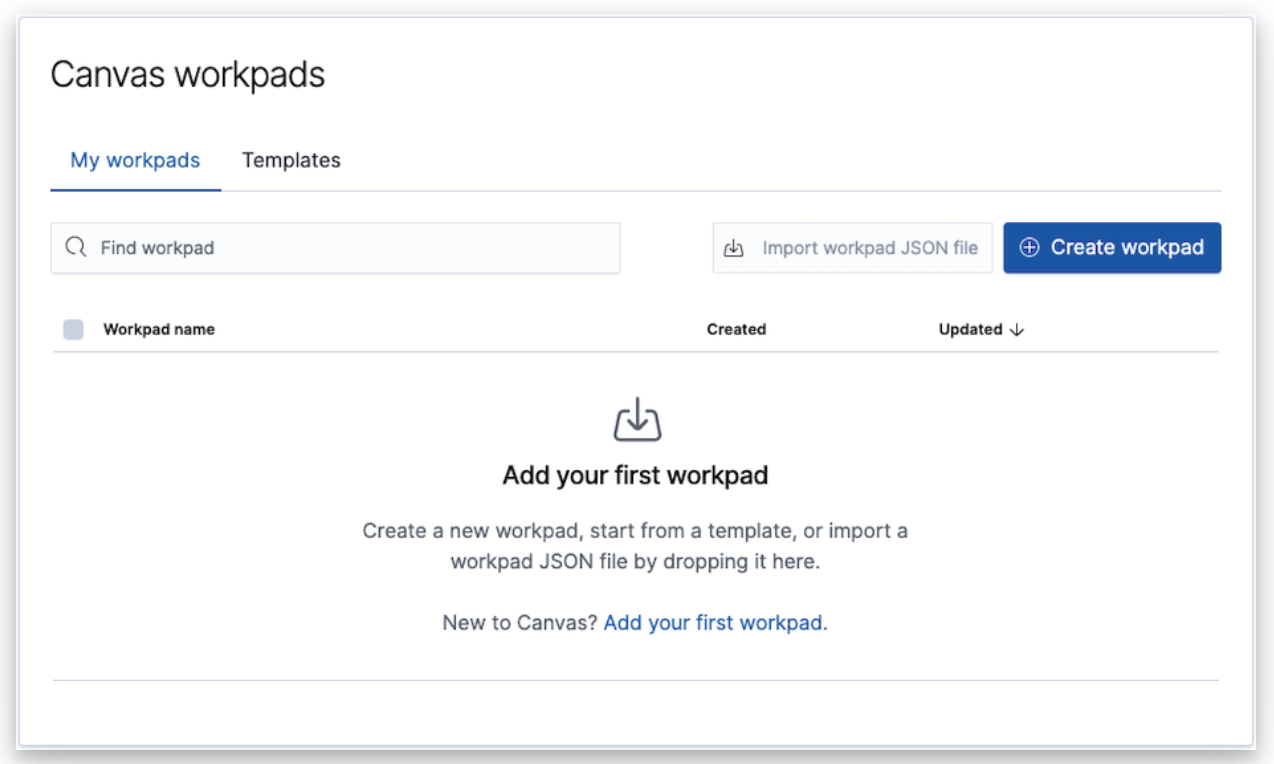
- The image at the top is for file upload, and should move closer to the file upload text.
- The template and create from scratch options should link to that functionality.
- The text should be formatted to clearly show the three options, ordered from easiest to hardest.
Something like this:
3 ways to add your workpad
- Start from a template
- Create from scratch
- Drop a JSON file here
_target for file upload_
@mdefazio, @shaunmcgough
 gchaps
All 12 comments
Pinging @elastic/kibana-app (Team:KibanaApp)
 elasticmachine
on 29 Oct 2020
elasticmachine
on 29 Oct 2020
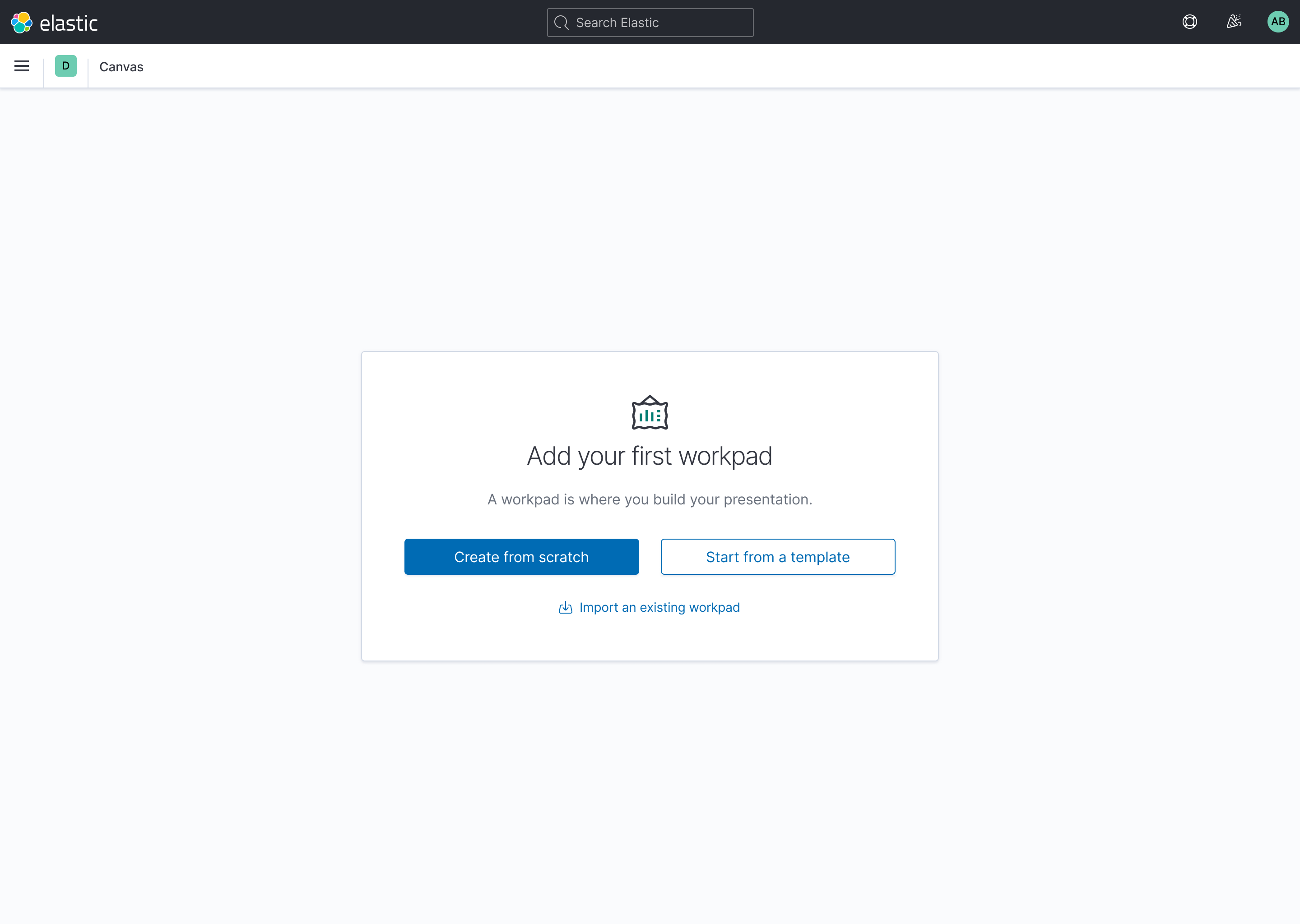
I would reference Visualize, Graphs and Dashboards for their empty states and try to align with those. I'm not as plugged into the user base for Canvas as either @MichaelMarcialis or @ryankeairns are, but here's a quick mockup aligning it to the other apps.

 mdefazio
on 29 Oct 2020
mdefazio
on 29 Oct 2020
Hey @mdefazio thanks for this. I accidentally pinged your name to @gchaps, when I clearly meant @MichaelMarcialis. But look at you! 👍
I love the simplicity of this, it's almost sublime. I think we could take this and run with it. You've cleaned up the interface and made a clear call to action. I also like the 'Create from scratch' wording. Very Elastish!
The only thing missing that I immediately notice is the import function, which could be some text below the buttons on your mock.
 shaunmcgough
on 29 Oct 2020
shaunmcgough
on 29 Oct 2020
Haha, we have too many Michaels! Thanks for putting this together @mdefazio. @shaunmcgough, let me know if you'd like me to update the above mockup to account for the import functionality, or if you've already passed along to the team for implementation.
 MichaelMarcialis
on 30 Oct 2020
MichaelMarcialis
on 30 Oct 2020
@shaunmcgough if you could also clarify the priority of actions. The current templates are rather limited and, I suspect, not often used. Additionally, @crob611 is working on a new UX for bringing in solution templates, right?
Perhaps the order is:
- Create workpad (primary)
- Import a JSON
- Add solution templates (is this via ingest manager?) and then
- Canvas templates
I'm not sure we need all of those but that's my best guess at priority. Depending on the state of Corey's work, it might make sense to work this alongside or after he's done.
 ryankeairns
on 30 Oct 2020
ryankeairns
on 30 Oct 2020
@MichaelMarcialis Yes, you can add the import functionality to this mock, and per Ryan's suggestion, change the primary call to action "Create from scratch".
@ryankeairns @MichaelMarcialis, the templates will all be in one spot, so the "Start from a template" should be the secondary item, which will call @crob611 screen. @crob611 can you share the link to your current work here please, and confirm All templates will be baked in there?
shaunmcgough
on 30 Oct 2020
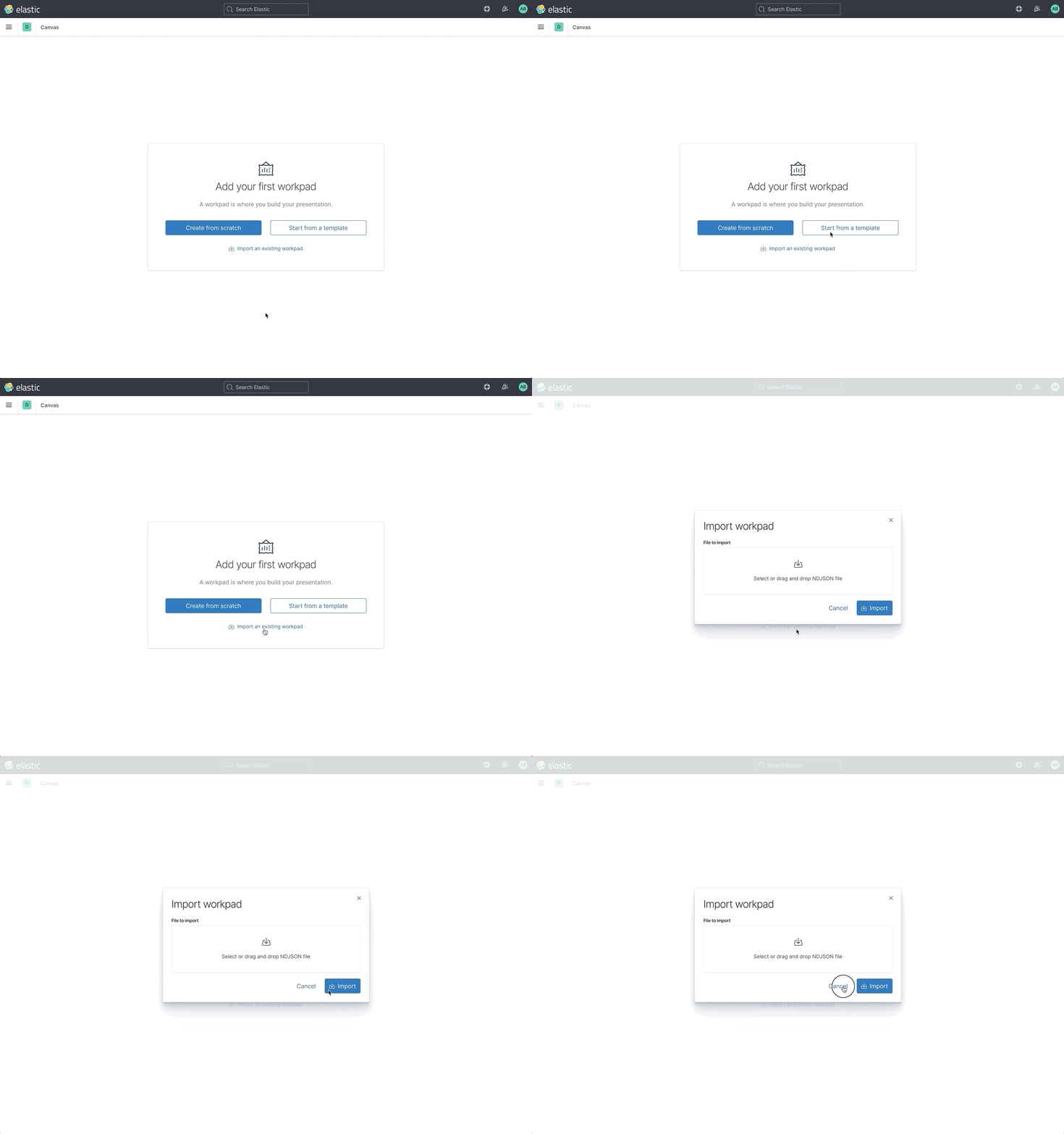
Hey, gang. Here's a quick little design update for Canvas' first workpad messaging. Please have a look and let me know if anyone has any feedback. The following changes have been made:
- "Create from scratch" is now the primary call-to-action.
- "Start from a template" is now the secondary call-to-action. This button will trigger @crob611's upcoming template package manager flyout, where it is assumed that all of the templates for Canvas will be housed going forward (rather than the separate tab that is used currently).
- A new "Import an existing workpad" button has been added to support an import flow. Interacting with this button should trigger a modal that contains the input to accept an NDJSON file. This was done to make it less prominent and take up less real estate from the outset. This new modal can also be used to replace the ever-present drop area on the post-first-workpad Canvas main page.
CCing @shaunmcgough, @ryankeairns.
MichaelMarcialis
on 12 Nov 2020
@gchaps might want to take a peek at this one.
ryankeairns
on 12 Nov 2020
@MichaelMarcialis This looks great!
For the Import workpad modal, my suggestion for text is:
Select an NDJSON file or drag it here.
But it's not clear to me how users select a file.
gchaps
on 13 Nov 2020
@MichaelMarcialis This looks great!
For the Import workpad modal, my suggestion for text is:
Select an NDJSON file or drag it here.
Thanks, @gchaps. I've updated the mockups to use your updated text.
But it's not clear to me how users select a file.
This will use the standard EUI file picker. Clicking on the input box will open your browser's file picker window.
MichaelMarcialis
on 16 Nov 2020
Just adding a note here, the file upload in Canvas doesn't support Saved Object NDJSON files. It only accepts the workpad JSON file exported from within the Canvas app. See https://github.com/elastic/kibana/issues/43678
 cqliu1
on 18 Nov 2020
cqliu1
on 18 Nov 2020
Just adding a note here, the file upload in Canvas doesn't support Saved Object NDJSON files. It only accepts the workpad JSON file exported from within the Canvas app. See #43678
Thanks, @cqliu1! I've updated the wording in the mockup to reflect this.
MichaelMarcialis
on 18 Nov 2020
Related issues
 celesteking
·
3Comments
celesteking
·
3Comments
 cafuego
·
3Comments
cafuego
·
3Comments
 snide
·
3Comments
snide
·
3Comments
 stacey-gammon
·
3Comments
stacey-gammon
·
3Comments
 LukeMathWalker
·
3Comments
LukeMathWalker
·
3Comments
Most helpful comment
@MichaelMarcialis Yes, you can add the import functionality to this mock, and per Ryan's suggestion, change the primary call to action "Create from scratch".
@ryankeairns @MichaelMarcialis, the templates will all be in one spot, so the "Start from a template" should be the secondary item, which will call @crob611 screen. @crob611 can you share the link to your current work here please, and confirm All templates will be baked in there?