Kibana: Terms list might be incomplete because the request is taking too long
Kibana version: 7.5.1
Elasticsearch version: 7.5.1
Server OS version: Ubuntu 18.04
Browser version: Firefox 76.0
Browser OS version: Linux Mint 19.1
Original install method (e.g. download page, yum, from source, etc.): apt
Description of the problem including expected versus actual behavior:
Visualisation of type "Controls" shows warning "Terms list might be incomplete because the request is taking too long. Adjust the autocomplete settings in kibana.yml for complete results." The list is incomplete and shows only 4 results. There must be 5).
I adjusted the settings kibana.autocompleteTerminateAfter and kibana.autocompleteTimeout and set them to nearly infinity. But changing the settings did not have an impact.
Other visualizations like pie chart work and show all values.

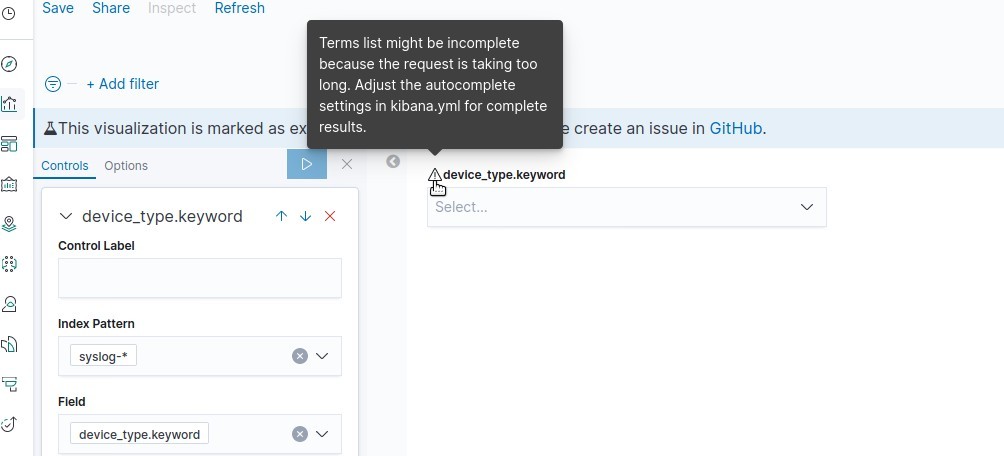
Could you please check?
 mgoritzk
All 6 comments
Pinging @elastic/kibana-app (Team:KibanaApp)
 elasticmachine
on 2 Jun 2020
elasticmachine
on 2 Jun 2020
@mgoritzk To rule out some cases - What value did you set kibana.autocompleteTerminateAfter to ? How many documents are in your index pattern and how many shards do you have?
 flash1293
on 3 Jun 2020
flash1293
on 3 Jun 2020
@flash1293 : I increased the values again and again and stopped with:
kibana.autocompleteTerminateAfter: 10000000
kibana.autocompleteTimeout: 200000
The index pattern used is syslog-* and here's the _cat/shards output:
syslog-2020.05.22 0 r STARTED 11492281 2.9gb 192.168.20.17 node-1
syslog-2020.05.22 0 p STARTED 11492281 2.9gb 192.168.20.26 node-3
syslog-2020.06.02 0 p STARTED 11806805 3gb 192.168.20.17 node-1
syslog-2020.06.02 0 r STARTED 11806805 3gb 192.168.20.20 node-2
syslog-2020.06.03 0 p STARTED 4380395 1.1gb 192.168.20.17 node-1
syslog-2020.06.03 0 r STARTED 4365091 1.1gb 192.168.20.26 node-3
syslog-2020.05.21 0 r STARTED 11256127 2.9gb 192.168.20.17 node-1
syslog-2020.05.21 0 p STARTED 11256127 2.9gb 192.168.20.20 node-2
syslog-2020.05.31 0 p STARTED 10917695 2.8gb 192.168.20.26 node-3
syslog-2020.05.31 0 r STARTED 10917695 2.7gb 192.168.20.20 node-2
syslog-2020.06.01 0 p STARTED 11450112 3gb 192.168.20.26 node-3
syslog-2020.06.01 0 r STARTED 11450112 3gb 192.168.20.20 node-2
syslog-2020.05.27 0 r STARTED 11635904 3gb 192.168.20.17 node-1
syslog-2020.05.27 0 p STARTED 11635904 3gb 192.168.20.26 node-3
syslog-2020.05.23 0 r STARTED 11206185 2.9gb 192.168.20.26 node-3
syslog-2020.05.23 0 p STARTED 11206185 2.9gb 192.168.20.20 node-2
syslog-2020.05.30 0 r STARTED 10883082 2.7gb 192.168.20.17 node-1
syslog-2020.05.30 0 p STARTED 10883082 2.7gb 192.168.20.20 node-2
syslog-2020.05.29 0 r STARTED 11399470 2.9gb 192.168.20.17 node-1
syslog-2020.05.29 0 p STARTED 11399470 2.9gb 192.168.20.20 node-2
syslog-2020.05.26 0 r STARTED 11855894 3.1gb 192.168.20.26 node-3
syslog-2020.05.26 0 p STARTED 11855894 3.1gb 192.168.20.20 node-2
syslog-2020.05.25 0 r STARTED 11818253 3.1gb 192.168.20.17 node-1
syslog-2020.05.25 0 p STARTED 11818253 3.1gb 192.168.20.20 node-2
syslog-2020.05.24 0 r STARTED 11274184 2.9gb 192.168.20.17 node-1
syslog-2020.05.24 0 p STARTED 11274184 2.9gb 192.168.20.20 node-2
syslog-2020.05.28 0 r STARTED 11587514 3gb 192.168.20.17 node-1
syslog-2020.05.28 0 p STARTED 11587514 3gb 192.168.20.20 node-2
28 shards with approx. 3 GB of data.
mgoritzk
on 3 Jun 2020
@mgoritzk the "terminate after" parameter is the number of documents considered per shard for building the terms list. It looksl like your system has a bunch of shards with more than 11 million documents, so that could explain the problem. Could you try setting it to 100 million?
flash1293
on 3 Jun 2020
@flash1293 : kibana.autocompleteTerminateAfter: 20000000 solved this issue.
Why is the defaut so "small"? The recommended shard-size is up to 50 GB. This will usually result in more than 100000 documents.
mgoritzk
on 3 Jun 2020
@mgoritzk It's small so it stays fast in a bunch of different configurations - this is a deliberate tradeoff.
When the data coming in is relatively uniform (all terms occurring by chance evenly distributed), the default is usually enough.
You are completely right though that this limit is rather low - I created an issue for this a while ago: https://github.com/elastic/kibana/issues/38073
flash1293
on 3 Jun 2020
Related issues
 bradvido
·
3Comments
bradvido
·
3Comments
 socialmineruser1
·
3Comments
socialmineruser1
·
3Comments
 ctindel
·
3Comments
ctindel
·
3Comments
 cafuego
·
3Comments
cafuego
·
3Comments
 stacey-gammon
·
3Comments
stacey-gammon
·
3Comments
Most helpful comment
@flash1293 :
kibana.autocompleteTerminateAfter: 20000000solved this issue.Why is the defaut so "small"? The recommended shard-size is up to 50 GB. This will usually result in more than 100000 documents.