Kibana: (Accessibility) v7.6 - EUI Kibana Data Tables Screen Reader Issues
Using a screen reader and navigating a data table through screen reader controls presents confusing verbiage to the user because of missing "scope=col" (see also 56536 ... ) attributes as well as having buttons as part of the table header cells...
Steps to reproduce
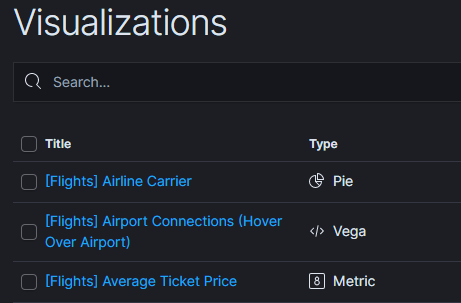
Go into Visualizations page, using screen reader navigate to the data table there.
Using Screen Reader (I used NVDA, Version 2019.2.1) controls when in the page:
(Note -
"CA-D-ARROW" means to press the "Ctrl-Alt and Down Arrow" keys
"CA-R-ARROW" means to press the "Ctrl-Alt and Right Arrow" keys
"CA-L-ARROW" means to press the "Ctrl-Alt and Left Arrow" keys
)
<Press T>
<Screen Reader says> clickable
Visualizations main landmark
table with 21 rows and 5 columns
Below is a table of 20 items.
<Press D-ARROW>
<Screen Reader says> Below is a table of 20 items.
row 1 Select all rows column 1
check box not checked Select all rows
<Press CA-D-ARROW>
<Screen Reader says> row 2 check box not checked Select this row _<-- What row is this referring to??? Lack of scope="row" prevents AT from identifying the row_
<Press CA-R-ARROW>
<Screen Reader says> Title Click to sort in ascending order column 2 link [Flights] Airline Carrier _<-- This cell has a link in it. If I click it the table won't be sorted in ascending order_
<Press CA-R-ARROW>
<Screen Reader says> Type Click to sort in ascending order column 3 Pie
_<-- No link in this cell but there's nothing to click either_
<Press CA-R-ARROW>
<Screen Reader says> Description Click to sort in ascending order column 4 row 3
<Press CA-L-ARROW>
<Screen Reader says> Type Click to sort in ascending order column 3 Vega
<Press CA-L-ARROW>
<Screen Reader says> Title Click to sort in ascending order column 2 link
[Flights] Airport Connections (Hover Over Airport)
<Press CA-D-ARROW>
<Screen Reader says>row 4 link [Flights] Average Ticket Price
<Press CA-R-ARROW>
<Screen Reader says>Type Click to sort in ascending order column 3 Metric
<Press CA-R-ARROW>
<Screen Reader says>Description Click to sort in ascending order column 4 row 5
<Press CA-L-ARROW>
<Screen Reader says>Type Click to sort in ascending order column 3 Controls
<Press CA-L-ARROW>
<Screen Reader says>Title Click to sort in ascending order column 2 link [Flights] Controls
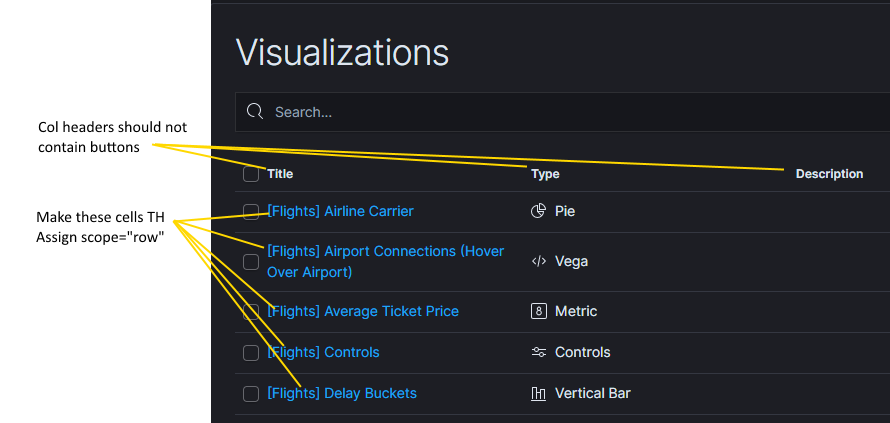
Suggestion for possible remediation check out: WAI-ARIA - Data Grid Design Pattern
Meta Issue
Kibana Version:
7.6
OS:
Windows 7
Browser:
Chrome
Screen reader: [if relevant]
NVDA, Version 2019.2.1
Note: NVDA - Speech Viewer (Display text as NVDA speaks)
To enable the speech viewer, check the "Speech Viewer" menu item under Tools in the NVDA menu. Uncheck the menu item to disable it.
1.3.1 Info and Relationships: Information, structure, and relationships conveyed through presentation can be programmatically determined or are available in text. (Level A)
Relevant ARIA spec: WAI-ARIA Authoring Practices 1.1
WAI-ARIA - Data Grid Design Pattern
 barlowm
All 3 comments
Pinging @elastic/kibana-app (Team:KibanaApp)
 elasticmachine
on 30 Oct 2020
elasticmachine
on 30 Oct 2020
I read through the linked spec for data grids, and I can't find anywhere they mention that you can't have buttons within header cells. Their examples are adding role="button" to a span in the header, but using <button> s inside the body cells. I checked with @myasonik and he hasn't heard of any issues with <button>s in header cells either. So I think we can skip that portion of this issue.
 cchaos
on 30 Oct 2020
cchaos
on 30 Oct 2020
Perfect, so this will close too 😄
 stratoula
on 30 Oct 2020
stratoula
on 30 Oct 2020
Related issues
 MaartenUreel
·
3Comments
MaartenUreel
·
3Comments
 socialmineruser1
·
3Comments
socialmineruser1
·
3Comments
 ctindel
·
3Comments
ctindel
·
3Comments
 ynux
·
3Comments
ynux
·
3Comments
 Ginja
·
3Comments
Ginja
·
3Comments
Most helpful comment
I read through the linked spec for data grids, and I can't find anywhere they mention that you can't have buttons within header cells. Their examples are adding
role="button"to a span in the header, but using<button>s inside the body cells. I checked with @myasonik and he hasn't heard of any issues with<button>s in header cells either. So I think we can skip that portion of this issue.