Kibana: [APM] Custom links: Show option to check link and possibly show example values from variables
Summary
In the creation flow we want to enable the user to preview and check the link they're creating, so they have an option to validate that the link and dynamic values are working as expected.
Design solution
We will show a preview panel in the flyout as the user is creating their custom link. We will choose to fetch a document that matches the defined filters (if any) to fill out e.g. a given trace.id that the user can use to check that their link is working as expected.
Tasks
- Show a
EuiPanelwith the beta badge option enabled to display "Preview" in the title. - Show a label and URL (clickable) to display the link created.
- Tip copy:
Test your link with values from an example transaction document based on the filters above.
Screen examples
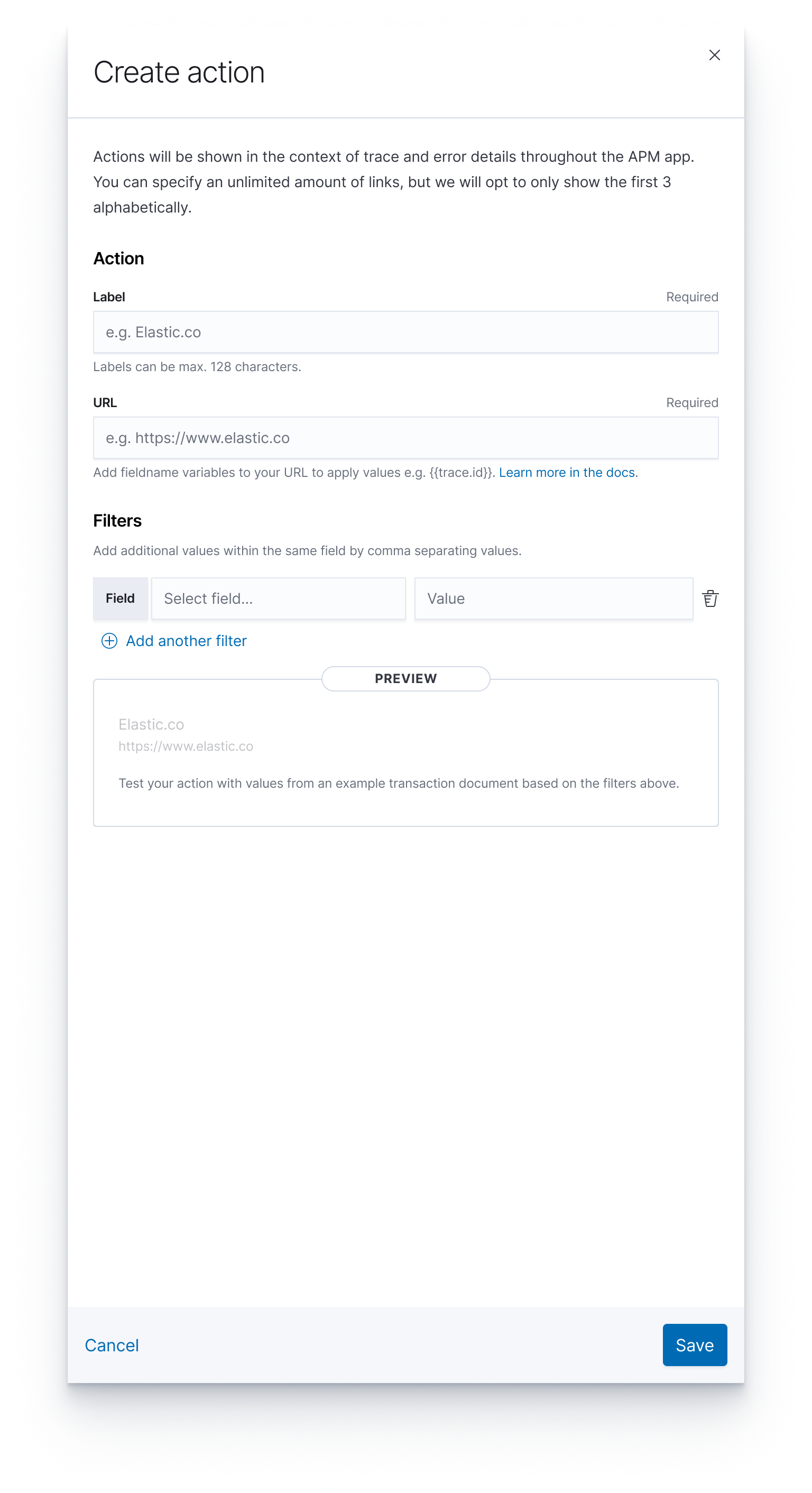
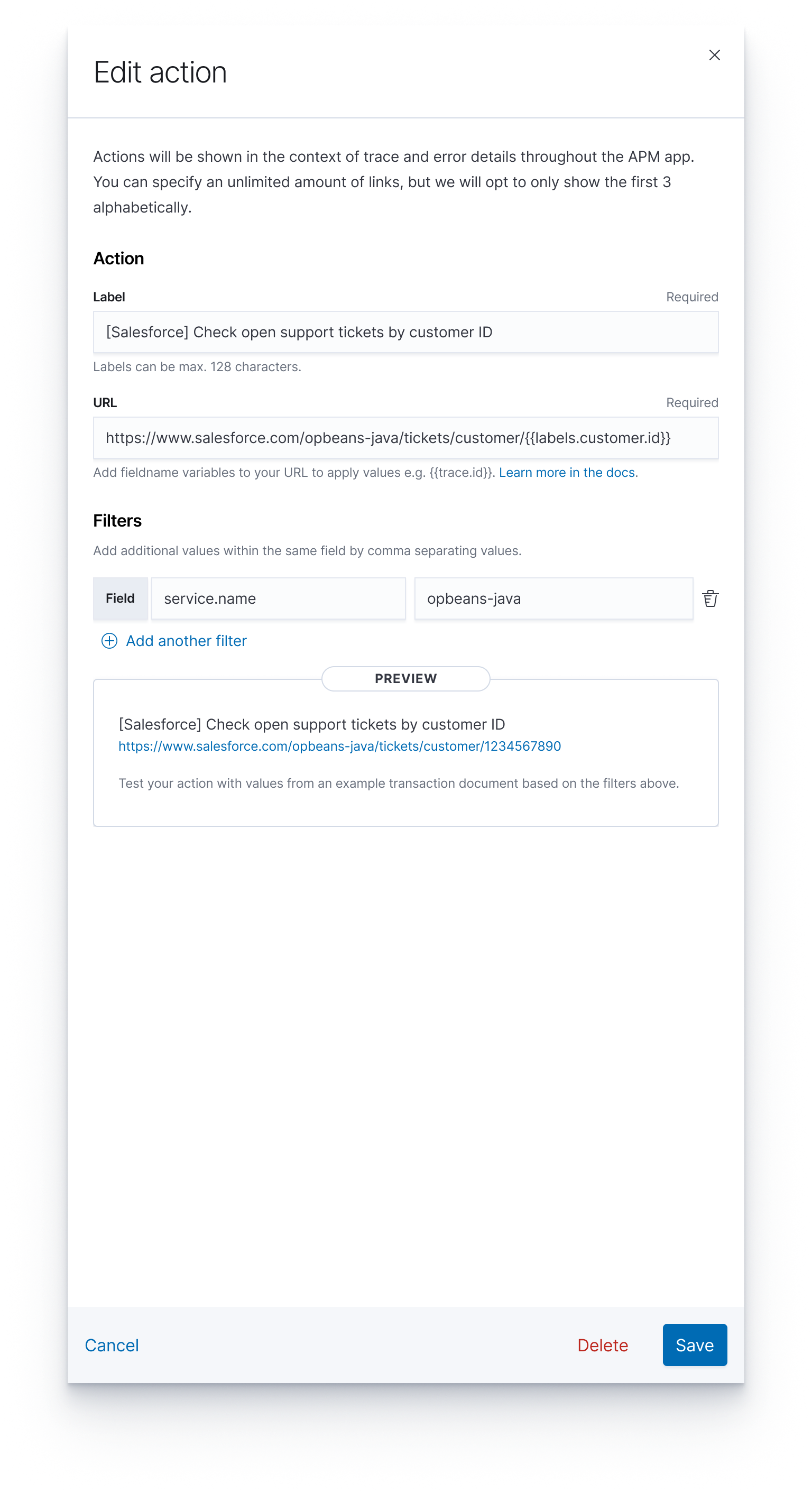
 formgeist
All 17 comments
Pinging @elastic/apm-ui (Team:apm)
 elasticmachine
on 20 Feb 2020
elasticmachine
on 20 Feb 2020
I've made some initial mocks on how we might include a preview of the action and filled link with variables data. The idea is that we'd grab whatever transaction document matches the filters specified (and any document, if no filters are specified).
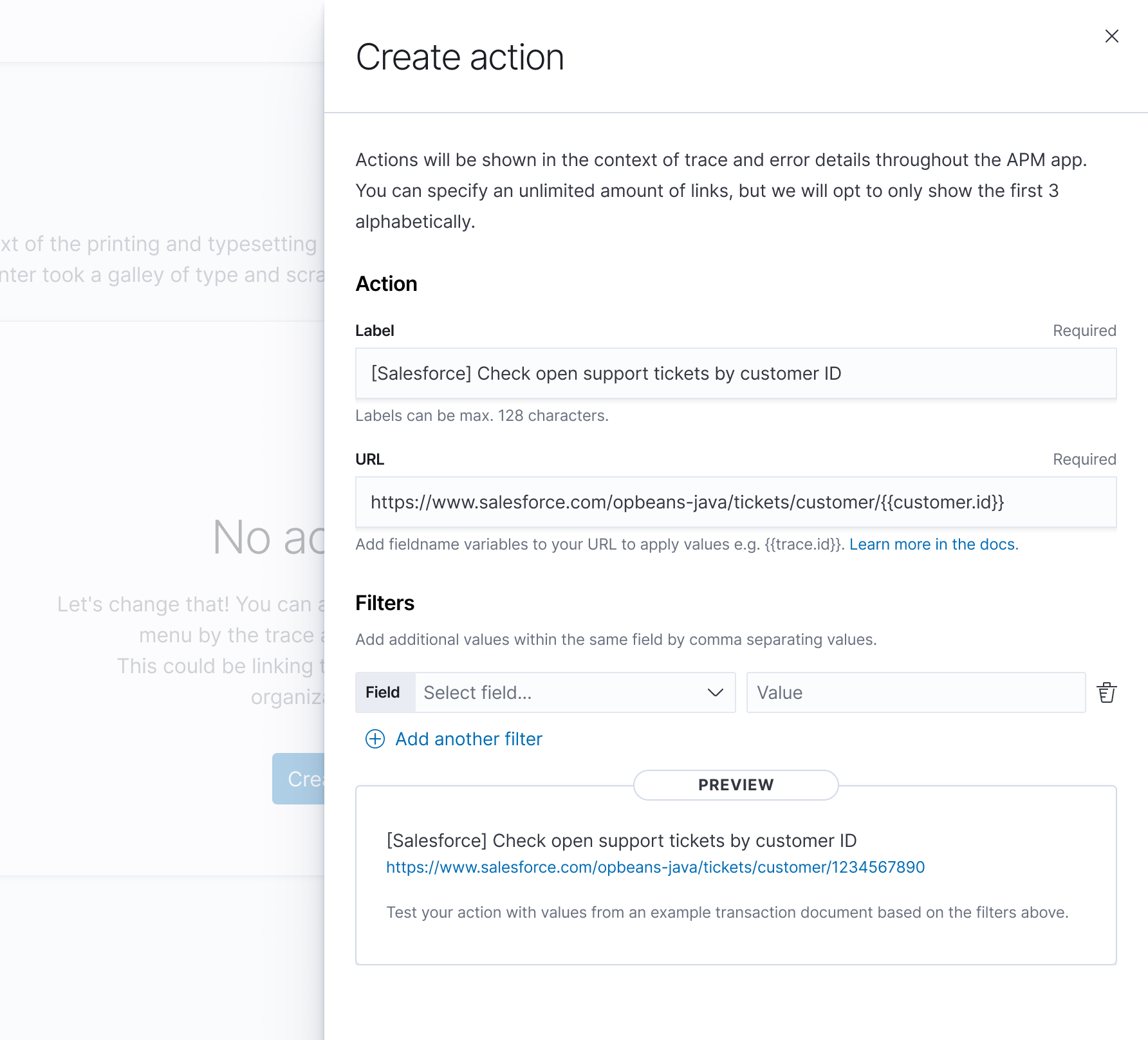
formgeist
on 24 Feb 2020
I think this looks good 👍
I'd change the copy from:
Test your action with values from [...]
To:
This is a preview of your Custom Action with values from [...]
Just because "Test your action" sounds like the user can click a button or something, but we're only presenting them with a static preview
 sqren
on 24 Feb 2020
sqren
on 24 Feb 2020
Just because "Test your action" sounds like the user can click a button or something, but we're only presenting them with a static preview
Why wouldn't the user be able to click the link in the preview?
formgeist
on 24 Feb 2020
Why wouldn't the user be able to click the link in the preview?
Hmm, okay I see. That should ofc be clickable.
I think my suggestion stems from something else. I think a better text would be:
Test your link with values from [...]
And then calling it Custom Links instead of Custom Actions. But maybe that's just me.
sqren
on 24 Feb 2020
And then calling it Custom Links instead of Custom Actions. But maybe that's just me.
You're not the first one to mention this. My intention with naming them "actions" was to indicate that we might offer more than mere links in the future (drilldowns or sharing, who knows) and also the context menu where they reside is named Actions. This word is obviously loaded in the context of Kibana with Alerting and Actions making their way in, so I'm OK with discussing another name for this.
formgeist
on 25 Feb 2020
My intention with naming them "actions" was to indicate that we might offer more than mere links in the future (drilldowns or sharing, who knows)
That makes sense. I can see how the Actions menu can contain more than just links in the future. But the Custom Actions we are making now, will never be more than simply links, right? So perhaps we could call them custom links and still have embed them in the actions menu?
sqren
on 25 Feb 2020
I see you've created an issue regarding the naming. I'll stop spamming this issue then :)
sqren
on 25 Feb 2020
@sqren @cauemarcondes I moved this to the planned column, but I know this is a stretch goal for this feature.
formgeist
on 2 Mar 2020
Agreed with @formgeist that we are going to fetch the transaction based on the context variables added by the user in the URL field, to guarantee that the user can click on the link in the preview container.
The filters field won't be used because they are only used to define where the Custom link will be visible.
Maybe we should change this text @formgeist Test your link with values from an example transaction document based on the filters above?
After speaking with @sqren I decided to stick with what the description says. That we should fetch a transaction using the filters added, refetching every time a change happens, with a debounce of 1s (will test to double check).
When for instance a context variable isn't available in the fetched transaction, it will be empty in the link preview. e.g.: https://www.mydashboard.com?service.name=opbeans-java&service.environment=
We also might not find any transaction available based on the filters added. It would be very nice to have a message saying that. @formgeist WDYT?
 cauemarcondes
on 18 Mar 2020
cauemarcondes
on 18 Mar 2020
After speaking with @sqren I decided to stick with what the description says. That we should fetch a transaction using the filters added, refetching every time a change happens, with a debounce of 1s (will test to double check).
When for instance a context variable isn't available in the fetched transaction, it will be empty in the link preview. e.g.:
https://www.mydashboard.com?service.name=opbeans-java&service.environment=
I think that makes sense.
We also might not find any transaction available based on the filters added. It would be very nice to have a message saying that. @formgeist WDYT?
I think it's hard to determine whether that's to be expected based on the data available for the service. I think it's OK for now not to inform the user of this.
formgeist
on 18 Mar 2020
I think it's hard to determine whether that's to be expected based on the data available for the service. I think it's OK for now not to inform the user of this.
So if the user selects service.name as filter and types in the name of a service that doesn't exist like:
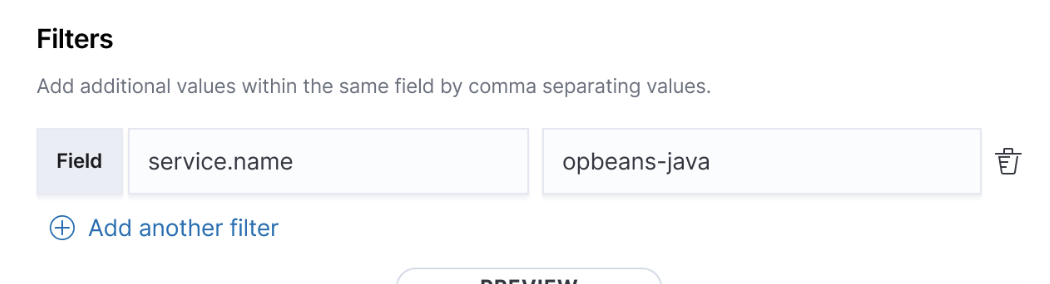
The preview should be hidden, without any indication as to why?
And then when the user changes opbeans-java to opbeans-node which does exist, the preview show up?
sqren
on 19 Mar 2020
I think it might be better to show an message in the preview saying that no preview can be displayed because there is no documents matching the filters.
sqren
on 19 Mar 2020
Agreed with @cauemarcondes and @sqren on Zoom that we want to display a status for the preview based on the availability of transaction metadata that can fill the variables. This will indicate to the user that we expect to be able to fill in the variables they've added based existing data.
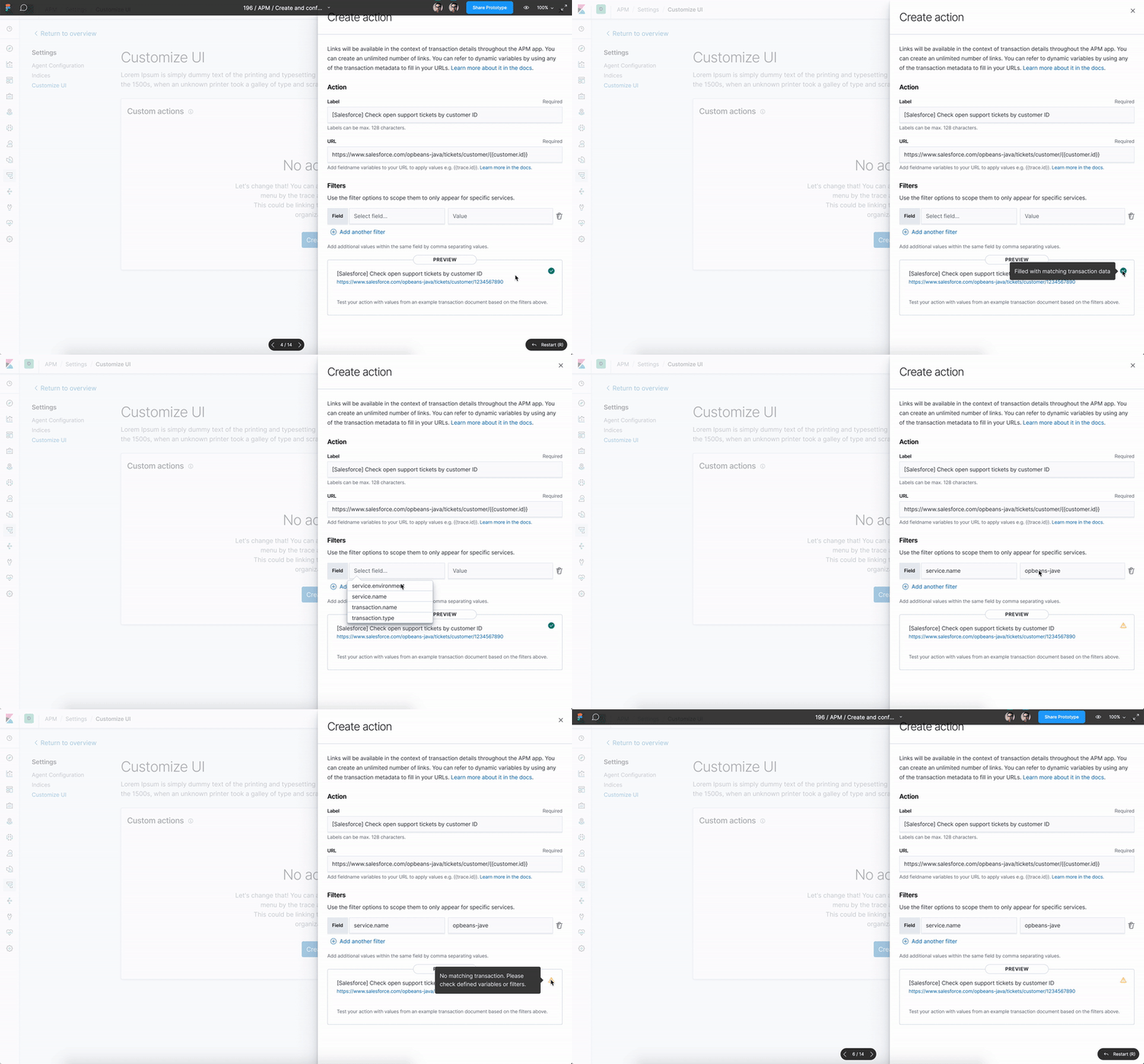
It's using a EuiButtonIcon for the indicator. It will show in the following states and tooltip copy on hover;
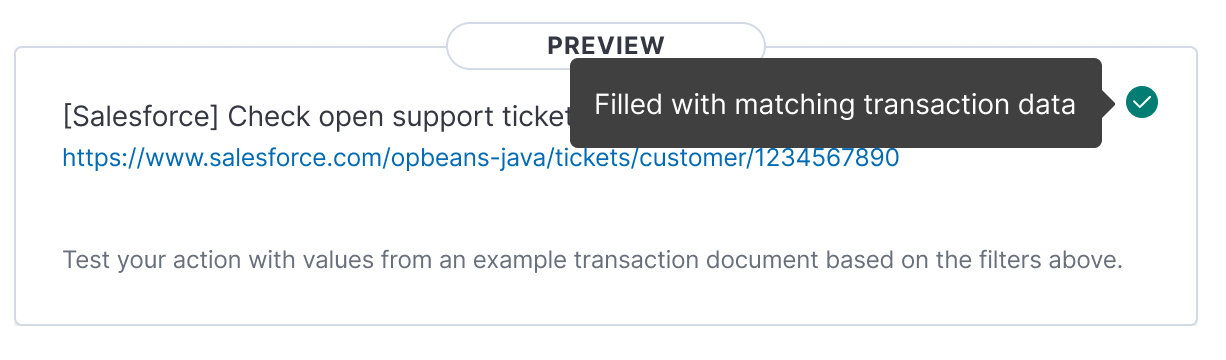
- Success:
checkInCircleFilledin colorsecondary
- Tooltip copy:
Filled with matching transaction data
- Tooltip copy:
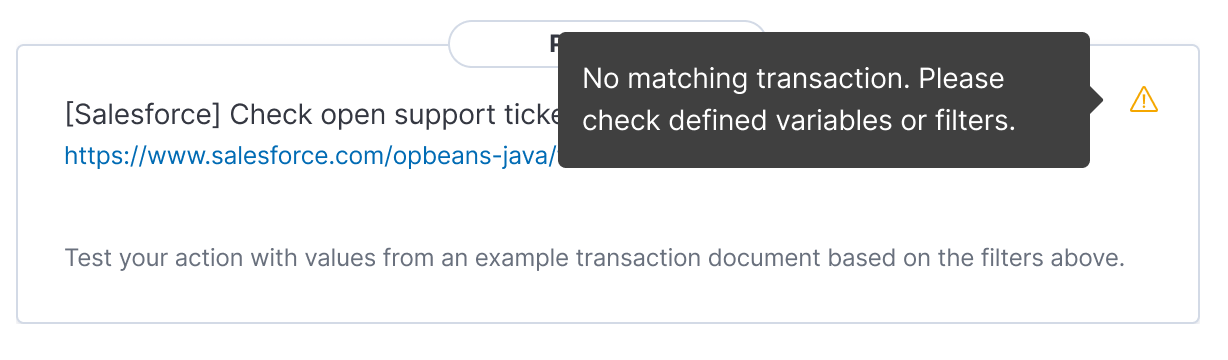
- Warning:
alertin colorwarning
- Tooltip copy:
No matching transaction. Please check defined variables or filters.
- Tooltip copy:
formgeist
on 19 Mar 2020
@cauemarcondes As we discussed, here's the tooltip messages for the following scenarios;
- Transaction is not found
We couldn't find a matching transaction documents based on the defined variables or filters. - Defined variable value wasn't found in the example transaction documents
We couldn't find a value match for {{variable}} in the example transaction document.- if there's multiple, list them out - Variable is invalid, possibly due to a typo or moustache wrong enclosing
We couldn't find an example transaction document due to invalid variable(s) defined.
Is this OK?
formgeist
on 19 Mar 2020
We couldn't find a matching transaction documents based on the defined variables or filters.
I think this should just be:
We couldn't find a matching transaction document based on the defined filters.
Since variables are not taken into account when fetching the doc.
sqren
on 19 Mar 2020
SGTM @sqren
formgeist
on 20 Mar 2020
Related issues
 stacey-gammon
·
3Comments
stacey-gammon
·
3Comments
stacey-gammon
·
3Comments
stacey-gammon
·
3Comments
 socialmineruser1
·
3Comments
socialmineruser1
·
3Comments
 cafuego
·
3Comments
cafuego
·
3Comments
 timroes
·
3Comments
timroes
·
3Comments
Most helpful comment
I think this should just be:
We couldn't find a matching transaction document based on the defined filters.Since variables are not taken into account when fetching the doc.