Kibana: Improve login error message when there's an unexpected error
The login page will currently display a "Oops! Error. Try again." message for anything besides a 401. This can conceal the real reason why the login attempt failed.
--- Original report follows ---
Following this docker repo for ELK stack users are not able to authenticate to Kibana via UI using latest FF (70.0.1 (64-bit)/Win10).
Issue has been fully documented here.
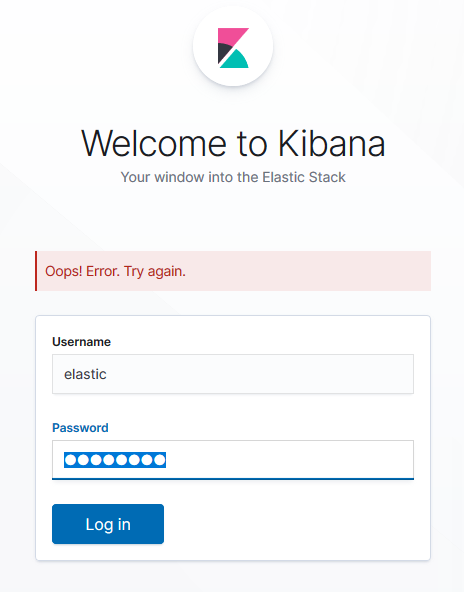
Response payload:
{"statusCode":400,"error":"Bad Request","message":"Request must contain a kbn-xsrf header."}
Request headers:
Host: 192.168.255.11:5601
User-Agent: Mozilla/5.0 (Windows NT 10.0; Win64; x64; rv:70.0) Gecko/20100101 Firefox/70.0
Accept: application/json, text/plain, */*
Accept-Language: en-US,en;q=0.7,sk;q=0.3
Accept-Encoding: gzip, deflate
Content-Type: application/json;charset=utf-8
kbn-version: 7.4.1
Content-Length: 44
Origin: http://192.168.255.11:5601
Connection: keep-alive
Referer: http://192.168.255.11:5601/login?next=%2F
Cookie: JSESSIONID=790F19C27F0E62374ED282EA997A683D; grafana_session=5bad8351275ea1dae6437eb695fdd0f5; HYDRA-XSRF-TOKEN=38753061-ed56-4d1b-882e-7d1fd34581b5; redirect=1; testing=1
Request headers (incognito):
Host: 192.168.255.11:5601
User-Agent: Mozilla/5.0 (Windows NT 10.0; Win64; x64; rv:70.0) Gecko/20100101 Firefox/70.0
Accept: application/json, text/plain, */*
Accept-Language: en-US,en;q=0.7,sk;q=0.3
Accept-Encoding: gzip, deflate
Content-Type: application/json;charset=utf-8
kbn-version: 7.4.1
Content-Length: 44
Origin: http://192.168.255.11:5601
DNT: 1
Connection: keep-alive
Referer: http://192.168.255.11:5601/login?next=%2F
Thanks.
 MacGyver27
All 5 comments
Pinging @elastic/kibana-security (Team:Security)
 elasticmachine
on 15 Nov 2019
elasticmachine
on 15 Nov 2019
@MacGyver27 I'm fairly confident this issue is isolated to https://github.com/deviantony/docker-elk/. I'm not sure what you want us to do to solve it. I'm unable to replicate this issue using 7.4.1 outside of https://github.com/deviantony/docker-elk/.
 kobelb
on 15 Nov 2019
kobelb
on 15 Nov 2019
@MacGyver27 I'm fairly confident this issue is isolated to https://github.com/deviantony/docker-elk/. I'm not sure what you want us to do to solve it. I'm unable to replicate this issue using 7.4.1 outside of https://github.com/deviantony/docker-elk/.
Hi, thank you for looking into it. I was just reporting this issue to the mentioned repo and conclusion with the maintainer was to get some hints from you guys..
MacGyver27
on 15 Nov 2019
@kobelb the issue is not isolated to the project you mentioned, it is actually not even closely related to it. I can reproduce it in any flavor of Kibana 7.x with Firefox's private mode.
The main problem is that the error message returned to the user ("Oops! Error. Try again.") lacks context. When a web browser blocks the kbn-xsrf header (for any reason), it would be useful to provide an indicator that the user's privacy enforcement prevents her/him from using Kibana.
I believe this is a useful issue report that deserves some attention.
 antoineco
on 15 Nov 2019
antoineco
on 15 Nov 2019
@antoineco thank you for the additional information. I've changed the name of the issue and added a description of the changes that you're asking for us to make.
kobelb
on 15 Nov 2019
Related issues
 socialmineruser1
·
3Comments
socialmineruser1
·
3Comments
 tbragin
·
3Comments
tbragin
·
3Comments
 Ginja
·
3Comments
Ginja
·
3Comments
 bhavyarm
·
3Comments
bhavyarm
·
3Comments
 MaartenUreel
·
3Comments
MaartenUreel
·
3Comments
Most helpful comment
@antoineco thank you for the additional information. I've changed the name of the issue and added a description of the changes that you're asking for us to make.