Kibana: 🐛 Selecting non-default Space causes infinite error+refresh loop
Kibana version: 7.2.0
Elasticsearch version: 7.2.0
Server OS version: Debian 9
Browser version: Firefox 67.0.4
Browser OS version: Ubuntu 18.04.2 LTS
Original install method (e.g. download page, yum, from source, etc.): Download page
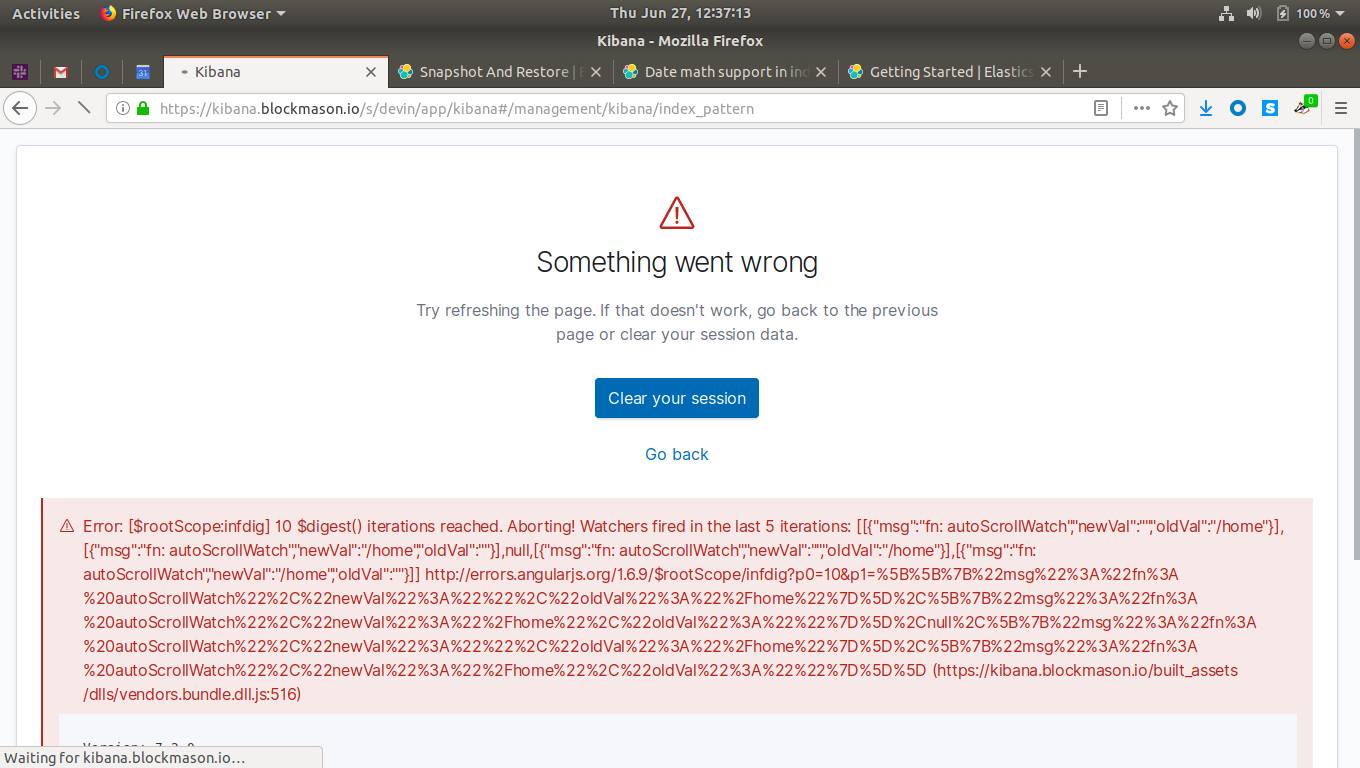
Describe the bug: After creating a new Space, then attempting to navigate to that space (either via the intro Space-selector screen or via the top-navigation dropdown menu for selecting a different Space), Kibana enters an infinite "loading... error" loop.
Steps to reproduce:
- Create a new Space without access to the Index Pattern Management feature.
- Navigate to that Space for the first time.
- Kibana immediately redirects to the Index Pattern Management interface, causing an infinite loading+error loop.
Expected behavior: Either of the following would be acceptable:
- Integrate the creation of at least one Index Pattern into the workflow of creating a new Space, OR
- When creating or modifying a Space with no index patterns, enforce that the Index Pattern Management feature is enabled, OR
- When a user attempts to access the Index Pattern Management feature, but does not have access to that feature (due to Space restrictions, Role permissions, or otherwise), simply display a helpful error instead of exploding spectacularly.
Screenshots (if relevant):
This screen appears briefly (less than 100ms) between long periods where only a Loading spinner is visible. It took a few attempts to get the timing right to take this screenshot:
Errors in browser console (if relevant):
Provide logs and/or server output (if relevant):
Any additional context:
 canterberry
All 8 comments
Pinging @elastic/kibana-security
 elasticmachine
on 27 Jun 2019
elasticmachine
on 27 Jun 2019
Hey @canterberry, thanks for the bug report.
I'm having a hard time reproducing this issue. Can you share a little more about your configuration? Can you post your kibana.yml, with any sensitive information redacted?
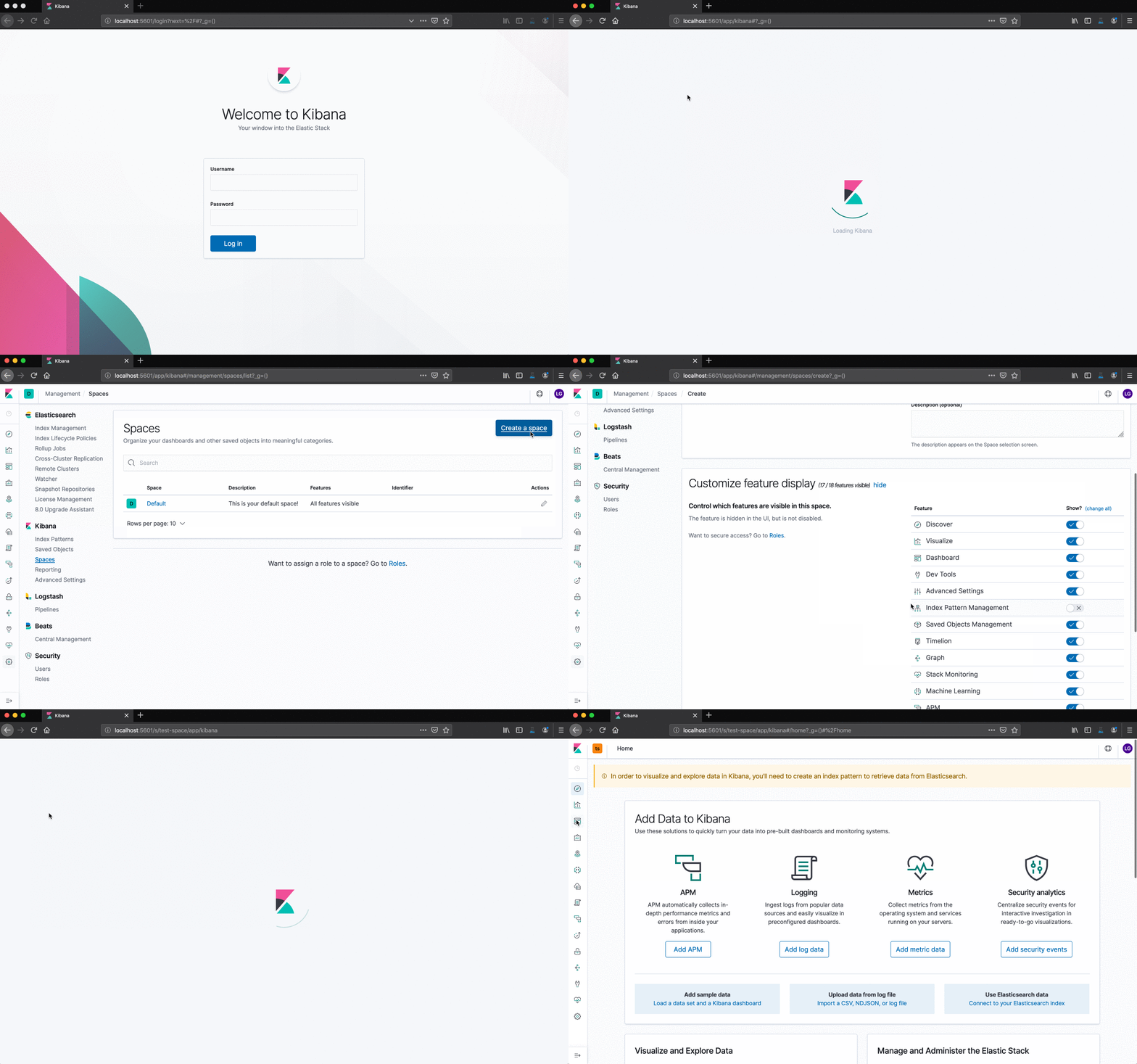
edit: the gif was cutoff at the end slightly, but still illustrates my attempt. Full video here: http://recordit.co/0I2npdKf2i
 legrego
on 28 Jun 2019
legrego
on 28 Jun 2019
Your repro steps look correct.
A video of me following the same steps (starting from the Spaces management screen):
:film_strip: elastic.kibana.39837.mp4
Here's our Kibana configuration:
kibana.yml
elasticsearch:
  hosts:
  - "<<<REDACTED>>>"
  username: "<<<REDACTED>>>"
  password: "<<<REDACTED>>>"
  ssl:
    certificate: "<<<REDACTED>>>"
    key: "<<<REDACTED>>>"
    certificateAuthorities:
    - "<<<REDACTED>>>"
    verificationMode: "full"
kibana:
  defaultAppId: "discover"
  index: ".kibana"
path:
  data: <<<REDACTED>>>
server:
  host: "<<<REDACTED>>>"
  port: "<<<REDACTED>>>"
  name: "<<<REDACTED>>>"
  xsrf:
    whitelist:
    - /api/security/v1/saml
  ssl:
    enabled: true
    certificate: "<<<REDACTED>>>"
    key: "<<<REDACTED>>>"
    certificateAuthorities:
    - "<<<REDACTED>>>"
    supportedProtocols:
    - "TLSv1.2"
xpack:
  monitoring:
    enabled: true
  security:
    authProviders:
    - saml
    encryptionKey: "<<<REDACTED>>>"
    public:
      hostname: "<<<REDACTED>>>"
      port: <<<REDACTED>>>
      protocol: https
    secureCookies: true
In this configuration, we have two Kibana nodes running behind an application load balancer in AWS, operating over TLSv1.2; our Kibana users are using SAML authentication.
canterberry
on 28 Jun 2019
Thanks for the update, I was able to reproduce when setting the kibana.defaultAppId option to "discover", like your kibana.yml indicates.
Can you verify that removing this configuration option "fixes" the problem for you? I want to make sure we're isolating the problem correctly.
legrego
on 1 Jul 2019
@legrego This default value of the kibana.defaultAppId option is "discover" according to the Kibana Settings documentation. Removing it should have no impact, so I'll try removing it and see if the problem persists.
canterberry
on 1 Jul 2019
You're absolutely right, it _shouldn't_ have an impact...however, it looks like there's a bug in the documentation, as the current default value is home:
https://github.com/elastic/kibana/blob/e1b1c56eefd4f0fe09666adc45d11b0f413a3d02/src/legacy/core_plugins/kibana/index.js#L54
legrego
on 1 Jul 2019
@legrego Excellent sleuthing. That did, indeed, fix the problem!
canterberry
on 1 Jul 2019
Awesome, thanks for confirming!
legrego
on 1 Jul 2019
Related issues
 treussart
·
3Comments
treussart
·
3Comments
 snide
·
3Comments
snide
·
3Comments
 cafuego
·
3Comments
cafuego
·
3Comments
 spalger
·
3Comments
spalger
·
3Comments
 bradvido
·
3Comments
bradvido
·
3Comments