Kibana: Saved objects misleading ui issue
When using the saved object ui to export/import objects to move them between spaces I notice a few things we should fix,
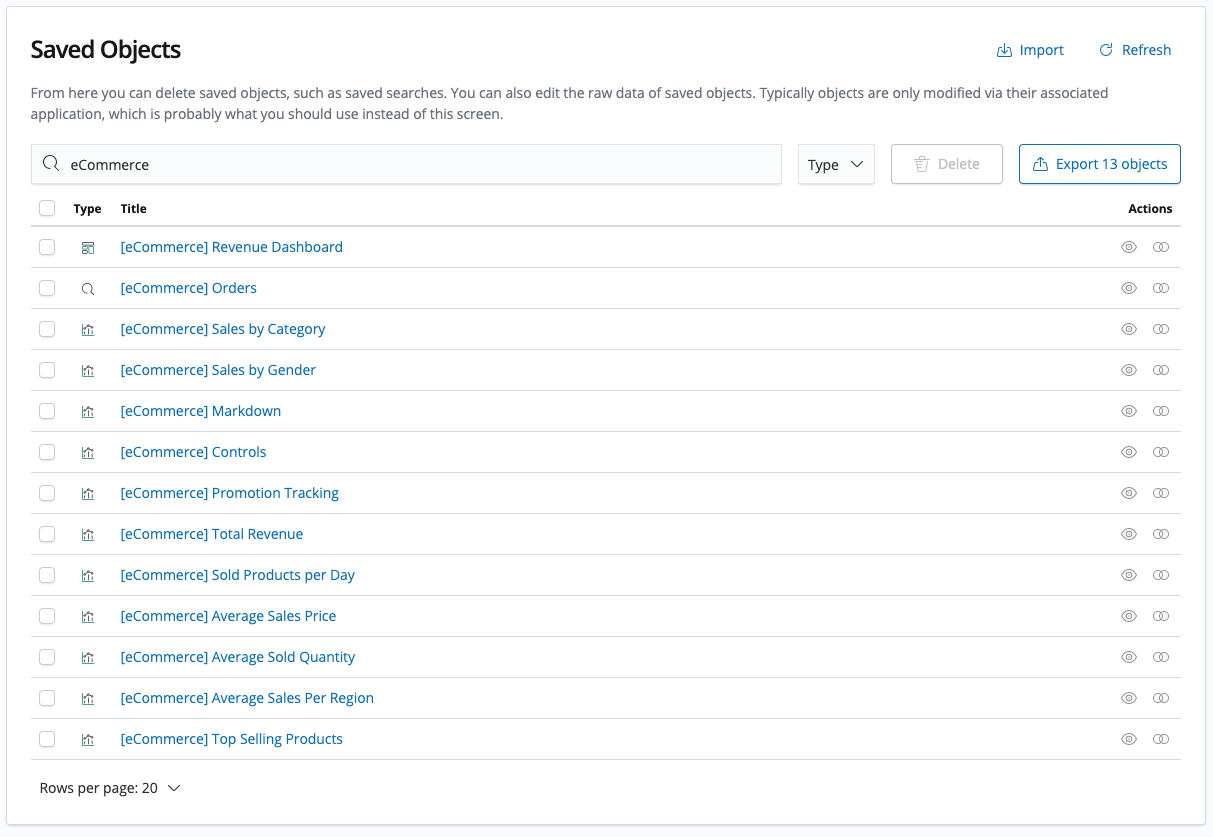
When searching for a keyword with multiple results the export all button show the option to export only the filtered the results (in my example export 54/407 objects), but in fact, it exports all the objects Fixed in https://github.com/elastic/kibana/pull/44723

Selecting Export 54 objects exported all 407 objects instead of only the 54 objects in the results set
In addition, when using the bulk selection (which was the workaround due to the previous issue) it only selects to export the results showed in the first page (50 is the max), so users need to export every page separately.
Expected behavior:
The export 54 objects should export only 54 objects which are the search results and not all objects- When selecting the bulk checkbox it should select all objects in the results in all the pages

 AlonaNadler
All 8 comments
When selecting the bulk checkbox it should select all objects in the results in all the pages
This is an interesting point; right now <EuiBasicTable /> only selects items one page at a time by default: https://elastic.github.io/eui/#/display/tables
IIRC there was a debate awhile back with @snide and @cchaos about how this case should be handled. Not sure if there has been any conclusion or further discussion since then.
 lukeelmers
on 3 Jan 2019
lukeelmers
on 3 Jan 2019
Pretty sure I ran into the exact same issue here. Likely the same cluster ;-) https://github.com/elastic/kibana/issues/27250
 alexfrancoeur
on 3 Jan 2019
alexfrancoeur
on 3 Jan 2019
Confusion is almost always solved by proper labeling of the buttons. We recommend to always put the counts into the buttons you use. Here's an example from the EUI docs.

From what I understand selecting all items was not possible from the component for technical reasons (persistance across pagination... or it could be thousands of items and the table doesn't have enough knowledge of the full data set...meaning you don't want individual items processed, you really want a bulk action that has little to do with the actual table guts).
Working around that...
Multiple ways to handle this from the design perspective if you want to retain an export all action, I'd suggest the following knowing that the table will only select the current page of items.
Scenario one, nothing selected in table
- Single button says "Export all items" or better "Export 158 items"
Scenario two, some items selected in the table
Change the button to a popover button if you want to retain both actions.
- Use a popover button that says "Export"
- Export {count} items (from the selection)
- Export all items
 snide
on 3 Jan 2019
snide
on 3 Jan 2019
+1
 mgoritzk
on 22 Feb 2019
mgoritzk
on 22 Feb 2019
Pinging @elastic/kibana-platform
 elasticmachine
on 27 Mar 2019
elasticmachine
on 27 Mar 2019
Proposal
A customer was bit by this today. Iterating on Dave's suggestion, here's a UX which I think will meet all of our requirements. Notice that there's only a single "Export" button in the screenshots below.
Export all by default
Per @snide's suggestion, this button should always be enabled and allow you to export all items. I think it's important to include both the count and the word "all" to indicate that, yes, you're getting everything, as well as the precise number as a sanity check in case you were expecting something different.

Export selection
This one is obvious, but the ones you select are the ones that get exported. This behavior exists today. To @lukeelmers's point, you can only export from the table's current page. If you want to export more than that you'll have to do a combination of filtering and bulk exporting.
The button label makes it clear that you're exporting only what you've selected.

Filtering and bulk exporting
When a filter is applied, the button allows you to bulk export the filter result. This is what users currently expect but are unpleasantly surprised by when the UI doesn't deliver. The button label loses the word "all" to stand in contrast to the "export all" default state.
Other problems
On a related note I noticed that the math doesn't always check out for the export modal. When we implement a solution we should be careful not to propagate this bug.

 cjcenizal
on 27 Jun 2019
cjcenizal
on 27 Jun 2019
Pinging @elastic/kibana-app-arch
elasticmachine
on 27 Jun 2019
https://github.com/elastic/kibana/pull/44723 Fixes the filter export behaviour, but doesn't address the selection dissapearing between multiple pages bug.
 rudolf
on 5 Sep 2019
rudolf
on 5 Sep 2019
Related issues
 timroes
·
3Comments
timroes
·
3Comments
 ctindel
·
3Comments
snide
·
3Comments
ctindel
·
3Comments
snide
·
3Comments
 socialmineruser1
·
3Comments
socialmineruser1
·
3Comments
 spalger
·
3Comments
spalger
·
3Comments