Kibana: Show decimals in Timelion legends
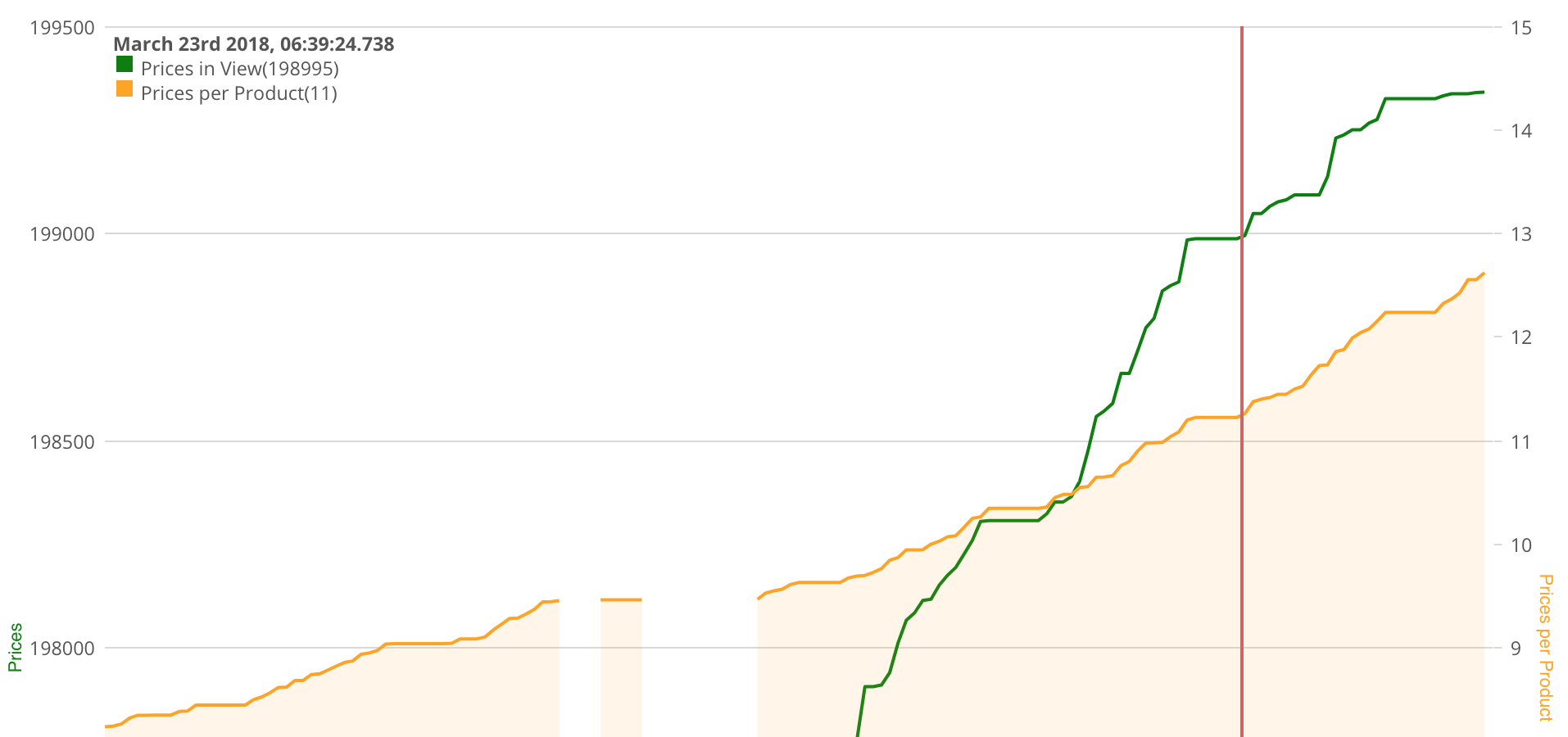
I have a Timelion sheet with an avg over an integer with numbers in the single or double digits, right axis, yellow line.
There is clearly a progression from 10 to 11 to 12 with multiple steps in between. Ideally this would lead to decimals in the legend. However, the legend is showing 10, 11, 12 without decimals.
 loekvangool
All 10 comments
I seem to have a similar/related issue. I posted it in the kibana forum and was advised to report it as a bug, but this issue seems close enough. Anyway:
In timelion, the values printed on the graph label are somehow a rounding of the values on the chart. In the next chart, ALL values in the plateau between 18:20:00 and 18:40:00 show up as either 3 or 4, even though in the graph it's clear they float around.
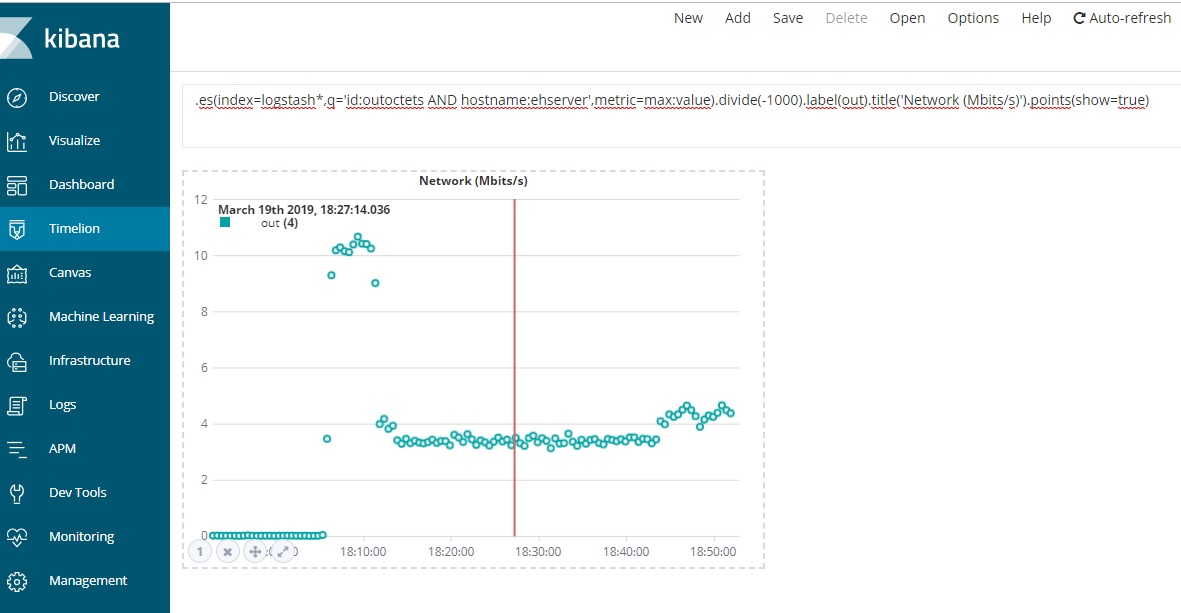
If I then zoom-in into that region, I get the decimals (The image doesn't show them because, well, I didn't select a point but believe me, they show correctly).
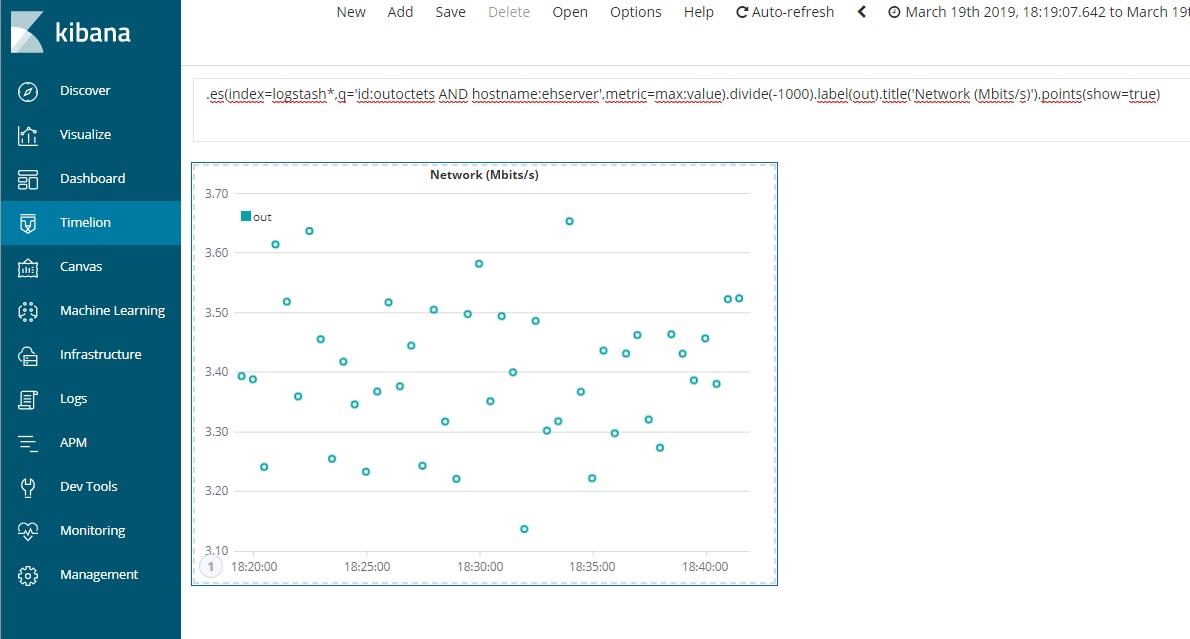
Is there a way to control the number of decimals printed on the label irrespective of the y-axis scale? Or is this really a bug?
Best regards,
Carlos
 camjesus2
on 20 Mar 2019
camjesus2
on 20 Mar 2019
Looks like the same thing indeed. Can you please tell us your exact version @camjesus2 ?
loekvangool
on 21 Mar 2019
I'm running kibana 6.6.2
camjesus2
on 22 Mar 2019
It seems as though the number of decimals in the label is tied (meaning, they are the same as) to the number of decimals in the y-axis. If we could change the number of decimals in the y-axis, that could be a workaround.
camjesus2
on 25 Mar 2019
What is the prefered way to change the decimal place on the Y Axis to implement @camjesus2 workaround
 scruffydan
on 4 Jun 2019
scruffydan
on 4 Jun 2019
I'm facing the issue on 7.6.1 version, is there any way around it?
 AgrPriyank
on 18 Mar 2020
AgrPriyank
on 18 Mar 2020
@timroes any workaround or input about this issue?
 liza-mae
on 19 Mar 2020
liza-mae
on 19 Mar 2020
You probably want to use something like .yaxis(tickDecimals=2). Note that despite being a parameter of yaxis, it seems to affect the legend, too (at least as of Kibana 7.7).
(This seems not to be well documented right now.)
 rudolfwalter
on 22 May 2020
rudolfwalter
on 22 May 2020
I can confirm that @rudolfwalter suggestion works as of at least 7.5 (last
time I've checked).
Instead of number of decimals, it would be nicer to define the number of
significant digits. Its not he same to have 1.22 and 10000.22 and for
dynamic charts this can be an issue.
But now I'm just being picky....
Best regards
rudolfwalter notifications@github.com escreveu no dia sexta, 22/05/2020
à(s) 07:45:
You probably want to use something like .yaxis(tickDecimals=2). Note that
despite being a parameter of yaxis, it seems to affect the legend, too
(at least as of Kibana 7.7).(This seems not to be well documented right now.)
—
You are receiving this because you were mentioned.
Reply to this email directly, view it on GitHub
https://github.com/elastic/kibana/issues/17379#issuecomment-632519966,
or unsubscribe
https://github.com/notifications/unsubscribe-auth/ALTE2Z2U5HXGOLSMPMMSUK3RSYNPXANCNFSM4EXG33RQ
.
camjesus2
on 1 Jun 2020
.yaxis(tickDecimals=2)
Yeah!! adding .yaxis(tickDecimals=2) worked for me.
Thank you.
 samindaroshan
on 9 Jun 2020
samindaroshan
on 9 Jun 2020
Related issues
 cff3
·
83Comments
cff3
·
83Comments
 pkubat
·
75Comments
pkubat
·
75Comments
 JulienPalard
·
95Comments
JulienPalard
·
95Comments
 passkey1510
·
96Comments
passkey1510
·
96Comments
 ctindel
·
81Comments
ctindel
·
81Comments
Most helpful comment
You probably want to use something like
.yaxis(tickDecimals=2). Note that despite being a parameter ofyaxis, it seems to affect the legend, too (at least as of Kibana 7.7).(This seems not to be well documented right now.)