Kibana: Data Table shows empty rows below the rows with data
UPDATE: Note, this is not a new issue. There was an older ticket about the same thing here https://github.com/elastic/kibana/issues/2023
Kibana version: 5.0.0-beta1
Elasticsearch version: 5.0.0-beta1
Server OS version: Linux 64-bit
Browser version: Firefox
Browser OS version: Linux 64-bit
Original install method (e.g. download page, yum, from source, etc.): tar.gz
Description of the problem including expected versus actual behavior:
The data table shows rows for each data bucket in the aggregation, and then it shows some empty rows before the table ends.
Steps to reproduce:
- Create a Data Table Visualization
- Leave the defaults (Just a "Count" metric, no split rows)
- 1 row shows up for the count, and then 8 empty rows appear
Note: the empty rows are not present in a saved file generated from exporting the data.
Screenshot:

 tsullivan
All 11 comments
Kibana seems to explicitly pad the table with empty rows.
This may have a reason?
 thomasneirynck
on 5 Oct 2016
thomasneirynck
on 5 Oct 2016
this functionality was introduced here: https://github.com/elastic/kibana/commit/564aed2e5ba643f1ffbaa9e9ce3f2a42e606a4f9
@spalger is this a valid issue?
thomasneirynck
on 5 Oct 2016
Apparently, this was introduced to ensure tables are consistent in height. This prevents resizing of the panels in dashboards, which could cause scrollbars if the table becomes larger than it initially was.
thomasneirynck
on 5 Oct 2016
via @jimmyjones2 from https://github.com/elastic/kibana/issues/2023:
Currently data table always shows 10 rows at a time. It would be great if this was more dynamic, so in Visualize mode could fill the whole screen with data with infinite scrolling like in Discover. When used in a Dashboard it pads to 10 rows, even if you've requested top 2 terms - could it scale to the number of results and scroll/page as necessary for overflow? The export button is also probably (visually) unwanted in a Dashboard, especially as its available in the spy.
 tbragin
on 14 Jan 2017
tbragin
on 14 Jan 2017
via @tbragin from https://github.com/elastic/kibana/issues/2023:
Slightly related - If you change "Page Size" to a large number, say 100, and there are less rows returned, a bunch of empty rows are shown. "All" does the right thing though by only showing as many as needed. As an aside - why do we call the setting "Page Size", isn't it more like "Rows per Page"?
 tbragin
on 14 Jan 2017
tbragin
on 14 Jan 2017
via @sqpdln from https://github.com/elastic/kibana/issues/2023:
Yes, this would be a rather nice fix. I want to have a top 3 Terms as a table in a dashboard, and the table ends up with ten rows and a scrollbar (if I don't size it up to show all ten). Maybe this even should be considered a bug.
tbragin
on 14 Jan 2017
via @ankureck from https://github.com/elastic/kibana/issues/2023"
Any updates on this issue. I have the same problem. I have around 250 terms and I have to make a bar chart showing only 10 terms and rest can be scrolled. Please share if any update available.
tbragin
on 14 Jan 2017
As @thomasneirynck pointed out about this is supposed to be a feature, to prevent scrollbars on the dashboard. Scrollbards on the dashboard are annoying as its hard to control what do you want to scroll, individual vis or whole dashboard.
 ppisljar
on 16 Jan 2017
ppisljar
on 16 Jan 2017
After additional discussion, closing as "won't fix" per @ppisljar and @thomasneirynck comments.
For those users that are looking for an option to change the default 10 rows presentation -- it is possible to modify the default number of rows in the data table in Options.


tbragin
on 27 Feb 2017
Let's reopen this.
It's difficult to do with the current datatable implementation, but is is nonetheless a valid request, it deserves more attention.
thomasneirynck
on 15 Nov 2017
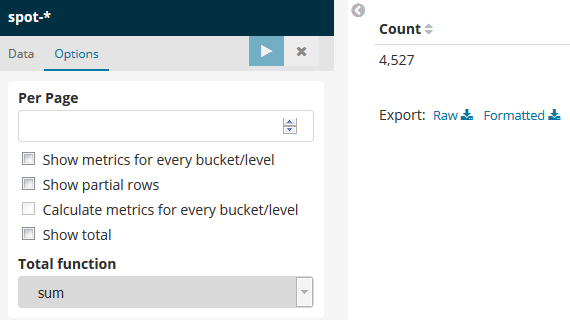
If you keep option "Per Page" empty, then, the displayed rows number will be exactly the fulfilled rows count.
 fbaligand
on 22 May 2018
fbaligand
on 22 May 2018
Related issues
 mark54g
·
3Comments
mark54g
·
3Comments
 timroes
·
3Comments
timroes
·
3Comments
 bhavyarm
·
3Comments
bhavyarm
·
3Comments
 ctindel
·
3Comments
ctindel
·
3Comments
 timmolter
·
3Comments
timmolter
·
3Comments
Most helpful comment
If you keep option "Per Page" empty, then, the displayed rows number will be exactly the fulfilled rows count.