Keystone: atTracking and byTracking don't create at and by fields
Bug report
Describe the bug
With this list:
import { Text } from '@keystonejs/fields';
import { atTracking, byTracking } from '@keystonejs/list-plugins';

export const FormSubmission = {
    fields: {
        formName: { type: Text },
    },
    access: true,
    plugins: [atTracking(), byTracking()],
};
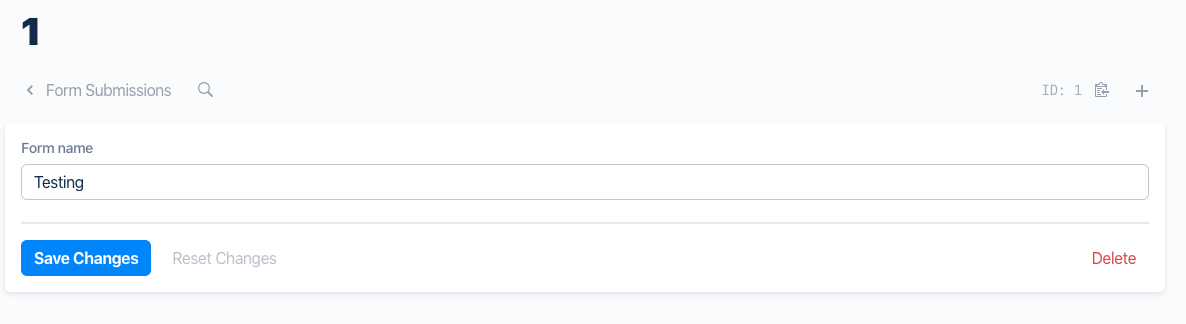
I run with dropDatabase: true and it does not create any fields for at or by tracking. The Admin UI shows just the formName field.
To Reproduce
Happy to provide a reproduction if needed.
Expected behaviour
As per the docs, I expected these plugins to add the needed fields to the list, which they don't seem to do. Do I need to also add the fields myself?
Screenshots
System information
- OS: macOS
- Browser (if applies) N/A
Additional context
"dependencies": {
    "@keystonejs/adapter-knex": "10.0.1",
    "@keystonejs/app-admin-ui": "6.0.2",
    "@keystonejs/app-graphql": "5.1.7",
    "@keystonejs/auth-password": "5.1.8",
    "@keystonejs/fields": "11.0.0",
    "@keystonejs/file-adapters": "file:keystone-file-adapters",
    "@keystonejs/keystone": "9.0.1",
    "@keystonejs/list-plugins": "6.0.0",
// etc
}
 thekevinbrown
All 2 comments
I think this was mostly confusion over the fact that the Admin UI doesn't show these values in the edit view as read only fields.
Looks like it's working now.
thekevinbrown
on 26 May 2020
👍4
Perhaps the should be show now that we have read-only fields
 MadeByMike
on 26 May 2020
MadeByMike
on 26 May 2020
Was this page helpful?
0 / 5 - 0 ratings
Related issues
 ra-external
·
12Comments
ra-external
·
12Comments
 arnaud-zg
·
18Comments
arnaud-zg
·
18Comments
 cowjen01
·
13Comments
cowjen01
·
13Comments
 jesstelford
·
19Comments
jesstelford
·
19Comments
 molomby
·
11Comments
molomby
·
11Comments
Most helpful comment
I think this was mostly confusion over the fact that the Admin UI doesn't show these values in the edit view as read only fields.
Looks like it's working now.