keystone.getResolvers is not a function
NOTE: I notice there have been some changes in the last day to the Keystone repo, so perhaps when I reinstalled my node_modules it grabbed the latest version and that is causing the problem?
I’m working on a KeystoneJS project. I added hooks to one of my lists and the project worked fine.
When I was finished with my work I pushed my work to GitHub and made a pull request for my team. However GitHub complained about a security error (in yarn.lock), so I deleted yarn.lock, reinstalled node_modules(yarn). When I ran the project again locally, however, I received the following error:
✔ Validated project entry file ./tsout/index.js
✔ Keystone server listening on port 4545
✔ Initialised Keystone instance
✖ Connecting to database
TypeError: keystone.getResolvers is not a function
    at createApolloServer (/Users/r/Documents/projects/yaa-keystone/node_modules/@keystonejs/app-graphql/lib/apolloServer.js:148:25)
    at GraphQLApp.prepareMiddleware (/Users/r/Documents/projects/yaa-keystone/node_modules/@keystonejs/app-graphql/index.js:23:20)
    at /Users/r/Documents/projects/yaa-keystone/node_modules/@keystonejs/keystone/lib/Keystone/index.js:752:17
    at Array.map (<anonymous>)
    at Keystone.prepare (/Users/r/Documents/projects/yaa-keystone/node_modules/@keystonejs/keystone/lib/Keystone/index.js:751:12)
    at executeDefaultServer (/Users/r/Documents/projects/yaa-keystone/node_modules/@keystonejs/keystone/bin/utils.js:112:42)
error Command failed with exit code 1.
info Visit https://yarnpkg.com/en/docs/cli/run for documentation about this command.
It’s throwing the error deep inside the keystone package in node_modules. I deleted and reinstalled node_modules, I reverted my project to a commit from yesterday that worked fine, but I keep getting the same error.
I went back to the already-working ’develop` branch and the same issue. It must be something inside node_modules?
Any help appreciated, as I'm dead in the water now.
 ra-external
All 10 comments
You're correct; this was changed in a release that went out about 10hrs ago.
There's a chance that the version of @keystonejs/keystone your project depends on is different to the version which @keystonejs/app-graphql depends on. If that's the case, then this error will occur.
You could verify this with yarn:
yarn why @keystonejs/keystone
Ideally, that would show only one version, but I suspect it will show you two versions.
By removing your yarn.lock, yarn has been instructed to fetch the latest versions of packages, and led to this issue. It's generally a good idea to avoid removing yarn.lock in its entirety for this and similar reasons. _(Personally, I do still delete it sometimes as it's the only way to get certain things to happen)_.
Two possible solutions to your current problem:
Revert the changes in
yarn.lock, remove yournode_modulesfolder, and runyarnagain.- If this continues to throw errors, go through your keystone dependencies in
package.json, and remove any semver range specifiers, then re-runyarn
For example, make this change:
-  "@keystonejs/keystone": "^1.0.0",
+  "@keystonejs/keystone": "1.0.0",
This should lock down the versions
- If this continues to throw errors, go through your keystone dependencies in
Preferred. Use ~
yarn outdated --latest~yarn upgrade-interactive --latestto update to the latest versions of all@keystonejs/*packages.- While there are some breaking changes, they're mostly for obscure undocumented functions, so you should be fine to do a full update as long as you're not too far behind.
- Every package has a detailed changelog which you can find either within the repo (eg; https://github.com/keystonejs/keystone/blob/master/packages/keystone/CHANGELOG.md), or by using the changelogs.xyz tool (eg; https://changelogs.xyz/@keystonejs/keystone)
 jesstelford
on 24 Mar 2020
jesstelford
on 24 Mar 2020
I tried option 1 and that worked. I tried yarn upgrade-interactive --latest and got
✔ Validated project entry file ./tsout/index.js
✔ Keystone server listening on port 4545
✖ Initialising Keystone instance
Error: List "User" does not exist.
    at Keystone.createAuthStrategy (/Users/ranthony/Documents/projects/yaa-keystone/node_modules/@keystonejs/keystone/lib/Keystone/index.js:282:13)
    at Object.<anonymous> (/Users/ranthony/Documents/projects/yaa-keystone/tsout/index.js:40:31)
    at Module._compile (internal/modules/cjs/loader.js:959:30)
    at Object.Module._extensions..js (internal/modules/cjs/loader.js:995:10)
    at Module.load (internal/modules/cjs/loader.js:815:32)
    at Function.Module._load (internal/modules/cjs/loader.js:727:14)
    at Module.require (internal/modules/cjs/loader.js:852:19)
    at require (internal/modules/cjs/helpers.js:74:18)
    at executeDefaultServer (/Users/ranthony/Documents/projects/yaa-keystone/node_modules/@keystonejs/keystone/bin/utils.js:101:7)
error Command failed with exit code 1.
info Visit https://yarnpkg.com/en/docs/cli/run for documentation about this command.
Any idea what I can do to make it work with the newer versions? I can't be that out of date, as I just started this project about 6 weeks ago...
Edit: The issue seems to be that createAuthStrategy is being called before I set up my lists. I'm doing it as follows:
const boot = async () => {
    createLists();
    await keystone.prepare({
        cors: { origin: true, credentials: true }
    });
};

const everything = {
    keystone,
    apps: [
        new GraphQLApp(),
        new AdminUIApp({
            adminPath: '/admin',
            hooks: require.resolve('./admin/'),
            authStrategy,
            enableDefaultRoute: true
        }),
        // new NextApp({ dir: 'app' })
        new StaticApp({
            path: '/',
            src: 'public',
            fallback: 'index.html'
        })
    ]
};

const setupCronJobs = async () => {
    const checkPub = await checkArticlePublishDates(keystone);
};

const start = async () => {
    await boot();
    await setupCronJobs();
};

start();

module.exports = everything;
It's a bit idiosyncratic, I admit. Basically I am not just exporting everything directly but rather consigning it to the variable everything so that I'll have time to set up my lists before Keystone starts. This may be erroneous but as it worked I thought I was OK.
ra-external
on 24 Mar 2020
I think this is related.
6.0.0
97fb01fe#2457 Thanks @timleslie! - IntroducedListAuthProviderto generate authentication mutations and queries. This introduces the following breaking changes:
Keystone.createAuthStrategy()must be called _after_ the associatedListhas been created.
 ropaolle
on 24 Mar 2020
ropaolle
on 24 Mar 2020
@ropaolle -- That would seem to be it. Do you know of any way I can delay the calling of Keystone.createAuthStrategy until after I create my lists? I've separated my list creation out into a separate function to keep things more manageable -- it runs through a directory and bundles al of the files there -- one per list -- and then creates the list. At present it seems that createAuthStrategy is being called automatically before my function is called.
ra-external
on 24 Mar 2020
Not sure, but maybe the problem is that you are not calling createAuthStrategy. My code looks like this.
// Add lists
const UsersSchema = require('./lists/Users.js');
keystone.createList('User', UsersSchema);

const authStrategy = keystone.createAuthStrategy({
  type: PasswordAuthStrategy,
  list: 'User',
});
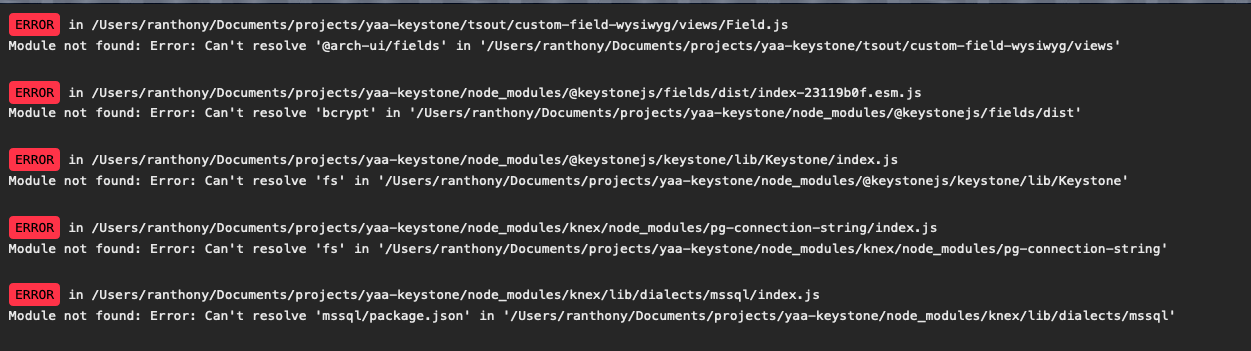
I was indeed calling createAuthStrategy too soon. When I changed the order I can get the AdminUI booted but when I enter the AdminUI -- http://localhost:4545/admin/signin -- I get the following errors -- webpack? I removed node_modules and installed again, but it didn't help.
ra-external
on 24 Mar 2020
@ra-external glad option 1 worked for you! You should be able to continue using that version until we get things sorted out with the newer versions.
It looks like that error from the admin ui is similar to https://github.com/keystonejs/keystone/issues/2559 - I'm thinking we may have accidentally introduced a regression for some field types.
jesstelford
on 24 Mar 2020
@jesstelford -- Thanks for the heads-up, we were still trying to solve the errors above. I'll go back to the older versions for now.
ra-external
on 25 Mar 2020
Really sorry about the headaches this has caused you!
jesstelford
on 25 Mar 2020
@ra-external It looks like everything here is now solved? If not, please re-open this issue and let us know where you're up to.
 timleslie
on 9 Apr 2020
timleslie
on 9 Apr 2020
Related issues
jesstelford
·
14Comments
 justinmoon
·
13Comments
justinmoon
·
13Comments
 thekevinbrown
·
31Comments
thekevinbrown
·
31Comments
 amorote
·
21Comments
amorote
·
21Comments
 jossmac
·
10Comments
jossmac
·
10Comments
Most helpful comment
You're correct; this was changed in a release that went out about 10hrs ago.
There's a chance that the version of
@keystonejs/keystoneyour project depends on is different to the version which@keystonejs/app-graphqldepends on. If that's the case, then this error will occur.You could verify this with yarn:
Ideally, that would show only one version, but I suspect it will show you two versions.
By removing your
yarn.lock, yarn has been instructed to fetch the latest versions of packages, and led to this issue. It's generally a good idea to avoid removingyarn.lockin its entirety for this and similar reasons. _(Personally, I do still delete it sometimes as it's the only way to get certain things to happen)_.Two possible solutions to your current problem:
Revert the changes in
yarn.lock, remove yournode_modulesfolder, and runyarnagain.package.json, and remove any semver range specifiers, then re-runyarnFor example, make this change:
This should lock down the versions
Preferred. Use ~
yarn outdated --latest~yarn upgrade-interactive --latestto update to the latest versions of all@keystonejs/*packages.