Keystone: Underscore in field name causes GraphQL error: Unable to find Mongo field which maps to graphQL path error
Bug report
Describe the bug
I'm migrating from Keystone 4 to Keystone 5. I have a database that has fields which have underscores in them (news_site, news_site_long). When I define these fields in createList I get the following error:
GraphQL error: Unable to find Mongo field which maps to graphQL path news
I've been searching in the docs to prevent this behavior, but I couldn't find an option.
To Reproduce
Steps to reproduce the behaviour. Please provide code snippets or a repository:
- Define a field with an underscore in it
- In the admin GUI, Click on the list
- See error
Expected behaviour
I expect to see a list of all my entries in that MongoDB collection.
Screenshots

System information
- OS: Debian, MacOS
- Browser (if applies): Opera, Chrome
Additional context
 derkweijers
All 19 comments
Did you try camelcase? Ie, newsSite and newsSiteLong?
 Vultraz
on 1 Nov 2019
Vultraz
on 1 Nov 2019
Hi,
Thanks! I've been away this weekend and will check it tonight.
Kind regards,
Derk
derkweijers
on 4 Nov 2019
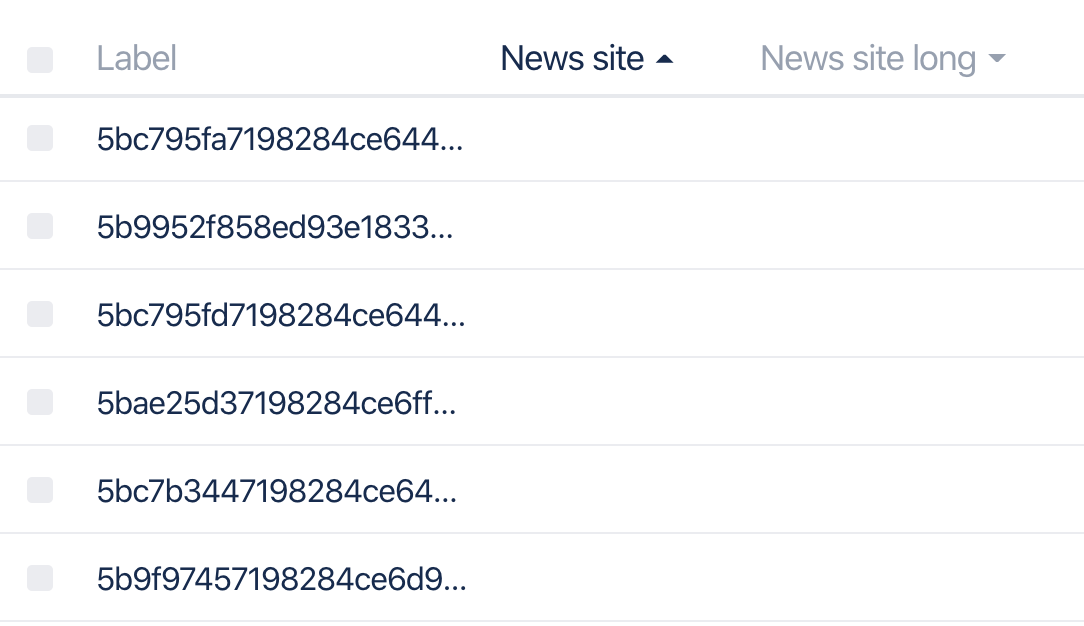
No errors with camelcase, but also no data:
derkweijers
on 4 Nov 2019
Hmmmmmmm... well, definitely sounds like a bug if you can't access fields with underscores 😬 Is there any way for you to convert the values on the DB side to camelcase? With the Mongo shell, perhaps?
Vultraz
on 4 Nov 2019
To test or permanently? If it's to test something; yes. If it's for real; I'm afraid that will get me in trouble with devs that connect to my API :)
derkweijers
on 4 Nov 2019
Ooof 😂 Yeah, I was suggesting for production. Let's see if @MadeByMike has any insight...
Vultraz
on 4 Nov 2019
I can't seem to reproduce this one. Here is the test config I used:
keystone.createList("Test", {
  fields: {
    name: { type: Text },
    the_mostest_underscores: { type: Text }
  }
});
I opened the Admin UI and I was able to create an item. The field labels and data both showed up:

Have I done this right?
 MadeByMike
on 6 Nov 2019
MadeByMike
on 6 Nov 2019
Hi!
Apologies for the late reply, I'm a bit busy.
It looks the same yes, here's my code:
module.exports = {
  fields: {
    newsSite: {
      type: Text,
      isRequired: true,
    },
...
}
In my index.js file (enty point):
keystone.createList('Article', ArticleSchema);
Here's a snippet directly from MongoDB:
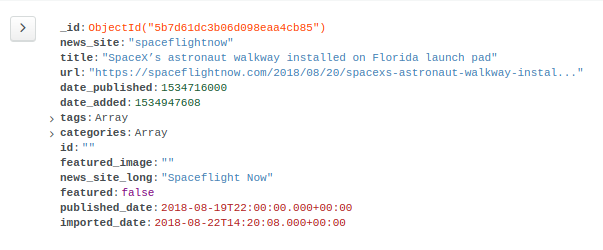
And this results in what's posted before.
I hadn't tried creating new documents and I just did. This seems to work at first (I see them in the UI) but it's inserted camel cased in the database:
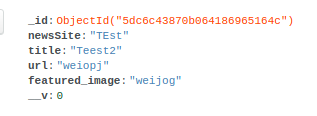
Fun thing to notice: the featured_image field does work as expected. I'm totally lost right now.
derkweijers
on 9 Nov 2019
By accident, I found a possible solution/workaround:
Define a non-underscore item as first item in the list (title, name, etc.). All underscore items will now behave correctly.
derkweijers
on 2 Dec 2019
Unfortunately, with defaultSort: it breaks again when you try to sort on an item with an underscore.
derkweijers
on 2 Dec 2019
Facing similar issue.
Solution : change the item names to camelCase (for Mongo Users)
In case you are using Knex Adapter with postgreSQL, change the item names to all lowercase or uppercase, depending upon column names in your DB.
 kvssandhu
on 7 Jan 2020
kvssandhu
on 7 Jan 2020
Facing similar issue.
Solution : change the item names to camelCase (for Mongo Users)
In case you are using Knex Adapter with postgreSQL, change the item names to all lowercase or uppercase, depending upon column names in your DB.
That worked partially for me, as defaultSort: breaks it again.
derkweijers
on 14 Jan 2020
It looks like there hasn't been any activity here in over 6 months. Sorry about that! We've flagged this issue for special attention. It wil be manually reviewed by maintainers, not automatically closed. If you have any additional information please leave us a comment. It really helps! Thank you for you contribution. :)
![stale[bot] picture](https://avatars.githubusercontent.com/in/1724?v=4&s=40) stale[bot]
on 13 May 2020
stale[bot]
on 13 May 2020
This also occurs over on the Postgres side. When you click to sort by key, any key with an underscore will throw the following error:
GraphQL error: Cannot read property 'sortKey' of undefined
Since keystone caches the currently visible tabs, all subsequent reloads without clearing the cache will throw the error before even displaying any information.
Kind of a major bug. If anyone has any workarounds that would be great.
 hew
on 16 May 2020
hew
on 16 May 2020
Actually never mind, you don't have to click anything. The underscore fields with fail on render.
hew
on 16 May 2020
Steps to reproduce:
- Start a new keystone project
- Choose postgres/Knex
- Create a list with a key that has an underscore
- Try to view that list
 "@keystonejs/adapter-knex": "^10.0.0",
 "@keystonejs/app-admin-ui": "^6.0.0",
It looks like there hasn't been any activity here in over 6 months. Sorry about that! We've flagged this issue for special attention. It wil be manually reviewed by maintainers, not automatically closed. If you have any additional information please leave us a comment. It really helps! Thank you for you contribution. :)
stale[bot]
on 13 Sep 2020
By accident, I found a possible solution/workaround:
Define a non-underscore item as first item in the list (title, name, etc.). All underscore items will now behave correctly.
Works for me as well
 cicibobo
on 22 Dec 2020
cicibobo
on 22 Dec 2020
I have still issue with a field name containing underscore. The GraphQL returns error in sortBy. Any help?
Thank you very much.
 radospanny
on 25 Jan 2021
radospanny
on 25 Jan 2021
Related issues
 justinmoon
·
13Comments
justinmoon
·
13Comments
 arnaud-zg
·
18Comments
arnaud-zg
·
18Comments
 jesstelford
·
19Comments
jesstelford
·
19Comments
 thekevinbrown
·
31Comments
thekevinbrown
·
31Comments
 bholloway
·
18Comments
bholloway
·
18Comments
Most helpful comment
By accident, I found a possible solution/workaround:
Define a non-underscore item as first item in the list (title, name, etc.). All underscore items will now behave correctly.