Keystone-classic: Problem saving models with CloudinaryImage fields in Safari 11
Expected behavior
Able to edit the contents in Admin UI.
Actual/Current behavior
When I submit modified content in Admin UI, I will get the following error on Safari 11:
Failed to load resource: The operation couldn’t be completed. (kCFErrorDomainCFNetwork error 303.)
Steps to reproduce the actual/current behavior
- Upgrade keystone version from 0.3 to 4.0.0-beta.8
- Login to Admin UI
- Edit a content and click Save
Environment
| Software | Version
| ---------------- | -------
| Keystone | 4.0.0-beta.8
| Node | 6.11.5
| Browser | Safari 11.1
 Tibi02
All 11 comments
@Tibi02 I can't reproduce this error in an application using Keystone 4.0.0-beta.8 with Safari 11.1.1 (13605.2.8) on macOS 10.13.5. The specific kCFErrorDomainCFNetwork error 303 message you are encountering in Safari appears to indicate an HTTP response that cannot be parsed. Can you confirm the behaviour (success or error) in Chrome or Firefox? Is there any further information in your application log?
Since you've recently upgraded from Keystone 0.3, perhaps there is something missing in your application code. Have you reviewed Upgrade Guide: 0.3 to 4.0?
If possible, it would be helpful if you can provide a minimal test case such as a Keystone model that demonstrates this problem.
Regards,
Stennie
 stennie
on 12 Jun 2018
stennie
on 12 Jun 2018
@stennie - Thanks for your quick reply!
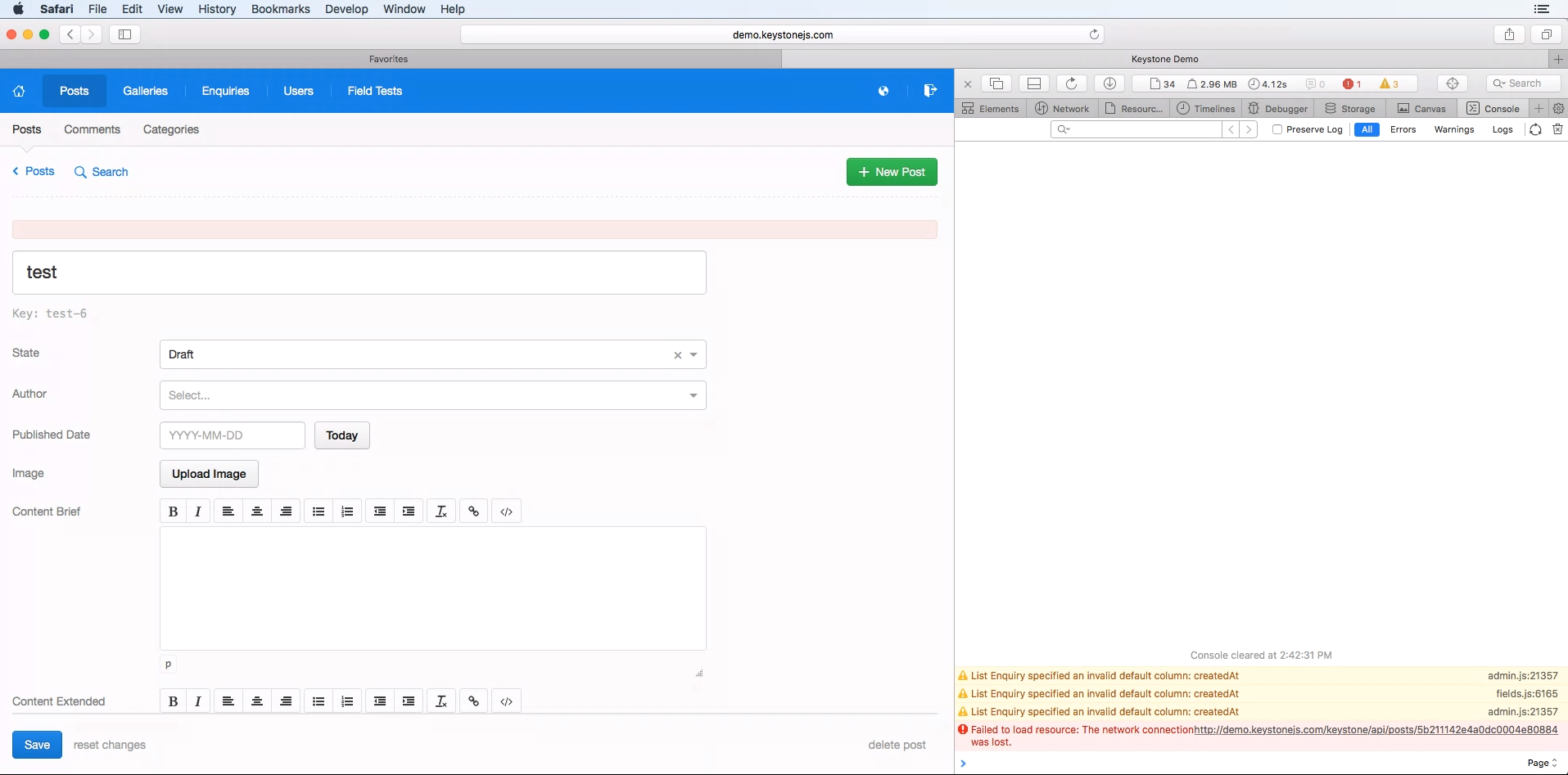
I've just tested this case with Safari 11.1 on http://demo.keystonejs.com and I also unable to save a modified content. I got the following error:
Failed to load resource: The network connection was lost. http://demo.keystonejs.com/keystone/api/posts/5b211142e4a0dc0004e80884
I went through the migration guide that you mentioned above.
I've also tested on Chrome, Firefox and Safari 10.1 and it's works well.
I think the previous kCFErrorDomainCFNetwork error 303 message comes from CloudFront, so I tested without CloudFront and I also got a same timeout error that I mentioned above.
If you have any suggestion please let me know!
Regards,
Tibi
Tibi02
on 13 Jun 2018
@Tibi02 I can reproduce the Safari issue on demo.keystonejs.com, which is currently running 4.0.0-beta.5. However, I cannot reproduce this locally with either 4.0.0-beta.5 or 4.0.0-beta.8 using the Node HTTP server.
One possible difference between environments is the web server: what are you using to test this with?
Can you try with a local Node server and see if the error is still reproducible?
Thanks,
Stennie
stennie
on 14 Jun 2018
Update: I can reproduce this locally using a checkout of https://github.com/keystonejs/keystone-demo and a local Node server. My earlier testing was with a freshly generated app (via yo keystone with default values).
This suggests that the web server isn't a key difference, but the culprit isn't obvious yet. Perhaps HTTP headers? Open to suggestions.
Regards,
Stennie
stennie
on 14 Jun 2018
@stennie - I can also reproduce this issue with a fresh keystone installation (using yo keystone).
My experience is that the Models with image upload could causes the issue.
It's working fine when I create a Post with an image than the filename is present in the request data and it's not an empty string.
Content-Disposition: form-data; name="CloudinaryImage-image-1011"; filename="chart1.jpg"
Content-Type: image/jpeg
The issue occurs when I create a Post and I don't touch the image upload field than the filename still present, but it's an empty sting.
Content-Disposition: form-data; name="CloudinaryImage-image-1003"; filename=""
Content-Type: application/octet-stream
Regards,
Tibi
Tibi02
on 14 Jun 2018
@Tibi02 Thanks for narrowing the surface area to CloudinaryImage! Looks like the fix might be to ignore the Cloudinary field unless a filename is present.
@chasms Since you've done a lot of work with Cloudinary for #4633, does this Safari issue sound familiar?
Thanks,
Stennie
stennie
on 14 Jun 2018
@stennie I actually fixed an issue in my PR where the list UI was breaking when the CloudinaryImage field was set as a column and any item in the list was missing an image. The CloudinaryImageField seems to default to the object structure of a regular Cloudinary Image, just with every key as an empty string or undefined... So you can see HERE that I added an early return where otherwise it would have tried to run a replace on a startingUrl that could be undefined.
May be a similar issue here? I use Chrome for dev so I've never run into this particular bug
 chasms
on 19 Jun 2018
chasms
on 19 Jun 2018
This doesn't merely have to do with CloudinaryImage. I'm using plain Files with the FS storage adapter and it also breaks saving Posts in Safari. Anybody found a solution yet? Looking at the HTTP headers, the problem looks like what @Tibi02 mentioned, for which @chasms PR doesn't provide a fix.
 erikvdplas
on 23 Jun 2018
erikvdplas
on 23 Jun 2018
@erikvdplas I believe this is the only open bug report specific to Safari, but it is helpful to know that FS adapter is also affected. If you have time to investigate and identify the fix, a pull request would be welcome.
Regards,
Stennie
stennie
on 23 Jun 2018
Found the issue: https://stackoverflow.com/questions/49614091/safari-11-1-ajax-xhr-form-submission-fails-when-inputtype-file-is-empty
Fixed in the front-end by manipulating the formdata in EditForm.js:
$(this.refs.editForm).find("input[type='file']").each(function(){
            if ($(this).get(0).files.length === 0) {$(this).prop('disabled', true);}
        });
        const formData = new FormData(editForm);
        $(this.refs.editForm).find("input[type='file']").each(function(){
            if ($(this).get(0).files.length === 0) {$(this).prop('disabled', false);}
        });
I will try to rewrite this to something cleaner, and make a PR.
erikvdplas
on 23 Jun 2018
Thanks for the PR @erikvdplas! Tested & merged to master.
Regards,
Stennie
stennie
on 30 Jun 2018
Related issues
 celiao
·
4Comments
celiao
·
4Comments
 christroutner
·
4Comments
christroutner
·
4Comments
 sorryididntmeantto
·
3Comments
sorryididntmeantto
·
3Comments
 kamontat
·
5Comments
kamontat
·
5Comments
 calebmcelroy
·
3Comments
calebmcelroy
·
3Comments
Most helpful comment
@stennie - I can also reproduce this issue with a fresh keystone installation (using
yo keystone).My experience is that the Models with image upload could causes the issue.
It's working fine when I create a Post with an image than the filename is present in the request data and it's not an empty string.
The issue occurs when I create a Post and I don't touch the image upload field than the filename still present, but it's an empty sting.
Regards,
Tibi