Keycloak-angular: CORS issue with the new version of Keycloak-angular
Bug Report or Feature Request (mark with an x)
- [x] bug report -> please search for issues before submitting
- [ ] feature request
Versions.
keycloak-angular: 7.3.1
Angular: 9.1.7
Keycloak 9.0.0.
Repro steps.
1) New ream created
2) New client created
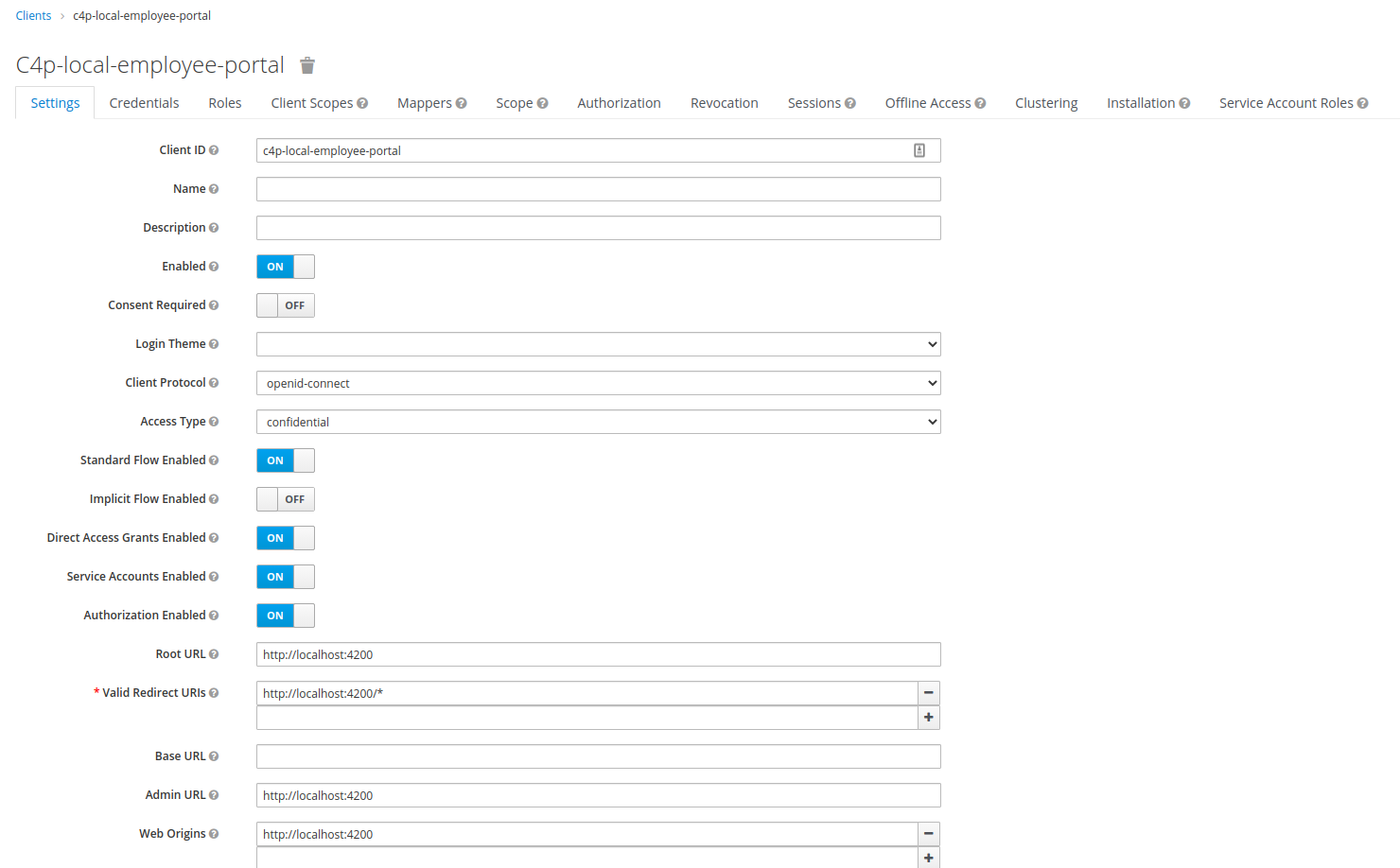
3) Client settings (image). Access type: Confidential and Authorization enabled as we want to use these features.

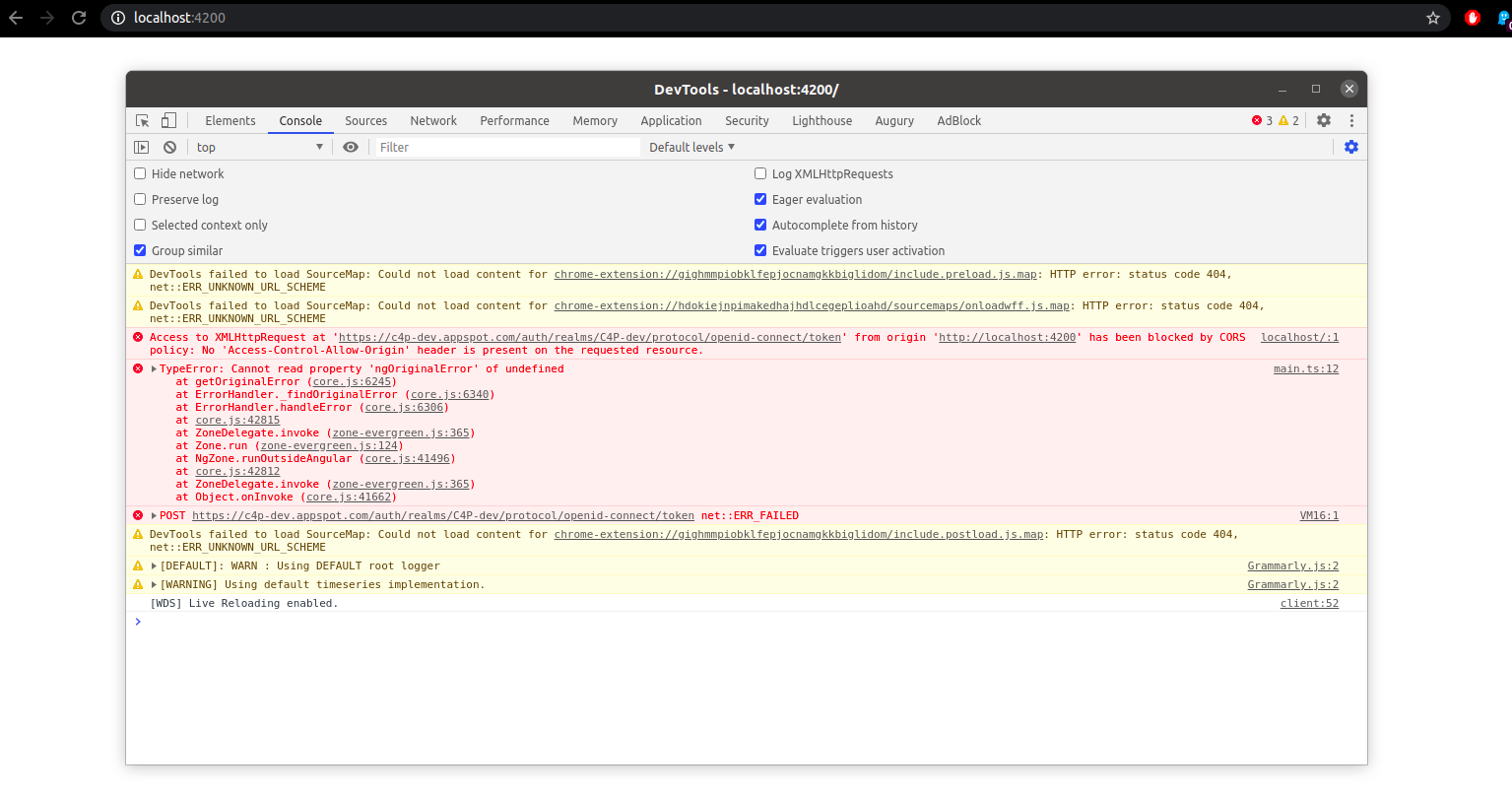
4) When the application runs, we are getting a CORS error.
Additional info: We did follow all the steps for library implementation. (Including view-profile within the scope)
The log given by the failure.
Console log output:

Desired functionality.
Previously, we used keycloak-angular 6.1.0 and we haven't had this issue before. When we switched to the new version, the issue started appearing.
Do you have any info on what could be causing the problem and what would be the best course of action to fix it?
 DamjanJ
All 12 comments
@DamjanJ This issue sounds very similar to https://github.com/mauriciovigolo/keycloak-angular/issues/257, have you checked out the comments there for a solution?
 jonkoops
on 2 Jul 2020
jonkoops
on 2 Jul 2020
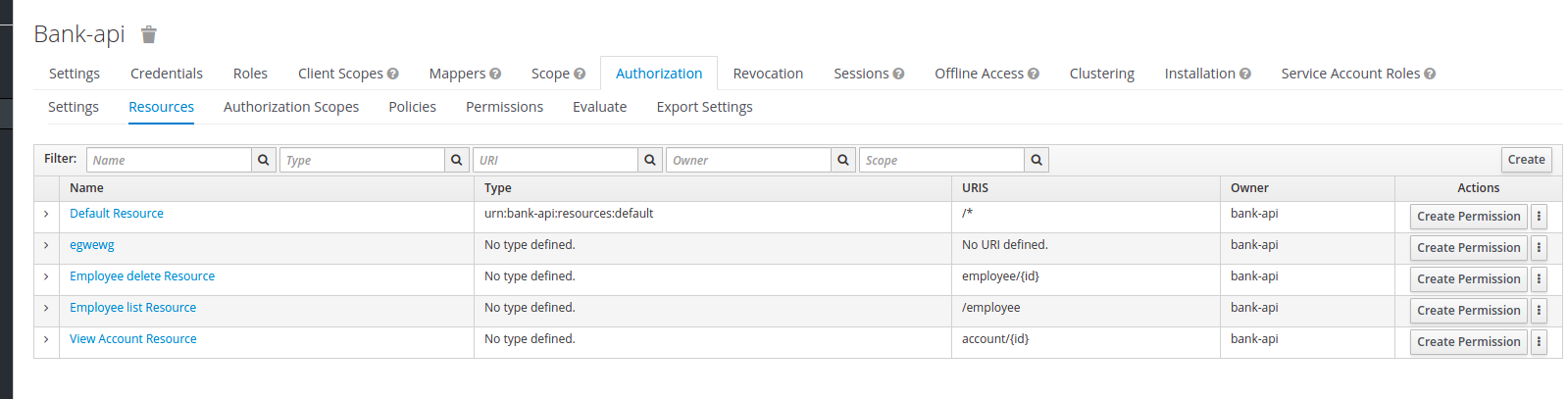
@jonkoops I did see the issue, BUT when it is set to Public we do not have the Authorization feature.
- Through Authorization, the goal is to manage resources, scopes, and permissions.
- Once set to public, Authorization tab is gone.
DamjanJ
on 2 Jul 2020
That's peculiar, I'd recommend asking around the Keycloak Community perhaps they can help you with this. In any case this is certainly an issue with the configuration of Keycloak itself and not an issue with Keycloak Angular so I will close this issue for administrative purposes.
Feel free to keep commenting in this thread or leave a comment if you find a solution that can help others.
jonkoops
on 2 Jul 2020
Beg pardon but not sure I agree. This is not a keycloak issue, this is how the keycloak works, and has worked from the beginning.
Public -> You dont have Authorization
Confidential -> You have Authorization
In the previous ticket the solution was to be switched to 'Public'.
So we need 'Confidential' enabled for Authorization, which in turn is causing the CORS issue.
DamjanJ
on 2 Jul 2020
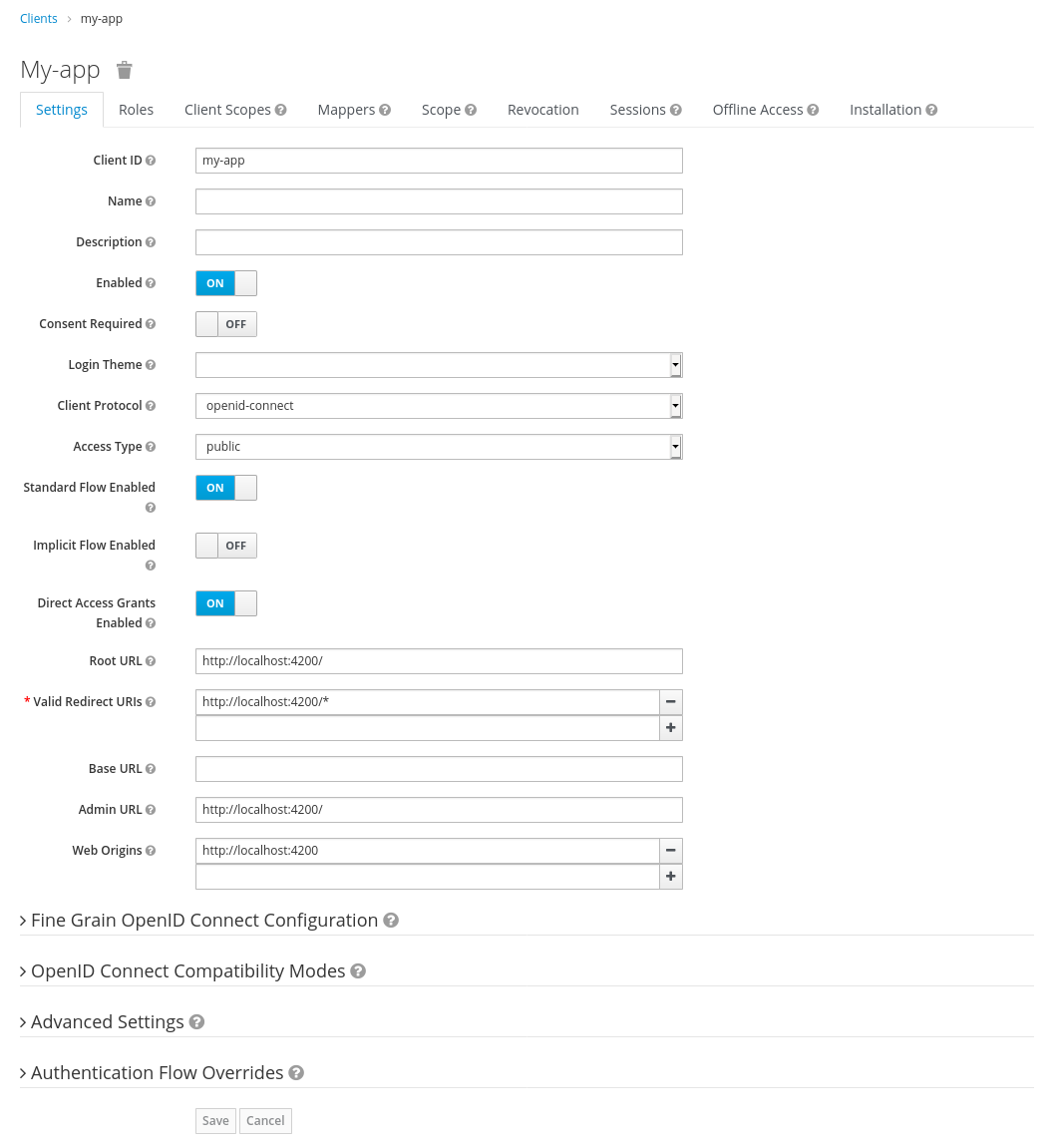
I'd recommend to check your settings for the following:
- In client settings, Set Valid Redirect URL to point to Angular app
- In client settings, Set Web Origin to point to Angular app
An example of a proper configuration:
As mentioned the confidential client is not supported any longer for security reasons, see https://github.com/mauriciovigolo/keycloak-angular/issues/257#issuecomment-650597593
jonkoops
on 2 Jul 2020
Thank you for the configuration.
As you can see from the picture you attached when the Access Type is set to public on the tabs above there is no tab 'Authorization'.
When the Access Type is set to Confidential, then the tab appears (see the image I attached below), and users can use the functionality in the Authorization Services. This is even listed in the official Keycloak documentation
https://www.keycloak.org/docs/6.0/authorization_services/#_getting_started_hello_world_enabling_authz_services
With the changes that you made, you have effectively disabled this keycloak feature completely. Is there an option to restore it as it was before?
DamjanJ
on 2 Jul 2020
It cannot be enabled again as I mentioned before confidential clients are no longer supported by keycloak-js, nor is it something you would want as the secret cannot be stored safely by the client.
jonkoops
on 2 Jul 2020
For what it's worth, we did manage to use confidential by using an older version of keycloak-angular:
"@angular/core": "9.1.7",
"keycloak-angular": "^6.1.0"
keycloak server version is: 9.0.0
Again, our issue was not how the secret was handled but that by switching to 'public' we lost out on all of the big Authorization keycloak features - resource, scope, policy and permission management.
But with this rollback, it seems to work.
DamjanJ
on 7 Jul 2020
Thanks @DamjanJ . I've this issue and to solve i downgrade the version is order to use it.
IMHO, it's a shame to not provide this. An excelent project with with failure... :/
 marquez2012
on 13 Aug 2020
marquez2012
on 13 Aug 2020
Did someone found a Solution here?
 danielehrhardt
on 4 Feb 2021
danielehrhardt
on 4 Feb 2021
Same here, is there already a solution available?
 cremfert
on 4 Mar 2021
cremfert
on 4 Mar 2021
@danielehrhardt @cremfert @marquez2012
There is a solution of sorts.. The way I did it was:
Frontend (using keycloak-angular _latest version_ ):
- Connects to the PUBLIC client to get token (my-app-frontend-client)
- Here I get client roles for example
Backend (using NodeJS):
- Connects to the CONFIDENTIAL client
- Here I retrieve all the permissions for the user role listed in the _authorization_ tab and send them to the Frontend
The downside is you are having two services calling keycloak and communicating with each other but it gets the job done, and most importantly it is both lightweight and allows you to keep your dependencies up to date.
Upside bit of a security upgrade.
Bit creative thinking but works like a charm!
DamjanJ
on 4 Mar 2021
Related issues
 osafi
·
5Comments
osafi
·
5Comments
 pahlers
·
3Comments
pahlers
·
3Comments
 Bjeaurn
·
4Comments
Bjeaurn
·
4Comments
 livthomas
·
4Comments
livthomas
·
4Comments
 ayoubnejm
·
3Comments
ayoubnejm
·
3Comments
Most helpful comment
Thanks @DamjanJ . I've this issue and to solve i downgrade the version is order to use it.
IMHO, it's a shame to not provide this. An excelent project with with failure... :/