Keycloak-angular: AppAuthGuard used only on some pages
Bug Report or Feature Request (mark with an x)
- [ ] bug report -> please search for issues before submitting
- [x] feature request
Versions.
keycloak-angular-4.0.0
angular-6.0.8
keycloak-4.1.0
Repro steps.
I'm testing this excellent library.
I have two components: DashboardComponent and ProductComponent.
I would like the dashboard to be visible without login while in the product component the user needs to be logged in
import { NgModule } from '@angular/core';
import { RouterModule } from '@angular/router';
import { Routes } from '@angular/router';
import { AppComponent } from './app.component';
import { AppAuthGuard } from './app-auth.guard';
import { DashboardComponent } from './dashboard/dashboard.component';
import { ProductComponent } from './product/product.component';

const routes: Routes = [
  { path: '', redirectTo: '/dashboard', pathMatch: 'full'},
  { path: 'dashboard', component: DashboardComponent},
  { path: 'products', component: ProductComponent, canActivate: [AppAuthGuard] },
];

@NgModule({
  imports: [RouterModule.forRoot(routes)],
  exports: [RouterModule],
  providers: [AppAuthGuard]
})
export class AppRoutingModule {}
If I add canActivate: [AppAuthGuard] to the ProductComponent, and I go to the dashboard it always redirect the keycloak login page.
can it be because it uses this initialization setting?
providers: [
    {
      provide: APP_INITIALIZER,
      useFactory: initializer,
      multi: true,
      deps: [KeycloakService]
    }
How can I limit only a few pages to login
The log given by the failure.
Desired functionality.
 pako-g
All 15 comments
Hi @pako-g, sorry for the delay to answer you here on github. As we already talked before on slack I will create an example with all the details to leave this configuration more understandable.
Release 4.1.0 was scheduled today to September but i will try to release this example earlier, so I will update this issue.
Thanks!
 mauriciovigolo
on 20 Aug 2018
mauriciovigolo
on 20 Aug 2018
Hi @mauriciovigolo
I have a similar problem.
Your help is welcome
Thanks!
 corentin59
on 2 Oct 2018
corentin59
on 2 Oct 2018
I have similar problem too.
A solution is appreciated.
Thanks !
 bsener
on 4 Oct 2018
bsener
on 4 Oct 2018
Hi @mauriciovigolo
I'm having the exact problem also.
I have three components that does not need login, if I modify auth guard, I keep redirect loops to the login page.
Do you have any road map for this task?
Or do we have any workarounds we can use until a permanent fix?
Btw thank you for the awesome library!
 mehmetzahid
on 15 Oct 2018
mehmetzahid
on 15 Oct 2018
Hi,
This a sample :
Step 1 : Create new guard (this guard must extends KeycloakAuthGuard)
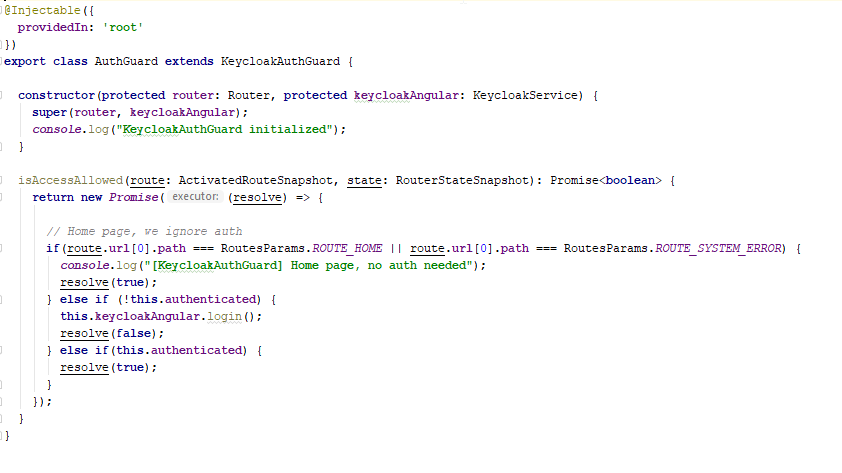
Step 2 : in app.module.ts
Add AuthGuard in providers
Add AuthGuard on each routes (canActivate)
corentin59
on 15 Oct 2018
is this request still open or the functionality is there now? I have the same requirement.
@corentin59 I've tried the similar approach but didn't work. do you mind sharing your init options? I've tried the same configuration that is in 'README' page and a guard similar to yours, but it seems during app initialization at some point 'login' method is called. so it's not up to the guard to call the login.
 kvmw
on 17 Oct 2018
kvmw
on 17 Oct 2018
I'm not really sure why people are asking for workarounds or fixes as the library works as it should. I didn't have any issues putting some routes behind keycloak auth and others not.
What I would guess is happening is you left "onLoad: 'login-required'," set in the initOptions. Which will, you guessed it, require a login as soon as keycloak is loaded. If that isn't what you wanted, then I'd probably read the documentation for the libraries you are using as well as the documentation for any underlying libraries like the keycloak-js adapter. I'd also look at each and every option you are using that you copy-pasted especially when it comes to anything security related.
If this is not your issue, then I would suggest creating a plunker (or something similar) so it will be easier to troubleshoot your issue and help you.
 nmcbride
on 24 Nov 2018
nmcbride
on 24 Nov 2018
In my case the problem was a call to asset folder to load an image in the public (not secured) component. I had forgotten to exclude the asset folder in keycloak configuration.
kvmw
on 26 Nov 2018
Gotcha. Im glad you got it figured out!
On Mon, Nov 26, 2018 at 5:48 AM Kaveh Shamsi notifications@github.com
wrote:
In my case the problem was a call to asset folder to load an image in the
public (not secured) component. I had forgotten to exclude the asset folder
in keycloak configuration.—
You are receiving this because you commented.
Reply to this email directly, view it on GitHub
https://github.com/mauriciovigolo/keycloak-angular/issues/90#issuecomment-441596698,
or mute the thread
https://github.com/notifications/unsubscribe-auth/AAy0zYGV6-hw5mZwFQsS7JRAIWbKKJ4Gks5uy8cHgaJpZM4Ve1fM
.
nmcbride
on 26 Nov 2018
I am also facing a similar issue . The page is always redirecting to keycloak login page . I have tried sso-required in keycloak init but it did not work for me .
 jokumar
on 3 Sep 2019
jokumar
on 3 Sep 2019
@jokumar The options for keycloak init are login-required or check-sso.
 ashteya
on 9 Sep 2019
ashteya
on 9 Sep 2019
Same problem.
async ngDoBootstrap(app) {

    try {
      await keycloakService.init({
        config: environment.keycloak,
        initOptions: {
          onLoad: 'check-sso'
        },
        enableBearerInterceptor: true
      })
      app.bootstrap(AppComponent)
    } catch (error) {
      console.error('Keycloak init failed', error)
    }
  }
 giovannicandido
on 2 Nov 2019
giovannicandido
on 2 Nov 2019
Hi all
I encountered the same issue and I found a workarround.
When you enable the 'login-required' in "onLoad" property of keycloack config, you will always be redirected to the login page when bootstrapping your app, so first remove 'login-required' to disable the automatic redirection to the login page when accessing your public page:
const keyclockConfig: KeycloakOptions = {
  config: {
    url: '/auth',
    realm: 'myRealm',
    clientId: 'myClient',
  },
  initOptions: {
    checkLoginIframe: false,
  },
  enableBearerInterceptor: true,
  bearerPrefix: 'Bearer',
  bearerExcludedUrls: ['/assets'],
};
Then, make the default landing page to your public one in the main routing file 'app-routing.module' without controlling its access by the AuthGuard, as follows:
const routes: Routes = [
  {
    path: 'pages',
    loadChildren: '@app/home/home.module#MainModule',
    canActivate: [AuthGuardService]
  },
  { path: '', component: MyPublicComponent }
];
The 'keycloak-service' calls the 'login' if the token is not valid (in case of public page for example), you have to disable it by providing a custom class instead of 'KeycloakService', so add in 'app.module' the following provider:
{ provide: KeycloakService, useClass: CustomKeycloakService },
And create the custom service by extending 'KeycloakService':
import { Injectable, Injector } from '@angular/core';
import { KeycloakService } from 'keycloak-angular';

@Injectable({
  providedIn: 'root'
})
export class CustomKeycloakService extends KeycloakService {
  async getToken(forceLogin = false): Promise<string> {
    try {
      await this.updateToken(10);
      return this.getKeycloakInstance().token;
    } catch (error) {
      if (forceLogin) {
        this.login();
      } else {
        throw error;
      }
    }
  }
}
Only the 'getToken' method is overwritten in order to change the default parameter 'forceLogin' to false which is true by default.
And finally, in your AuthGuard, you have to call the login check (redirection to login page will be automatically fired for no authenticated user):
isAccessAllowed(
    route: ActivatedRouteSnapshot,
    state: RouterStateSnapshot
  ): Promise<boolean> {
    return new Promise((resolve, reject) => {
      if (!this.authenticated) {
        this.keycloakAngular.login().catch((e) => console.error(e));
        return resolve(false);
      }
      return resolve(true);
    });
  }
By this way, your public page will be accessible for public users and your internal pages are automatically secured by keycloak checks.
Note: do not inject the KeycloakService in your public page because the 'authenticated' status will be always false and you can't do redirection for example if the user is authenticated, because the service is updated after calling the login which is disabled in that page and only fired for our internal pages via the Guard.
Hope this can help :)
Thanks
 odaper
on 3 May 2020
odaper
on 3 May 2020
Hi all
I encountered the same issue and I found a workarround.
When you enable the 'login-required' in "onLoad" property of keycloack config, you will always be redirected to the login page when bootstrapping your app, so first remove 'login-required' to disable the automatic redirection to the login page when accessing your public page:const keyclockConfig: KeycloakOptions = { config: { url: '/auth', realm: 'myRealm', clientId: 'myClient', }, initOptions: { checkLoginIframe: false, }, enableBearerInterceptor: true, bearerPrefix: 'Bearer', bearerExcludedUrls: ['/assets'], };Then, make the default landing page to your public one in the main routing file 'app-routing.module' without controlling its access by the AuthGuard, as follows:
const routes: Routes = [
  {
    path: 'pages',
    loadChildren: '@app/home/home.module#MainModule',
    canActivate: [AuthGuardService]
  },
  { path: '', component: MyPublicComponent }
];
The 'keycloak-service' calls the 'login' if the token is not valid (in case of public page for example), you have to disable it by providing a custom class instead of 'KeycloakService', so add in 'app.module' the following provider:
{ provide: KeycloakService, useClass: CustomKeycloakService },
And create the custom service by extending 'KeycloakService':import { Injectable, Injector } from '@angular/core'; import { KeycloakService } from 'keycloak-angular'; @Injectable({ providedIn: 'root' }) export class CustomKeycloakService extends KeycloakService { async getToken(forceLogin = false): Promise<string> { try { await this.updateToken(10); return this.getKeycloakInstance().token; } catch (error) { if (forceLogin) { this.login(); } else { throw error; } } } }Only the 'getToken' method is overwritten in order to change the default parameter 'forceLogin' to false which is true by default.
And finally, in your AuthGuard, you have to call the login check (redirection to login page will be automatically fired for no authenticated user):
isAccessAllowed(
    route: ActivatedRouteSnapshot,
    state: RouterStateSnapshot
  ): Promise<boolean> {
    return new Promise((resolve, reject) => {
      if (!this.authenticated) {
        this.keycloakAngular.login().catch((e) => console.error(e));
        return resolve(false);
      }
      return resolve(true);
    });
  }
By this way, your public page will be accessible for public users and your internal pages are automatically secured by keycloak checks.
Note: do not inject the KeycloakService in your public page because the 'authenticated' status will be always false and you can't do redirection for example if the user is authenticated, because the service is updated after calling the login which is disabled in that page and only fired for our internal pages via the Guard.
Hope this can help :)
Thanks
Hi @odaper!
When u utilize keycloak.init with the configuration?
Can u show u app.module with providers?
I hope u can help me! Thanks! :)
 lucasbianchi8
on 11 May 2020
lucasbianchi8
on 11 May 2020
This should no longer be an issue when using the silent SSO method provided in the README and by adding the guard only to the appropriate routes.
 jonkoops
on 21 Jul 2020
jonkoops
on 21 Jul 2020
Related issues
 Wassim24
·
4Comments
Wassim24
·
4Comments
 jderuere
·
4Comments
jderuere
·
4Comments
 Bjeaurn
·
4Comments
Bjeaurn
·
4Comments
 pahlers
·
3Comments
pahlers
·
3Comments
 arratejasvi
·
4Comments
arratejasvi
·
4Comments
Most helpful comment
I'm not really sure why people are asking for workarounds or fixes as the library works as it should. I didn't have any issues putting some routes behind keycloak auth and others not.
What I would guess is happening is you left "onLoad: 'login-required'," set in the initOptions. Which will, you guessed it, require a login as soon as keycloak is loaded. If that isn't what you wanted, then I'd probably read the documentation for the libraries you are using as well as the documentation for any underlying libraries like the keycloak-js adapter. I'd also look at each and every option you are using that you copy-pasted especially when it comes to anything security related.
If this is not your issue, then I would suggest creating a plunker (or something similar) so it will be easier to troubleshoot your issue and help you.