Keycloak-angular: ERROR Error: Uncaught (in promise): The user profile could not be loaded.
Hi all,
We are using Keycloak 3.4.3 with "keycloak-angular": "^1.2.4" and "keycloak-js": "^3.4.3",
After successful login, the application shows a blank page with following error:-
if we access https://qsso.abc.com/auth/realms/TestRealm/account from another tab in the same browser, we are seeing User Account Information.
Please advise.
14:47:41.362 keycloak.js:685 [KEYCLOAK] Estimated time difference between browser and server is 36 seconds
14:47:41.466 zone.js:2969 OPTIONS https://qsso.abc.com/auth/realms/TestRealm/account 0 ()
scheduleTask @ zone.js:2969
webpackJsonp../node_modules/zone.js/dist/zone.js.ZoneDelegate.scheduleTask @ zone.js:407
onScheduleTask @ zone.js:297
webpackJsonp../node_modules/zone.js/dist/zone.js.ZoneDelegate.scheduleTask @ zone.js:401
webpackJsonp../node_modules/zone.js/dist/zone.js.Zone.scheduleTask @ zone.js:232
webpackJsonp../node_modules/zone.js/dist/zone.js.Zone.scheduleMacroTask @ zone.js:255
scheduleMacroTaskWithCurrentZone @ zone.js:1114
(anonymous) @ zone.js:3001
proto.(anonymous function) @ zone.js:1394
Keycloak.kc.loadUserProfile @ keycloak.js:346
(anonymous) @ keycloak.service.js:329
step @ keycloak.service.js:32
(anonymous) @ keycloak.service.js:13
(anonymous) @ keycloak.service.js:7
ZoneAwarePromise @ zone.js:891
webpackJsonp../node_modules/keycloak-angular/src/services/keycloak.service.js.__awaiter @ keycloak.service.js:3
(anonymous) @ keycloak.service.js:322
ZoneAwarePromise @ zone.js:891
webpackJsonp../node_modules/keycloak-angular/src/services/keycloak.service.js.KeycloakService.loadUserProfile @ keycloak.service.js:322
(anonymous) @ keycloak.service.js:103
step @ keycloak.service.js:32
(anonymous) @ keycloak.service.js:13
(anonymous) @ keycloak.service.js:7
ZoneAwarePromise @ zone.js:891
webpackJsonp../node_modules/keycloak-angular/src/services/keycloak.service.js.__awaiter @ keycloak.service.js:3
(anonymous) @ keycloak.service.js:98
setSuccess @ keycloak.js:780
(anonymous) @ keycloak.js:116
setSuccess @ keycloak.js:780
authSuccess @ keycloak.js:575
req.onreadystatechange @ keycloak.js:549
wrapFn @ zone.js:1188
webpackJsonp../node_modules/zone.js/dist/zone.js.ZoneDelegate.invokeTask @ zone.js:421
onInvokeTask @ core.js:4740
webpackJsonp../node_modules/zone.js/dist/zone.js.ZoneDelegate.invokeTask @ zone.js:420
webpackJsonp../node_modules/zone.js/dist/zone.js.Zone.runTask @ zone.js:188
webpackJsonp../node_modules/zone.js/dist/zone.js.ZoneTask.invokeTask @ zone.js:496
invokeTask @ zone.js:1540
globalZoneAwareCallback @ zone.js:1566
XMLHttpRequest.send (async)
scheduleTask @ zone.js:2969
webpackJsonp../node_modules/zone.js/dist/zone.js.ZoneDelegate.scheduleTask @ zone.js:407
onScheduleTask @ zone.js:297
webpackJsonp../node_modules/zone.js/dist/zone.js.ZoneDelegate.scheduleTask @ zone.js:401
webpackJsonp../node_modules/zone.js/dist/zone.js.Zone.scheduleTask @ zone.js:232
webpackJsonp../node_modules/zone.js/dist/zone.js.Zone.scheduleMacroTask @ zone.js:255
scheduleMacroTaskWithCurrentZone @ zone.js:1114
(anonymous) @ zone.js:3001
proto.(anonymous function) @ zone.js:1394
processCallback @ keycloak.js:557
(anonymous) @ keycloak.js:164
success @ keycloak.js:795
processInit @ keycloak.js:162
success @ keycloak.js:795
Keycloak.kc.init @ keycloak.js:205
(anonymous) @ keycloak.service.js:97
ZoneAwarePromise @ zone.js:891
webpackJsonp../node_modules/keycloak-angular/src/services/keycloak.service.js.KeycloakService.init @ keycloak.service.js:93
(anonymous) @ init.ts:8
step @ user-exists.guard.ts:15
(anonymous) @ user-exists.guard.ts:15
(anonymous) @ user-exists.guard.ts:15
ZoneAwarePromise @ zone.js:891
webpackJsonp../src/app/auth/init.ts.__awaiter @ user-exists.guard.ts:15
(anonymous) @ init.ts:6
ZoneAwarePromise @ zone.js:891
(anonymous) @ init.ts:6
webpackJsonp../node_modules/@angular/core/esm5/core.js.ApplicationInitStatus.runInitializers @ core.js:3573
(anonymous) @ core.js:5500
_callAndReportToErrorHandler @ core.js:5679
(anonymous) @ core.js:5498
webpackJsonp../node_modules/zone.js/dist/zone.js.ZoneDelegate.invoke @ zone.js:388
onInvoke @ core.js:4749
webpackJsonp../node_modules/zone.js/dist/zone.js.ZoneDelegate.invoke @ zone.js:387
webpackJsonp../node_modules/zone.js/dist/zone.js.Zone.run @ zone.js:138
webpackJsonp../node_modules/@angular/core/esm5/core.js.NgZone.run @ core.js:4566
webpackJsonp../node_modules/@angular/core/esm5/core.js.PlatformRef.bootstrapModuleFactory @ core.js:5489
(anonymous) @ core.js:5568
webpackJsonp../node_modules/zone.js/dist/zone.js.ZoneDelegate.invoke @ zone.js:388
webpackJsonp../node_modules/zone.js/dist/zone.js.Zone.run @ zone.js:138
(anonymous) @ zone.js:872
webpackJsonp../node_modules/zone.js/dist/zone.js.ZoneDelegate.invokeTask @ zone.js:421
webpackJsonp../node_modules/zone.js/dist/zone.js.Zone.runTask @ zone.js:188
drainMicroTaskQueue @ zone.js:595
Promise.then (async)
scheduleMicroTask @ zone.js:578
webpackJsonp../node_modules/zone.js/dist/zone.js.ZoneDelegate.scheduleTask @ zone.js:410
webpackJsonp../node_modules/zone.js/dist/zone.js.Zone.scheduleTask @ zone.js:232
webpackJsonp../node_modules/zone.js/dist/zone.js.Zone.scheduleMicroTask @ zone.js:252
scheduleResolveOrReject @ zone.js:862
ZoneAwarePromise.then @ zone.js:962
webpackJsonp../node_modules/@angular/core/esm5/core.js.PlatformRef.bootstrapModule @ core.js:5568
./src/main.ts @ main.ts:12
__webpack_require__ @ bootstrap a750dc1c576a11f9b317:54
0 @ permission.service.mock.ts:11
__webpack_require__ @ bootstrap a750dc1c576a11f9b317:54
webpackJsonpCallback @ bootstrap a750dc1c576a11f9b317:25
(anonymous) @ main.bundle.js:1
14:47:41.468 core.js:1448 ERROR Error: Uncaught (in promise): The user profile could not be loaded.
at resolvePromise (zone.js:814)
at zone.js:724
at rejected (keycloak.service.js:5)
at ZoneDelegate.webpackJsonp../node_modules/zone.js/dist/zone.js.ZoneDelegate.invoke (zone.js:388)
at Object.onInvoke (core.js:4749)
at ZoneDelegate.webpackJsonp../node_modules/zone.js/dist/zone.js.ZoneDelegate.invoke (zone.js:387)
at Zone.webpackJsonp../node_modules/zone.js/dist/zone.js.Zone.run (zone.js:138)
at zone.js:872
at ZoneDelegate.webpackJsonp../node_modules/zone.js/dist/zone.js.ZoneDelegate.invokeTask (zone.js:421)
at Object.onInvokeTask (core.js:4740)
 rsachin
All 22 comments
Hi @rsachin, this seems to be related to giving the user the view_account permission, as mentioned in #37 and #57.
Let me know if it helps, thanks!
 mauriciovigolo
on 22 May 2018
mauriciovigolo
on 22 May 2018
Hi @mauriciovigolo ,
I run into the same error. I think my keycloak configuration ist correct. Should I send some Screenshots to verify that?
But unfortunananntelly I get the same Error as @rsachin.
In Firefox Developer Console I can see, that the account endpoint is successfully called:
https://development.keycloak.private:8443/auth/realms/MY-REALM/account
Accessing that URL in a second tab, shows up the user profile. But in my angular app, it seems not to be loaded. I try to access it, via: this.userDetails = this.keycloakService.loadUserProfile();
Beside that, I have an error with CORS. I need to disable it in my Browser, to access the login. what must be done, to get it work even without disabling CORS check in Browsers.
 Danny-P
on 31 May 2018
Danny-P
on 31 May 2018
@Danny-P, sorry for the delay. Could you check if the clientId has the view_account role from the accounts client? This problem usually happens when you don't have the permissions to access it.
mauriciovigolo
on 5 Jun 2018
Hi @mauriciovigolo , thank you for your reply.
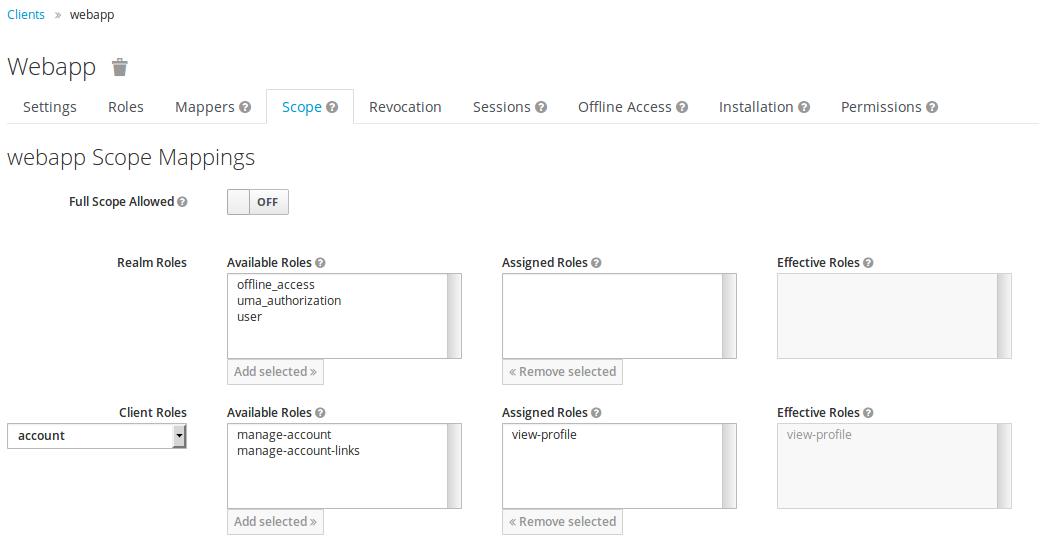
my client in Keycloak has the permission.
Look at this screenshot, I think it is correct?
Danny-P
on 6 Jun 2018
@Danny-P, yes it seems to be okay.
One thing I noticed now is the realm name in your url: MY-REALM
https://development.keycloak.private:8443/auth/realms/MY-REALM/account.
Is it correct?
mauriciovigolo
on 6 Jun 2018
@mauriciovigolo yes it is correct. I'm working with some test configuration to get it working first.
I did a reboot of my keycloak Server. Now the error has changed and it seems be related to a CORS Problem. I get the following error:
Cross-Origin Request Blocked: The Same Origin Policy disallows reading the remote resource at https://development.keycloak.private:8443/auth/realms/MY-REALM/protocol/openid-connect/token. (Reason: CORS header ‘Access-Control-Allow-Origin’ does not match 'http://localhost:4200, *').
@Danny-P, looking to the message I think it is a keycloak setup issue. Do you have an example to share so I would be easier to help you. Did you try the keycloak-heroes example with your server?
I'm working to improve the project documentation, so I will try to reproduce the common errors the people are having to create a FAQ.
mauriciovigolo
on 12 Jun 2018
@mauriciovigolo : I cloned the heros example to localhost. Then I did npm install and changed environment.ts to my configuration. You can find it in this gist: https://gist.github.com/Danny-P/3b85a4f7162966118e621517c756c711
I created a default Realm with a client called app. The only things I configured are the Redirect Uri (http://localhost:4200/*) and the scope settings.
Try the user test with password test
In this example I will get the error. Is this helpfull for you?
Danny-P
on 14 Jun 2018
@Danny-P, thanks for using your time to create this scenario. I asked about the keycloak-heroes because this is a working example, so it should work in your server as well. Taking a look at your config on gist, I saw that you are using HTTPS. Is this a self signed certificate? It might be the root of the problem.
mauriciovigolo
on 15 Jun 2018
@mauriciovigolo thank you very much for your assistance!
It is a Let's Encrypt certificate and still valid for the next four weeks.
Danny-P
on 15 Jun 2018
@Danny-P, if this is a valid certificate it might be a setup issue on keycloak. I'm creating some docker images to work with the examples, so you could use it to check your setups. It will be released on 4.0.0-beta.5 milestone together with the new project docs, but as soon as I push to the docker hub I will get in touch with you. Thanks!
mauriciovigolo
on 15 Jun 2018
I'm having a similar issue. It only happens when the user isn't logged in. Once the user logs in, the error goes away. We want the user to be able to use the site w/o being logged in. At the top of index.js, we're initiating
keycloak.init({ onLoad: 'check-sso' }).success( authenticated => {
The error back is Uncaught (in promise) Undefined
It's reported on this line:
p.reject(result);
Line 989 of keycloak.js
As mentioned, once the user clicks the login link and is authenticated by keycloak, this error goes away. It only happens when the user is unauthenticated.
If it makes a difference, we're using react-redux as well.
 TechGnome
on 22 Jun 2018
TechGnome
on 22 Jun 2018
@TechGnome, did you make any calls to loadUserProfile before the login? This could be the reason.
I will change the loadUserProfile to only proceed with the request if the user is logged in.
Thanks for everyone that contributed to this issue!
mauriciovigolo
on 26 Jun 2018
Versions 1.4.1, 2.0.2, 3.0.2 and 4.0.0 includes the fix for this bug. Thanks for all help!
mauriciovigolo
on 26 Jun 2018
@mauriciovigolo -no. There were no calls to anything except the init. After some review, it looks like the firs time it happens is on the init, the second happens with the iframe code, when it attempts to check the token. Thanks for taking a look at this. I'll pull it and see if the problem is resolved.
TechGnome
on 26 Jun 2018
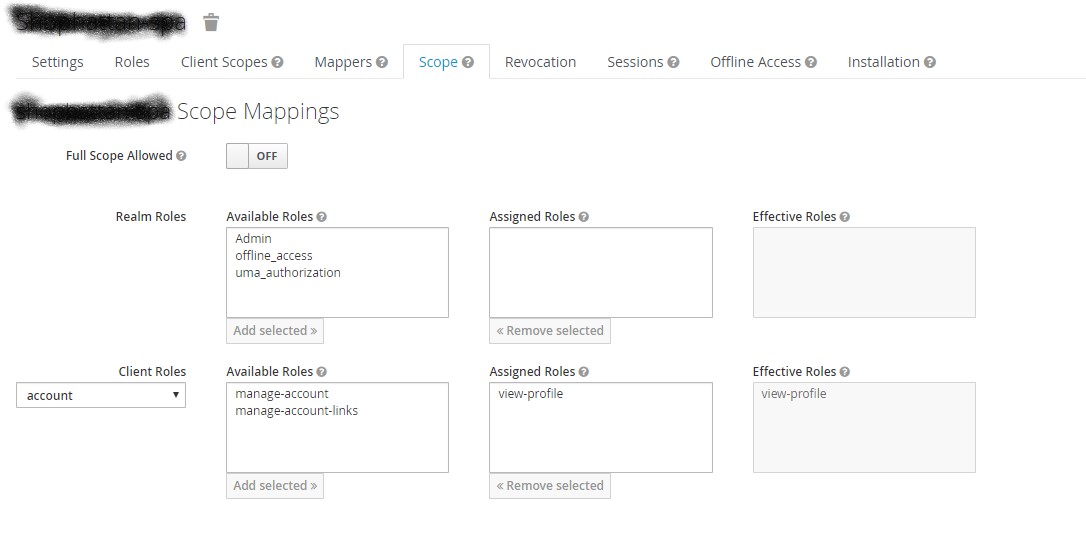
had the same problem and realized that I need to add an account view-profile role to the client scope also (not just to the user).
 KresoJ
on 9 Feb 2020
KresoJ
on 9 Feb 2020
I'm getting the same error after upgrading to Angular 10, Keycloak 11, Keycloak-Angular 8, and replacing old NgDoBootstrap initialization with the new function (Great idea. Good luck finding the culprit now...)
My config seems correct to me
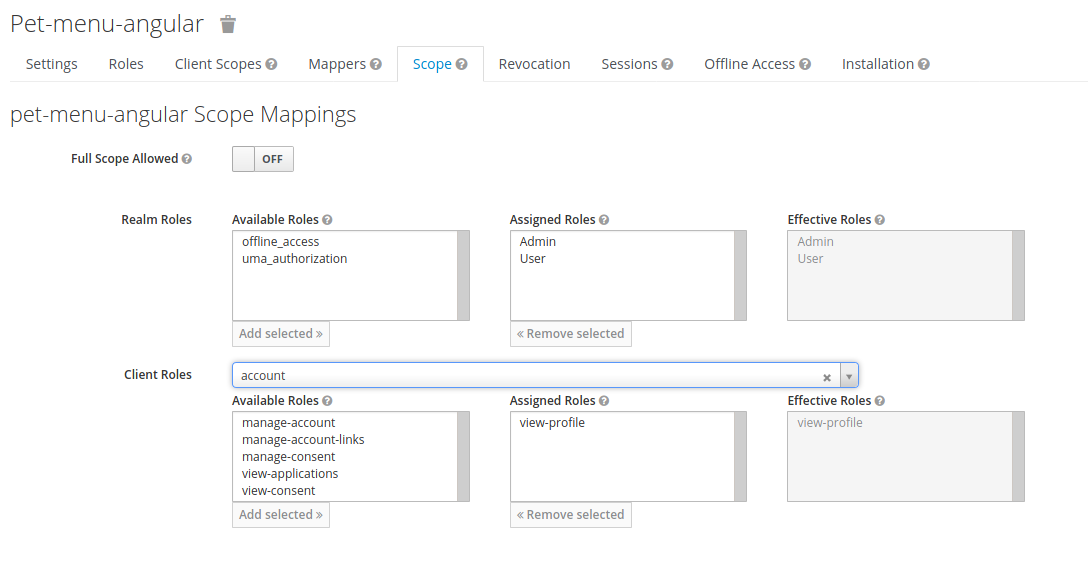
but I got to admit that I'm confused a lot by the "Scope" meaning inside Keycloak admin panel. (Yes, I try to read many explanations, from official doc and online, but those are not too revealing)
EDIT:
Just tested with the old ngDoBootstrap way for initialization. Same error.
ERROR Error: Uncaught (in promise): Error: User not logged in or user profile was not loaded.
 4javier
on 2 Sep 2020
4javier
on 2 Sep 2020
I'm having the same issue as @4javier.
After upgrading to Angular 10 and Keycloak-Angular 8, I get:
ERROR Error: Uncaught (in promise): Error: User not logged in or user profile was not loaded.
Edit: Happens on getUsername()
 moonbeamglitterblossom
on 7 Sep 2020
moonbeamglitterblossom
on 7 Sep 2020
@moonbeamglitterblossom
My problem was due to the hackish way I had set up a component. No bug.
Check your keycloak config as explained by Mauricio here, but remember that role is called view_profile and not view_account
@Danny-P, sorry for the delay. Could you check if the clientId has the view_account role from the accounts client? This problem usually happens when you don't have the permissions to access it.
Then verify you're not calling getUsername in your code without being logged in.
4javier
on 7 Sep 2020
@moonbeamglitterblossom can you verify that the solution mentioned by @4javier works for you? If the problem still persists please open up a new issue.
 jonkoops
on 8 Sep 2020
jonkoops
on 8 Sep 2020
@jonkoops not entirely sure, but it might be a version issue, as we're running on a lower keycloak server version. Will stick to keycloak-angular 7 for now. Thank you for your help tho!
moonbeamglitterblossom
on 10 Sep 2020
I'm having the same issue as @4javier.
After upgrading to Angular 10 and Keycloak-Angular 8, I get:
ERROR Error: Uncaught (in promise): Error: User not logged in or user profile was not loaded.Edit: Happens on
getUsername()
As per keycloak-angular changelog(https://openbase.io/js/keycloak-angular/versions):
Breaking changes 💥
user profile information is no longer loaded by default (#269)
Therefore getUsername() will not work unless user profile is loaded.
To fix this if using ngDoBootstrap way is to add "loadUserProfileAtStartUp: true" to keycloakService.init
``
ngDoBootstrap(app) {
keycloakService
    .init({
      config: {
        url: env.auth,
        realm: '***',
        clientId: '***'
      },
      initOptions: {
        onLoad: 'login-required',
        checkLoginIframe: false
      },
      enableBearerInterceptor: true,
      bearerExcludedUrls: ['/login'],
      loadUserProfileAtStartUp: true
    })
    .then(() => {
      app.bootstrap(AppComponent);
    })
    .catch(error => console.error('[ngDoBootstrap] init Keycloak failed', error));
  }
 MikusMartinsons
on 1 Oct 2020
MikusMartinsons
on 1 Oct 2020
Related issues
 Bjeaurn
·
4Comments
Bjeaurn
·
4Comments
 unib1t
·
4Comments
unib1t
·
4Comments
 czeckd
·
4Comments
czeckd
·
4Comments
 honzajde
·
3Comments
4javier
·
3Comments
honzajde
·
3Comments
4javier
·
3Comments
Most helpful comment
As per keycloak-angular changelog(https://openbase.io/js/keycloak-angular/versions):
Breaking changes 💥
user profile information is no longer loaded by default (#269)
Therefore getUsername() will not work unless user profile is loaded.
To fix this if using ngDoBootstrap way is to add "loadUserProfileAtStartUp: true" to keycloakService.init
``
    .init({
      config: {
        url: env.auth,
        realm: '***',
        clientId: '***'
      },
      initOptions: {
        onLoad: 'login-required',
        checkLoginIframe: false
      },
      enableBearerInterceptor: true,
      bearerExcludedUrls: ['/login'],
      loadUserProfileAtStartUp: true
    })
    .then(() => {
      app.bootstrap(AppComponent);
    })
    .catch(error => console.error('[ngDoBootstrap] init Keycloak failed', error));
  }