Kestrelhttpserver: BadHttpRequestException at Microsoft.AspNetCore.Server.Kestrel.Core.Internal.Http.HttpParser`1.RejectRequestLine
We're experiencing some strange behavior a couple of times per day.
The behavior is that we are receiving exceptions about bad requests somewhere in the core when it tries to parse the Http Method.
We see it from both an integration and from random web UI requests.
Good to know is that these errors are always occurring during higher load (from the integration) and in bursts.
We have not been able to reproduce it, the burst of errors occur 1-2 a day and almost every day.
The integration is using HttpClient.PostAsync, we have tried to resend one of those requests (the integration is logging what it sends) that have failed, but we couldn't reproduce it that way.
Stack
{"assembly":"Microsoft.AspNetCore.Server.Kestrel.Core, Version=2.0.0.0, Culture=neutral, PublicKeyToken=adb9793829ddae60","method":"Microsoft.AspNetCore.Server.Kestrel.Core.Internal.Http.HttpParser`1.RejectRequestLine","level":0,"line":0}

{"assembly":"Microsoft.AspNetCore.Server.Kestrel.Core, Version=2.0.0.0, Culture=neutral, PublicKeyToken=adb9793829ddae60","method":"Microsoft.AspNetCore.Server.Kestrel.Core.Internal.Http.HttpParser`1.GetUnknownMethod","level":1,"line":0}

{"assembly":"Microsoft.AspNetCore.Server.Kestrel.Core, Version=2.0.0.0, Culture=neutral, PublicKeyToken=adb9793829ddae60","method":"Microsoft.AspNetCore.Server.Kestrel.Core.Internal.Http.HttpParser`1.ParseRequestLine","level":2,"line":0}

{"assembly":"Microsoft.AspNetCore.Server.Kestrel.Core, Version=2.0.0.0, Culture=neutral, PublicKeyToken=adb9793829ddae60","method":"Microsoft.AspNetCore.Server.Kestrel.Core.Internal.Http.HttpParser`1.ParseRequestLine","level":3,"line":0}

{"assembly":"Microsoft.AspNetCore.Server.Kestrel.Core, Version=2.0.0.0, Culture=neutral, PublicKeyToken=adb9793829ddae60","method":"Microsoft.AspNetCore.Server.Kestrel.Core.Internal.Http.Frame.TakeStartLine","level":4,"line":0}

{"assembly":"Microsoft.AspNetCore.Server.Kestrel.Core, Version=2.0.0.0, Culture=neutral, PublicKeyToken=adb9793829ddae60","method":"Microsoft.AspNetCore.Server.Kestrel.Core.Internal.Http.Frame.ParseRequest","level":5,"line":0}

{"assembly":"Microsoft.AspNetCore.Server.Kestrel.Core, Version=2.0.0.0, Culture=neutral, PublicKeyToken=adb9793829ddae60","method":"Microsoft.AspNetCore.Server.Kestrel.Core.Internal.Http.Frame`1+<ProcessRequestsAsync>d__2.MoveNext","level":6,"line":0}
Some examples of exception messages:
Connection id "0HL95LTL4S3HH" bad request data: "Invalid request line: '0OTHER%20TDF%20RD.&Customer%20Address%20State=KY&Customer%20Address%20Zip%20Code=44531&Customer%20Gender=M&Customer%20Name=AIL...'"

Connection id "0HL95LTL4S3HL" bad request data: "Invalid request line: 'ustomer%20Address%20Line%201=3744%20OTHER%20ST&Customer%20Address%20State=TX&Customer%20Address%20Zip%20Code=74433&Customer...'"

-- This is typical from the UI this is probably apart of an cookie we expect
Connection id "0HL95LTL4S3HQ" bad request data: "Invalid request line: 'zk61GfzMxephxR0aOpKFPEmm0WmhhqWqYuJdxQ-O2Odb5PMgh2r4ClOE8X5Zke511b8r4yvAp_E2NFcNTZ6c9oZzDfBh253Z_Y-fiBCEofO_P3wZUz9X6Al-Ey-m8jCI...'"
 npehrsson
All 49 comments
Are the requests originating from .NET Core's HttpClient on Linux? I think you might be running into the issue described in #2095.
 halter73
on 8 Nov 2017
halter73
on 8 Nov 2017
Well, the integration job runs in Azure with .NET version v4.6.1.
The requests failing is originating from both the integration job and a web browser (only during the integration job is running though).
npehrsson
on 9 Nov 2017
Hmm. If the requests are coming from Windows, then this is almost certainly unrelated to #2095. I thought it might be related because in both cases it seems that Kestrel is interpreting the middle of a request as the start of the request.
The previous request having an incorrect content-length could explain this. If you cannot come up with a repro, maybe capturing a network trace during the failure will be enough to figure out the root cause.
halter73
on 9 Nov 2017
The bursts is only occurring during approximately 20 seconds and it's hosted on azure so it could be a bit hard to trace the traffic from outside of the application.
I've been thinking to record the message into a stream, I haven't figured out how to do this on this level, and are at the same time concerned if the error will occur if we do.
It sounds like a but that requests can affect each other in this way?
It would be easier if only one source of the requests were failing but it's not two sources.
npehrsson
on 10 Nov 2017
Are you running as an Azure App Service?
It is possible for requests to affect each other in this way if they're made over same TCP connection. It's pretty uncommon for it to happen though, since it requires the connection being reused after a corrupted request which generally doesn't happen absent a buggy http client.
halter73
on 10 Nov 2017
The web application is hosted on Azure Web Apps.
I don't think the requests are on the same TCP connection because some of them come from an integration job hosted in Azure and some requests come from a user with a web browser.
Not sure if it ensures new TCP connections but the exception messages tell about different "Connection id" above.
npehrsson
on 10 Nov 2017
It is weird that this is happening when hosted on Azure Web Apps. All request should be proxied through IIS/ANCM in that case, so any bad requests should get rejected before reaching Kestrel. Maybe @Tratcher has some ideas.
You correct about each "Connection id" corresponding to a TCP connection. It makes sense that each error has a unique connection id, because Kestrel kills the underlying connection after receiving a bad request.
I think we're going need to find a way to capture a network trace or reproduce the issue to find out what's really going on.
halter73
on 10 Nov 2017
In process stream corruption is my only guess at this stage. Not much we can do without a repro.
 Tratcher
on 10 Nov 2017
Tratcher
on 10 Nov 2017
@Tratcher that's my initial thought too.
I don't think our application will suffer if it would keep the request in memory until it has fully been processed. Is there a way to keep everything in memory and if this error occurs dump the current stream to a storage. I know about the EnableRewind, but that is only for Body not at this level.
npehrsson
on 13 Nov 2017
@npehrsson You could try out UseConnectionLogging. The will log every single byte of every request and response. Unfortunately, this would probably be way too noisy for most production scenarios.
There is no capability to buffer full raw requests and dump it if something has gone wrong. The IConnectionAdapter interface isn't tightly integrated with the HTTP-parsing side of things, so it is difficult to even determine where requests and responses start and end short of reparsing HTTP in the adapter.
halter73
on 13 Nov 2017
@npehrsson are these all GET requests?
 davidfowl
on 14 Nov 2017
davidfowl
on 14 Nov 2017
No both.
The integration is a POST without Body (sending null as Body to the HttpClient, so that may be a clue?).
The client calls are GET's
npehrsson
on 14 Nov 2017
I have a hunch that it might be to do with how we're processing the message body but we'd need more information here. If you can reproduce the issue can you tell us if you're sending a post body with a content length? (even if it's 0). Any idea of the request pattern would help us diagnose this.
davidfowl
on 15 Nov 2017
Well, this is happening sporadically in bursts, maybe 10-20 requests will fail, requests that normally succeed. Replaying a failed request does also succeed.
The common denominator is the integration job running which is posting with null as a body but with quite many query parameters.
I understand the need for data to be able to reproduce it, but I don't know how to collect it.
npehrsson
on 15 Nov 2017
The common denominator is the integration job running which is posting with null as a body but with quite many query parameters.
Ok lets start there. Can you change this to a GET and see if it still fails? I don't know if that's possible but I'd like to test the theory.
davidfowl
on 15 Nov 2017
We can definitely test it out.
npehrsson
on 15 Nov 2017
Hello guys,
We're also getting this error.
Microsoft.AspNetCore.Server.Kestrel[17]
      Connection id "0HL9EQFJA6T89" bad request data: "Invalid request line: 'yMbvhRBHIeOYFlBJ_MhDOmLmvbPLM_Pb4IVRglMe154S-46vfMtr9OiHf5Z-dCBhfOYtTndQlL9pKqG6HvqgnbYQUeMsJ_d1thSMwPMpXEvQAoKD3QIItfGj7a16WGKj...'"
Microsoft.AspNetCore.Server.Kestrel.Core.BadHttpRequestException: Invalid request line: 'yMbvhRBHIeOYFlBJ_MhDOmLmvbPLM_Pb4IVRglMe154S-46vfMtr9OiHf5Z-dCBhfOYtTndQlL9pKqG6HvqgnbYQUeMsJ_d1thSMwPMpXEvQAoKD3QIItfGj7a16WGKj...'
   at Microsoft.AspNetCore.Server.Kestrel.Core.Internal.Http.HttpParser`1.RejectRequestLine(Byte* requestLine, Int32 length)
   at Microsoft.AspNetCore.Server.Kestrel.Core.Internal.Http.HttpParser`1.GetUnknownMethod(Byte* data, Int32 length, Int32& methodLength)
   at Microsoft.AspNetCore.Server.Kestrel.Core.Internal.Http.HttpParser`1.ParseRequestLine(TRequestHandler handler, Byte* data, Int32 length)
   at Microsoft.AspNetCore.Server.Kestrel.Core.Internal.Http.HttpParser`1.ParseRequestLine(TRequestHandler handler, ReadableBuffer buffer, ReadCursor& consumed, ReadCursor& examined)
   at Microsoft.AspNetCore.Server.Kestrel.Core.Internal.Http.Frame.TakeStartLine(ReadableBuffer buffer, ReadCursor& consumed, ReadCursor& examined)
   at Microsoft.AspNetCore.Server.Kestrel.Core.Internal.Http.Frame.ParseRequest(ReadableBuffer buffer, ReadCursor& consumed, ReadCursor& examined)
   at Microsoft.AspNetCore.Server.Kestrel.Core.Internal.Http.Frame`1.<ProcessRequestsAsync>d__2.MoveNext()
Initally, I caught them using app insights in a production server (low load windows hosted server in Azure with IIS), which led us to further investigate the problem. They are registered as HTTP 400 without any helpful information (exceptions, etc.).
It's possible to reproduce it locally, but it's not consistent. We traced the bad request line and it's always part of an ASP.NET Identity Claim Cookie (xxx.C1). Once the server starts responding with this error, it kinda sticks and affects randomly all kinds of requests.
Clearing the cookies for the related address solves the problem - temporaly.
Our environment
Windows (clients & server).
TFM => netcoreapp2.0
AspNetCore v2.0 stack (also reproduced with v2.0.1).
 tmzblue
on 20 Nov 2017
tmzblue
on 20 Nov 2017
Clearing the cookies fixes it? Interesting. Can you capture a fiddler trace of a failing request? Or a lower level trace like wireshark or network monitor?
Tratcher
on 20 Nov 2017
@Tratcher, I ran some additional tests today and clearing the cookies didn't fix the problem.
Oddly enough, I'm getting this error consistently with Google Chrome when using the address http://localhost:5000. When I change it to http://localhost.:5000 (notice the . at the end of the address), it won't give any errors.

The request fails. When retrying, it succeeds.
Fiddler Trace -> POST:
817_Full_POST.txt
817_BadHttpRequestException.txt
Fiddler Trace -> GET:
716_Full_GET.txt
716_BadHttpRequestException.txt
I tested with other browsers (Edge v40.15063.674.0 and FireFox 57.0 64-bit), and everything seems ok.
tmzblue
on 20 Nov 2017
@tmzblue What was the request pattern that reproduces the problem? POST followed by the GET? I think you can export fiddler sessions, that might be useful here.
davidfowl
on 20 Nov 2017
Note that in 817_Full_POST.txt the Content-Length is wrong. It says 83 but is only sending 36. That's exactly the kind of problem that would cause this error on the next request. Check your request code that's setting the lengths.
Tratcher
on 20 Nov 2017
@Tratcher I couldn't figure out why I couldn't reproduce the issue with fiddler then I saw this:
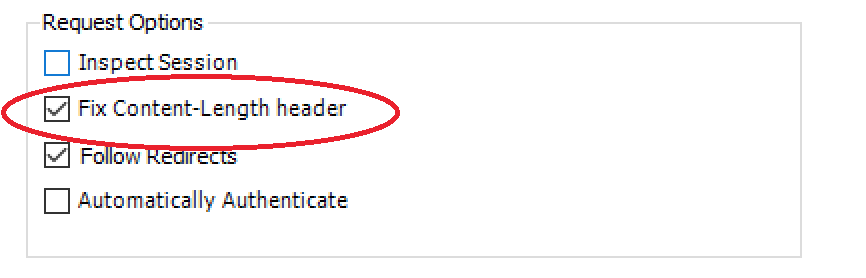
davidfowl
on 20 Nov 2017
@Tratcher I'm sorry I couldn't respond earlier.
I intentionally removed sensitive data from the payload, that's why the content-length is different. My bad.
@davidfowl for what I have seen: get => get, get => post
I'll try to reproduce it with bogus data and export the session 'as is'.
tmzblue
on 20 Nov 2017
Can anyone who's able to reproduce the issue (pinging @tmzblue and @npehrsson) try out this BadRequestDiagnosticAdapter? You should be able to copy BadRequestDiagnosticAdapter.cs into your web project and then add it as demonstrated in the Program.cs of the gist.
I've included some sample output from the adapter below. The adapter logs are at the end:
$ dotnet run
Hosting environment: Production
Content root path: ~/source/halter73/BadRequestDiagnosticAdapter
Now listening on: http://[::]:5000
Application started. Press Ctrl+C to shut down.
info: Microsoft.AspNetCore.Server.Kestrel[17]
      Connection id "0HL9GHCS6PH29" bad request data: "Invalid request line: 'GET /te\x0A'"
Microsoft.AspNetCore.Server.Kestrel.Core.BadHttpRequestException: Invalid request line: 'GET /te\x0A'
   at Microsoft.AspNetCore.Server.Kestrel.Core.Internal.Http.HttpParser`1.RejectRequestLine(Byte* requestLine, Int32 length)
   at Microsoft.AspNetCore.Server.Kestrel.Core.Internal.Http.HttpParser`1.ParseRequestLine(TRequestHandler handler, Byte* data, Int32 length)
   at Microsoft.AspNetCore.Server.Kestrel.Core.Internal.Http.HttpParser`1.ParseRequestLine(TRequestHandler handler, ReadableBuffer buffer, ReadCursor& consumed, ReadCursor& examined)
   at Microsoft.AspNetCore.Server.Kestrel.Core.Internal.Http.Frame.TakeStartLine(ReadableBuffer buffer, ReadCursor& consumed, ReadCursor& examined)
   at Microsoft.AspNetCore.Server.Kestrel.Core.Internal.Http.Frame.ParseRequest(ReadableBuffer buffer, ReadCursor& consumed, ReadCursor& examined)
   at Microsoft.AspNetCore.Server.Kestrel.Core.Internal.Http.Frame`1.<ProcessRequestsAsync>d__2.MoveNext()
fail: BadRequestDiagnosticAdapter.BadRequestDiagnosticAdapter[0]
      Observed 400 response. The last 21 bytes of request data were:
      [HEX] 47 45 54 20 2F 74 65 0A 73 74 20 48 54 54 50 2F 31 2E 31 0D 0A
      [RAW] GET /te
      st HTTP/1.1
I made the bad request using python's telnet library:
$ python
Python 2.7.10 (default, Jul 15 2017, 17:16:57)
[GCC 4.2.1 Compatible Apple LLVM 9.0.0 (clang-900.0.31)] on darwin
Type "help", "copyright", "credits" or "license" for more information.
>>> import telnetlib
>>> tn = telnetlib.Telnet("localhost", 5000)
>>> tn.write("GET /te\nst HTTP/1.1\r\n")
Basically all this connection adapter is doing is looking for "HTTP/1.1 400 Bad Request\r\n" in the output stream and then when it sees it it logs up to the last N bytes (N is defined to be 16384 in the gist's Program.cs) from the corresponding input stream.
Use this at your own risk. The adapter can be tricked by any "HTTP/1.1 400 Bad Request\r\n" string in a response header or response body. To harden against this would probably require parsing the response. There's also the possibility that the adapter contains memory leaks, off-by-one errors, etc...
I did try to make the adapter as fast as possible however, so it shouldn't add to much strain on the server at least (ignoring possible bugs ofc).
halter73
on 21 Nov 2017
@halter73 I've just tested your adapter. Something weird happened.
a) Without the adapter:
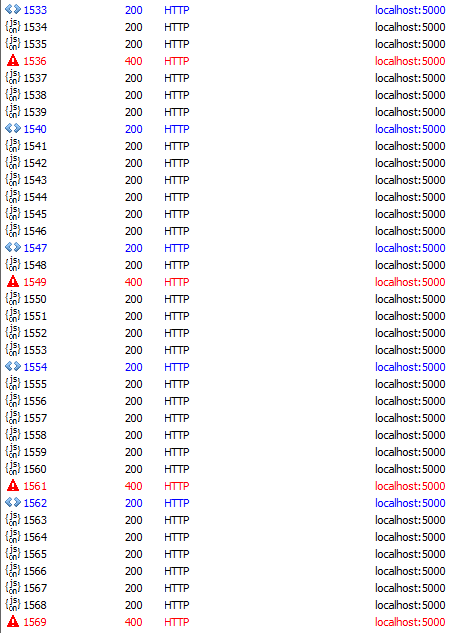
b) With the adapter (bad responses are gone - for the same test scenario)
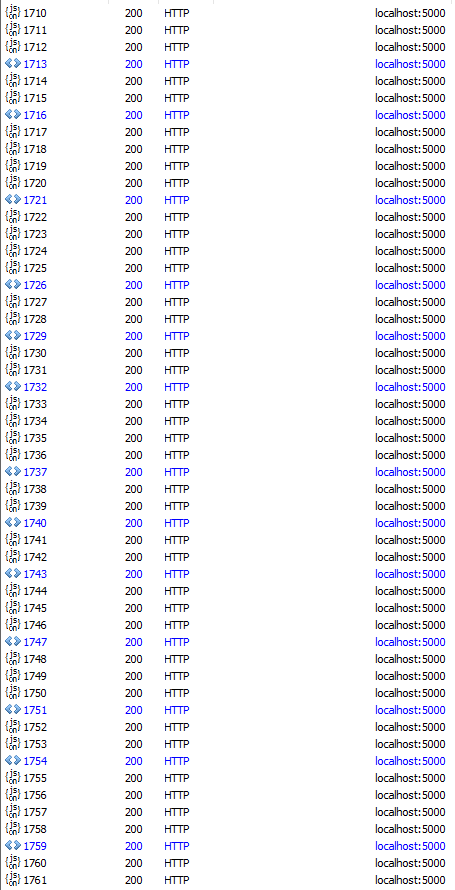
Removing the diagnostic adapter makes the server behave like a) again
tmzblue
on 21 Nov 2017
@tmzblue Seems like you have a consistent repro, if you could send the fiddler trace that would be great.
davidfowl
on 22 Nov 2017
@davidfowl Here you go!
As you will see, it seems that the bad request always happen after a call to:
http://localhost:5000/api/testBaconCow/listByPorkChopCow?id_Bacon_Chop=6&skip=0&take=10
hope it helps.
tmzblue
on 22 Nov 2017
Glad to see that this is moving forward.
npehrsson
on 22 Nov 2017
@tmzblue We cant seem to reproduce the issue with just the fiddler trace. Can you try reproducing it yourself on a new project? We'd like to see if we have to mimic your application patterns to reproduce the issue.
davidfowl
on 23 Nov 2017
Never mind, I was able to reproduce the issue. I'll see if I can create a reliable repro with these bits. Thanks alot!
davidfowl
on 23 Nov 2017
Ok I dug into it and figured it out. The problem occurs when the request is a multiple of the block size which in this case is 4K (well 4032 bytes to be pedantic) and with an empty block allocated with nothing written into it as yet. Here's what it looks like:
[ 4K full with request data ] -> [ 4K with request data ] -> [ 4K empty ready to be filled ]
The header parsing completes and puts the cursor at the end of the empty 4K buffer (because of a computation bug) and it throws all of the lengths off causing it to explode on the next request.
davidfowl
on 23 Nov 2017
@davidfowl any time frame for when the fix will be released? We're getting these issues a couple of times a week. If not anytime soon, do you know if there's a workaround we can implement?
 hfjallemark
on 28 Nov 2017
hfjallemark
on 28 Nov 2017
There's no workaround. We're looking to patch this in January ish timeframe. I just merged a fix into the 2.0.x patch branch.
davidfowl
on 29 Nov 2017
I might too have the same issue here, the exception stack info is as follows:
info: Microsoft.AspNetCore.Server.Kestrel[17]
Connection id "0HLALH7R9IQUI" bad request data: "Invalid request line: '9sDE1OXo92cfLXu_IhMX5W8sE14jCZV8ZQpBiFwHqyj7fv0q9S5oDY_fmgqOQ6sJYs4z78h9nsgPxzY94dwLGA\x0D\x0A'"
Microsoft.AspNetCore.Server.Kestrel.Core.BadHttpRequestException: Invalid request line: '9sDE1OXo92cfLXu_IhMX5W8sE14jCZV8ZQpBiFwHqyj7fv0q9S5oDY_fmgqOQ6sJYs4z78h9nsgPxzY94dwLGA\x0D\x0A'
at Microsoft.AspNetCore.Server.Kestrel.Core.Internal.Http.HttpParser1.RejectRequestLine(Byte* requestLine, Int32 length) at Microsoft.AspNetCore.Server.Kestrel.Core.Internal.Http.HttpParser1.GetUnknownMethod(Byte* data, Int32 length, Int32& methodLength)
at Microsoft.AspNetCore.Server.Kestrel.Core.Internal.Http.HttpParser1.ParseRequestLine(TRequestHandler handler, Byte*data, Int32 length) at Microsoft.AspNetCore.Server.Kestrel.Core.Internal.Http.HttpParser1.ParseRequestLine(TRequestHandler handler, ReadableBuffer buffer, ReadCursor& consumed, ReadCursor& examined)
at Microsoft.AspNetCore.Server.Kestrel.Core.Internal.Http.Frame.TakeStartLine(ReadableBuffer buffer, ReadCursor& consumed, ReadCursor& examined)
at Microsoft.AspNetCore.Server.Kestrel.Core.Internal.Http.Frame.ParseRequest(ReadableBuffer buffer, ReadCursor& consumed, ReadCursor& examined)
at Microsoft.AspNetCore.Server.Kestrel.Core.Internal.Http.Frame`1.d__2.MoveNext()
The request originated from Chrome (latest version) and I'm running a MacOS 10.13.2, the dotnet version is 2.0.3. Chrome got 400 status code from this request.
If it's the same issue I will wait for the bug fix, otherwise I can provide more info for the team to investigate more, let me know. Thanks.
 LiangZugeng
on 7 Jan 2018
LiangZugeng
on 7 Jan 2018
@LiangZugeng it looks exactly like the same issue
davidfowl
on 10 Jan 2018
I had kind of the same issue, and it was working partially with localhost.:4200
When i tried the solution mentioned https://github.com/aspnet/KestrelHttpServer/issues/949 , by removing all browser cookies. The problem was fixed.
 vky84
on 10 Jan 2018
vky84
on 10 Jan 2018
@davidfowl This issue happens to me every day with more frequency than before, no matter I'm running Windows 10 or MacOS 10.13.2, with Chrome it happens about 2 out of 10 times. Sometimes clearing all cookies fixes it, sometime refreshing the page fixes it, I couldn't reproduce it consistently.
I noticed that you merged the fix into 2.1.0-preview2, and I just checked the .NET Core download page, the latest stable release is .NET Core 2.0.5 and SDK 2.1.4, I suppose that 2.1.0-preview2 refers to the dotnet runtime version but not SDK version, so instead of downloading and compiling the latest source code of .NET Core runtime all by myself, how can I get a installer (even it's not stable) with this bug fix? Thanks.
LiangZugeng
on 18 Jan 2018
@LiangZugeng You can try our public nightly feed for the upcoming ASP.NET patch that includes this fix: https://dotnet.myget.org/gallery/aspnet-2018-feb-patch-public
These are not yet final or supported, so use at your own risk.
halter73
on 19 Jan 2018
@halter73 I tried the nightly build and ran my code for 10 minutes, so far so good, the exception was gone, seems it's a right fix for me.
What's the time frame for 2.0.6 to be released? Feb 2018? Will that be supported in production environment?
LiangZugeng
on 19 Jan 2018
We're targeting 2.0.6 for February. It will be fully supported once it's on NuGet.org.
halter73
on 19 Jan 2018
@halter73 Any news on when 2.0.6 will be stable?
 Beffyman
on 6 Mar 2018
Beffyman
on 6 Mar 2018
@muratg?
halter73
on 6 Mar 2018
@Beffyman Kestrel patch will be out this month per the current plan.
 muratg
on 7 Mar 2018
muratg
on 7 Mar 2018
Had a very similar problem as @tmzblue reported on 19 Nov 2017 only running in AWS with dotnet core v2.1.x Tried everything to find root cause and our dev team quickly divided into: Team: "These are Hack attempts" and Team: "dotnet core is jacked ...(again)"
With many thanks to TCPDump we eventually discovered that our AWS ELB (Load balancer) was sending status request to the service port to determine if the service was healthy. Once this was reconfigured error messages stopped. (work relationships are still recovering).
 sjbeskur
on 24 Jul 2018
sjbeskur
on 24 Jul 2018
We are still seeing this happen in Microsoft.AspNetCore.All v2.1.0
 tomkerkhove
on 30 Jul 2018
tomkerkhove
on 30 Jul 2018
It was solved for us directly after the fix was released.
npehrsson
on 30 Jul 2018
Entered this in wrong issue, lol. My bad!
tomkerkhove
on 30 Jul 2018
I've just stumbled on this issue when trying to migrate some existing server code across.
The issue is that the client application doesn't send a correct http response (linux) however it works in apache.
So it fails at "Microsoft.AspNetCore.Server.Kestrel.Core.Internal.Http.HttpParser`1", is it possible to rewrite your own parser, assuming via the ConnectionListener?
 RonniePitts
on 12 Aug 2018
RonniePitts
on 12 Aug 2018
Comments on closed issues are not tracked, please open a new issue with the details for your scenario.
Tratcher
on 12 Aug 2018
Related issues
 felschr
·
6Comments
felschr
·
6Comments
 neyromant
·
4Comments
neyromant
·
4Comments
 ciriarte
·
7Comments
ciriarte
·
7Comments
 M-Curtis
·
3Comments
halter73
·
5Comments
M-Curtis
·
3Comments
halter73
·
5Comments
Most helpful comment
Ok I dug into it and figured it out. The problem occurs when the request is a multiple of the block size which in this case is 4K (well 4032 bytes to be pedantic) and with an empty block allocated with nothing written into it as yet. Here's what it looks like:
[ 4K full with request data ] -> [ 4K with request data ] -> [ 4K empty ready to be filled ]
The header parsing completes and puts the cursor at the end of the empty 4K buffer (because of a computation bug) and it throws all of the lengths off causing it to explode on the next request.