Kestrelhttpserver: Authentication failed because the remote party has closed the transport stream
When I configure HTTPS and browse to my app I see this error logged when I close the browser:
      Failed to authenticate HTTPS connection.
System.IO.IOException: Authentication failed because the remote party has closed the transport stream.
   at System.Net.Security.SslState.StartReadFrame(Byte[] buffer, Int32 readBytes, AsyncProtocolRequest asyncRequest)
   at System.Net.Security.SslState.PartialFrameCallback(AsyncProtocolRequest asyncRequest)
--- End of stack trace from previous location where exception was thrown ---
   at System.Runtime.ExceptionServices.ExceptionDispatchInfo.Throw()
   at System.Net.Security.SslState.InternalEndProcessAuthentication(LazyAsyncResult lazyResult)
   at System.Net.Security.SslState.EndProcessAuthentication(IAsyncResult result)
   at System.Net.Security.SslStream.EndAuthenticateAsServer(IAsyncResult asyncResult)
   at System.Threading.Tasks.TaskFactory`1.FromAsyncCoreLogic(IAsyncResult iar, Func`2 endFunction, Action`1 endAction, Task`1 promise, Boolean requiresSynchronization)
--- End of stack trace from previous location where exception was thrown ---
   at System.Runtime.ExceptionServices.ExceptionDispatchInfo.Throw()
   at System.Runtime.CompilerServices.TaskAwaiter.HandleNonSuccessAndDebuggerNotification(Task task)
   at Microsoft.AspNetCore.Server.Kestrel.Https.HttpsConnectionAdapter.<OnConnectionAsync>d__7.MoveNext()
~\Desktop\NewApp> dotnet --info
.NET Command Line Tools (2.0.0-preview1-005977)

Product Information:
 Version:            2.0.0-preview1-005977
 Commit SHA-1 hash:  414cab8a0b

Runtime Environment:
 OS Name:     Windows
 OS Version:  10.0.15063
 OS Platform: Windows
 RID:         win10-x64
 Base Path:   C:\Program Files\dotnet\sdk\2.0.0-preview1-005977\

Microsoft .NET Core Shared Framework Host

  Version  : 2.0.0-preview1-002111-00
  Build    : 1ff021936263d492539399688f46fd3827169983
 danroth27
All 10 comments
This is currently logged as information. The exception makes it scary, but it's important to log for real handshake failures.
Maybe there is something we can do to identify connection made to HTTPS endpoints that are closed by the client without sending any data. In that case we could avoid logging the exception altogether.
 halter73
on 24 May 2017
halter73
on 24 May 2017
We decided to close this as the exception message is not too bad. If we get more feedback from customers, we'll revisit this.
In a future milestone, we should consider bringing back the "audit log" concept to Kestrel as a feature. /cc @shirhatti
 muratg
on 26 Jun 2017
muratg
on 26 Jun 2017
@muratg I too am getting this error. Why would closing the browser cause this? It happens every time with a simple ASP.net Core 2.0 hello world app configured to use Https. There shouldn't be any handshake process going, the page was already served... this smells of a deeper issue but I don't know much about these things so I wanted to post here and double check.
 bzuillsmith
on 3 Sep 2017
bzuillsmith
on 3 Sep 2017
One thing to check, using wireshark is your browser sending an end session alert over tls? If not it's technically an exception because a thirdparty could have terminated the connection.
 Drawaes
on 3 Sep 2017
Drawaes
on 3 Sep 2017
Upon further experimentation, I only get the error when automatically opening the url using the VS Code Launch browser task with Chrome as the default, and only the first time the page is opened and closed with each run of the server. Opening and closing the page more times does not produce the error unless I restart the server. Also, if I don't launch the browser when the app starts and just open Chrome manually, it does not produce the error when closing. So somehow it is related to VS Code starting Chrome directly.
bzuillsmith
on 3 Sep 2017
Re-opening, we're getting more feedback that this is confusing people, especially when it shows up in VS.
https://github.com/aspnet/External/issues/63
https://github.com/aspnet/KestrelHttpServer/issues/2007
One proposal we've discussed is to do a zero-byte read on new connections and only create the SslStream when data becomes available.
 Tratcher
on 5 Apr 2018
Tratcher
on 5 Apr 2018
Note the zero-byte read approach didn't work out. We downgraded the log to Debug instead.
Tratcher
on 12 Apr 2018
I think I know one "valid" reason this might happen. We are hosting Kestrel inside AWS using a network load balancer. One option for the load balancer to perform a health check is TCP based: Validate that a TCP connection can be opened. Either I need to put the healthcheck on a different port or somehow say that this scenario is OK.
 richardgavel
on 2 Sep 2018
richardgavel
on 2 Sep 2018
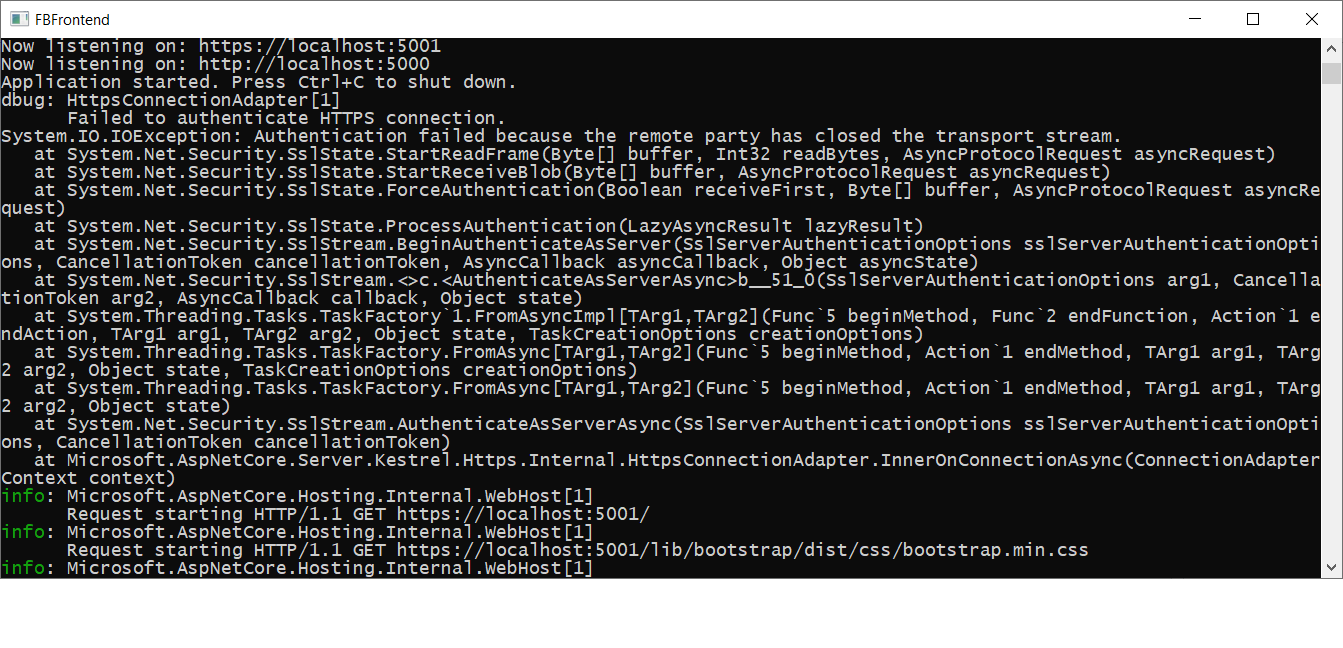
This problem started for me when I upgraded an old project to core 2.1, is there a fix in the works?
I'm executing Asp.net core 2.1 web app, launched in debug mode from VS 2017 Enterprise, not using IIS Express.
 jerroldneal
on 18 Nov 2018
jerroldneal
on 18 Nov 2018
@jerroldneal Does the app still work? If so, you can get rid of the "Failed to authenticate" logs by setting your minimum LogLevel to Information or above.
halter73
on 27 Nov 2018
Related issues
 codepunkt
·
7Comments
codepunkt
·
7Comments
 chtbof
·
3Comments
chtbof
·
3Comments
 benaadams
·
5Comments
benaadams
·
5Comments
 fabiobraganet
·
7Comments
fabiobraganet
·
7Comments
 neyromant
·
4Comments
neyromant
·
4Comments
Most helpful comment
Upon further experimentation, I only get the error when automatically opening the url using the VS Code Launch browser task with Chrome as the default, and only the first time the page is opened and closed with each run of the server. Opening and closing the page more times does not produce the error unless I restart the server. Also, if I don't launch the browser when the app starts and just open Chrome manually, it does not produce the error when closing. So somehow it is related to VS Code starting Chrome directly.