Hi, everyone,
I'm trying to load frames from a dataset to an 3D Convolutional Neural Network.
I wrote an algorithm to extract frames from videos of the UCF101 Action Recognition dataset, 40 frames per video, so basically i have a new dataset with subfolders representing classes, and inside each class folder i have 40 frames per videos. So, to detail, if i have 50 videos in a class folder, i have 50*40 frames.
The model that i'm using is coded bellow:
   `def cnn_3d(self):

    """
    The 3D CNN method
    """

    #Layers
    model = Sequential()

    model.add(Conv3D(32, (3,3,3), activation='relu', input_shape=(40, 80, 80, 3)))

    model.add(MaxPooling3D(pool_size=(1, 2, 2), strides=(1, 2, 2)))

    model.add(Conv3D(64, (3,3,3), activation='relu'))

    model.add(MaxPooling3D(pool_size=(1, 2, 2), strides=(1, 2, 2)))

    model.add(Conv3D(128, (3,3,3), activation='relu'))

    model.add(Conv3D(128, (3,3,3), activation='relu'))

    model.add(MaxPooling3D(pool_size=(1, 2, 2), strides=(1, 2, 2)))

    model.add(Conv3D(256, (2,2,2), activation='relu'))

    model.add(Conv3D(256, (2,2,2), activation='relu'))

    model.add(MaxPooling3D(pool_size=(1, 2, 2), strides=(1, 2, 2)))

    #FC Layers
    model.add(Flatten())

    model.add(Dense(1024))

    model.add(Dropout(0.5))

    model.add(Dense(1024))

    model.add(Dropout(0.5))

    model.add(Dense(self.n_classes, activation='softmax'))

    return model`
And i'm trying to load 40 frames at a time to train the network. Which is the best way to do this is Keras?
Just setting the input_shape as a tuple with (frames, w, h, color) ? The 3D input shape for 3D CNN takes 40 frames at a time?
I'm trying to use ImageDataGenerator to fit the model:
 `train_datagen = ImageDataGenerator(
    rescale=1./255,
    shear_range=0.0,
    zoom_range=0.0,
    horizontal_flip=False,
    featurewise_center=False,
    featurewise_std_normalization=False,
    rotation_range=0.0,
    width_shift_range=0.0,
    height_shift_range=0.0)

 test_datagen = ImageDataGenerator(rescale=1./255)

 train_generator = train_datagen.flow_from_directory(
    '/train/',
    target_size=(80, 80),
    batch_size=32,
    class_mode='categorical')

 validation_generator = test_datagen.flow_from_directory(
    '/test/',
    target_size=(80, 80),
    batch_size=32,
    class_mode='categorical')

 model.fit_generator(
    train_generator,
    steps_per_epoch=1000,
    epochs=30,
    validation_data=validation_generator,
    validation_steps=1000)`
And i'm getting this error:
`ValueError: Error when checking input: expected conv3d_62_input to have 5 dimensions, but got array with shape (32, 80, 80, 3)`
Someone can help me?
Thanks for the support and attention!
 gonsalesarthur
All 15 comments
Hi @gonsalesarthur, I do face the same problem exactly. I also got an error says expected to have 5 dimensions. Please did you find the solution?
 portlion
on 9 May 2018
portlion
on 9 May 2018
The 5 dimensions are (batch, frames, height, width, channels), I write a generator to produce such vector for 3D CNN training.
 nicholasding
on 31 Jul 2018
nicholasding
on 31 Jul 2018
I wrote using OpenCV to preprocess frames in order to create a big tensor of images (or batches of image, like sets of 15 frames, for example).
Use this snippet:
video_folder = '/path.../'
X_data = []
y_data = []
list_of_videos = os.listdir(vide_folder)

for i in list_of_videos:
    #Video Path
    vid = str(video_folder + i) #path to each video from list1 = os.listdir(path)
    #Reading the Video
    cap = cv2.VideoCapture(vid)
    #Reading Frames
    #fps = vcap.get(5)
    #To Store Frames
    frames = []
    for j in range(40): #here we get 40 frames, for example
        ret, frame = cap.read()
        if ret == True:
            print('Class 1 - Success!')
            frame = cv2.cvtColor(frame, cv2.COLOR_BGR2GRAY) #converting to gray
            frame = cv2.resize(frame,(30,30),interpolation=cv2.INTER_AREA)
            frames.append(frame)
        else:
            print('Error!')
    X_data.append(frames) #appending each tensor of 40 frames resized to 30x30
    y_data.append(1) #appending a class label to the set of 40 frames
X_data = np.array(X_data)
y_data = np.array(y_data) #ready to split! :)
You can use NumPy to reshape your final dataset to (batch, frames, height, width, channels), as nicholasding said.
So, if you have 10000 samples in total, using sets of 10 frames per input, with 30 x 30 dimensions and 1 channel of color, you may reshape you X_data like:
X_data = X_data.reshape(10000, 10, 30, 30, 1) #this way you get 5 dimensions. :)
Note that in the snippet shown above (using OpenCV), a target of one is appended in a separated array (y_data) that corresponds to each set of frames in the X_data. In this case, this target is 1. If you are working with more than one class (obviously), you may repeat this code appending other numbers to the y_data, at the end of the preprocessing, stack the X_datas to get you complete X, you can do this by using the vstack() numpy function, like this:
X_data_class_1 #numpy big tensor that contains sets of frames for the first class
X_data_class_2 #numpy big tensor that contains sets of frames for the second class
X_final = np.vstack((X_data_class_1, X_data_class_2))
This way you'll get your final X_data with 10000 samples, repeat this process to y_data and train your model! :)
gonsalesarthur
on 11 Aug 2018
@gonsalesarthur Hello! I used your method, but i have an issue when using numpy arrays with model.fit_generator(). Here is the error:
ValueError: Input to .fit() should have rank 4. Got array with shape: (453, 10, 100, 110, 3)
 FotisDionisopoulos
on 5 Mar 2019
FotisDionisopoulos
on 5 Mar 2019
@gonsalesarthur Hello! I used your method, but i have an issue when using numpy arrays with model.fit_generator(). Here is the error:
ValueError: Input to.fit()should have rank 4. Got array with shape: (453, 10, 100, 110, 3)
Post more of your code here, @FotisDionisopoulos maybe the problem might be with the input layer of your neural network. Keep in mind that when you're using Keras, you don't need to specify the number of samples you have in the input layer parameters.
gonsalesarthur
on 5 Mar 2019
@gonsalesarthur here it is: https://pastebin.com/sr7GHDGg
I have to mention that my dataset is already in frames so i removed some of your code.
FotisDionisopoulos
on 5 Mar 2019
@gonsalesarthur here it is: https://pastebin.com/sr7GHDGg
I have to mention that my dataset is already in frames so i removed some of your code.
You're passing to your input_shape parameter a tuple as your input parameters:
input_shape = (10, 110,110, 3)
net.add(Conv3D(32,kernel_size=(3, 3, 3),input_shape=(input_shape), padding= 'same'))
You need to pass the parameters inside this tuple from your input_shape variable, this way:
input_shape = (10, 110,110, 3)
net.add(Conv3D(32,kernel_size=(3, 3, 3),input_shape=(10, 110,110, 3), padding= 'same'))
or
input_shape = (10, 110,110, 3)
net.add(Conv3D(32,kernel_size=(3, 3, 3),input_shape=input_shape, padding= 'same'))
Here i wrote a 3D CNN to classify amazonian lizards from, obviously, a 3D perspective, you can use it to fit your problem.
gonsalesarthur
on 5 Mar 2019
@gonsalesarthur There is no issue with input_shape and the way that i use it.
I read your code and did some minor tweaks based on it and now it works! Thank you very much.
FotisDionisopoulos
on 5 Mar 2019
The 5 dimensions are (batch, frames, height, width, channels), I write a generator to produce such vector for 3D CNN training.
Hi,
Can you share the code where we can input the multiple adjacent frames to a 3D CNN?
Thanks!
 rahul322837
on 23 Apr 2019
rahul322837
on 23 Apr 2019
The 5 dimensions are (batch, frames, height, width, channels), I write a generator to produce such vector for 3D CNN training.
Hi,
Can you share the code where we can input the multiple adjacent frames to a 3D CNN?
Thanks!
Hi, @rahul322837
Actually i just shared the snippet of code above, using OpenCV. If it don't work for your problem, you may being facing another issue. Share some part of your code and problem so i can help you. :)
gonsalesarthur
on 23 Apr 2019
I'm trying to use this snippet. But it is giving me an error at the end when calling model.fit_generator() from the 'ImageDataGenerator'. As far as I have read, there is no provision inside it to deal with 5D tensors as in this case.
Please see: https://github.com/keras-team/keras/issues/2939 and https://gist.github.com/Emadeldeen-24/736c33ac2af0c00cc48810ad62e1f54a
I have 280 samples of data, with frame size of 3 and rest is the img_widht, img_height and num_channels => X_train.shape: (280, 3, 150, 150, 3)
Error: ValueError: ('Input data in NumpyArrayIterator should have rank 4. You passed an array with shape', (280, 3, 150, 150, 3))
 yashkarle
on 27 Apr 2019
yashkarle
on 27 Apr 2019
I wrote using OpenCV to preprocess frames in order to create a big tensor of images (or batches of image, like sets of 15 frames, for example).
Use this snippet:
video_folder = '/path.../'
X_data = []
y_data = []
list_of_videos = os.listdir(vide_folder)for i in list_of_videos:
#Video Path
vid = str(video_folder + i) #path to each video from list1 = os.listdir(path)
#Reading the Video
cap = cv2.VideoCapture(vid)
#Reading Frames
#fps = vcap.get(5)
#To Store Frames
frames = []
for j in range(40): #here we get 40 frames, for example
ret, frame = cap.read()
if ret == True:
print('Class 1 - Success!')
frame = cv2.cvtColor(frame, cv2.COLOR_BGR2GRAY) #converting to gray
frame = cv2.resize(frame,(30,30),interpolation=cv2.INTER_AREA)
frames.append(frame)
else:
print('Error!')
X_data.append(frames) #appending each tensor of 40 frames resized to 30x30
y_data.append(1) #appending a class label to the set of 40 frames
X_data = np.array(X_data)
y_data = np.array(y_data) #ready to split! :)You can use NumPy to reshape your final dataset to (batch, frames, height, width, channels), as nicholasding said.
So, if you have 10000 samples in total, using sets of 10 frames per input, with 30 x 30 dimensions and 1 channel of color, you may reshape you X_data like:
X_data = X_data.reshape(10000, 10, 30, 30, 1) #this way you get 5 dimensions. :)
Note that in the snippet shown above (using OpenCV), a target of one is appended in a separated array (y_data) that corresponds to each set of frames in the X_data. In this case, this target is 1. If you are working with more than one class (obviously), you may repeat this code appending other numbers to the y_data, at the end of the preprocessing, stack the X_datas to get you complete X, you can do this by using the vstack() numpy function, like this:
X_data_class_1 #numpy big tensor that contains sets of frames for the first class
X_data_class_2 #numpy big tensor that contains sets of frames for the second class
X_final = np.vstack((X_data_class_1, X_data_class_2))
This way you'll get your final X_data with 10000 samples, repeat this process to y_data and train your model! :)
thanks for your opinions.But I found that methods is not efficient, meanwhile, it can not dataargument the frames.Did you have better methos to solve thi problems? thank you.
 yongfali
on 24 Nov 2019
yongfali
on 24 Nov 2019
I have the same Problem and already used all the methods above but no luck:
I have an array of shape (5874, 1, 128, 128, 10) :
dataset = tf.data.Dataset.from_tensor_slices((arrays, np.array(dataset_raw[()]["label"])))
dataset = dataset.shuffle(10000)

model = tf.keras.Sequential([
    Conv3D(input_shape=(,128,128,10), filters = 8, kernel_size=(5,5,5), padding="same"
           , activation="relu", data_format="channels_last"),
    BatchNormalization(),
    Conv3D(filters = 8, kernel_size=(3,3,3), padding="same", activation="relu"),
    BatchNormalization(),
    MaxPool3D(pool_size=(1,2,2), strides=(1,1,1)),

    Conv3D(filters = 16, kernel_size=(5,5,5), padding="same", activation="relu"),
    BatchNormalization(),
    Conv3D(filters = 16, kernel_size=(3,3,3), padding="same", activation="relu"),
    BatchNormalization(),
    MaxPool3D(pool_size=(1,2,2), strides=(1,1,1)),

    Conv3D(filters = 32, kernel_size=(5,5,5), padding="same", activation="relu"),
    BatchNormalization(),
    Conv3D(filters = 32, kernel_size=(3,3,3), padding="same", activation="relu"),
    BatchNormalization(),
    MaxPool3D(pool_size=(1,2,2), strides=(1,1,1)),

    Flatten(),
    Dropout(0.2),
    Dense(512, activation="relu"),
    Dropout(0.2),
    Dense(5, activation="softmax")])
The Error
ValueError: Error when checking input: expected conv3d_21_input to have 5 dimensions, but got array with shape (1, 128, 128, 10)
 hamidkhb
on 21 Apr 2020
hamidkhb
on 21 Apr 2020
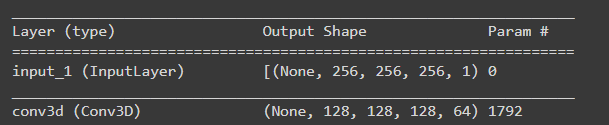
Hi I have the same issue. did anyone managed to solve this?
the error code:
ValueError: ('Input data in
NumpyArrayIteratorshould have rank 4. You passed an array with shape', (132, 256, 256, 256, 1))
its a little bit wierd because this is exactly what my model is expecting
 BismaMutiargo
on 18 Nov 2020
BismaMutiargo
on 18 Nov 2020
@BismaMutiargo This worked for me:
model_3d = tf.keras.Sequential([
        Input((1,10,30,30)),
        Conv3D(filters = 8, kernel_size=(3,3,3), padding="same", activation="relu", name="c1", data_format="channels_first"),
        BatchNormalization(),
        Conv3D(filters = 8, kernel_size=(3,3,3), padding="same", activation="relu", name="c2", data_format="channels_first"),
        BatchNormalization(),
        MaxPool3D(pool_size=(2,2,2), strides=(1,1,1), padding="valid", name="m2", data_format="channels_first"),

        Conv3D(filters = 16, kernel_size=(3,3,3), padding="same", activation="relu", name="c3",data_format="channels_first"),
        BatchNormalization(),
        Conv3D(filters = 16, kernel_size=(3,3,3), padding="same", activation="relu", name="c4", data_format="channels_first"),
        BatchNormalization(),
        MaxPool3D(pool_size=(2,2,2), strides=(2,2,2),  padding="valid", name="m4",data_format="channels_first"),

        Flatten(),
        Dense(256, activation="relu", use_bias=True ),
        Dropout(0.2),
        Dense(5,  use_bias=True)])

model_3d.summary()
Related issues
 fredtcaroli
·
3Comments
fredtcaroli
·
3Comments
 anjishnu
·
3Comments
anjishnu
·
3Comments
 snakeztc
·
3Comments
snakeztc
·
3Comments
 amityaffliction
·
3Comments
amityaffliction
·
3Comments
 LuCeHe
·
3Comments
LuCeHe
·
3Comments
Most helpful comment
I wrote using OpenCV to preprocess frames in order to create a big tensor of images (or batches of image, like sets of 15 frames, for example).
Use this snippet:
You can use NumPy to reshape your final dataset to (batch, frames, height, width, channels), as nicholasding said.
So, if you have 10000 samples in total, using sets of 10 frames per input, with 30 x 30 dimensions and 1 channel of color, you may reshape you X_data like:
X_data = X_data.reshape(10000, 10, 30, 30, 1) #this way you get 5 dimensions. :)Note that in the snippet shown above (using OpenCV), a target of one is appended in a separated array (y_data) that corresponds to each set of frames in the X_data. In this case, this target is 1. If you are working with more than one class (obviously), you may repeat this code appending other numbers to the y_data, at the end of the preprocessing, stack the X_datas to get you complete X, you can do this by using the vstack() numpy function, like this:
This way you'll get your final X_data with 10000 samples, repeat this process to y_data and train your model! :)