Keras-yolo3: What's annotation_path = 'train.txt'?
I get this error:
minh@minh-Aspire-A515-51G:~/keras-yolo3$ python train.py
/home/minh/.local/lib/python3.5/site-packages/h5py/__init__.py:36: FutureWarning: Conversion of the second argument of issubdtype from float to np.floating is deprecated. In future, it will be treated as np.float64 == np.dtype(float).type.
from ._conv import register_converters as _register_converters
Using TensorFlow backend.
Traceback (most recent call last):
File "train.py", line 153, in
_main()
File "train.py", line 31, in _main
input_shape, max_boxes=100, load_previous=True)
File "train.py", line 76, in get_training_data
image = Image.open(filename)
File "/home/minh/.local/lib/python3.5/site-packages/PIL/Image.py", line 2548, in open
fp = builtins.open(filename, "rb")
FileNotFoundError: [Errno 2] No such file or directory: '000012\n'
I don't know where is the file 'train.txt' and i got this file in VOCdevkit/VOC2007/ImageSets/Main?
Can you help me?
 maiminh1996
All 24 comments
Hi, Did U read the code "train.py"? In my view, the"train.txt" is the path of your train images, such as "/home/DL/YOLOV3/trainimages/0000.jpg", and one raw for one image. But, I do not understand “box1 box2 ... boxN” in "image_file_path box1 box2 ... boxN" in README. Do U know?
 zhengvh
on 18 May 2018
zhengvh
on 18 May 2018
As README says,
One row for one image;
Row format: image_file_path box1 box2 ... boxN;
Box format: x_min,y_min,x_max,y_max,class_id (no space).
For VOC dataset, try python voc_annotation.py
if you have 2 boxes in one image, the sample is one row
path/to/image.jpg 0,0,100,100,0 50,50,200,300,5
 qqwweee
on 21 May 2018
qqwweee
on 21 May 2018
I want to implement yolov3 avec tensorflow et use fine tuning on my dataset who has 2 classes. But i have a problem with the weights. Can you help m, pls? I don't know how to convert the weights in darknet to tensorflow and put it in my model.
maiminh1996
on 21 May 2018
@maiminh1996 Try convert.py, it convert a Darknet model to a Keras model. And remeber to use your own cfg file and weights file.
qqwweee
on 21 May 2018
@qqwweee thanks you but i'am trying to implement yolov3 with tensorflow.
In your code, what's input_shape? It's (416, 416) or (13,13) for scale1, (26,26) for scale2 and (52,52) for scale3. (I use the case the size of input image is (416,416)
maiminh1996
on 22 May 2018
@maiminh1996 It depends on input data, usally (416, 416).
And there is a way to convert a keras model to a tensorflow model. See keras_to_tensorflow.
qqwweee
on 22 May 2018
Can you tell me what you want in the output of 3 functions: letterbox_image, get_training_data and preprocess_true_boxes, please! I have some doubts about your code. Thank you
maiminh1996
on 2 Jun 2018
letterbox_image and get_training_data process the image to fixed size, like 416*416.
preprocess_true_boxes gets the expected output of model which is used to calculate loss.
qqwweee
on 3 Jun 2018
I did an example (with input_shape= 416,416) as:
From VOC_train.txt 000012.jpg 156, 97, 351, 270, 6 (image shape: w=500, h=333)
I got the output of get_training_data: 129, 150, 292, 294, 6 (what does it mean?)
And for the output of preprocess_true_boxes: 0.504, 0.533, 0.3918, 0.346 (what does it mean?)
Thank you.
maiminh1996
on 3 Jun 2018
The box 156, 97, 351, 270, 6 for 500*333, and 129, 150, 292, 294, 6 for 416*416. The box changes with image size, then can be used to train. The 5 numbers are x_min, y_min, x_max, y_max, class_id.
The output of preprocess_true_boxes are x, y, w, h with YOLO format, relative value w.r.t. whole image, (x, y) is the center of box.
qqwweee
on 3 Jun 2018
It's ok for me!
But in the case there is no object in an image, your code will make error, i think!
Ex: path_to_image1
path_to_image2 156, 236, 452, 123, 6
maiminh1996
on 3 Jun 2018
I supposed the image with no object shouldn't exist in annotation file, just like other datasets. I'll check the code and find the effect. By the way, I update the code many times and get_training_data is no longer used.
qqwweee
on 3 Jun 2018
@qqwweee I try to replicate yolov3 flow your code. Thanks that you share code. But, I can not detect object after training model! Maybe there are some errors in the code.
zhengvh
on 3 Jun 2018
Can you tell me the form of the loss, please!
i got this error: ValueError: Dimensions must be equal, but are 13 and 3 for 'mul_11' (op: 'Mul') with input shapes: [?,13,13,3,1], [?,?,?,3,1,1].
(They are the shape of object_mask and ignore_mask)
maiminh1996
on 5 Jun 2018
For each true box, the anchor box which has best IOU with the true box is responsible (certain output layer, certain anchor), the grid which the center of the true box is on is responsible (certain h, w). Then, for each responsible position, we have a prediction pred[b, j, i, k, :], 4+1+num_classes values. All values are applied sigmoid except box wh.
For each responsible position, xy loss is BCE(xy_true, xy_pred), where BCE is binary cross-entropy. wh loss is mean squared error. And there is a scale 2 - size_true for xy loss and wh loss. Class loss is BCE(probs_true, probs_pred). Object loss is BCE(1, conf_pred).
For positions with no responsibility, object loss is BCE(0, conf_pred) only when the predict box has a low enough IOU with every true box. There is no other loss.
Total loss is the sum of the above.
Object_mask stands for responsible positions. Ignore_mask stands for low IOU positions.
qqwweee
on 5 Jun 2018
@qqwweee , is there a tool to generate the label file?
 xugaoxiang
on 6 Jun 2018
xugaoxiang
on 6 Jun 2018
@maiminh1996 i can't found train.txt .
Load weights model_data/yolo_weights.h5.
Freeze the first 249 layers of total 252 layers.
Traceback (most recent call last):
File "train.py", line 166, in
_main()
File "train.py", line 33, in _main
train(model, annotation_path, input_shape, anchors, len(class_names), log_dir=log_dir)
File "train.py", line 48, in train
with open(annotation_path) as f:
FileNotFoundError: [Errno 2] No such file or directory: 'train.txt'
how to slove it ? tks
 xm1112
on 7 Jun 2018
xm1112
on 7 Jun 2018
@xm1112 python voc_annotation to get these files or see the details here https://github.com/maiminh1996/YOLOv3-tensorflow
maiminh1996
on 7 Jun 2018
@xugaoxiang see README. voc_annotation.py for VOC dataset.
qqwweee
on 7 Jun 2018
@qqwweee i want to use voc and coco classes and add more in the training . how can i do that ?
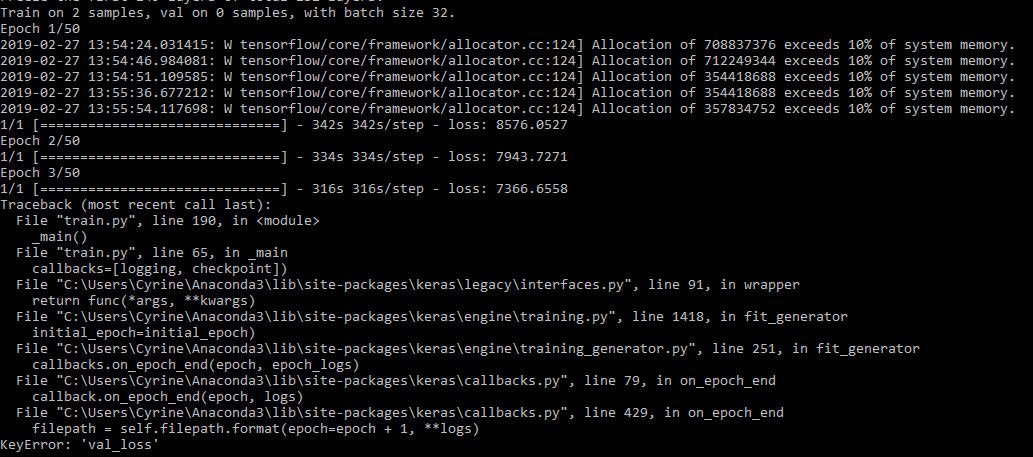
i tested the training on 2 samples but i have these errors :
 cyrineee
on 27 Feb 2019
cyrineee
on 27 Feb 2019
@cyrineee This is because 'val_split'=0.1 in file train.py and you only have 2 samples so there would be no validation samples. Use at least 10 samples or change the value of 'val_split' so that there would be some validation samples
 MathewAlexander
on 20 Apr 2019
MathewAlexander
on 20 Apr 2019
@maiminh1996 @qqwweee how to solve the dimension missmatch problem?
ValueError: Dimensions must be equal, but are 4 and 3 for 'yolo_loss/truediv_2' (op: 'RealDiv') with input shapes: [?,26,26,4,2], [3,2].
 universewill
on 11 Jun 2019
universewill
on 11 Jun 2019
@qqwweee I want to know whether the box's size in Row format: image_file_path box1 box2 ... boxN; is relative to the original image.
 zhoujinhai
on 28 Aug 2019
zhoujinhai
on 28 Aug 2019
I have made a text file for the anchor boxes which looks like this:
C:path\00000002.jpg 0.33999999999999997,0.6900000000000001,0.7225,0.26,1 0.7775,0.40249999999999997,0.91,0.265,1 0.68,0.97,0.84,0.8025,1
..
(path x1,y1,x2,y2,class)
I have made it by myself with converting the form from txt file which was like this:
(class x y width height)
*Used a different annotator
Now when I try to run the train.py and put the path to my txt file for my anchors, classes,the path to my foldaer with the photos and the output folder its gives me ERROR :
Using TensorFlow backend.
2019-11-13 08:17:06.054804: I C:\tf_jenkins\workspace\rel-win\M\windows\PY\36\tensorflow\coreplatform\cpu_feature_guard.cc:140] Your CPU supports instructions that this TensorFlow binary was not compiled to use: AVX2
.................................
Traceback (most recent call last):
File "train.py", line 190, in
_main()
File "train.py", line 42, in _main
with open(annotation_path) as f:
FileNotFoundError: [Errno 2] No such file or directory: 'train.txt'
What should I do ?
 sandramateska
on 13 Nov 2019
sandramateska
on 13 Nov 2019
Related issues
 DocF
·
5Comments
DocF
·
5Comments
 wingNine
·
5Comments
wingNine
·
5Comments
 OverFlow7
·
4Comments
OverFlow7
·
4Comments
 warsi22
·
3Comments
warsi22
·
3Comments
 nguyeho7
·
4Comments
nguyeho7
·
4Comments
Most helpful comment
For each true box, the anchor box which has best IOU with the true box is responsible (certain output layer, certain anchor), the grid which the center of the true box is on is responsible (certain h, w). Then, for each responsible position, we have a prediction
pred[b, j, i, k, :], 4+1+num_classes values. All values are applied sigmoid except box wh.For each responsible position, xy loss is
BCE(xy_true, xy_pred), where BCE is binary cross-entropy. wh loss is mean squared error. And there is a scale2 - size_truefor xy loss and wh loss. Class loss isBCE(probs_true, probs_pred). Object loss isBCE(1, conf_pred).For positions with no responsibility, object loss is
BCE(0, conf_pred)only when the predict box has a low enough IOU with every true box. There is no other loss.Total loss is the sum of the above.
Object_mask stands for responsible positions. Ignore_mask stands for low IOU positions.