Keras-retinanet: Multiple detected boxes for a target
It just happened after updating keras-retinanet. In the previous version, a trained retinanet would only produce 300 predicted_labels for each image in prediction. A trained retinanet of current version could produced up to 100k predicted_labels for one image. I was wondering if there any way to fix this or you designed it in this way.
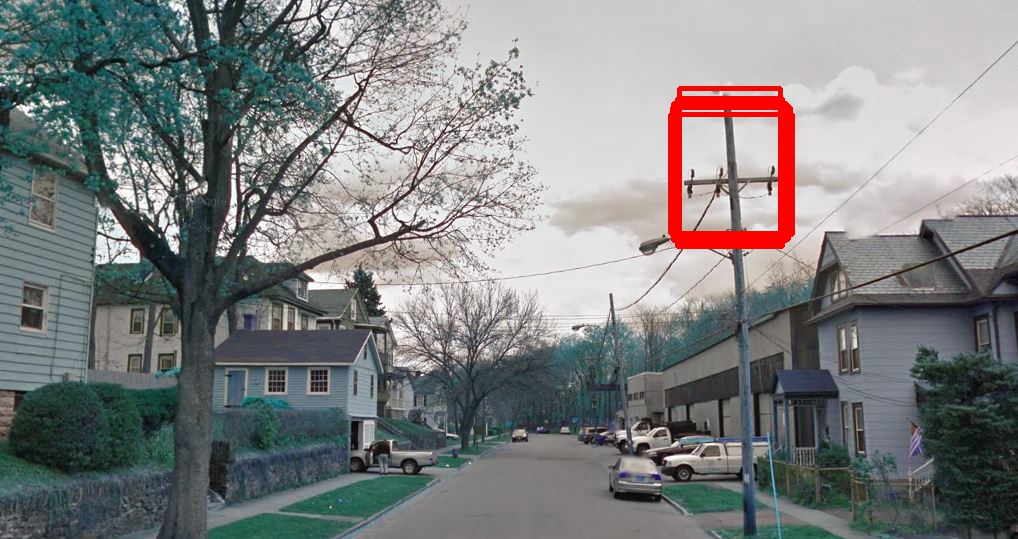
Thank you
 Weixing-Zhang
All 7 comments
There has indeed been an intended change here. NMS used to be performed on the max of scores for each detection. However, NMS is generally applied per class (so the class "cat" cannot suppress the class "dog"), so this had to change.
Without getting to technical, the new NMS now outputs all detections (where a detection is an anchor + regression) and sets the score for a certain class to 0 if it is suppressed. However this should still suppress the boxes you shared, unless they are all of different classes but I doubt that is the case. Are you sure there is a NMS layer in your network?
EDIT: I just ran the example, which gives me correct output. Are you getting the same response in the example?
 hgaiser
on 6 Mar 2018
hgaiser
on 6 Mar 2018
It looks like something wrong with the "create_models" function in train.py which I used. I have to try all over again. Thank you for your quick response. I will keep my result posted.
`def create_models(num_classes, weights='imagenet', multi_gpu=0):
# create "base" model (no NMS)
# Keras recommends initialising a multi-gpu model on the CPU to ease weight sharing, and to prevent OOM errors.
# optionally wrap in a parallel model
if multi_gpu > 1:
    with tf.device('/cpu:0'):
        model = resnet50_retinanet(num_classes, weights=weights, nms=False)
    training_model = multi_gpu_model(model, gpus=multi_gpu)
else:
    model = resnet50_retinanet(num_classes, weights=weights, nms=False)
    training_model = model

# append NMS for prediction only
classification   = model.outputs[1]
detections       = model.outputs[2]
boxes            = keras.layers.Lambda(lambda x: x[:, :, :4])(detections)
detections       = layers.NonMaximumSuppression(name='nms')([boxes, classification, detections])
prediction_model = keras.models.Model(inputs=model.inputs, outputs=model.outputs[:2] + [detections])

# compile model
training_model.compile(
    loss={
        'regression'    : losses.smooth_l1(),
        'classification': losses.focal()
    },
    optimizer=keras.optimizers.adam(lr=1e-5, clipnorm=0.001)
)

return model, training_model, prediction_model`
Ah yes, it looks like that function is incorrect. You could look at the new version: https://github.com/fizyr/keras-retinanet/blob/master/keras_retinanet/bin/train.py#L59-L89
However looking at it, it appears that multi-gpu support might've been broken with this change, not sure.
hgaiser
on 6 Mar 2018
I was about to use the trained model to conduct prediction like before. The trained retina couldn't be loaded.
This is the error:
TypeError                                 Traceback (most recent call last)
<ipython-input-3-2be1207aa857> in <module>()
      1 # load retinanet model
----> 2 model = keras.models.load_model("/home/wei-gpu01/Documents/DeepLearning_GSV/01_Code/02_ObjectDetection/keras-retinanet-master_latest/keras_retinanet/bin/snapshots/resnet50_csv_03.h5", custom_objects=custom_objects)

/home/wei-gpu01/.local/lib/python2.7/site-packages/keras/models.pyc in load_model(filepath, custom_objects, compile)
    241             raise ValueError('No model found in config file.')
    242         model_config = json.loads(model_config.decode('utf-8'))
--> 243         model = model_from_config(model_config, custom_objects=custom_objects)
    244
    245         # set weights

/home/wei-gpu01/.local/lib/python2.7/site-packages/keras/models.pyc in model_from_config(config, custom_objects)
    315                         'Maybe you meant to use '
    316                         '`Sequential.from_config(config)`?')
--> 317     return layer_module.deserialize(config, custom_objects=custom_objects)
    318
    319

/home/wei-gpu01/.local/lib/python2.7/site-packages/keras/layers/__init__.pyc in deserialize(config, custom_objects)
     53                                     module_objects=globs,
     54                                     custom_objects=custom_objects,
---> 55                                     printable_module_name='layer')

/home/wei-gpu01/.local/lib/python2.7/site-packages/keras/utils/generic_utils.pyc in deserialize_keras_object(identifier, module_objects, custom_objects, printable_module_name)
    142                 return cls.from_config(config['config'],
    143                                        custom_objects=dict(list(_GLOBAL_CUSTOM_OBJECTS.items()) +
--> 144                                                            list(custom_objects.items())))
    145             with CustomObjectScope(custom_objects):
    146                 return cls.from_config(config['config'])

/home/wei-gpu01/.local/lib/python2.7/site-packages/keras/engine/topology.pyc in from_config(cls, config, custom_objects)
   2508         # First, we create all layers and enqueue nodes to be processed
   2509         for layer_data in config['layers']:
-> 2510             process_layer(layer_data)
   2511         # Then we process nodes in order of layer depth.
   2512         # Nodes that cannot yet be processed (if the inbound node

/home/wei-gpu01/.local/lib/python2.7/site-packages/keras/engine/topology.pyc in process_layer(layer_data)
   2494
   2495             layer = deserialize_layer(layer_data,
-> 2496                                       custom_objects=custom_objects)
   2497             created_layers[layer_name] = layer
   2498

/home/wei-gpu01/.local/lib/python2.7/site-packages/keras/layers/__init__.pyc in deserialize(config, custom_objects)
     53                                     module_objects=globs,
     54                                     custom_objects=custom_objects,
---> 55                                     printable_module_name='layer')

/home/wei-gpu01/.local/lib/python2.7/site-packages/keras/utils/generic_utils.pyc in deserialize_keras_object(identifier, module_objects, custom_objects, printable_module_name)
    144                                                            list(custom_objects.items())))
    145             with CustomObjectScope(custom_objects):
--> 146                 return cls.from_config(config['config'])
    147         else:
    148             # Then `cls` may be a function returning a class.

/home/wei-gpu01/.local/lib/python2.7/site-packages/keras/engine/topology.pyc in from_config(cls, config)
   1267             A layer instance.
   1268         """
-> 1269         return cls(**config)
   1270
   1271     def count_params(self):

/home/wei-gpu01/.local/lib/python2.7/site-packages/keras_retinanet-0.0.1-py2.7.egg/keras_retinanet/layers/_misc.pyc in __init__(self, nms_threshold, top_k, max_boxes, *args, **kwargs)
     81         self.top_k         = top_k
     82         self.max_boxes     = max_boxes
---> 83         super(NonMaximumSuppression, self).__init__(*args, **kwargs)
     84
     85     def call(self, inputs, **kwargs):

/home/wei-gpu01/.local/lib/python2.7/site-packages/keras/engine/topology.pyc in __init__(self, **kwargs)
    290         for kwarg in kwargs:
    291             if kwarg not in allowed_kwargs:
--> 292                 raise TypeError('Keyword argument not understood:', kwarg)
    293         name = kwargs.get('name')
    294         if not name:

TypeError: ('Keyword argument not understood:', u'score_threshold')
It seems your installed version of keras-retinanet is not up-to-date.
hgaiser
on 7 Mar 2018
That's right. I thought my new installment would overwrite the old version of keras-retinanet.
pip install . --user would install keras-retinanet in the user directory. One has to uninstall the old keras-retinanet using this command line: sudo -H uninstall keras-retinanet before reinstall the newer version. Just a quick note for other users.
Again, thanks a lot!
Weixing-Zhang
on 7 Mar 2018
pip install . --user --upgrade would also work. Also for uninstalling it's better to use pip uninstall keras-retinanet.
hgaiser
on 7 Mar 2018
Related issues
 fernandocamargoti
·
4Comments
fernandocamargoti
·
4Comments
 sumeetssaurav
·
4Comments
sumeetssaurav
·
4Comments
 KwanjaiKJ
·
3Comments
KwanjaiKJ
·
3Comments
 xyiaaoo
·
5Comments
xyiaaoo
·
5Comments
 aaronBioBot
·
5Comments
aaronBioBot
·
5Comments
Most helpful comment
pip install . --user --upgradewould also work. Also for uninstalling it's better to usepip uninstall keras-retinanet.