Kendo-ui-core: Editor inline commands generate wrong HTML markup for multi-line content
Bug report
If the Editor contains multi-line text and an Inline command (Bold, Italic, Underline, Hyperlink) is used to modify the content, wrong HTML markup is generated for every node except the first and the last one.
Reproduction of the problem
The issue can be reproduced on the following Dojo:
- Select all content
- Click on "Insert hyperlink" tool and add a url.
- Inspect the markup of the middle paragraph and compare it to the first and last one.
Current behavior
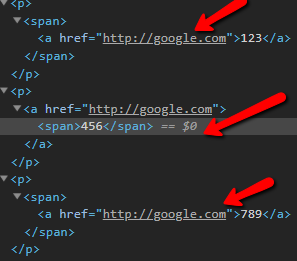
Expected/desired behavior
Inline commands should generate the correct HTML markup for multi-line content.
Environment
- Kendo UI version: 2018.3.1017
- Browser: [all]
 Juveniel
All 4 comments
We should consider this issue as two separate bugs:
- The correct markup for multi-line selection would be:
<p>
    <a href="http://google.com">
        <span>456</span>
    </a>
</p>
The first and last node contain span.k-marker element in order to handle the selection. However, this leads to incorrect rendering due to the following code: inlineformatter#L182 . The navigation works with this rendering, but I consider it as a bug and navigation should be handled on 2nd point.
<p>
    <span>
        <a href="http://google.com">456</a>
    </span>
</p>
- Change the navigation on
mousedownto occur if there is closest anchor tag:
https://github.com/telerik/kendo/blob/master/src/editor/main.js#L962
You could consider the following scenario to make the decision for correct behavior:
- Navigate to demo: https://demos.telerik.com/kendo-ui/editor/index
- Set text: Testing links
- Set link to the whole text
- Set Bold to links
-Navigation of link does not occur when clicking over the bold part.
<p>
    <a href="http://dasdas">
        Testing <strong>links</strong>
    </a>
</p>
 jivanova
on 25 Dec 2018
jivanova
on 25 Dec 2018
Workaround for changing the navigation on mousedown to occur if there is closest anchor tag:
<script>
        kendo.ui.Editor.fn._mousedown = function(e) {
            var editor = this;
            editor._selectionStarted = true;

            if ($(editor.body).parents('.k-window').length) {
                e.stopPropagation();
            }

            // handle middle-click and ctrl-click on links
            if (kendo.support.browser.gecko) {
                return;
            }

            var target = $(e.target);

            if ((e.which == 2 || (e.which == 1 && e.ctrlKey)) &&
                target.closest("a[href]")) {
                window.open(target.attr("href"), "_new");
            }
        }
</script>
After further investigation it turns out that the inconsistent markup generated by the inline commands only concerns the Hyperlink Tool, and more specifically inserting an anchor for multi-line content. Thus, we decided to proceed with fixing only the anchor navigation issue.
Juveniel
on 27 Dec 2018
After the fix a new browser window is opened on clicking the link, however a page is not loaded in the newly opened browser window. Steps to replicate:
- Open the page: http://kendobuild.telerik.com/dojo-staging/eyIsELAv
- Select all content and insert a link
- Click on 456
Actual: A new blank browser window is opened.
Expected: A new browser window is opened and is navigated to the relevant link page
 mparvanov
on 11 Jan 2019
mparvanov
on 11 Jan 2019
Related issues
 IvanDanchev
·
4Comments
IvanDanchev
·
4Comments
 pettersoft
·
4Comments
pettersoft
·
4Comments
 simonssspirit
·
3Comments
simonssspirit
·
3Comments
 andreluizbellon
·
5Comments
simonssspirit
·
3Comments
andreluizbellon
·
5Comments
simonssspirit
·
3Comments
Most helpful comment
We should consider this issue as two separate bugs:
The first and last node contain
span.k-markerelement in order to handle the selection. However, this leads to incorrect rendering due to the following code: inlineformatter#L182 . The navigation works with this rendering, but I consider it as a bug and navigation should be handled on 2nd point.mousedownto occur if there is closest anchor tag:https://github.com/telerik/kendo/blob/master/src/editor/main.js#L962
You could consider the following scenario to make the decision for correct behavior:
-Navigation of link does not occur when clicking over the bold part.