Kendo-angular: Editor Should Emit Values On Keystrokes
Describe the bug
Editor fails to emit a new value on each keystroke or when a toolbar button is clicked.
To Reproduce
See the Forms Support page in the documentation. Notice changes to the value inside the Editor aren't emitted until the user clicks off of the Editor. This is not truly a two-way binding, as the emitted value does not update on each keystroke.
Expected behavior
In most text-related (e.g. Input, TextArea, etc.) implementations of ngModel, Template-driven Forms, or Reactive Forms, new values are emitted after each keystroke; which should be consistent in this Editor. However, a new value is only emitted when the Editor is blurred. The documentation states that:
"Fires each time the value of the Editor is changed upon user interaction..."
However, this is misleading as the user can change the Editor's value without any kind of new value being emitted (until the user clicks off of the Editor).
Additionally, clicking any of the toolbar buttons should also emit an event as the value has been updated.
Browser
- All.
Additional context
If the original bug is actually intended behavior, then this request may need to be changed to a Feature request. In our implementation, we need to know the new value after each keystroke. The value is saved to our server after a debounce of 500-1000 milliseconds. In our implementation it's possible for the user to open the Editor, make the changes, and refresh the page without us ever seeing the new value emitted. The documentation is confusing as to when exactly the new value is emitted and either needs to be clarified or this is, in fact, a bug.
Thank you for the time.
 kbpontius
All 9 comments
@tapopov Any movement on this?
kbpontius
on 19 Jul 2019
Hi @kbpontius
The current behaviour replicates the change event of an HTML text area, where the event is emitted after the component is blurred.
It may be suitable when the Editor is used as a stand-alone component, but I agree that it is not correct in the context of Angular form scenarios. The main concern for emitting valueChange on each keystroke is performance. Firing the valueChange rapidly while the user types will inevitably result in poor performing applications.
We will need more time to consider this enhancement and test how it will perform in complex scenarios. Most probably we'll also introduce an optional debounce property, which will allow the developers to choose how often the value will be updated. In this way, the developer will be able to control the valueChange frequency.
You may expect this enhancement/change in the official release of the Editor, which is due to be published in mid-September.
 valchev
on 22 Jul 2019
valchev
on 22 Jul 2019
Hey @valchev
Thanks for the detailed response. Your analysis of the need and potential implementation look great to me. I look forward to using it later this year.
kbpontius
on 24 Jul 2019
We are seeing poor performance when using
onValueChange(event) {
   this.model = event;
}
Is the expected official release of the editor with debounce coming soon?
 Sniipe
on 2 Oct 2019
Sniipe
on 2 Oct 2019
Hi @Sniipe
v0.9.0 is available now. The updateInterval property can be used to control the frequency of the value change event. The specified interval (in milliseconds) should be a positive number, by default it is set to 100 milliseconds. If set to zero the delay will be disabled entirely.
valchev
on 2 Oct 2019
Firstly; Thanks for the interval update.
However, I'm seeing unusual behaviour with the new release.
<kendo-editor
        [value]="model"
        (valueChange)="onValueChange($event)"
        [updateInterval]="5000"
 >
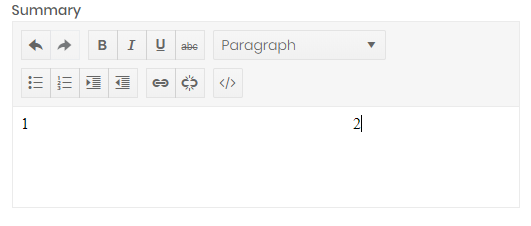
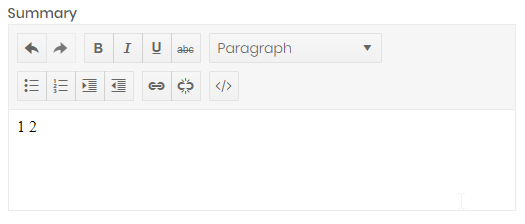
If I type and and then hold down on the spacebar for a few seconds and then type some more the spaces dissappear.
Sniipe
on 2 Oct 2019
@Sniipe
I managed to reproduce the behaviour only if I re-assign the value inside the onValueChange event handler.
public onValueChange = (value) => {
  this.model = value;
}
The issue occurs because when the value is re-assigned the non-breakable spaces are trimmed. I can confirm that this is an issue, but it is not related to the changes discussed in this thread and can be reproduced with the older versions of the package.
- You may try your test page with v0.7.0 and observe the same behaviour after the component is blurred.
- You won't be able to reproduce it with v0.8.0, because the
valueChangeevent will not fire.
That said this is not a regression. I've opened a new issue for it, see telerik/kendo-angular#2510
valchev
on 2 Oct 2019
@valchev thanks for the update!
So just to clarify, the [updateInterval] input essentially acts as a debounce when changes are made? If nothing changes, does it still emit a change event every X milliseconds?
Just wanted to make sure I understood how it worked.
kbpontius
on 2 Oct 2019
Hi @kbpontius
You're right, the updateInterval acts like debounce or to be even more precise its the auditTime duration.
The Editor will not emit valueChange if the value was not changed, no matter the updateInterval.
valchev
on 3 Oct 2019
Related issues
 MaklaCof
·
3Comments
MaklaCof
·
3Comments
 ulgen
·
3Comments
ulgen
·
3Comments
 ipeshev
·
3Comments
ipeshev
·
3Comments
 alexeykostevich
·
3Comments
alexeykostevich
·
3Comments
 talcarl
·
3Comments
talcarl
·
3Comments
Most helpful comment
Hi @kbpontius
You're right, the
updateIntervalacts like debounce or to be even more precise its theauditTimeduration.The Editor will not emit
valueChangeif the value was not changed, no matter theupdateInterval.