Kendo-angular: Grid headers are not responding to width changes
Here is a plunker showing the issue. Click the 'X' on the side pop-over to allow the width of the grid change. Note the visibility of the non-locked column headers.
http://plnkr.co/edit/LOR0tKKDnaclwwgio0dz?p=preview
Would it be possible to add a public resize method to the grid component for issues like this? (If one already exists disregard)
 kallenkortuem-alt
All 6 comments
The issue is still reproducible with the given example and kendo-angular-grid v.1.2.3
 siyka-marinova
on 13 Jul 2017
siyka-marinova
on 13 Jul 2017
Should be fixed in v1.2.4-dev.201707251109
 tsvetomir
on 25 Jul 2017
tsvetomir
on 25 Jul 2017
As suggested by @gyoshev we might need to clip the header content with:
.k-grid-header {
  flex: 1 0 auto;
  overflow-x: hidden;
}
@rkonstantinov @rusev do you think this can cause trouble with e.g. column menus?
tsvetomir
on 25 Jul 2017
To illustrate:
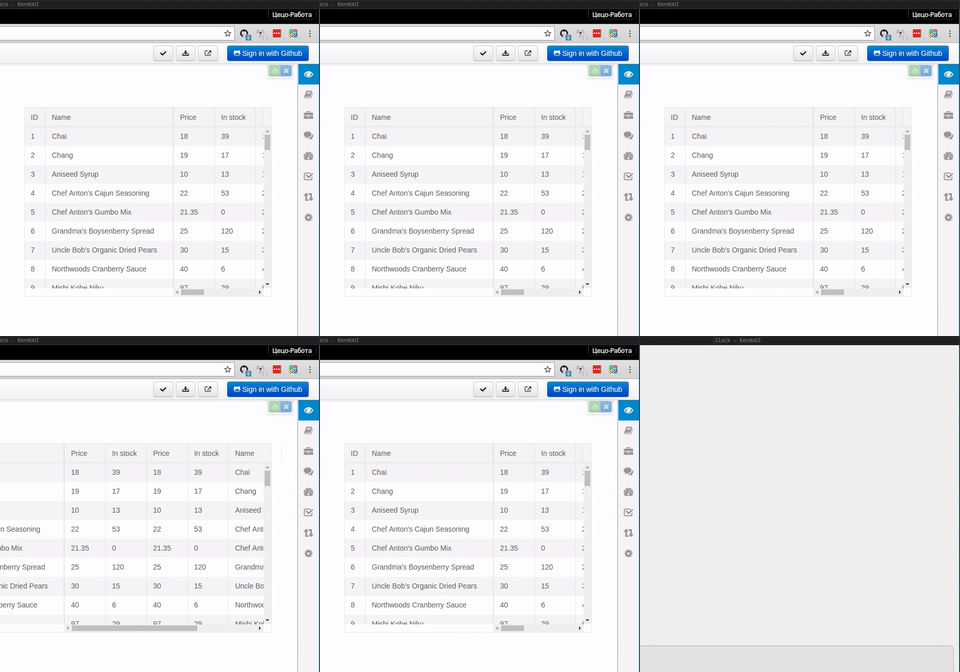
Observe the column headers during resize.
tsvetomir
on 26 Jul 2017
After giving it some thought, we can skip the need for the overflow-x: hidden if we calculate the layout with flexbox. It will also remove then need to set the width through scripts, and yields better performance. Here is the updated plunker, requires a bit more testing.
 gyoshev
on 26 Jul 2017
gyoshev
on 26 Jul 2017
Fix shipped in v1.3.1
tsvetomir
on 11 Aug 2017
Related issues
 patrykp57
·
3Comments
patrykp57
·
3Comments
 ilianiv
·
3Comments
ilianiv
·
3Comments
 Mostafa-Rady
·
3Comments
Mostafa-Rady
·
3Comments
 ChrisProlls
·
3Comments
ChrisProlls
·
3Comments
 ipeshev
·
3Comments
ipeshev
·
3Comments
Most helpful comment
After giving it some thought, we can skip the need for the
overflow-x: hiddenif we calculate the layout with flexbox. It will also remove then need to set thewidththrough scripts, and yields better performance. Here is the updated plunker, requires a bit more testing.