Keepassxc: Database locking should happen after a while BY DEFAULT
Summary
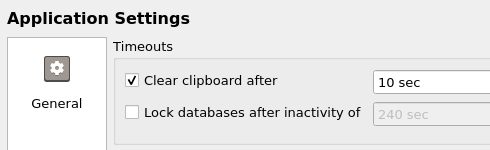
At the moment in the latest KeePassXC (just like it was in KeePassX) the database isn't locked after a short while by default:
Examples
That "Lock databases after inactivity of: 240 sec" should be CHECKED by default in my mind.
Context
If you're at work place and just installed all your software and at some point was fetching a password for something and then you're called for lunch and you leave your desktop without locking the computer (yes, also stupid), then anyone could browse, view and copy your passwords...
 manujarvinen
All 7 comments
I disagree and won't change the default. Not securing your Workstation when you leave it invites all sorts of possible attack scenarios.
 droidmonkey
on 5 Sep 2020
droidmonkey
on 5 Sep 2020
I don't get it, do you mean it's not default because you want the (perhaps not computer proficient) user to feel even more unsecure?
manujarvinen
on 5 Sep 2020
I'd agree. By default you should assume the user is not aware of potential risks and thus the software, that promises to keep your secrets secret, should always assume the worst case by default and take measures. More advanced users or anyone who's uncomfortable with that default can easily disable it. You could even have a little informative message displayed when the application was locked that explains why it was locked and provides information where to change that, if it bothers you.
I don't find the argument of @droidmonkey valid. You do not encourage bad practise just by assuming that people do it. If that would be true we wouldn't need a password manager in first place because everyone would simply remember their passwords. We know that humans are capable of storing the required amount of data. Yet we have programs that help us because we know we're lazy bastards.
We know for a fact that many people do not lock their workstations. It's not our job to point fingers or question why they do so. A program that intends to do better should come with safe defaults.
Fail-safe is a thing.
 omniproc
on 5 Sep 2020
omniproc
on 5 Sep 2020
I wasn't meaning to argue against the default setting because we want to encourage locking workstations. Those were meant to be two separate statements.
I disagree with making it default on because it causes unexpected behavior from the users perspective. "Why does my database keep locking automatically??" I can see the issues now. Everything we do is a balance at this point and some segment of the community will demand a change that conflicts with another.
The better solution to this is to "onboard" the new user by asking them explicitly what they want their security level to be.
droidmonkey
on 5 Sep 2020
Hmm,
I think the option of locking the database is something which the user should/could be made aware of during the initial installation
process of the software. By this design the user is being made aware of the "feature" and he is led to a descision process
on which path he/she wants to go.
In my point of view: certain software should be designed to encourage, but not force, the user to "dig deeper"
and to understand what implications which e.g feature/setting has on his user/safety experience.
By this the user still has the choice of "hey I want to become an advanced user" or stay a "I'd rather stay a novice for now".
 Colfenor
on 5 Sep 2020
Colfenor
on 5 Sep 2020
Before settling on KeepassXC I tried a range of password managers. Most of those had a time based lock by default. I was in fact surprised that KeepassXC did not have this set as a default. I agree with others that the default should be to lock it. Looking at people whom I have helped their mindset would be "I installed a password manager to protect me, how did someone get my passwords?". It would be best to prevent that.
 woowoo803
on 7 Sep 2020
woowoo803
on 7 Sep 2020
I was irritated enough that I had to look through settings to figure out why my clipboard contents were being auto-erased. I agree with the rationale of having this off by default.
 Asherathe
on 13 Sep 2020
Asherathe
on 13 Sep 2020
Related issues
 bleepnetworks
·
3Comments
bleepnetworks
·
3Comments
 MountainX
·
3Comments
MountainX
·
3Comments
 n1trux
·
3Comments
n1trux
·
3Comments
 haroldm
·
3Comments
haroldm
·
3Comments
 TheZ3ro
·
3Comments
TheZ3ro
·
3Comments
Most helpful comment
I'd agree. By default you should assume the user is not aware of potential risks and thus the software, that promises to keep your secrets secret, should always assume the worst case by default and take measures. More advanced users or anyone who's uncomfortable with that default can easily disable it. You could even have a little informative message displayed when the application was locked that explains why it was locked and provides information where to change that, if it bothers you.
I don't find the argument of @droidmonkey valid. You do not encourage bad practise just by assuming that people do it. If that would be true we wouldn't need a password manager in first place because everyone would simply remember their passwords. We know that humans are capable of storing the required amount of data. Yet we have programs that help us because we know we're lazy bastards.
We know for a fact that many people do not lock their workstations. It's not our job to point fingers or question why they do so. A program that intends to do better should come with safe defaults.
Fail-safe is a thing.