Keepassxc: Follow system theme when app theme is set to "auto"
Overview
When changing the appearance option inside macOS settings, only half of KeepassXC will change to the correct mode.
Steps to Reproduce
- Start KeepassXC
- Make sure View -> Theme is set to "Automatic"
- Switch the appearance setting inside Settings -> General
Expected Behavior
The interface should transition to the correct appearance.
Actual Behavior
Only half of the interface transitions to the correct appearance, leaving some elements barely readable.
https://www.youtube.com/watch?v=Wu-TvI5ij5g (In the video I'm using an experimental version somewhere between 2.6 and 2.6.1, although I checked 2.6.1 and the issue still persists)
Context
I also have a similar issue when I have it set to automatic, where I sometimes have to set it to something else, back to automatic and then restart KeepassXC to fix it.
KeePassXC - Version 2.6.1
Revision: 9a35bba

Qt 5.15.0
Diagnosemodus ist deaktiviert.

Betriebssystem: macOS 10.15
CPU-Architektur: x86_64
Kernel: darwin 19.6.0

Aktivierte Erweiterungen:
- Auto-Type
- Browser-Integration
- SSH-Agent
- KeeShare (bestätigtes und unbestätigtes Teilen)
- YubiKey
- TouchID

Kryptographische Bibliotheken:
 libgcrypt 1.8.5
Operating System: macOS
 opa334
All 7 comments
I think the steps to reproduce are wrong; I've experienced this too, and here is how I can reproduce, on macOS 10.15:
- Start System Preferences and go to the General pane
- Set the appearance to Light
- Open KeePassXC 2.6.1
- In the menu bar, select View -> Theme -> Automatic
- Restart KeePassXC
- Back in System Preferences, set the appearance to Dark
Here's a screenshot of the result:
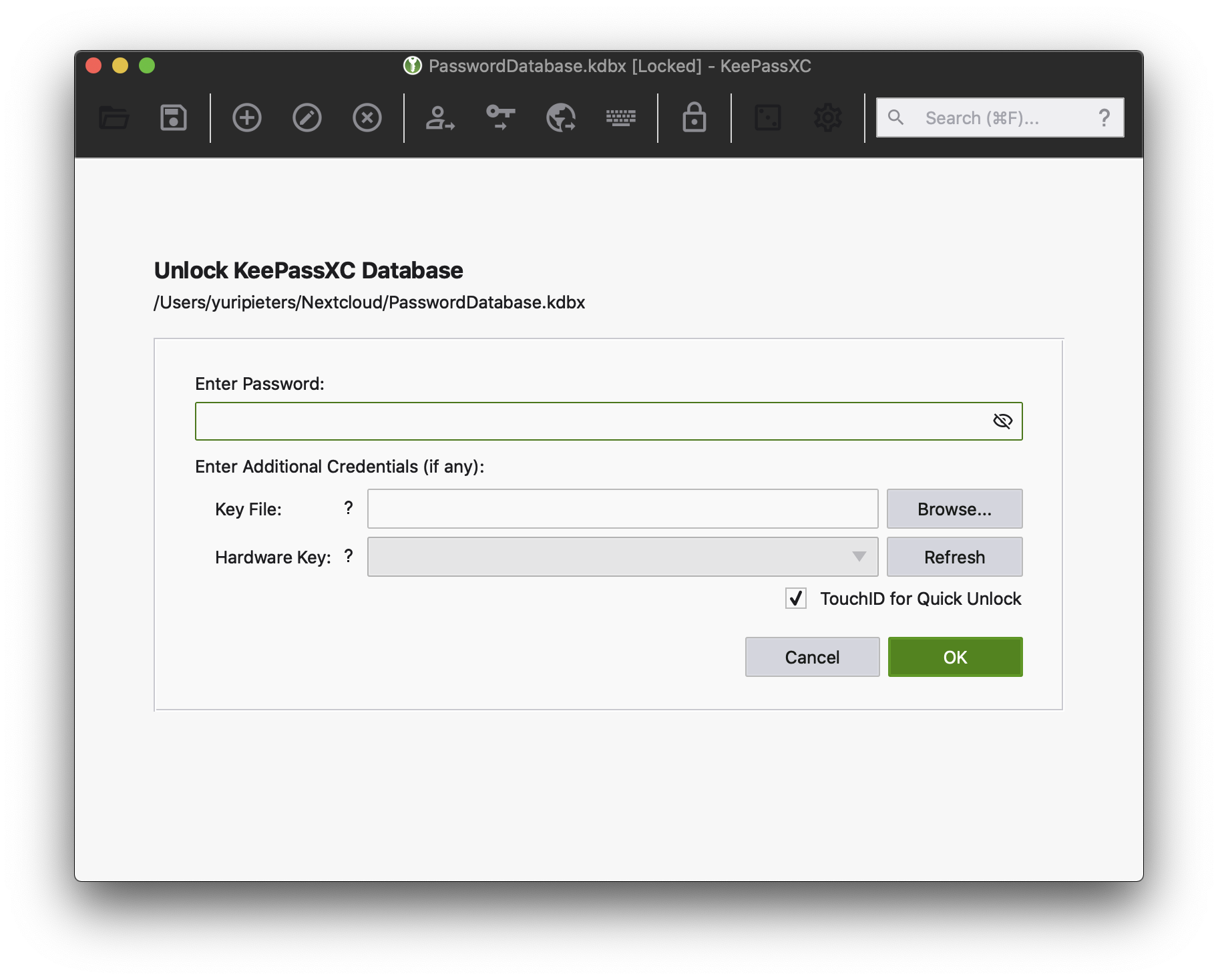
The reverse, going from dark to light theme, produces the reverse effect with a light-themed toolbar and the rest of the ui dark themed.
I noticed this issue first when using macOS's automatic light/dark theme switching. It would be great if KeePassXC could work with that!
 MageJohn
on 27 Aug 2020
MageJohn
on 27 Aug 2020
We probably won't due to some limitations in Qt, you have to completely restart the app in order to set the new theme correctly everywhere.
 droidmonkey
on 28 Aug 2020
droidmonkey
on 28 Aug 2020
Indeed, there seems to be a Qt bug for this issue here: https://bugreports.qt.io/browse/QTBUG-73435
However, might it be possible to fix the issue with some parts of the UI responding to the change and others not? It's worse to respond partially to the change in the system theme than not at all. The issue doesn't arise with the theme set to either Light or Dark, just with Automatic, so I presume that Automatic isn't the same as making a choice between Light and Dark at startup. Maybe doing that would be a good workaround until the Qt bug is resolved.
MageJohn
on 28 Aug 2020
I think the steps to reproduce are wrong; I've experienced this too, and here is how I can reproduce, on macOS 10.15:
Ah yes, setting View -> Theme to Automatic seems to be important, edited my issue
We probably won't due to some limitations in Qt, you have to completely restart the app in order to set the new theme correctly everywhere.
I see, hadn't found anything on this so I assumed it was a problem with KeepassXC.
opa334
on 28 Aug 2020
@droidmonkey I think it's safe to say there is a bug in here somewhere.
I'm on osx 10.13, which doesn't have automatic dark/light features and v2.6.1's UI broke (from v2.6.0). It looks exactly like the above screenshot by @MageJohn. My workaround it to select NOT select 'Automatic' nor 'Light' from 'View > Theme'.
I'm using 'Classic'. When I select 'Dark', it works properly (but I don't like it). When I select 'Automatic' or 'Light' I get the above screenshot.
Hint: It seems that the default background color is not working on the toolbar and the "About KeepassXC" dialog (and possibly others ...I didn't completely test).
Note: v2.6.0 did not have this issue.
 cmroanirgo
on 2 Sep 2020
cmroanirgo
on 2 Sep 2020
I want to more than +1 what @cmroanirgo just said. (Maybe it needs to be a separate issue).
I just installed the latest update
KeePassXC - Version 2.6.1
Revision: 9a35bba

Qt 5.15.0
Debugging mode is disabled.

Operating system: macOS High Sierra (10.13)
CPU architecture: x86_64
Kernel: darwin 17.7.0
And suddenly the UI is dark and some icons are not even displaying. It displayed just fine with the previous version; I have not changed anything.
Just like what @MageJohn has in their screenshot, I cannot see the "Open Database" icon (with or without text) because it is black on black. When I hover over it, it becomes visible; it is black with a light gray background.
Interestingly, when I open up the Preferences, I _can_ see the "Open Database" icon and text. (it is light gray on a black background, like the others). Once the preferences are closed, the icon and text is no longer visible.
When I have a database open, the "Open Database" and "New Entry" are not visible unless I hover.
Even the "about" modal is also displaying the dark background:
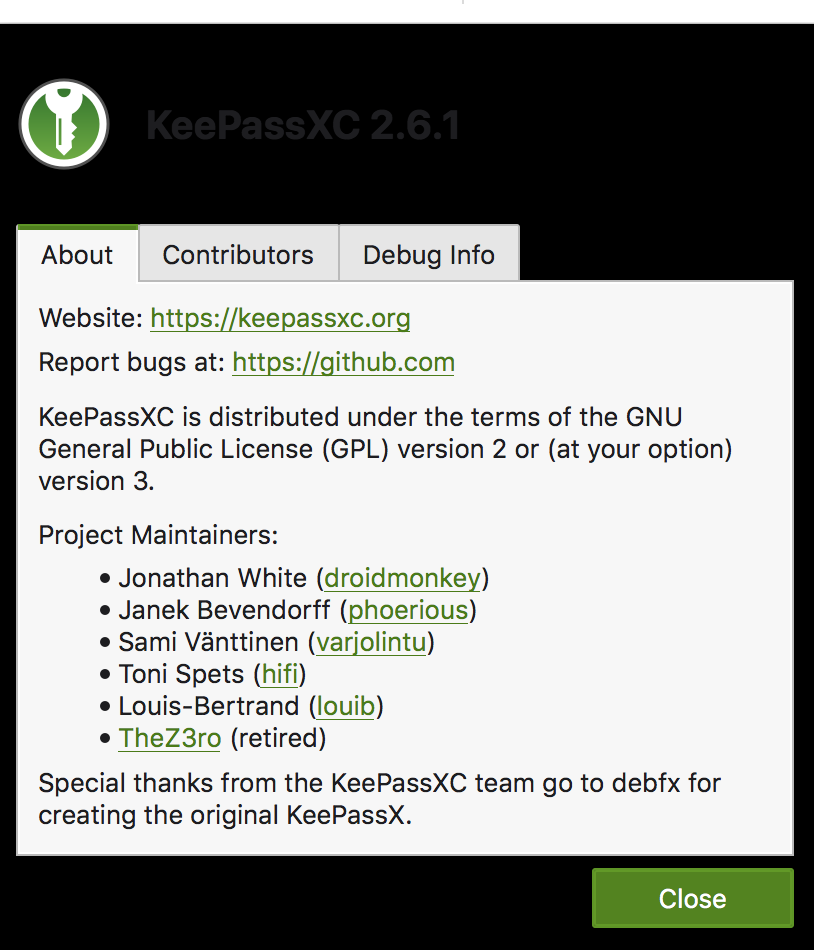
Whatever changed with regard to the UI / QT needs to be reverted. This is close to unusable.
 weedySeaDragon
on 4 Sep 2020
weedySeaDragon
on 4 Sep 2020
Thanks, we have more than enough information at this time to attempt a fix.
droidmonkey
on 4 Sep 2020
Related issues
 Throne3d
·
3Comments
Throne3d
·
3Comments
 nfnty
·
3Comments
nfnty
·
3Comments
 haroldm
·
3Comments
haroldm
·
3Comments
 rugk
·
3Comments
rugk
·
3Comments
 MisterY
·
3Comments
MisterY
·
3Comments