Keepassxc: Yubikey hardware key no longer detected under 2.6.0
just updated to KeepassXC2.6.0 on windows 10 pro 2004 - trying to open database with hardware key (yubikey standard 2.4.2 firmware). Yubikey is not detected.
The yubikey is detected by the yubikey personalisation tool on my computer and appears to be functioning normally.
 rse12345
All 48 comments
hey you, i just installed V 2.6.0 and had exactly the same problem you mentioned above (Windows 10, 64-bit).
the field "hardware token" was blank. pressing the button "reload" next to the field did not help either.
the only way to get access to my keepass-database again, was to deinstall Version 2.6.0 and reinstall Version 2.4.2.
 kaikobarg
on 8 Jul 2020
kaikobarg
on 8 Jul 2020
Do you both have a yubikey standard?
 droidmonkey
on 9 Jul 2020
droidmonkey
on 9 Jul 2020
I use a Yubikey 5 Neo via USB-Port
kaikobarg
on 9 Jul 2020
I can report the same issue, both of my YubiKeys are not detected by version 2.6.0. I checked if other applications are having the same issue but they continue working just like they did yesterday. The YubiKey Manager is also detecting both correctly.
The keys I'm using are YubiKey 5 NFC USB-A running Firmware 5.2.4.
As a sanity check I reinstalled the previous KeePassXC version 2.5.4 and this version still detects my YubiKeys and can open my database without any problems.
 SirJson
on 9 Jul 2020
SirJson
on 9 Jul 2020
@SirJson what OS and distribution format (MSI, PPA, snap, etc) are you using?
droidmonkey
on 9 Jul 2020
For everyone, in the YubiKey Personalization Tool, does your YubiKey show a serial number:
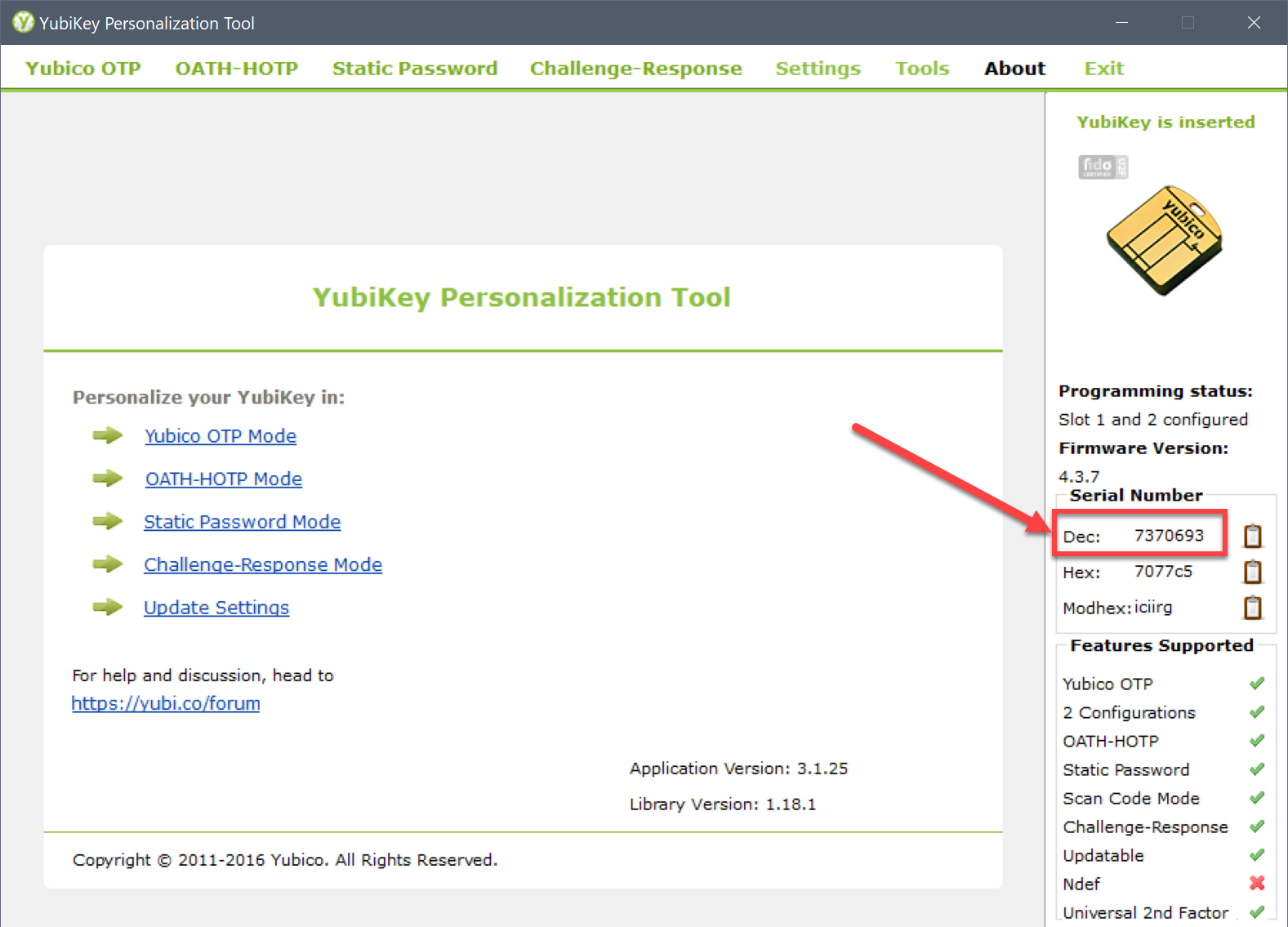
The new implementation tracks your key by serial number (that is what allows for multiple keys), but if the firmware doesn't provide a serial number than it won't work at all.
Unfortunately, Yubico firmware varies wildly between keys because of their decision to not allow firmware flashing. The only keys I have are YubiKey Neo (original), YubiKey 4, and OnlyKey. I am ordering a YubiKey 5 NFC now.
droidmonkey
on 9 Jul 2020
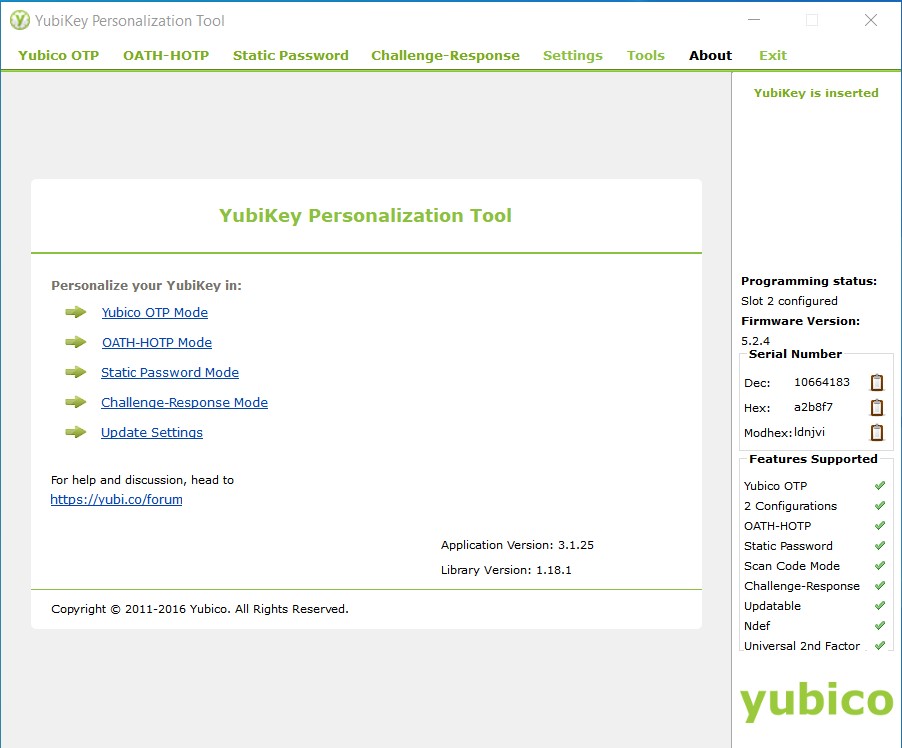
Because I have the same problem, here is a screenshot of my personalisation tool. It shows a serial number for my YubiKey 5 NFC
 max-stockhausen
on 9 Jul 2020
max-stockhausen
on 9 Jul 2020
I have a similar problem on Debian 10.
KeePassXC 2.6.0 does not recognize the Yubikey 4 if I (re)connect it while running.
I have to close the app and open it again while Yubikey is connected.

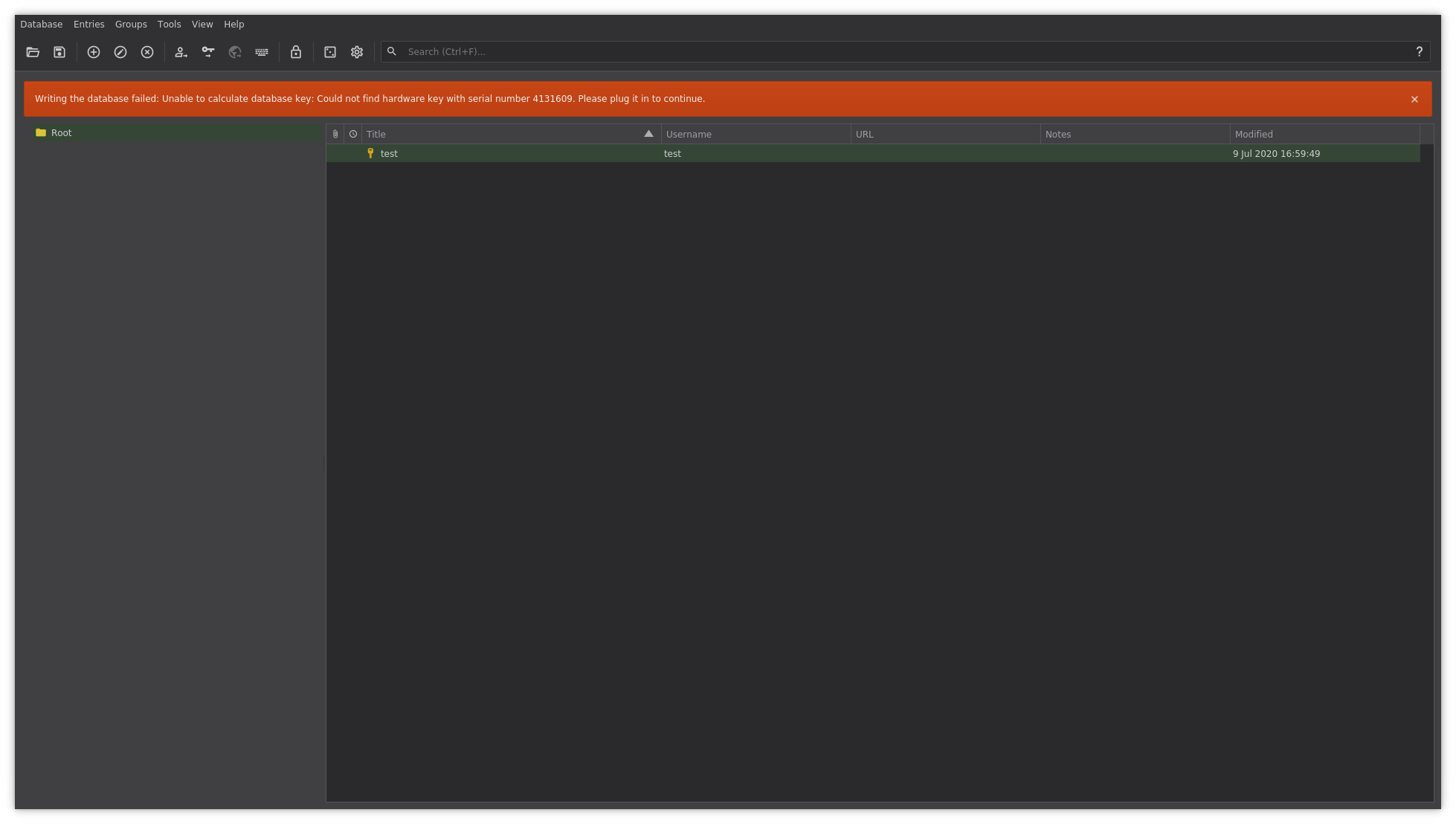
I checked again with KeePassXC 2.5.4 and works perfectly. I can disconnect/reconnect the YubiKey and KeePassXC recognizes it without any issue.
 igaritano
on 9 Jul 2020
igaritano
on 9 Jul 2020
In 2.6.0, we repoll for the key every time we want to use it, which is completely different from 2.5.4 that held onto a USB instance for the duration of the program. If anything it should always work in 2.6.0 and certainly I tested that case in ALL operating systems. Albeit not Debian, but Ubuntu.
What I'm trying to say is that closing and reopening the application does nothing to solve the problem. The problem is that your key is not coughing up its serial number properly when asked. I need to look into that process a little further.
droidmonkey
on 9 Jul 2020
Same issue here with a YubiKey 5 NFC. Running KPXC 2.6.0 on windows 10.0.17763. The key is running on firmware version 5.2.4, serial number dec is 10655617. SSH key authentication with ssh-agent works as always. When hitting _Hardware Key: Refresh_ inside KPXC, the key blinks green and the combo box flickers but the key is not showing up.
 teedog
on 9 Jul 2020
teedog
on 9 Jul 2020
thanks for the reply - I can confirm that my yuibkey personalisation tool shows that I do have a serial number for my yuibkey standard
rse12345
on 9 Jul 2020
I am having the same problem too on Windows 10 Version 2004 (64-bit).
Tried both YubiKey 5 NFC I had: firmware version 5.1.2 (9714699) and version 5.2.4 (11490086)
2.6.0 cannot detect them both (keys lit up when pressed refresh but nothing more). Right now I reverted back to 2.5.4.
 trumpet205
on 9 Jul 2020
trumpet205
on 9 Jul 2020
Same issue. All 3 of my keys (all firmware 5.2.4) report their serial# correctly in ykey personalization tool, ykman, and various gpg agents. My key does light up when trying to refresh key detection in 2.6.0, but no key is reported by the program
 1overdrive
on 9 Jul 2020
1overdrive
on 9 Jul 2020
Ok so when I get my Yubikey 5 NFC I'll fix this issue.
droidmonkey
on 9 Jul 2020
same issue with one of an older yubikey with firmware version 4.1.1 on my linux mint 20. i have reverted back to an older version of keepassxc.
 iamjakko
on 9 Jul 2020
iamjakko
on 9 Jul 2020
Unfortunately, Yubico firmware varies wildly between keys because of their decision to not allow firmware flashing. The only keys I have are YubiKey Neo (original), YubiKey 4, and OnlyKey. I am ordering a YubiKey 5 NFC now.
@droidmonkey
I've got a YubiKey Neo (original) on firmware 3.4.9 and a YubiKey 4 Nano on firmware 4.3.5, and neither of them work for me. I have tested both of those on Ubuntu 20.04 with the official PPA as well as on MacOS with the keepassxc cask and no combination works, so it's definitely not just the YubiKey 5. Both of them show a serial, and it might be worth noting that both of them also have all 3 interfaces (OTP, FIDO, and CCID) enabled.
I'm happy to help debug if there's anything I can do.
 cheeseandcereal
on 10 Jul 2020
cheeseandcereal
on 10 Jul 2020
My guess is that the failure is on line 3/4 of this code block:
for (int slot = 1; slot <= 2; ++slot) {
    auto config = (i == 1 ? CONFIG1_VALID : CONFIG2_VALID);
    if (!(ykds_touch_level(st) & config)) {
        // Slot is not configured
        continue;
    }
    // Don't actually challenge a YubiKey Neo or below, they always require button press
    // if it is enabled for the slot resulting in failed detection
    if (pid <= NEO_OTP_U2F_CCID_PID) {
        auto display = tr("%1 [%2] Configured Slot - %3")
                           .arg(vender, QString::number(serial), QString::number(slot));
        ykSlots.append({slot, display});
    } else if (performTestChallenge(yk_key, slot, &wouldBlock)) {
        auto display = tr("%1 [%2] Challenge Response - Slot %3 - %4")
                           .arg(vender,
                                QString::number(serial),
                                QString::number(slot),
                                wouldBlock ? tr("Press") : tr("Passive"));
        ykSlots.append({slot, display});
    }
}
Basically I skip the check to see if a slot is a challenge/response slot if the slot reports that it has NOT been configured. It would seem that older keys and YK 5 may not respond properly to that...
droidmonkey
on 10 Jul 2020
@droidmonkey
The problem is with that codeblock, but it's because you typo'd i == 1 which is the number of yubikey instead of slot == 1.
This makes it so if you only have one yubikey plugged in, then it will only check slot 1 twice, causing this bug for people who only have slot 2 configured on their yubikey.
I have my 2 yubikeys set up with _only_ slot 2, and confirmed this by seeing one of the keys detect properly when there are 2 keys plugged in at the same time (since the second key will be i = 2; where my slot is), but no keys detect properly if only one is plugged in at a time.
You should be able to repro this bug if you change any of your yubikeys to have slot 2 configured, and delete the configuration from slot 1.
I submitted a PR to fix this
cheeseandcereal
on 10 Jul 2020
Holy cow!!!
droidmonkey
on 10 Jul 2020
Fixed in #5004
droidmonkey
on 10 Jul 2020
I've just built the release/2.6.1 branch on Windows 10 and can confirm that my Keys got detected again and I was able to unlock my db with it. Good job on fixing the problem so quickly! I was worried I would be stuck on 2.5 for quite some time 😄
SirJson
on 10 Jul 2020
Is there maybe a build from a CI system that we can test? The explanation of @cheeseandcereal absolutely makes sense. Forgot to mention: My YubiKey also is configured on slot 2.
teedog
on 10 Jul 2020
great job thanks
rse12345
on 10 Jul 2020
I merged v2.6.1 branch into develop, you can test the YubiKey fixes from the latest snapshot: https://snapshot.keepassxc.org/latest
droidmonkey
on 13 Jul 2020
Great. Had the same problem. Snapshot works for me under Linux. 👍Tested the AppImage Version from 2020-07-13 03:22
 HarrPerson
on 13 Jul 2020
HarrPerson
on 13 Jul 2020
Works on Windows 10, YK 5 NFC, Slot 2. Thanks for that fast fix!
teedog
on 13 Jul 2020
Cannot reproduce - reading this thread I was fearfull when I realized Debian testing upgraded to 2.6.0, but I have no trouble with recognition of my yubikey:
- YubiKey 5 NFC (Firmware version 5.1.2) - Slot 2 used for challenge response
- keepassxc version 2.6.0+dfsg.1-1
I browsed the only patch used by debian (https://sources.debian.org/src/keepassxc/2.6.0+dfsg.1-1/debian/patches/series/) only briefly but as far as I read it doesn't touch handling of yubikeys.
 rupi-lol
on 18 Jul 2020
rupi-lol
on 18 Jul 2020
They would need commit 4f1d894 as a patch. Looking at the changeset it should be easy to include into debian. Have you tried building the latest develop branch yourself? It includes this commit and building KeePassXC is pretty well documented.
SirJson
on 18 Jul 2020
Searched the Issues and couldn't find if this was already reported somewhere / related to this issue, but since installing v2.6.0, my Hardware Key is never remembered (YubiKey Slot 2- Passive). I have to manually select it from the dropdown menu every time.
Even if I close the database and immediately try to open it, there is a short latency where it shows "Detecting hardware keys..." before I am forced to manually select it.
 felker
on 21 Jul 2020
felker
on 21 Jul 2020
Have you tried a snapshot build to confirm it was fixed? Also, if your using Linux and your ~/.cache folder is mounted to a tempfs than you will lose your "local" settings including recently used yubikey slots.
droidmonkey
on 21 Jul 2020
Confirmed that this minor issue still occurs on the snapshot. Should I open a fresh issue?
felker
on 21 Jul 2020
Sure, but you should attempt to isolate why the issue is occurring because it certainly doesn't occur in my testing or for anyone else in this issue thread (which specifically affects slot 2). Do you have the setting "Remember database key files and security dongles" enabled?
droidmonkey
on 21 Jul 2020
Yes, that option is enabled. I am on macOS Catalina, and I use a YubiKey 5C Nano (firmware 5.1.2).

felker
on 21 Jul 2020
KeePassXC started remembering my database's Hardware Key again today (didnt change anything since last night), so it seems this behavior is somewhat unpredictable.
felker
on 21 Jul 2020
Can confirm that the latest 2.6 snapshot also fixes the issue for me. Thanks for fixing!
 x86dev
on 30 Jul 2020
x86dev
on 30 Jul 2020
For anyone else arriving here .. even with 2.6.1, I had to disable "remember security keys", close, restart, renable the option, close, restart .. and now it remembers!
 srd424
on 24 Aug 2020
srd424
on 24 Aug 2020
Coming from 2.4.3, I can't use any v 2.6+. Attempted 2.6.0 and 2.6.1 again and neither detects my YubiKey 5C Nano. It's a real key, serial is there as well. 2.6.0 showed random serials on each Refresh (noted as fixed in 2.6.1?) but 2.6.1 just shows "15" for the serial and is incorrect. Refreshing still shows 15. Falling back to 2.4.3. Slot 1 configured, not sure what I configured it for, last year.
 OdinVex
on 6 Sep 2020
OdinVex
on 6 Sep 2020
@OdinVex That sounds like a different issue than what this particular issue was tracking. Do you have any more information? Maybe create a new github issue with some additional information if possible.
cheeseandcereal
on 6 Sep 2020
@cheeseandcereal Issue matches most of the other things reported in this one. Second one, even. Not exactly sure what information I could provide. YubiKey 5C Nano, worked in 2.4.3, doesn't work 2.6.0+. Using Ubuntu PPA. Refreshing shows the YubiKey but no longer works, thinks it has a serial number of 15. In 2.6.0 it was a random serial due to the typo in code.
OdinVex
on 6 Sep 2020
2.6.0 didn't cause the serial number to change at all. The code typo simply made it so that if you had a yubikey where the _only_ slot configured was slot 2, then it wouldn't show up in 2.6.0 (and was since fixed in 2.6.1).
Refreshing shows the YubiKey but no longer works
What do you mean by 'no longer works'? Are you getting an actual error message or screenshot you can share? It's hard to diagnose a problem when the description of the issue is it 'no longer works'. What about v2.5? You said you came from 2.4, but was this a bug introduced in one of the 2.5.X version, or 2.6?
cheeseandcereal
on 6 Sep 2020
@cheeseandcereal I know it didn't change the serial number of the actual hardware. According to YubiKey, serials cannot be changed. Tin-foil hat doubts that but anyway... I have not tried any 2.5.* builds. Build 2.4.3 is the only non-2.6.* build I can try at the moment. Build 2.6.0 showed random serials for the same YubiKey on each Refresh. As mentioned earlier build 2.6.1 thinks the serial number is '15' even if Refreshed. Not exactly sure how I can clarify any further. Cannot open the db, KeePassXC being unable to find the YubiKey (any 2.6.* build...). Only slot 1 is configured.
OdinVex
on 6 Sep 2020
You need to provide operating system, manner of install (apt, ppa, appimage, snap), and in this case what version of libykpers you have installed.
droidmonkey
on 6 Sep 2020
Ubuntu-_like_, KeePassXC's ppa, libkypers 1.20.0-2.
OdinVex
on 6 Sep 2020
You mention it shows a serial number, which means it is at least detecting the key. Are you able to unlock your database with the key even though the serial number is wrong? Can you try using the appimage to rule out library interference?
droidmonkey
on 6 Sep 2020
You mention it shows a serial number, which means it is at least detecting the key. Are you able to unlock your database with the key even though the serial number is wrong? Can you try using the appimage to rule out library interference?
It of course shows the key in the selection but the serial is always wrong. The AppImage showed a random serial but it failed to open the database because no device had that serial number. Refreshed, serial always shows as "1".
I decided to try a throw-away Windows install and used 2.5.1 which worked. Showed serial as "31" though. 2.6.1 showed no hardware keys at all, none.
YubiKey 5C Nano.
I'm not terribly concerned because I'm seeking an open-source hardware and firmware solution and this YubiKey will be given away as I no longer trust YubiKey.
OdinVex
on 6 Sep 2020
I think your yubikey is non-functional. This may have worked in previous versions of keepassxc since we didn't care about the serial number at all.
droidmonkey
on 6 Sep 2020
I got it working. I had disabled serial-api-visible, serial-btn-visible, serial-usb-visible long ago. I suspected they were problematic in 2.6.* and re-enabled them but forgot to update the configuration for slot 1. Personalization Tool would show those enabled but they weren't actually enabled. I know it is deprecated but I hate the UI of YubiKey Manager.
Perhaps KeePassXC may need a work-around for those who want serials disabled or an option to detect this issue and maybe alert people.
OdinVex
on 6 Sep 2020
I eject myself from this ticket, if there are any other problems please ping me (I am the Fedora co-maintainer)
Thank you
 Germano0
on 6 Sep 2020
Germano0
on 6 Sep 2020
Related issues
 JosephHatfield
·
3Comments
JosephHatfield
·
3Comments
 Throne3d
·
3Comments
Throne3d
·
3Comments
 mstarke
·
3Comments
mstarke
·
3Comments
 nfnty
·
3Comments
nfnty
·
3Comments
 rugk
·
3Comments
rugk
·
3Comments
Most helpful comment
@droidmonkey
The problem is with that codeblock, but it's because you typo'd
i == 1which is the number of yubikey instead ofslot == 1.This makes it so if you only have one yubikey plugged in, then it will only check slot 1 twice, causing this bug for people who only have slot 2 configured on their yubikey.
I have my 2 yubikeys set up with _only_ slot 2, and confirmed this by seeing one of the keys detect properly when there are 2 keys plugged in at the same time (since the second key will be i = 2; where my slot is), but no keys detect properly if only one is plugged in at a time.
You should be able to repro this bug if you change any of your yubikeys to have slot 2 configured, and delete the configuration from slot 1.
I submitted a PR to fix this