Keepassxc: Icons missing after upgrade to 2.6.0
Overview
on Linux Mint 19.3 MATE, after having updated KeePassXC to 2.6.0 as per the official Ubuntu PPA, the icons are garbled:

am I missing some new dependencies? is this normal? thanks.
Context
KeePassXC - Version 2.6.0
Revision: 0765954

Qt 5.9.5
Debugging mode is disabled.

Operating system: Linux Mint 19.3
CPU architecture: x86_64
Kernel: linux 5.3.0-62-generic
 piramiday
All 64 comments
Those icons are incredibly broken
 droidmonkey
on 7 Jul 2020
droidmonkey
on 7 Jul 2020
I'm having the exactly same issue, Mint 19.3 (Cinnamon) as well. Changing icon theme doesn't help.
Running via terminal prints messages, that might be related.
$ keepassxc
qt5ct: using qt5ct plugin
qt5ct: palette support is disabled
qt5ct: D-Bus global menu: no
QPainter::begin: Paint device returned engine == 0, type: 3
QPainter::setCompositionMode: Painter not active
QPainter::begin: Paint device returned engine == 0, type: 3
QPainter::setCompositionMode: Painter not active
QPainter::begin: Paint device returned engine == 0, type: 3
(last two lines repeated around 40 times)
 okaestne
on 8 Jul 2020
okaestne
on 8 Jul 2020
Same here....Mint 19.2 (Cinnamon)
 john9527
on 8 Jul 2020
john9527
on 8 Jul 2020
I am having the same issue. Linux Mint 19.3 (Cinnamon). Installed via ppa.
Interestingly also the theme choosing option is missing in the settings (was available under "User Interface" in the 2.6.0-beta1 release). Maybe this is related.
 koelle25
on 8 Jul 2020
koelle25
on 8 Jul 2020
Theme choice is now in the view menu
droidmonkey
on 8 Jul 2020
several people seem to be experiencing this, so this could possibly occurr on any distro derived from Ubuntu 18.04.
@droidmonkey any ideas? fixes? workarounds? otherwise I'll downgrade because I have no idea what I'm clicking.
piramiday
on 8 Jul 2020
Use appimage or snap distro. Have no idea what the issue is at this time, seems like it could be a faulty SVG renderer.
droidmonkey
on 8 Jul 2020
I can confirm that the AppImage-Version is working fine.
koelle25
on 8 Jul 2020
Assuming I have the same issue, it is not just related to Mint.
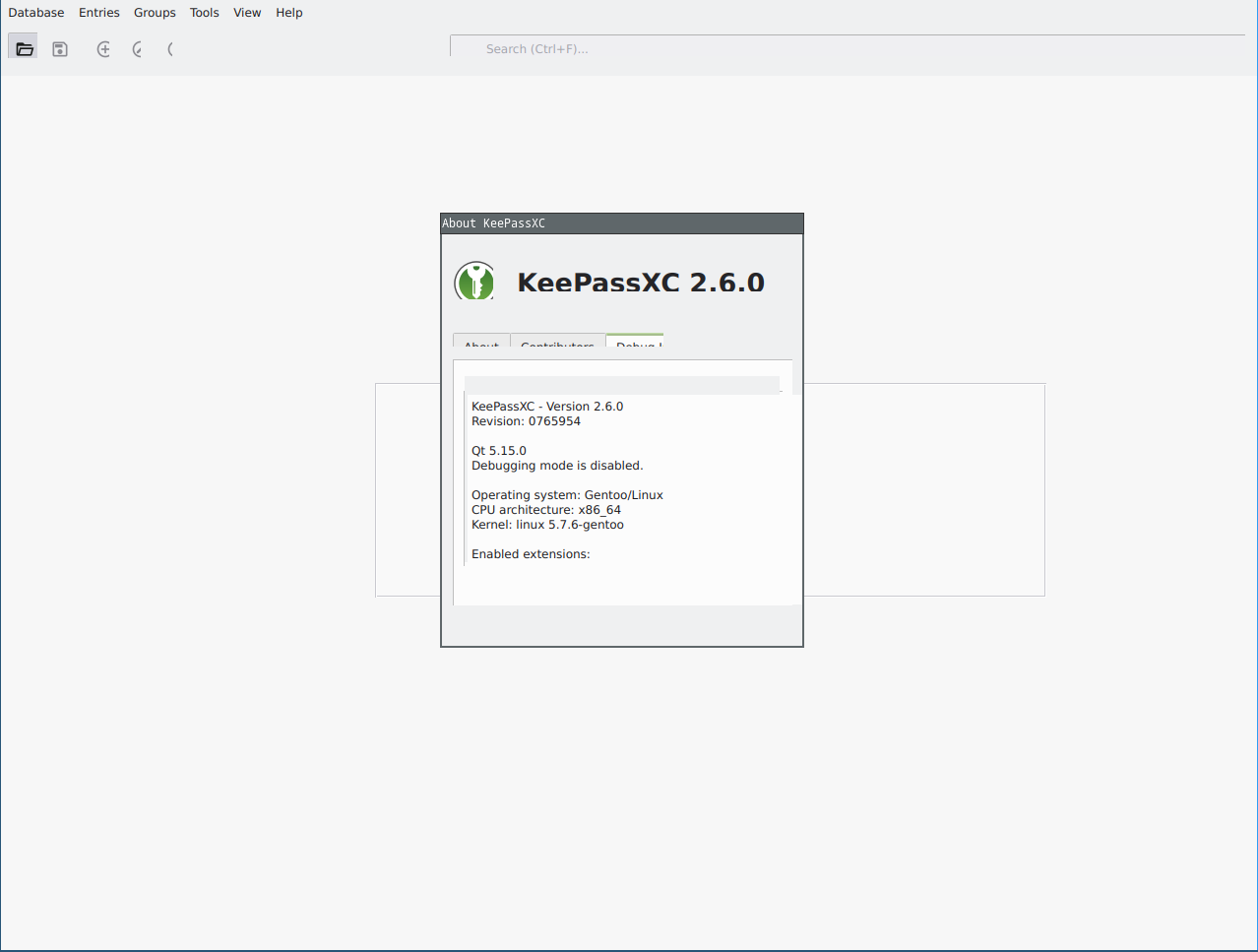
KeePassXC - Version 2.6.0
Revision: 0765954

Qt 5.15.0
Debugging mode is disabled.

Operating system: Gentoo/Linux
CPU architecture: x86_64
Kernel: linux 5.7.6-gentoo

Enabled extensions:
- Browser Integration
- SSH Agent
- Secret Service Integration

Cryptographic libraries:
 libgcrypt 1.8.6
 telans
on 8 Jul 2020
telans
on 8 Jul 2020
@telans your issue looks completely different.
droidmonkey
on 8 Jul 2020
I have the same problem on Mint 19.3 Cinnamon:

I changed the KeePassXC theme setting from 'automatic' to 'dark' and to 'system native' but neither of those changes helped.
Still, the new look with this version of KeePassXC is very nice!
KeePassXC - Version 2.6.0
Revision: 0765954

Qt 5.9.5
Debugging mode is disabled.

Operating system: Linux Mint 19.3
CPU architecture: x86_64
Kernel: linux 5.6.13-050613-generic

Enabled extensions:
- Auto-Type
- Browser Integration
- SSH Agent
- KeeShare (signed and unsigned sharing)
- YubiKey
- Secret Service Integration

Cryptographic libraries:
 libgcrypt 1.8.1
I will test on the newly released Mint 20 if I get a chance.
EDIT: a workaround is to tell KeePassXC to show text labels next to icons.
EDIT: also, the 'dark' version of the tray icon has badly messed up spacing - whereas the 'light' version is (as indeed it always used to be) merely slightly cramped.
 LinuxOnTheDesktop
on 8 Jul 2020
LinuxOnTheDesktop
on 8 Jul 2020
Same problem here: Linux Mint 19.3 ppa
Snap version looks fine.
 stevenjhall
on 8 Jul 2020
stevenjhall
on 8 Jul 2020
I thought I was the only one. Damn. I installed it from the official ppa. I appreciate the theme change, but somebody forgot to put the icons.

KeePassXC` - Version 2.6.0
Revision:` 0765954

Qt 5.9.5
Debugging mode is disabled.

Operating system: Linux Mint 19.3
CPU architecture: x86_64
Kernel: linux 5.4.0-40-generic
 iangozl
on 8 Jul 2020
iangozl
on 8 Jul 2020
I see a lot of Mint users here. But I'm using Budgie 20.04 (fully up-to-date) and getting the very same issue after updating to 2.6.0.
KeePassXC - Version 2.6.0
Revision: 0765954

Qt 5.12.8
Debugging mode is disabled.

Operating system: Ubuntu 20.04 LTS
CPU architecture: x86_64
Kernel: linux 5.4.0-40-generic
libqt5svg5 is installed:
ii libqt5svg5:amd64 5.12.8-0ubuntu1 amd64 Qt 5 SVG module
 syphernl
on 8 Jul 2020
syphernl
on 8 Jul 2020
So it took Ubuntu only two years this time to create LTS issues for third-party apps? Nice.
I couldn't reproduce any of this on Ubuntu 20.04. Qt 5.9 is not an LTS release and will not get any updates except security backports by Canonical.
The icons you do have are also wrong.
 phoerious
on 8 Jul 2020
phoerious
on 8 Jul 2020
BTW please make sure you have libqt5svg5 installed. It's possible that the build system didn't catch that dependency, since it's a dynamically loaded module.
phoerious
on 8 Jul 2020
Same issue using Linux Mint Mate 19.3 with PPA. Library libqt5svg5 is installed. Added -dev lib also. But still most of the icons are missing. Error messages when startting from terminal:
$ keepassxc
qt5ct: using qt5ct plugin
qt5ct: palette support is disabled
qt5ct: D-Bus global menu: no
QPainter::begin: Paint device returned engine == 0, type: 3
QPainter::setCompositionMode: Painter not active
QPainter::begin: Paint device returned engine == 0, type: 3
QPainter::setCompositionMode: Painter not active
QPainter::begin: Paint device returned engine == 0, type: 3
QPainter::setCompositionMode: Painter not active
 bvhoesel
on 8 Jul 2020
bvhoesel
on 8 Jul 2020
The error means the image loaded into QPainter is empty, which points to a decoding issue or missing image plugin.
phoerious
on 8 Jul 2020
I also have this issue, and I've tried a few things like different icon themes, different qt themes and I got nothing.
 JoeJoeTV
on 8 Jul 2020
JoeJoeTV
on 8 Jul 2020
Interestingly this only impacts the material icons used for menus, the default database icons are unaffected. I think this has something to do with when we are recoloring the SVG's on first use.
droidmonkey
on 8 Jul 2020
I don't think it's the recolouring, it's the loading of SVGs somehow. The icons that do exist are the wrong ones that slip through from the system theme.
phoerious
on 8 Jul 2020
The problem is indeed the SVG loading:
QImage img = icon.pixmap(128, 128).toImage().convertToFormat(QImage::Format_ARGB32_Premultiplied);
returns QImage(null) for most icons. When I remove the system icon path from the QIcon search path, all icons except the dice icon are gone. I highly suspect a bug in Qt's SVG parser.
Update: It's not the SVG loading, it's the icon theme resolution. I can get it to work when I hard-code the SVG file paths.
phoerious
on 8 Jul 2020
Probably caused by this bug: https://bugreports.qt.io/browse/QTBUG-63187
Some icons are loading, most are not. I cannot reproduce it on KDE, so maybe they have some magic workaround. I can reproduce it in a Mint VM, however. There doesn't seem to be a workaround except for switching from SVG to PNG.
phoerious
on 8 Jul 2020
same issue. and the icon in the system tray is also missing.
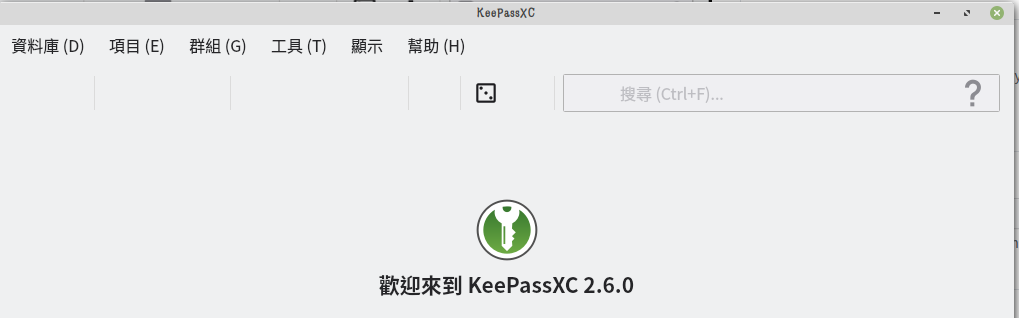
update:
The AppImage is OK.

system:
No LSB modules are available.
Distributor ID: LinuxMint
Description: Linux Mint 19.3 Tricia
Release: 19.3
Codename: tricia
 lagagain
on 8 Jul 2020
lagagain
on 8 Jul 2020
I'm on a loss here. It's clearly a Qt bug. Some icons do load, most don't. Unlike what I suspected before, the deciding factor is not whether the icon is PNG or SVG. It appears to be entirely random.
phoerious
on 8 Jul 2020
I am starting to think that this is a Mint bug, not a Qt or Ubuntu bug. Since I couldn't reproduce it in my Kubuntu 20.04 VM, I tested plain Ubuntu 16.04, 18.04, and 19.10 live systems and none of them show this bug. This is Ubuntu 19.10 with KeePassXC installed from the PPA:
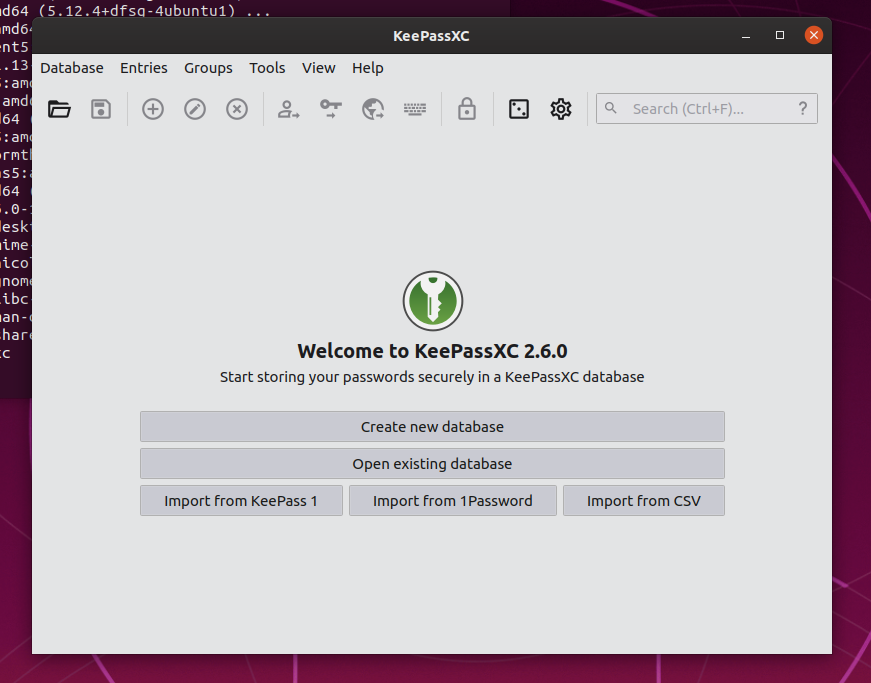
Is Mint using some sort of custom QIconEngine that might interfere with icon loading? I believe we also would have got a lot more bug reports by now if this were a problem on standard Ubuntu and there should be something to find on the Qt bug tracker if it were a fundamental Qt issue.
phoerious
on 8 Jul 2020
@phoerious
Thank you for investigating. However: someone above reports having the problem under Budgie. That distro is a version of Ubuntu and not of Mint.
LinuxOnTheDesktop
on 8 Jul 2020
Budgie is using Budgie as its desktop environment. Neither plain Ubuntu (Unity or Gnome), nor Kubuntu have this bug.
phoerious
on 8 Jul 2020
@phoerious
Perhaps I miss something. Here is how things seem to me. If various flavours of Mint (MATE, Cinnamon, perhaps others), but also Budgie, have the problem, then surely the problem does not consist solely in something to do with Mint. Perhaps Mint shares something - something problematic - with Budgie?
LinuxOnTheDesktop
on 8 Jul 2020
Either the distributions have patched Qt somehow or the desktop environments are doing something funky. The behaviour is clearly buggy and should actually affect a lot of Qt applications if they are using custom icon themes.
phoerious
on 8 Jul 2020
@phoerious
OK. So, if you determine what the funky behaviour is, and what is doing it, then it can get reported against the right project(s).
LinuxOnTheDesktop
on 8 Jul 2020
I found it! The problem is actually qt5ct. If you unset QT_QPA_PLATFORMTHEME or set it to gtk2, it works. qt5ct is not used on Unity, Gnome, or KDE.
phoerious
on 8 Jul 2020
A bug report should be filed against qt5ct
droidmonkey
on 8 Jul 2020
Yeah, if only it weren't a Sourceforge project. Eww...
phoerious
on 8 Jul 2020
Thanks for investigating so fast. Changing the environment variable does get the icons 'back'. But it also changes the fonts for me. So this is not the real solution for me.
bvhoesel
on 8 Jul 2020
Datapoint: for me on Mint 19.3 Cinnamon, either of those two workarounds restores the icons (though also seemingly removes the dark theme and the option for the dark theme; my fonts did not seem to change).
LinuxOnTheDesktop
on 8 Jul 2020
The toolbar icons are ok for me, but the system tray icon isn't. I'm running Linux Mint KDE 18.3 (so an older version).
Yes I will eventually upgrade (probably to Kubuntu 20.04) but for now it's a pain that after the upgrade I can't see the keepassxc icon in the system tray.
The keypassxc icon is between the red shutdown icon and the yellow knotes icon in this image, hovering will show the KeePassXC tooltip

 mlippert
on 8 Jul 2020
mlippert
on 8 Jul 2020
Stay on topic please. @LinuxOnTheDesktop you change the theme through the View menu.
droidmonkey
on 8 Jul 2020
Can this be fixed in keepassxc packaging?
As a workaround I copied /usr/share/applications/org.keepassxc.KeePassXC.desktop into ~/.local/share/applications, modified Exec=keepassxc %f to Exec=env QT_QPA_PLATFORMTHEME= keepassxc %f and restarted the cinnamon shell and it is working. Also modified Exec line in automatic startup file (.config/autostart/org.keepassxc.KeePassXC.desktop) to Exec=env QT_QPA_PLATFORMTHEME= /usr/bin/keepassxc.
Here's an script for this workaround:
cp /usr/share/applications/org.keepassxc.KeePassXC.desktop ~/.local/share/applications/
sed 's;^Exec.*;Exec=env QT_QPA_PLATFORMTHEME= keepassxc %f;' -i ~/.local/share/applications/org.keepassxc.KeePassXC.desktop
[ -f .config/autostart/org.keepassxc.KeePassXC.desktop ] && sed 's;^Exec.*;Exec=env QT_QPA_PLATFORMTHEME= /usr/bin/keepassxc;' -i .config/autostart/org.keepassxc.KeePassXC.desktop
After changing the files, hit alt+f2, type r and hit enter
 markkrj
on 8 Jul 2020
markkrj
on 8 Jul 2020
Thanks @markkrj your workaround worked perfectly. I had to re-set the theme to Dark from the View > Theme menu inside the app once I restarted Cinnamon, and now the icons are visible again!
 mishley
on 8 Jul 2020
mishley
on 8 Jul 2020
You should probably set it to gtk2, so it picks up your GTK font settings at least.
phoerious
on 8 Jul 2020
Here is a happy datum: I have tested the PPA version on Linux Mint 20 Cinnamon - without any hacks (but in a VM) - and the icons work. Mint 20 is based upon Ubuntu 20.04.
LinuxOnTheDesktop
on 8 Jul 2020
Some _Settings page_'s icons (and the tray icon) were missing in Linux Mint 19.3 XFCE, and I did @markkrj 's workaround and it solved it.
Before:

After:

 ruanmed
on 8 Jul 2020
ruanmed
on 8 Jul 2020
Time for everyone to update to Mint 20...
droidmonkey
on 9 Jul 2020
'Time for everyone to update to Mint 20': perhaps not. Here's why. Mint 20 came out only last month. Seasoned Mint users recommend that people wait at least a month or even perhaps until the first 'point' release. For, there tend to bugs (albeit some of them inherited from Ubuntu). I myself am having troubles running Mint 20 in a Virtual Machine (though possibly that is the fault of VirtualBox).
Still, I can confirm that markkrj's helpful script does do the job on Mint 19. I note also that amending that script to mention 'gtk2' made the icon problems re-occur.
LinuxOnTheDesktop
on 9 Jul 2020
qt5ct bug report: https://sourceforge.net/p/qt5ct/tickets/80/
phoerious
on 9 Jul 2020
Fixed in the upcoming 2.6.1 release.
phoerious
on 10 Jul 2020
Here is a happy datum: I have tested the PPA version on Linux Mint 20 Cinnamon - without any hacks (but in a VM) - and the icons work. Mint 20 is based upon Ubuntu 20.04.
Doesn't work for Mint 20 Mate - upgraded today, icons still missing.
Maybe related to my dual-monitor configuration - one is HiDPI (resolution: 3000x2000x60Hz), second is FullHD (1920x1080x60Hz).
 Chugajstyr
on 11 Jul 2020
Chugajstyr
on 11 Jul 2020
It does not work for me on real - as against virtual - Mint 20 Cinnamon. So I tried testing the virtual version again; and, not for the first time recently, VirtualBox refused to boot. Still, on real Mint 20 Cinnamon, I find that the script hack, posted above, works.
LinuxOnTheDesktop
on 12 Jul 2020
Just for reference: not only KeepassXC suffers from this 'issue', also the latest version of QOwnNotes shows the exact same effects (On Mint Mate 19.3).
So it seems to be a broader context issue. On an other Mint Mate 19.3 machine there is no issue. That machine has hardly extra software installed. Any body knows how to 'clean' the qt5 environment without 'breaking' the machine?
bvhoesel
on 13 Jul 2020
It's a qt5ct issue. Please read the rest of the thread.
phoerious
on 13 Jul 2020
Seems to be fixed in qt5ct with commit [r575]:
https://sourceforge.net/p/qt5ct/code/575/
 marrowsuck
on 13 Jul 2020
marrowsuck
on 13 Jul 2020
Yes, I tested the patch and it works. But it will take time until the patch arrives in downstream distributions. Some LTS distributions might never get it.
phoerious
on 13 Jul 2020
I wonder what to do about phoerious's point about the patch landing slowly or not at all on some distros. I wonder this especially since I find that the workaround posted above stops working after a while (after a reboot) and that something - perhaps the workaround - prevents the KeePassXC tray icon from showing on my Mint 20 Cinnamon computers. I note also that the patch is to a C++ file and so would require compilation - it's not a mere matter of changing some lines in a file. Also (and as I've moaned above before) working around the problem in another way, namely by telling KP to show text rather than icons, hides the search box (though one can find it).
LinuxOnTheDesktop
on 15 Jul 2020
If the env var is not persistent than that would mean you are not applying it correctly. The env var should ALWAYS work if you are explicitly launching KeePassXC with it. Additionally, we added a code fix on our side for 2.6.1 that corrects this issue.
droidmonkey
on 15 Jul 2020
@droidmonkey
I was using the script provided by @markkrj. I have now undone what it did and I will await 2.6.1. Thanks.
EDITED.
LinuxOnTheDesktop
on 15 Jul 2020
@phoerious Sorry if this is slightly OT, but I saw you mentioning in the qt5ct bug report:
which forces Qt to fall back to the system icon theme resulting in some system icons being shown
I think I'm running into a similar issue under KDE on Arch: When using the colorful tray icon, the locked icon is taken from the system theme, it's this one: https://github.com/KDE/breeze-icons/blob/master/icons/status/22/keepassxc-locked.svg
The unlocked icon is taken from KeepassXC (it's the green app icon as expected) and also all other icons in the app seem to work as expected, it's only this one.
I don't have qt5ct installed.
Is this related to the same problem or should I create a new issue?
 jensrutschmann
on 17 Jul 2020
jensrutschmann
on 17 Jul 2020
There is no way we are pulling from the system icons for tray icon. We only look in the compiled in resources for those icons. It could be a cached icon.
droidmonkey
on 17 Jul 2020
@droidmonkey I logged out, on a VT deleted ~/.cache, logged back in -> same problem. Are there any other locations where the icon might be cached?
jensrutschmann
on 18 Jul 2020
Launch KeePassXC with QT_QPA_PLATFORMTHEME= keepassxc. This will be addressed in 2.6.1.
droidmonkey
on 18 Jul 2020
@droidmonkey Launching with QT_QPA_PLATFORMTHEME= keepassxc doesn't change anything.
I debugged this a bit further:
- It also happens with a clean user account, (deleted all (dot) files in home) so I don't think it's related to (user-level) caching.
- It seems to be related to the icon file names:
- The color icons in KeepassXC are:
share/icons/application/scalable/apps/keepassxc.svgshare/icons/application/scalable/apps/keepassxc-locked.svg
- The breeze theme contains:
/usr/share/icons/breeze/status/22/keepassxc-unlocked.svg/usr/share/icons/breeze/status/22/keepassxc-locked.svg
- The color icons in KeepassXC are:
- If I rename
/usr/share/icons/breeze/status/22/keepassxc-locked.svgto something else, the locked icon is taken from KeepassXC and not the breeze theme anymore. - If I rename the breeze file
/usr/share/icons/breeze/status/22/keepassxc-unlocked.svgto/usr/share/icons/breeze/status/22/keepassxc.svg(so it matches the unlocked icon filename from within KeepassXC) then suddenly the unlocked icon is also taken from Breeze rather than the bundled icon.
Let me know if you think it will still be fixed by 2.6.1 or if I should create a separate issue for this.
jensrutschmann
on 18 Jul 2020
The same behavior applies to the app icon as used in KDE task bar or the "start menu":
Once I had renamed the breeze file /usr/share/icons/breeze/status/22/keepassxc-unlocked.svg to /usr/share/icons/breeze/status/22/keepassxc.svg the app icon was no longer the green icon but the one from the breeze theme.
And just to confirm: this happens with 2.6.0 so some code is definitely still loading system theme icons.
jensrutschmann
on 18 Jul 2020
I can confirm using "env QT_QPA_PLATFORMTHEME= keepassxc" restore icons, although i loose gtk theme. I have no DE, only Openbox with qt5ct.
KeePassXC - Version 2.6.0
Révision : 0765954

Qt 5.14.2
Le mode débogage est désactivé.

Système d’exploitation : Devuan GNU/Linux 4 (chimaera/ceres)
Architecture de l’unité centrale : x86_64
Noyau : linux 5.7.0-1-amd64

Extensions activées :
- Saisie automatique
- Intégration aux navigateurs
- Agent SSH
- KeeShare (partage non signé uniquement)
- YubiKey
- Intégration au Secret Service

Bibliothèques cryptographiques :
 libgcrypt 1.8.5
 thierrybo
on 23 Jul 2020
thierrybo
on 23 Jul 2020
Locking this since the solution is already merged in 2.6.1
droidmonkey
on 23 Jul 2020
Related issues
 shaneknysh
·
3Comments
shaneknysh
·
3Comments
 haroldm
·
3Comments
haroldm
·
3Comments
 rugk
·
3Comments
rugk
·
3Comments
 amvasilyev
·
3Comments
amvasilyev
·
3Comments
 TheZ3ro
·
3Comments
TheZ3ro
·
3Comments
Most helpful comment
Fixed in the upcoming 2.6.1 release.